July 28, 2026
10 Best Free Image Compressor Tools in 2026 (Compared)
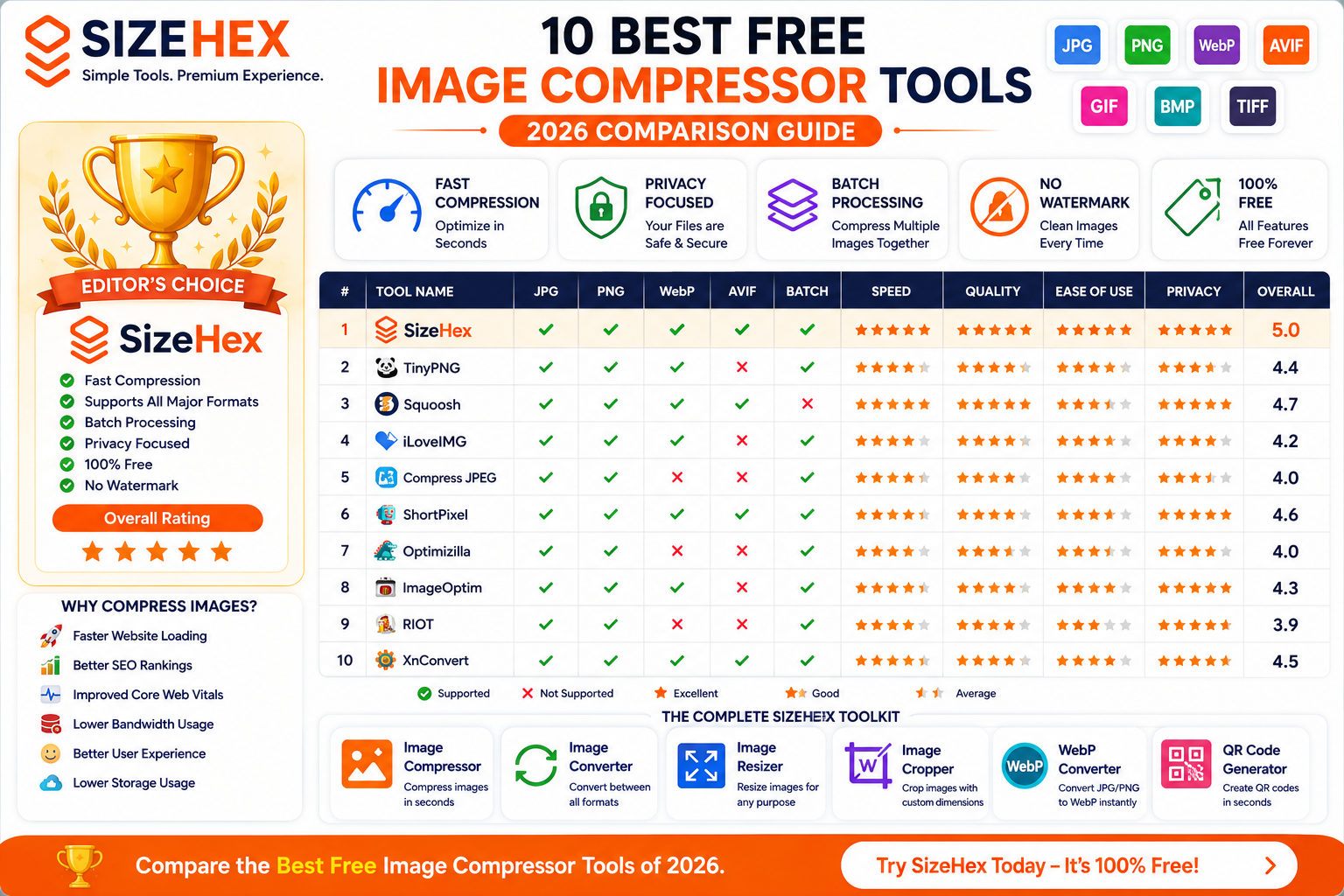
Best Free Image Compressor Tools
Images play a crucial role in websites, blogs, online stores, portfolios, and social media. High-quality visuals improve engagement, build trust, and create a professional appearance. However, large image files can slow down your website, increase storage requirements, and negatively affect search engine rankings.
This is where image compressor tools become essential.
A good image compressor can significantly reduce file size while preserving excellent visual quality. The result is faster-loading web pages, better Core Web Vitals, improved SEO, reduced bandwidth usage, and a smoother experience for visitors.
Today, there are dozens of free image compression tools available online. Some focus on maximum compression, while others prioritize image quality, privacy, batch processing, or support for modern formats like AVIF and WebP.
With so many options available, choosing the right one can be confusing.
This guide compares the best free image compressor tools available in 2026, helping you understand their features, strengths, limitations, and ideal use cases. Whether you're a blogger, developer, photographer, designer, student, or business owner, you'll find a tool that fits your workflow.
What Is an Image Compressor?
An image compressor is a tool that reduces the file size of an image without making it unusable.
It does this by optimizing how image data is stored. Depending on the compression method, the tool may:
- Remove unnecessary image information
- Optimize color data
- Remove metadata
- Apply efficient encoding techniques
- Convert images into more efficient formats
The goal is to create a smaller file that still looks visually appealing.
For example:
| Original Image | Compressed Image |
|---|---|
| 7.8 MB | 720 KB |
To most users, both images appear almost identical, but the compressed version loads much faster and consumes significantly less storage.
Image compressors support a wide range of formats, including:
- JPG (JPEG)
- PNG
- WebP
- AVIF
- GIF
- BMP
- TIFF
- SVG (depending on the tool)
Why Compress Images?
Compressing images offers much more than just reducing file size. It directly impacts website performance, user experience, and even search engine optimization.
Here are some of the biggest benefits.
1. Faster Website Loading
Large images are one of the most common causes of slow websites.
Smaller images download faster, helping pages load quickly on desktops, tablets, and smartphones.
2. Better SEO
Google considers page speed and user experience when evaluating websites.
Optimized images can contribute to:
- Faster loading times
- Better Core Web Vitals
- Improved crawl efficiency
- Higher chances of ranking well in search results
3. Lower Storage Requirements
Compressed images occupy less storage space on your hosting account, cloud storage, or local device.
This is especially useful for websites with thousands of images.
4. Reduced Bandwidth Usage
Every website visitor downloads your images.
Smaller files mean:
- Lower bandwidth costs
- Faster downloads
- Better performance on slow internet connections
5. Better Mobile Experience
Many visitors browse using mobile devices.
Optimized images:
- Load faster
- Save mobile data
- Improve user satisfaction
6. Faster Uploads
Smaller files upload more quickly to:
- Websites
- Blogs
- Online stores
- Cloud storage
- Social media platforms
7. Improved User Engagement
Visitors are more likely to stay on websites that load quickly.
Fast-loading pages often experience:
- Lower bounce rates
- Longer session durations
- Better conversion rates
Features to Look for in an Image Compressor
Not all image compression tools offer the same capabilities. When comparing tools, consider the following features.
Image Quality
The primary goal is reducing file size without introducing visible artifacts or blurriness.
Look for tools that maintain excellent visual quality.
Compression Efficiency
Some tools reduce file sizes by 20%, while others can achieve reductions of 70% or more.
Higher compression efficiency generally results in faster websites.
Supported Formats
A modern image compressor should support:
- JPG
- PNG
- WebP
- AVIF
- GIF
- BMP
- TIFF
Support for modern formats like AVIF and WebP is a major advantage.
Batch Compression
Uploading and compressing multiple images simultaneously saves significant time.
This feature is especially useful for:
- Bloggers
- Photographers
- E-commerce businesses
- Agencies
Privacy
If you're uploading sensitive or proprietary images, privacy matters.
Look for tools that:
- Use secure connections (HTTPS)
- Automatically delete uploaded files after processing
- Clearly explain their privacy policy
Speed
The best tools compress images within seconds, even when processing multiple files.
Fast processing improves productivity.
Ease of Use
A clean interface makes optimization simple.
Useful features include:
- Drag-and-drop uploads
- One-click compression
- Instant previews
- Simple download options
Additional Features
Many tools offer extra capabilities beyond compression, such as:
- Image resizing
- Image conversion
- Cropping
- Format conversion
- QR code generation
- Background removal
Choosing a toolkit with multiple utilities can streamline your workflow.
Online vs Desktop Image Compressors
Both online and desktop tools have advantages depending on your needs.
| Feature | Online Tools | Desktop Software |
|---|---|---|
| Installation Required | ❌ No | ✅ Yes |
| Works Anywhere | ✅ Yes | ❌ Device-specific |
| Batch Processing | Usually Available | Usually Available |
| Automatic Updates | ✅ Yes | Manual or Automatic |
| Internet Required | ✅ Yes | ❌ Often No |
| Ease of Use | Very Easy | Moderate |
| Best For | Most Users | Professionals with offline workflows |
For most bloggers, developers, marketers, students, and small businesses, online tools provide a convenient and efficient solution.
Free vs Paid Image Compressors
Many free tools provide excellent results, while paid solutions often include advanced features.
| Feature | Free Tools | Paid Tools |
|---|---|---|
| Basic Compression | ✅ | ✅ |
| Batch Processing | Often Available | Usually Available |
| AVIF & WebP Support | Varies | Usually Available |
| API Access | Rare | Common |
| Automation | Limited | Advanced |
| Priority Processing | ❌ | ✅ |
| Cloud Integrations | Limited | Often Included |
For most personal websites and small businesses, a high-quality free image compressor is more than sufficient.
Comparison Criteria
To compare the tools fairly, we'll evaluate each one using the following criteria:
- Compression quality
- File size reduction
- Supported image formats
- Ease of use
- Processing speed
- Privacy and security
- Batch processing capabilities
- Browser compatibility
- Additional editing features
- Overall value for users
This approach ensures that each recommendation is based on practical usability rather than just popularity.
Top 10 Best Free Image Compressor Tools (2026 Comparison)
Now that you know why image compression is important, let's compare the best free image compressor tools available in 2026.
Our comparison is based on:
- Image Quality
- Compression Efficiency
- Supported Formats
- Ease of Use
- Processing Speed
- Privacy
- Batch Processing
- Additional Features
- Overall Value
Note: No single tool is perfect for every use case. The best choice depends on whether you're optimizing images for a blog, e-commerce store, photography portfolio, or business website.
1. SizeHex ⭐ Editor's Choice
Website: https://www.sizehex.com/
Overview
SizeHex is a modern online image optimization toolkit designed for speed, simplicity, and privacy. Unlike tools that only compress images, SizeHex provides multiple utilities—including image compression, conversion, resizing, cropping, and QR code generation—all within one clean interface.
It supports both traditional and modern image formats, making it an excellent choice for bloggers, developers, designers, students, and business owners.
Key Features
-
Compress images in seconds
-
Supports JPG, PNG, WebP, AVIF, GIF, BMP, TIFF
-
Modern, responsive interface
-
No software installation
-
Fast cloud processing
-
Multiple image utilities
-
Free to use
Pros
✅ Clean interface
✅ Fast processing
✅ Supports modern formats
✅ Multiple image tools
✅ Beginner-friendly
✅ No watermark
Cons
❌ Advanced automation features are still limited compared to enterprise platforms.
Best For
-
Bloggers
-
Web Developers
-
Small Businesses
-
Students
-
Digital Marketers
-
E-commerce Stores
Supported Formats
-
JPG
-
PNG
-
WebP
-
AVIF
-
GIF
-
BMP
-
TIFF
Pricing
Free
Overall Rating
Category Rating Image Quality ⭐⭐⭐⭐⭐ Compression ⭐⭐⭐⭐⭐ Speed ⭐⭐⭐⭐⭐ Ease of Use ⭐⭐⭐⭐⭐ Privacy ⭐⭐⭐⭐⭐ Overall ⭐⭐⭐⭐⭐
| Category | Rating |
|---|---|
| Image Quality | ⭐⭐⭐⭐⭐ |
| Compression | ⭐⭐⭐⭐⭐ |
| Speed | ⭐⭐⭐⭐⭐ |
| Ease of Use | ⭐⭐⭐⭐⭐ |
| Privacy | ⭐⭐⭐⭐⭐ |
| Overall | ⭐⭐⭐⭐⭐ |
2. TinyPNG
Overview
TinyPNG is one of the most popular online image compression tools. Despite its name, it compresses both PNG and JPG images using smart lossy compression.
Key Features
-
Drag-and-drop upload
-
Batch compression
-
API available
-
Browser plugin support
Pros
✅ Excellent quality
✅ Easy to use
✅ Trusted by millions
Cons
❌ Limited free uploads
❌ Limited format support
Best For
Small blogs and websites.
Supported Formats
-
PNG
-
JPG
-
WebP
Pricing
Free with limitations.
Overall Rating
⭐⭐⭐⭐☆
3. Squoosh
Overview
Created by Google Chrome Labs, Squoosh is designed for developers and advanced users who want complete control over image optimization.
Key Features
-
Side-by-side comparison
-
Multiple compression algorithms
-
Adjustable quality settings
-
Browser-based
Pros
✅ Excellent quality
✅ Advanced controls
✅ Supports AVIF
Cons
❌ Not beginner-friendly
❌ Interface can feel technical
Best For
Developers and designers.
Supported Formats
-
JPG
-
PNG
-
WebP
-
AVIF
Pricing
Free
Overall Rating
⭐⭐⭐⭐⭐
4. iLoveIMG
Overview
iLoveIMG is a complete online image editing platform offering compression, resizing, cropping, watermarking, and format conversion.
Key Features
-
Image compression
-
Resize
-
Crop
-
Convert
-
Batch processing
Pros
✅ Easy interface
✅ Multiple editing tools
✅ Good compression
Cons
❌ Ads on the free version
Best For
Content creators and businesses.
Supported Formats
-
JPG
-
PNG
-
GIF
-
WebP
Pricing
Free with premium plans.
Overall Rating
⭐⭐⭐⭐☆
5. Compress JPEG
Overview
Compress JPEG is a lightweight online tool focused on quickly reducing the file size of JPG images.
Key Features
-
Simple interface
-
Fast uploads
-
Batch processing
-
Multiple downloads
Pros
✅ Very simple
✅ Fast
Cons
❌ Limited image formats
❌ Few editing features
Best For
Users who primarily work with JPG files.
Supported Formats
-
JPG
-
PNG
Pricing
Free
Overall Rating
⭐⭐⭐⭐☆
6. ShortPixel
Overview
ShortPixel is widely used by WordPress users for automated image optimization and website performance improvements.
Key Features
-
WordPress plugin
-
Lossy & lossless compression
-
Bulk optimization
-
CDN integration
Pros
✅ Excellent compression
✅ Website optimization
✅ Automation
Cons
❌ Monthly free limits
Best For
WordPress websites and agencies.
Supported Formats
-
JPG
-
PNG
-
GIF
-
WebP
-
AVIF
Pricing
Free plan available with paid upgrades.
Overall Rating
⭐⭐⭐⭐⭐
7. Optimizilla
Overview
Optimizilla provides a balance between image quality and file size using an adjustable compression slider.
Key Features
-
Quality preview
-
Batch uploads
-
Compression slider
-
Drag-and-drop support
Pros
✅ Great visual comparison
✅ Easy controls
Cons
❌ Limited format support
Best For
Photographers and bloggers.
Supported Formats
-
JPG
-
PNG
Pricing
Free
Overall Rating
⭐⭐⭐⭐☆
8. ImageOptim (Mac)
Overview
ImageOptim is a desktop application built specifically for macOS users. It compresses images offline while preserving excellent quality.
Key Features
-
Offline compression
-
Metadata removal
-
Batch optimization
-
High-quality results
Pros
✅ Excellent privacy
✅ Fast
✅ Offline
Cons
❌ macOS only
Best For
Mac users.
Supported Formats
-
JPG
-
PNG
-
GIF
-
WebP
Pricing
Free
Overall Rating
⭐⭐⭐⭐☆
9. RIOT (Windows)
Overview
RIOT (Radical Image Optimization Tool) is a Windows application focused on giving users detailed control over image compression.
Key Features
-
Live preview
-
Manual quality adjustment
-
Resize tools
-
Batch optimization
Pros
✅ Advanced controls
✅ Offline
Cons
❌ Windows only
❌ Older interface
Best For
Windows power users.
Supported Formats
-
JPG
-
PNG
-
GIF
Pricing
Free
Overall Rating
⭐⭐⭐⭐☆
10. XnConvert
Overview
XnConvert is a cross-platform batch image processing application that supports hundreds of image formats.
Key Features
-
Batch conversion
-
Batch compression
-
Filters
-
Resize
-
Rename
-
Format conversion
Pros
✅ Supports hundreds of formats
✅ Powerful automation
Cons
❌ Interface may feel complex for beginners
Best For
Professional photographers and designers.
Supported Formats
-
JPG
-
PNG
-
WebP
-
AVIF
-
TIFF
-
BMP
-
GIF
-
RAW (various camera formats)
Pricing
Free for personal use.
Overall Rating
⭐⭐⭐⭐⭐
Which Image Compressor Is Best? (Final Verdict)
After comparing the top free image compressor tools, one thing becomes clear: the best tool depends on your specific needs.
Some users prioritize maximum compression, while others focus on image quality, privacy, speed, or support for modern formats like AVIF and WebP.
Below are our recommendations based on different use cases.
Best Image Compressor for Beginners
🥇 Winner: SizeHex
If you're new to image optimization, you need a tool that's fast, simple, and doesn't require technical knowledge.
Why It Stands Out
-
Clean and beginner-friendly interface
-
No installation required
-
One-click compression
-
Supports multiple image formats
-
Fast processing
-
Free to use
Perfect for students, bloggers, freelancers, and small business owners.
Best Image Compressor for Bloggers
🥇 Winner: SizeHex
Blog images directly affect page speed and SEO.
A good compression tool should:
- Reduce file size
- Preserve image quality
- Support modern formats
- Improve loading speed
SizeHex offers all of these while keeping the workflow simple.
Best Image Compressor for Web Developers
🥇 Winner: Squoosh
Developers often need complete control over compression settings.
Squoosh provides:
- Adjustable quality
- Format comparison
- AVIF support
- WebP support
- Real-time previews
It is an excellent choice for users who want fine-grained optimization.
Best Image Compressor for WordPress
🥇 Winner: ShortPixel
ShortPixel is designed for website automation.
Benefits include:
- WordPress plugin
- Bulk optimization
- Automatic compression
- AVIF support
- WebP support
Ideal for websites with hundreds or thousands of images.
Best Image Compressor for Designers
🥇 Winner: XnConvert
Designers often work with multiple formats and large batches of images.
XnConvert provides:
- Batch processing
- Hundreds of supported formats
- Image conversion
- Automation
- Offline processing
Best Image Compressor for Photographers
🥇 Winner: ImageOptim
Professional photographers usually prioritize image quality over maximum compression.
ImageOptim offers:
- Excellent quality preservation
- Metadata removal
- Offline processing
- Batch optimization
Great for Mac users working with high-resolution photos.
Best Image Compressor for E-commerce
🥇 Winner: SizeHex
Online stores contain hundreds of product images.
A good compressor should:
- Maintain product quality
- Improve loading speed
- Support modern formats
- Reduce bandwidth
These improvements can contribute to better user experience and potentially higher conversions.
Best Overall Free Image Compressor
Category Winner Beginners 🏆 SizeHex Bloggers 🏆 SizeHex Business Websites 🏆 SizeHex E-commerce 🏆 SizeHex Developers 🏆 Squoosh WordPress 🏆 ShortPixel Designers 🏆 XnConvert Photographers 🏆 ImageOptim
| Category | Winner |
|---|---|
| Beginners | 🏆 SizeHex |
| Bloggers | 🏆 SizeHex |
| Business Websites | 🏆 SizeHex |
| E-commerce | 🏆 SizeHex |
| Developers | 🏆 Squoosh |
| WordPress | 🏆 ShortPixel |
| Designers | 🏆 XnConvert |
| Photographers | 🏆 ImageOptim |
Why SizeHex Is Our Editor's Choice
While every tool in this comparison has strengths, SizeHex stands out because it combines multiple image optimization features into a single, easy-to-use platform.
Key Advantages
-
Free online image compression
-
Support for JPG, PNG, WebP, AVIF, GIF, BMP, and TIFF
-
Fast compression without software installation
-
Beginner-friendly interface
-
Additional tools like Image Resizer, Image Converter, Image Cropper, and QR Generator
-
No watermark on downloaded files
-
Works directly in your browser on desktop and mobile devices
Instead of using separate websites for compression, resizing, and conversion, users can manage their image workflow in one place.
Frequently Asked Questions (FAQ)
1. Which is the best free image compressor?
For most users, SizeHex, Squoosh, and ShortPixel are among the strongest options, depending on whether you prioritize simplicity, advanced controls, or website automation.
2. Can I compress images without losing quality?
Yes. Lossless compression preserves image quality, while efficient lossy compression can greatly reduce file size with little or no noticeable visual difference.
3. Which format provides the smallest file size?
AVIF generally delivers the highest compression efficiency for photographs while maintaining excellent quality.
4. Is WebP better than JPG?
In many web scenarios, yes. WebP often achieves smaller file sizes while maintaining similar visual quality.
5. Is AVIF better than WebP?
AVIF usually compresses images more efficiently, though WebP has broader compatibility with older software.
6. Does image compression improve SEO?
Yes. Faster-loading pages improve user experience and support better technical SEO.
7. Should I compress every image?
Yes. Compressing images before uploading them helps reduce storage, bandwidth, and page load times.
8. Which format is best for websites?
AVIF and WebP are generally excellent choices for photographs and web graphics, while PNG remains useful for lossless graphics and SVG for vector artwork.
9. Can I compress PNG images?
Yes. PNG files can be optimized using lossless compression while preserving image quality.
10. Which format is best for logos?
SVG is the preferred format because it scales without losing quality.
11. Are online image compressors safe?
Reputable services that use secure HTTPS connections and have transparent privacy practices are generally safe. Avoid uploading sensitive images to services you don't trust.
12. Do image compressors remove metadata?
Many tools can remove metadata such as camera details or GPS information to reduce file size.
13. Can I compress multiple images at once?
Yes. Many image compressors support batch processing, making it easy to optimize multiple files together.
14. Are free image compressors enough?
For most bloggers, students, freelancers, and small businesses, a quality free tool provides all the essential features needed.
15. Which image compressor is fastest?
Processing speed depends on image size, format, and internet connection, but lightweight browser-based tools generally provide very fast results.
Conclusion
Image compression is one of the simplest ways to improve website performance, reduce storage usage, and create a better user experience.
Whether you're publishing blog posts, managing an online store, designing marketing materials, or sharing content on social media, choosing the right image compressor helps you deliver high-quality visuals without unnecessary file size.
Our comparison shows that different tools excel in different areas:
- SizeHex – Best all-around choice for everyday users.
- Squoosh – Excellent for developers who want detailed control.
- ShortPixel – Great for WordPress websites.
- XnConvert – Powerful for designers and batch processing.
- ImageOptim – Ideal for Mac users focused on quality.
If you're looking for a fast, free, and easy-to-use solution with support for modern image formats and multiple optimization tools, SizeHex is an excellent place to start.
Try SizeHex Today
Optimize your images in seconds with SizeHex, a free online toolkit designed for creators, developers, businesses, and students.
With SizeHex, you can:
- Compress images while maintaining excellent visual quality
- Resize images for websites and social media
- Convert between popular image formats
- Crop images with precision
- Generate QR codes instantly
Whether you're optimizing a single photo or preparing hundreds of images for your website, SizeHex helps simplify your workflow.
Related Tools
Image Compressor
Compress JPG, PNG, WebP, AVIF, GIF, BMP, and TIFF images quickly while preserving visual quality.
Image Resizer
https://www.sizehex.com/image-resizer.html
Resize images for websites, blogs, presentations, and social media.
Image Converter
https://www.sizehex.com/image-converter.html
Convert between JPG, PNG, WebP, AVIF, GIF, BMP, TIFF, and more.
WebP Converter
https://www.sizehex.com/webp-converter.html
Convert JPG and PNG images into efficient WebP files.
Image Cropper
https://www.sizehex.com/image-crop.html
Crop images using custom dimensions or preset aspect ratios.
QR Code Generator
https://www.sizehex.com/qr-generator.html
Create QR codes for URLs, contact information, Wi-Fi credentials, and more.