July 31, 2026
AVIF SEO Guide: Benefits, Browser Support & Best Practices (2026 Guide)
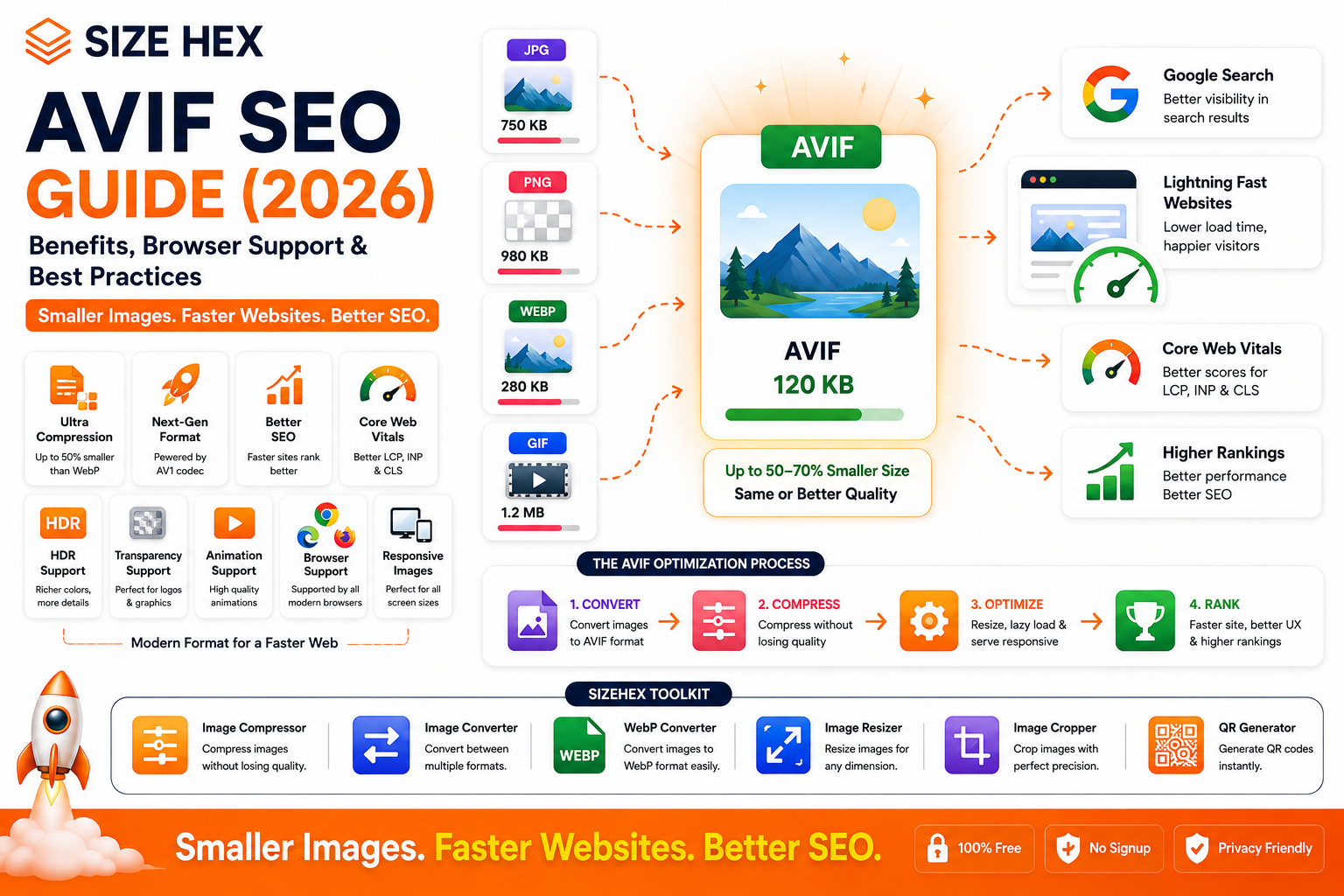
AVIF SEO Guide: Benefits, Browser Support & Best Practices (2026)
Website performance has become one of the most important aspects of modern SEO. Faster websites provide a better user experience, reduce bounce rates, and improve important performance metrics like Core Web Vitals. Since images usually make up the largest portion of a webpage's size, choosing the right image format can have a significant impact on loading speed.
Over the last few years, WebP has become the preferred image format for many websites. However, image technology continues to evolve, and AVIF is emerging as one of the most efficient image formats available today.
AVIF offers excellent image quality while producing even smaller file sizes than many traditional formats, including JPG, PNG, and in many cases, WebP. This makes it an attractive option for developers, designers, bloggers, and businesses looking to improve website performance without sacrificing visual quality.
Although simply converting images to AVIF won't automatically improve search rankings, faster-loading pages can contribute to a better user experience and support an effective SEO strategy.
In this guide, you'll learn what AVIF is, how it works, how it compares with other image formats, browser compatibility, and when it makes sense to use AVIF on your website in 2026.
What Is AVIF?
AVIF (AV1 Image File Format) is a modern image format based on the AV1 video codec, developed by the Alliance for Open Media (AOMedia).
It is designed to deliver:
- Extremely efficient image compression
- Excellent visual quality
- HDR support
- Transparency
- Animation
- Wide color gamut
Its primary goal is to reduce image file sizes while preserving as much image quality as possible.
History of AVIF
AVIF was introduced in 2019 as an image format built on the AV1 video compression technology.
It was created by the Alliance for Open Media, a consortium that includes major technology companies such as Google, Microsoft, Apple, Amazon, Mozilla, Netflix, Intel, and others.
Since its introduction:
- Browser support has steadily expanded.
- Image editing tools have added AVIF export capabilities.
- Content Delivery Networks (CDNs) have begun serving AVIF automatically.
- Modern CMS platforms increasingly support AVIF uploads.
- Website optimization tools have started offering AVIF conversion.
Today, AVIF is becoming an important part of next-generation image optimization.
Why AVIF Was Created
As internet usage shifted toward mobile devices and high-resolution displays, image sizes continued to grow.
Large images often cause:
- Slow-loading webpages
- Increased mobile data usage
- Higher bandwidth costs
- Poor user experience
- Lower performance scores
AVIF was developed to solve these problems by providing:
- Better compression efficiency
- Smaller file sizes
- High image fidelity
- Modern feature support
- Improved web performance
Its objective is to help websites deliver rich visuals while minimizing download times.
How AVIF Works
AVIF uses advanced compression techniques derived from the AV1 video codec.
Instead of storing unnecessary visual information, it compresses images efficiently while preserving important details.
AVIF supports both:
Lossy Compression
Lossy AVIF removes visual information that is less noticeable to the human eye.
Advantages include:
- Extremely small file sizes
- Excellent image quality
- Ideal for photographs
- Faster loading webpages
Lossless Compression
Lossless AVIF preserves every pixel from the original image.
Best suited for:
- Logos
- User interface graphics
- Screenshots
- Technical diagrams
- Illustrations
This flexibility allows AVIF to support many different types of website images.
Why AVIF Matters for SEO
Google's goal is to provide users with fast, helpful, and accessible websites.
Although AVIF is not a direct Google ranking factor, it can improve several performance-related aspects that support SEO.
Using AVIF may help:
- Reduce image file sizes
- Improve page loading speed
- Support better Core Web Vitals
- Reduce bandwidth consumption
- Improve mobile performance
- Enhance user experience
- Increase perceived website speed
When combined with image compression, descriptive filenames, responsive images, alt text, and lazy loading, AVIF becomes an important component of a modern image SEO strategy.
AVIF vs JPG
| Feature | AVIF | JPG |
|---|---|---|
| File Size | Much Smaller | Larger |
| Compression | Excellent | Good |
| Transparency | ✅ Yes | ❌ No |
| HDR Support | ✅ Yes | ❌ No |
| Animation | ✅ Yes | ❌ No |
| SEO Performance | Excellent | Good |
| Best For | Modern websites | Legacy compatibility |
For most modern websites, AVIF offers superior compression and more advanced features than JPG.
AVIF vs PNG
| Feature | AVIF | PNG |
|---|---|---|
| File Size | Much Smaller | Larger |
| Transparency | ✅ Yes | ✅ Yes |
| Lossless Support | ✅ Yes | ✅ Yes |
| HDR | ✅ Yes | ❌ No |
| Website Performance | Excellent | Moderate |
PNG remains useful in some workflows, but AVIF can often deliver comparable quality with significantly smaller files.
AVIF vs WebP
| Feature | AVIF | WebP |
|---|---|---|
| Compression | Better in many cases | Excellent |
| File Size | Often Smaller | Small |
| Encoding Speed | Slower | Faster |
| Browser Support | Very Good | Excellent |
| HDR Support | ✅ Yes | Limited |
| Transparency | ✅ Yes | ✅ Yes |
| Animation | ✅ Yes | ✅ Yes |
AVIF often produces smaller file sizes than WebP, though encoding can take longer. Many websites use WebP as the default format today while gradually adopting AVIF where appropriate.
Browser Support
Modern browser support for AVIF has improved significantly.
AVIF is supported by major browsers including:
- Google Chrome
- Microsoft Edge
- Mozilla Firefox
- Opera
- Safari (modern versions)
- Android Browser
Older browsers may not support AVIF, so it's important to provide suitable fallback formats when necessary.
Common Myths About AVIF
Let's clear up a few common misconceptions.
Myth 1: AVIF automatically boosts SEO rankings.
Reality: AVIF supports SEO by improving performance, but rankings depend on many factors beyond image format.
Myth 2: AVIF always looks better than every other format.
Reality: Visual quality depends on the compression settings and the type of image being optimized.
Myth 3: Every website should immediately replace all images with AVIF.
Reality: Test quality, compatibility, and workflows before migrating your entire image library.
Myth 4: AVIF completely replaces WebP.
Reality: WebP remains an excellent choice for many websites. AVIF and WebP can coexist depending on browser support and performance goals.
Myth 5: AVIF is only useful for photographers.
Reality: AVIF benefits blogs, e-commerce stores, SaaS platforms, portfolios, educational websites, news portals, and many other types of websites.
Real-World Examples
Example 1: E-commerce Website
An online electronics store converts product images to AVIF.
Benefits include:
- Smaller product image sizes
- Faster category pages
- Improved mobile browsing experience
Example 2: Photography Portfolio
A professional photographer serves high-resolution AVIF galleries.
Visitors enjoy faster loading images without noticeable quality loss.
Example 3: News Website
A news publisher uses AVIF for featured article images.
Smaller image files help pages load more quickly during periods of heavy traffic.
Example 4: SaaS Website (SizeHex)
A platform like SizeHex uses AVIF for blog featured images, UI previews, tutorials, comparison graphics, and tool screenshots.
Combined with responsive images, lazy loading, descriptive filenames, and image compression, AVIF helps deliver excellent visual quality while reducing bandwidth and improving page performance.
Key Takeaways
- AVIF is a next-generation image format based on the AV1 video codec.
- It provides excellent compression while maintaining high visual quality.
- AVIF supports lossy and lossless compression, transparency, HDR, and animation.
- Smaller image files contribute to faster page loading and better user experience.
- AVIF supports an overall SEO strategy by improving website performance, though it is not a direct ranking factor.
- Browser support has grown substantially, making AVIF a practical option for many modern websites in 2026.
- Combining AVIF with responsive images, lazy loading, descriptive alt text, and proper compression creates a strong foundation for image optimization.
-
Complete AVIF SEO Guide
Now that you understand what AVIF is and why it's gaining popularity, let's explore how to use it effectively to improve website performance and support your overall SEO strategy.
1. How AVIF Improves Website Speed
Images are usually the largest resources on a webpage.
Large image files increase:
- Page loading time
- Bandwidth usage
- Server requests
- Mobile data consumption
AVIF significantly reduces image sizes while maintaining impressive visual quality.
Benefits include:
- Faster page loading
- Better mobile performance
- Lower hosting bandwidth
- Improved user experience
Example
Format File Size JPG 520 KB PNG 890 KB WebP 260 KB AVIF 180 KB Actual savings vary depending on the image and compression settings, but AVIF often delivers the smallest files among widely supported raster formats.
2. AVIF & Core Web Vitals
Google's Core Web Vitals measure how users experience your website.
Optimized AVIF images can support these metrics.
Largest Contentful Paint (LCP)
Hero images often determine LCP.
Smaller AVIF images download faster, allowing the largest visible content to appear sooner.
Interaction to Next Paint (INP)
Reduced image download sizes lower network activity, helping the browser remain more responsive during user interactions.
Cumulative Layout Shift (CLS)
AVIF itself doesn't prevent layout shifts.
To improve CLS:
- Specify image width
- Specify image height
- Reserve layout space
- Use responsive images
3. Better User Experience
Fast websites create better experiences.
Using AVIF can help provide:
- Faster loading
- Smooth scrolling
- Better mobile browsing
- Lower waiting time
- Lower bounce rates
- Higher visitor satisfaction
Visitors are more likely to stay on websites that load quickly.
4. Lossy vs Lossless AVIF
AVIF supports both compression methods.
Lossy AVIF
Ideal for:
- Photography
- Blogs
- Product images
- Travel websites
- Portfolio images
Advantages:
- Very small files
- Excellent quality
- Fast loading
Lossless AVIF
Best for:
- Logos
- UI graphics
- Icons
- Screenshots
- Technical diagrams
Advantages:
- Pixel-perfect quality
- Crisp text
- Excellent transparency support
Choose the compression mode based on the type of image you're optimizing.
5. HDR Support
One major advantage of AVIF is High Dynamic Range (HDR) support.
HDR images can display:
- More vibrant colors
- Better highlights
- Improved shadows
- Greater color accuracy
This is especially useful for:
- Photography
- Travel websites
- Luxury products
- Digital art
6. Transparency Support
Like PNG and WebP, AVIF supports transparent backgrounds.
Perfect for:
- Logos
- Icons
- Stickers
- Product cut-outs
- UI elements
Because AVIF often produces much smaller files than PNG, it can be a strong replacement for many transparent web graphics.
7. Animation Support
AVIF also supports animation.
Animated AVIF files may provide:
- Better compression
- Smaller sizes
- Higher quality
Suitable for:
- Tutorials
- Product demonstrations
- UI animations
- Educational content
8. Converting Images to AVIF
Most modern image optimization tools support conversion from:
- JPG → AVIF
- PNG → AVIF
- WebP → AVIF
- TIFF → AVIF
- BMP → AVIF
Before converting:
- Keep original images.
- Compare quality.
- Test browser compatibility.
- Optimize dimensions before export.
9. Best Compression Settings
No single compression setting works for every image.
General recommendations:
Photographs
- Medium compression
- Preserve natural details
Product Images
- Balanced quality
- Clean edges
- Accurate colors
Logos
- Lossless mode
- Maximum sharpness
Blog Featured Images
- Balanced compression
- Fast loading
- Excellent readability
Always preview exported images before publishing.
10. Responsive AVIF Images
Users browse websites on many different devices.
Instead of serving one large image to everyone, responsive images deliver the most appropriate size for each screen.
Benefits include:
- Faster loading
- Reduced bandwidth
- Better mobile experience
- Improved responsiveness
Responsive AVIF images help maximize performance across devices.
11. Lazy Loading
Lazy loading delays image downloads until they're close to entering the user's viewport.
Advantages:
- Faster initial page load
- Reduced bandwidth usage
- Better performance
- Improved mobile experience
Combining AVIF with lazy loading often provides substantial performance gains.
12. CDN Optimization
Content Delivery Networks (CDNs) distribute images from servers closer to users.
Benefits include:
- Faster global delivery
- Lower latency
- Reduced server load
- Better international performance
Many modern CDNs can automatically serve AVIF to compatible browsers while providing alternative formats to others.
13. WordPress Support
Recent WordPress versions and many optimization plugins support AVIF.
Capabilities include:
- Upload AVIF images
- Automatic conversion
- Responsive image generation
- CDN integration
Always verify that your hosting environment supports AVIF correctly before migrating a large image library.
14. Google Search Console
Google Search Console doesn't specifically report AVIF usage.
However, it helps monitor the effects of image optimization through:
- Core Web Vitals
- Page Experience
- Search Performance
- Crawl Reports
- Indexed Pages
Combine Search Console with PageSpeed Insights and Lighthouse for a comprehensive performance review.
15. Common SEO Mistakes
Avoid these mistakes.
❌ Converting images without quality checks
❌ Using excessively large dimensions
❌ Missing alt text
❌ Poor filenames
❌ No responsive images
❌ Forgetting width and height attributes
❌ Ignoring browser compatibility
❌ Removing original images
❌ Skipping performance testing
❌ Blocking image crawling
16. AVIF Best Practices
Follow these recommendations.
- Compress images before uploading.
- Resize images appropriately.
- Use descriptive filenames.
- Write meaningful alt text.
- Enable lazy loading.
- Use responsive images.
- Serve images over HTTPS.
- Keep original files.
- Monitor performance regularly.
- Test image quality after conversion.
17. Testing AVIF
After optimization, verify:
- Visual quality
- Browser compatibility
- Mobile performance
- Desktop performance
- File size reduction
- Loading speed
Regular testing ensures your images continue to perform well.
18. Migration Strategy
If you're migrating an existing website:
- Audit current images.
- Prioritize high-traffic pages.
- Convert images gradually.
- Test quality and compatibility.
- Monitor analytics.
- Check Search Console.
- Keep original files until migration is complete.
A gradual rollout reduces risk and makes troubleshooting easier.
19. Troubleshooting
If AVIF images don't display correctly:
- Check browser support.
- Verify server MIME types.
- Review image paths.
- Clear CDN and browser caches.
- Confirm fallback images are available.
- Test across multiple devices.
These checks resolve most common deployment issues.
20. Complete AVIF SEO Checklist
Task Status Images Converted to AVIF ✅ Compression Optimized ✅ Quality Verified ✅ Responsive Images Enabled ✅ Lazy Loading Enabled ✅ Width & Height Set ✅ Alt Text Added ✅ Descriptive Filenames Used ✅ HTTPS Enabled ✅ CDN Configured (if used) ✅ Performance Tested ✅ Core Web Vitals Reviewed ✅
Pro Tips
- Use AVIF for large hero images and photo-heavy pages where maximum compression provides the greatest benefit.
- Keep WebP or other fallback formats available for browsers that don't fully support AVIF.
- Don't optimize for file size alone—always balance compression with visual quality.
- Combine AVIF with responsive images, lazy loading, descriptive alt text, and fast hosting for the best results.
- Regularly monitor PageSpeed Insights, Lighthouse, and Google Search Console to measure the impact of your image optimization efforts.
Advanced AVIF SEO Strategies, FAQs & Publishing Checklist
You've learned what AVIF is, how it works, and how to optimize it effectively. In this final section, we'll explore advanced optimization strategies, common mistakes, frequently asked questions, and a complete publishing checklist.
While AVIF offers excellent compression and modern features, it delivers the best results when combined with a comprehensive image SEO strategy that includes responsive images, descriptive alt text, lazy loading, fast hosting, and high-quality content.
Before Publishing Checklist
Before publishing pages with AVIF images, review the following checklist.
Images
✅ High-quality original images
✅ Correct image dimensions
✅ AVIF format
✅ Appropriate compression level
SEO
✅ SEO-friendly filenames
Example:
avif-seo-guide.avif✅ Descriptive alt text
✅ Responsive images
Performance
✅ Lazy loading enabled
✅ Width & height attributes specified
✅ Browser compatibility tested
Technical SEO
✅ HTTPS enabled
✅ Images crawlable
✅ XML Sitemap updated
✅ No broken image URLs
Testing
✅ Mobile devices tested
✅ Desktop browsers tested
✅ PageSpeed Insights reviewed
✅ Core Web Vitals checked
Advanced AVIF Optimization Tips
1. Optimize Hero Images First
Hero banners usually contribute the most to page weight.
Converting these images to AVIF often provides the biggest performance improvements.
2. Serve Responsive Images
Different devices require different image sizes.
Responsive AVIF images help deliver:
- Faster loading
- Better mobile experience
- Reduced bandwidth
- Improved performance
3. Keep Original Images
Always preserve:
- JPG originals
- PNG originals
- PSD files
- AI files
Generate AVIF versions from the originals whenever changes are needed.
4. Resize Before Converting
Avoid converting unnecessarily large images.
Recommended workflow:
Resize → Compress → Export AVIF → Upload
This prevents wasting bandwidth on oversized files.
5. Combine AVIF with Lazy Loading
Lazy loading and AVIF work well together.
Benefits include:
- Faster initial rendering
- Reduced network requests
- Better mobile performance
- Improved perceived speed
6. Optimize Featured Images
Featured images appear across multiple areas of your website:
- Homepage
- Blog archive
- Categories
- Related posts
- Search results
Optimizing them improves the performance of many pages simultaneously.
7. Monitor Performance Regularly
Review performance using:
- Google PageSpeed Insights
- Lighthouse
- Core Web Vitals
- Google Search Console
Track improvements over time rather than relying on a single test.
Common AVIF Mistakes
Avoid these common errors.
❌ Excessive compression causing visible artifacts
❌ Oversized image dimensions
❌ Missing alt text
❌ Poor filenames
❌ No responsive images
❌ Missing width and height attributes
❌ Ignoring browser compatibility
❌ Forgetting fallback formats
❌ Deleting original files
❌ Never testing image quality
Frequently Asked Questions (FAQ)
1. What is AVIF?
AVIF is a modern image format based on the AV1 video codec that offers excellent compression and image quality.
2. Does AVIF improve SEO?
Not directly. AVIF supports SEO by improving website performance and user experience.
3. Is AVIF better than WebP?
In many cases, AVIF produces smaller files while maintaining similar or better quality. However, WebP generally has faster encoding and broader compatibility with existing workflows.
4. Is AVIF better than JPG?
For most websites, AVIF provides significantly better compression and more modern features than JPG.
5. Does AVIF support transparency?
Yes.
AVIF supports transparent backgrounds similar to PNG and WebP.
6. Does AVIF support HDR?
Yes.
HDR is one of AVIF's major advantages for high-quality photography and media.
7. Does AVIF support animation?
Yes.
Animated AVIF files are supported and can provide efficient compression for animated content.
8. Which browsers support AVIF?
Modern versions of Chrome, Edge, Firefox, Safari, Opera, and Android browsers support AVIF. Always verify compatibility for your audience and provide fallback formats where appropriate.
9. Should every image use AVIF?
Not necessarily.
Test image quality, browser compatibility, and your workflow before converting your entire image library.
10. Does AVIF improve Core Web Vitals?
It can contribute by reducing image download sizes, particularly for large images that affect loading performance.
11. Is AVIF suitable for e-commerce websites?
Yes.
Product images, banners, and promotional graphics can benefit from AVIF's efficient compression.
12. Can I convert PNG to AVIF?
Yes.
PNG images can be converted while preserving transparency when required.
13. Can I convert WebP to AVIF?
Yes.
Many modern image optimization tools support WebP-to-AVIF conversion.
14. Is AVIF good for mobile websites?
Yes.
Smaller files reduce mobile data usage and improve loading speed.
15. Which converter should I use?
Use a trusted converter that balances image quality with file size. A browser-based tool like SizeHex Image Converter can simplify the conversion process.
Conclusion
AVIF represents one of the most advanced image formats available for the modern web. Its outstanding compression efficiency, support for HDR, transparency, animation, and excellent visual quality make it a compelling choice for websites focused on performance.
Although AVIF is not a direct Google ranking factor, smaller image files can improve loading speed, support Core Web Vitals, and create a smoother browsing experience. Combined with responsive images, descriptive alt text, lazy loading, and quality content, AVIF becomes an important part of a modern image SEO strategy.
As browser support continues to mature, AVIF is likely to play an increasingly important role in delivering fast, high-quality web experiences.
Why Choose SizeHex?
SizeHex provides fast, browser-based tools to optimize your images without compromising privacy or quality.
Features
- Convert images to AVIF, WebP, JPG, PNG, BMP, TIFF, and GIF
- Compress images while maintaining excellent quality
- Resize images for websites and social media
- Crop images with precision
- No software installation required
- Fast browser-based processing
- Free and easy to use
Whether you're a blogger, developer, designer, digital marketer, photographer, or business owner, SizeHex helps you prepare images for faster, more efficient websites.
Related Tools
Image Compressor
Reduce image file size without noticeable quality loss.
Image Converter
https://www.sizehex.com/image-converter.html
Convert between popular image formats, including AVIF.
WebP Converter
https://www.sizehex.com/webp-converter.html
Convert images to modern WebP format.
Image Resizer
https://www.sizehex.com/image-resizer.html
Resize images for any device.
Image Cropper
https://www.sizehex.com/image-crop.html
Crop images with precision.
QR Generator
Generate QR codes instantly.