July 24, 2026
AVIF vs WebP: Which Image Format Is Better? (Complete 2026 Guide)
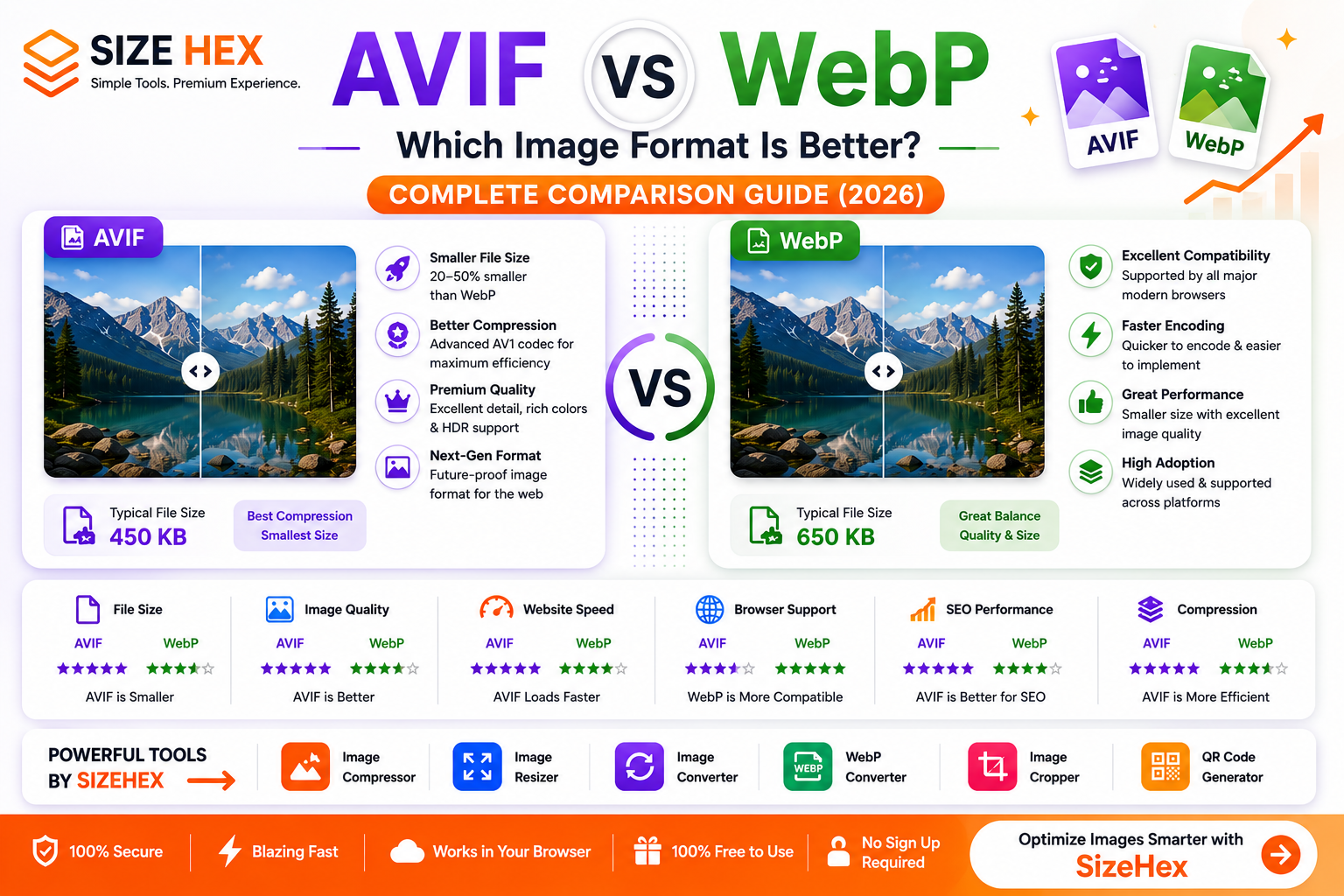
AVIF vs WebP: Which Image Format Is Better?
Modern websites demand fast loading speeds, excellent image quality, and efficient file sizes. Choosing the right image format can significantly improve website performance, user experience, and search engine optimization.
Among today's most advanced image formats, AVIF and WebP stand out as the leading choices for web optimization.
WebP has become the standard image format for many websites because it delivers excellent image quality with significantly smaller file sizes than traditional formats like JPG and PNG.
AVIF is the next generation of image compression technology. Developed using the AV1 video codec, AVIF offers even better compression efficiency than WebP while maintaining outstanding visual quality.
But does that automatically make AVIF the better choice?
Not necessarily.
Each format has strengths, limitations, and ideal use cases depending on your website, browser support requirements, and workflow.
In this complete comparison guide, you'll learn everything you need to know about AVIF vs WebP, including image quality, file size, compression, browser compatibility, SEO, website performance, and which format is best for different situations.
What Is AVIF?
AVIF (AV1 Image File Format) is a modern image format based on the AV1 video compression codec, developed by the Alliance for Open Media (AOMedia).
It was designed to provide exceptional image quality while dramatically reducing file sizes.
Compared to older formats, AVIF delivers:
- Extremely efficient compression
- Outstanding image quality
- HDR image support
- Transparency support
- Wide color gamut
- High color depth
- Animation support
- Better storage efficiency
One of AVIF's biggest advantages is its ability to produce files that are often 20–50% smaller than WebP while maintaining similar or even better image quality.
This makes AVIF one of the most efficient image formats currently available for modern websites.
What Is WebP?
WebP is a modern image format developed by Google to improve website performance.
It supports both:
- Lossy compression
- Lossless compression
- Transparent backgrounds
- Animation
WebP quickly became popular because it significantly reduces image sizes compared to JPG and PNG while maintaining excellent visual quality.
Benefits of WebP include:
- Smaller file sizes
- Faster websites
- Better Core Web Vitals
- Excellent browser support
- Faster page loading
- Lower bandwidth usage
Today, WebP is supported by all major modern browsers and has become one of the most widely used image formats on the web.
AVIF vs WebP: Key Differences
Although both formats are designed for modern websites, there are several important differences.
| Feature | AVIF | WebP |
|---|---|---|
| Compression | ✅ Better | Excellent |
| File Size | ✅ Smallest | Small |
| Image Quality | ✅ Outstanding | Excellent |
| Transparency | ✅ Yes | ✅ Yes |
| Animation | ✅ Yes | ✅ Yes |
| HDR Support | ✅ Yes | Limited |
| Browser Support | Excellent | ✅ Excellent |
| Website Performance | ✅ Outstanding | Excellent |
| Encoding Speed | Slower | ✅ Faster |
The biggest difference is efficiency.
AVIF focuses on achieving maximum compression while preserving exceptional image quality, whereas WebP offers a balance between compression, quality, and faster processing.
Image Quality Comparison
Image quality is one of the biggest reasons developers are interested in AVIF.
AVIF uses advanced compression algorithms capable of preserving fine details, smooth gradients, and vibrant colors while producing remarkably small files.
Compared to WebP, AVIF often performs better in:
- Fine textures
- Shadows
- Color gradients
- High-resolution images
- HDR content
WebP still provides excellent image quality and is more than sufficient for most websites.
However, at similar file sizes, AVIF generally retains slightly more detail.
For professional photography and premium visual experiences, AVIF has a slight advantage.
Winner: ✅ AVIF
File Size Comparison
Reducing image file size is one of the easiest ways to improve website speed.
Here's a typical comparison:
| Format | Typical File Size |
|---|---|
| WebP | 650 KB |
| AVIF | 450 KB |
The exact numbers depend on the image, but AVIF usually creates noticeably smaller files than WebP.
Smaller images provide several benefits:
- Faster page loading
- Lower hosting bandwidth
- Better mobile browsing
- Improved Core Web Vitals
- Reduced storage usage
- Faster downloads
For websites focused on maximum performance, AVIF offers a clear advantage.
Understanding Compression
Compression determines how efficiently an image can be stored while maintaining visual quality.
AVIF Compression
AVIF uses the advanced AV1 compression algorithm, which was originally designed for next-generation video encoding.
It provides:
- Extremely high compression efficiency
- Excellent visual quality
- Better detail retention
- Smaller file sizes
- High dynamic range support
WebP Compression
WebP supports both:
- Lossy compression
- Lossless compression
It provides an excellent balance between image quality, compression efficiency, and encoding speed.
WebP images are usually larger than AVIF images, but they are often quicker to encode and decode, making them practical for many workflows.
Browser Support
Compatibility is an important consideration when choosing an image format.
WebP enjoys widespread support across modern browsers, operating systems, and content management systems, making it a safe choice for most websites.
AVIF support has expanded rapidly and is available in current versions of major browsers such as:
- Google Chrome
- Microsoft Edge
- Mozilla Firefox
- Safari
- Opera
- Brave
If your audience primarily uses up-to-date browsers, AVIF is a practical option. For environments where older software or legacy browser compatibility is important, WebP may still be the simpler choice.
AVIF vs WebP for Websites
Modern websites require images that load quickly without sacrificing quality. Faster websites improve user experience, reduce bounce rates, and help visitors stay engaged.
Both AVIF and WebP were created with web performance in mind, but AVIF offers even greater compression efficiency.
For most websites, both formats are excellent choices. However, if your server, CMS, and visitors' browsers fully support AVIF, it can deliver even smaller image files than WebP.
Benefits of AVIF for Websites
- Smaller image file sizes
- Faster page loading
- Lower bandwidth usage
- Better mobile performance
- Reduced hosting costs
- Improved Core Web Vitals
- Excellent visual quality
WebP remains an outstanding choice because of its wide compatibility, faster encoding, and proven performance across millions of websites.
If maximum compatibility is your priority, WebP is still a safe option.
Winner for Websites: ✅ AVIF (Performance)
Runner-up: ✅ WebP (Compatibility)
AVIF vs WebP for SEO
Google does not rank websites simply because they use AVIF or WebP.
However, image optimization directly affects page speed, which influences user experience and Core Web Vitals.
Since AVIF images are usually smaller, they can help improve:
- Largest Contentful Paint (LCP)
- Mobile Page Speed
- Website Performance
- User Experience
- Bandwidth Efficiency
To maximize image SEO:
- Compress every image.
- Use descriptive filenames.
- Add meaningful alt text.
- Resize images before uploading.
- Use responsive images.
- Serve modern formats like AVIF or WebP where supported.
For most modern websites, AVIF offers the strongest performance benefits.
Winner for SEO: ✅ AVIF
Speed Comparison
Smaller images load faster.
Here's a typical comparison:
| Format | Average File Size | Loading Speed |
|---|---|---|
| WebP | 650 KB | Excellent |
| AVIF | 450 KB | Outstanding |
Because AVIF files are generally smaller:
- Pages render faster.
- Less bandwidth is consumed.
- Mobile browsing improves.
- CDN delivery becomes more efficient.
For raw loading performance, AVIF usually has the advantage.
Winner: ✅ AVIF
Best Format for Photography
Photography requires:
- Rich colors
- Smooth gradients
- Fine details
- Realistic textures
AVIF excels at preserving these details while keeping file sizes extremely small.
Professional photographers and portfolio websites can benefit from AVIF because it maintains impressive quality even at lower bitrates.
WebP also performs exceptionally well and remains easier to integrate into many workflows.
For websites displaying high-resolution photography, AVIF often delivers the best balance of quality and efficiency.
Winner: ✅ AVIF
Best Format for Logos
Logos need:
- Sharp edges
- Transparent backgrounds
- Crisp text
- High-quality graphics
Both AVIF and WebP support transparency.
However, many design tools still use PNG as the primary editing format, with AVIF or WebP used for optimized web versions.
If your workflow supports AVIF, it can reduce logo file sizes further.
Otherwise, WebP remains an excellent alternative.
Winner: 🟰 Both
Best Format for Screenshots
Screenshots usually contain:
- Text
- Buttons
- User interfaces
- Icons
- Charts
- Code snippets
AVIF preserves detail extremely well while reducing file size.
WebP also provides excellent clarity and is often quicker to generate.
For publishing screenshots on websites, both formats perform very well.
If your platform supports AVIF, it usually provides the smaller file.
Winner: ✅ AVIF
Best Format for Social Media
Most social media platforms automatically recompress uploaded images.
Whether you upload AVIF or WebP, many platforms convert images into their own optimized formats.
For images hosted on your own website, AVIF offers the greatest performance advantage.
For sharing across various services, WebP may offer broader compatibility depending on the platform.
Winner: 🟰 Both, depending on the platform.
Best Format for E-commerce
E-commerce websites rely heavily on image performance.
Every product image affects:
- Page speed
- Customer experience
- Mobile browsing
- Conversion rates
Using AVIF for product images can significantly reduce total page weight.
Recommended workflow:
- Edit original images in high quality.
- Export AVIF for websites.
- Keep WebP versions as a fallback when broader compatibility is needed.
This approach combines excellent quality with maximum performance.
Winner: ✅ AVIF
AVIF vs WebP: Pros and Cons
AVIF Advantages
- Smallest file sizes
- Outstanding image quality
- Excellent HDR support
- Transparency support
- Better compression
- Ideal for modern websites
- Lower bandwidth usage
- Better storage efficiency
AVIF Disadvantages
- Slower encoding times.
- Some older software has limited support.
- Legacy workflows may require fallback formats.
WebP Advantages
- Excellent image quality
- Small file sizes
- Wide browser support
- Faster encoding
- Supports transparency
- Supports animation
- Easy to implement
- Excellent website performance
WebP Disadvantages
- Larger files than AVIF in many cases.
- Compression is generally less efficient than AVIF.
- Doesn't always preserve as much detail at the same file size.
Best Practices
For the best image optimization strategy:
- Use AVIF whenever your website and audience support it.
- Serve WebP as a fallback for browsers or systems without AVIF support.
- Keep original master images in a high-quality editable format.
- Compress every image before publishing.
- Resize images to their display dimensions.
- Add descriptive filenames and alt text.
- Test visual quality after optimization.
- Avoid uploading oversized images directly to your website.
AVIF vs WebP: Which One Should You Choose?
Both AVIF and WebP are excellent modern image formats, but the right choice depends on your website, workflow, and compatibility requirements.
Choose AVIF if you need:
- Maximum image compression
- Fastest website performance
- Better Core Web Vitals
- Smaller file sizes
- Premium photography
- High-resolution portfolio images
- Modern SaaS websites
- E-commerce stores
- Better bandwidth efficiency
- Future-proof image optimization
AVIF is the ideal choice for websites that prioritize performance and use modern browsers.
Choose WebP if you need:
- Excellent browser compatibility
- Faster image encoding
- Easy implementation
- Broad CMS support
- Reliable website performance
- Blog featured images
- Business websites
- General web development
- Compatibility with existing workflows
WebP remains one of the most practical image formats because it offers an excellent balance between quality, performance, and compatibility.
AVIF vs WebP: Final Comparison
Category Best Choice File Size ✅ AVIF Image Quality ✅ AVIF Website Performance ✅ AVIF SEO ✅ AVIF Core Web Vitals ✅ AVIF Browser Compatibility ✅ WebP Encoding Speed ✅ WebP Photography ✅ AVIF Transparency 🟰 Both Animation 🟰 Both Mobile Performance ✅ AVIF Ease of Implementation ✅ WebP
Frequently Asked Questions (FAQ)
Is AVIF better than WebP?
For image compression and file size, yes.
AVIF generally produces smaller files while maintaining excellent visual quality. However, WebP remains easier to integrate into many existing workflows and has broader ecosystem support.
Which format has better image quality?
Both formats offer excellent image quality.
At similar file sizes, AVIF often preserves slightly more detail, especially in photographs and complex gradients.
Is AVIF good for SEO?
Yes.
AVIF images can improve page speed and Core Web Vitals by reducing image file sizes, which contributes to a better user experience.
Can AVIF replace WebP?
In many modern websites, yes.
However, many developers still provide WebP as a fallback to ensure compatibility across different browsers, applications, and content management systems.
Does AVIF support transparency?
Yes.
Like WebP, AVIF supports transparent backgrounds, making it suitable for logos, icons, illustrations, and graphics.
Which format is smaller?
AVIF.
In many real-world scenarios, AVIF images are 20–50% smaller than equivalent WebP images while maintaining comparable visual quality.
Which format is better for websites?
If your visitors use modern browsers and your platform supports it, AVIF is generally the better choice for performance.
If you need wider compatibility or a simpler workflow, WebP is an excellent alternative.
Can I convert WebP to AVIF?
Yes.
Converting WebP images to AVIF can further reduce file sizes for supported environments, though it's best to convert from the original high-quality source image whenever possible.
Conclusion
Both AVIF and WebP are excellent choices for modern websites.
If your goal is the smallest possible file sizes, outstanding image quality, and maximum website performance, AVIF is currently one of the most advanced image formats available.
WebP remains a fantastic option because it combines excellent compression, fast performance, broad browser support, and straightforward implementation.
A practical workflow is:
- Keep original master images in a high-quality editable format.
- Export AVIF for browsers and platforms that support it.
- Provide WebP as a fallback where broader compatibility is needed.
This approach gives you the best balance of speed, quality, and user experience while preparing your website for the future.
Try SizeHex Today
Optimize your images with SizeHex—a fast, secure, and free online image toolkit.
Whether you need to compress, resize, convert, crop, or generate QR codes, SizeHex helps you optimize images directly in your browser without installing any software.
Related Tools
Image Compressor
Reduce image file size without noticeable quality loss. Perfect for websites, blogs, e-commerce stores, and social media.
Image Resizer
https://www.sizehex.com/image-resizer.html
Resize images for websites, Instagram, Facebook, YouTube, LinkedIn, and more.
Image Converter
https://www.sizehex.com/image-converter.html
Convert images between JPG, PNG, WebP, AVIF, BMP, GIF, TIFF, and other popular image formats.
WebP Converter
https://www.sizehex.com/webp-converter.html
Convert images to and from WebP for faster website loading and improved performance.
Image Cropper
https://www.sizehex.com/image-crop.html
Crop images online using custom dimensions or preset aspect ratios without installing any software.
QR Code Generator
https://www.sizehex.com/qr-generator.html
Generate QR codes for URLs, Wi-Fi, contact details, emails, phone numbers, and more.