July 28, 2026
Best Image Format for SEO (Complete 2026 Guide)
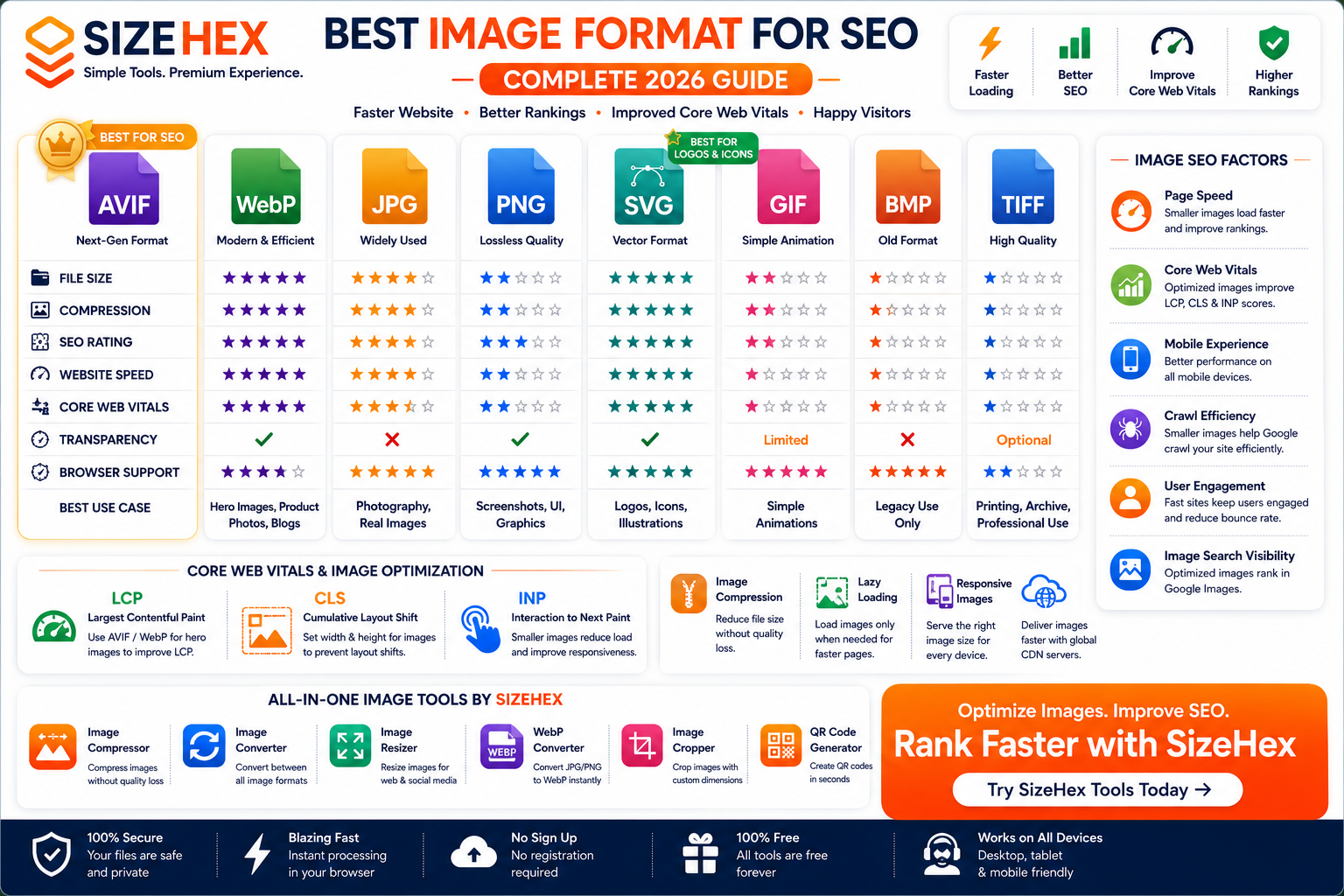
Best Image Format for SEO
Images make websites more engaging, improve readability, showcase products, and enhance user experience. However, they also account for a significant portion of a webpage's total size. Large or unoptimized images can slow down your website, negatively affect user experience, and make it harder to achieve excellent performance scores.
Search engines like Google prioritize websites that load quickly and provide a smooth browsing experience. While image format alone does not directly determine rankings, choosing the right format can improve page speed, Core Web Vitals, and mobile performance—all of which contribute to better technical SEO.
Today, website owners have several image formats to choose from. Traditional formats such as JPG and PNG are still widely used, while modern formats like WebP and AVIF provide better compression and smaller file sizes. SVG remains the preferred format for logos and icons because it scales perfectly without losing quality.
The challenge is knowing which format is best for each type of image.
In this guide, you'll learn how different image formats affect SEO, compare their strengths and weaknesses, and discover best practices for optimizing images to improve website performance and search visibility.
Why Images Matter for SEO
Images influence much more than the visual appearance of a website.
Properly optimized images can help improve:
- Website speed
- User experience
- Mobile performance
- Core Web Vitals
- Search engine crawling
- Image search visibility
- Visitor engagement
Poorly optimized images, on the other hand, often result in:
- Slow loading pages
- Higher bounce rates
- Increased bandwidth usage
- Poor PageSpeed Insights scores
- Lower user satisfaction
For websites with many images—such as blogs, e-commerce stores, portfolios, and news sites—image optimization becomes an essential part of technical SEO.
How Google Evaluates Images
Google evaluates images as part of the overall page experience rather than simply looking at their file format.
Some important factors include:
- File size
- Loading speed
- Responsive image delivery
- Accessibility
- Structured data (when applicable)
- Alt text
- Context within the page
- Mobile usability
Choosing an efficient image format makes it easier to optimize these factors.
How Images Affect Google Rankings
Although Google doesn't rank a page simply because it uses AVIF or WebP, image optimization supports several important ranking signals.
1. Page Speed
Page speed is one of the most important technical aspects of SEO.
Large image files increase download time, making pages slower to load.
Modern image formats like AVIF and WebP help reduce image sizes while preserving visual quality.
Benefits include:
- Faster loading
- Lower bandwidth usage
- Better mobile experience
- Improved user satisfaction
2. Largest Contentful Paint (LCP)
Largest Contentful Paint measures how quickly the main content of a webpage becomes visible.
Large hero images or banners often become the LCP element.
Using optimized formats such as AVIF or WebP can reduce loading time for these images, helping improve your LCP score.
3. Cumulative Layout Shift (CLS)
CLS measures unexpected movement of page elements while a page is loading.
Although image format itself doesn't directly affect CLS, using properly sized images helps prevent layout shifts.
Best practices include:
- Always specify image width and height.
- Reserve image space before loading.
- Use responsive image dimensions.
4. Mobile Experience
Most users browse websites on smartphones.
Optimized images:
- Load faster
- Use less mobile data
- Improve scrolling performance
- Reduce waiting time
Small image files are especially valuable for visitors using slower mobile connections.
5. Crawl Efficiency
Search engines have limited resources when crawling websites.
Optimized images reduce unnecessary bandwidth usage and make websites easier to crawl and index efficiently.
6. User Engagement
Fast-loading pages generally create a better browsing experience.
Visitors are more likely to:
- Stay longer
- View additional pages
- Interact with content
- Complete purchases
- Return in the future
These engagement signals indirectly support SEO.
What Makes an SEO-Friendly Image?
Not every image format is equally suitable for search engine optimization.
An SEO-friendly image should balance quality, speed, and accessibility.
1. Small File Size
Smaller images load faster.
Benefits include:
- Better PageSpeed Insights scores
- Faster mobile loading
- Lower hosting costs
- Reduced CDN bandwidth
- Improved Core Web Vitals
Modern formats like AVIF and WebP excel in this area.
2. High Image Quality
Compression should reduce file size without noticeably reducing image quality.
Images should remain:
- Sharp
- Clear
- Color accurate
- Professional-looking
Poor-quality images can reduce trust and negatively affect user experience.
3. Correct Image Dimensions
Uploading oversized images wastes bandwidth.
Instead:
- Resize images before uploading.
- Match image dimensions to the display size.
- Use responsive images for different screen sizes.
4. Responsive Images
Modern websites should serve different image sizes depending on the visitor's device.
Benefits include:
- Faster loading
- Improved mobile performance
- Better user experience
- Reduced unnecessary downloads
5. Efficient Compression
Compression is one of the easiest ways to improve website speed.
Lossy Compression
Removes some image data to achieve much smaller file sizes.
Used by:
- JPG
- WebP
- AVIF
Best for:
- Photographs
- Blog images
- Product photos
- Marketing graphics
Lossless Compression
Preserves every pixel.
Used by:
- PNG
- TIFF
Best for:
- Logos
- Screenshots
- Graphics with text
- UI elements
6. Descriptive File Names
Instead of uploading images with names like:
IMG_48291.jpg
Use descriptive names such as:
best-image-format-for-seo.avif
This helps search engines better understand the image's content.
7. Alt Text
Alternative text improves accessibility and provides context for search engines.
Good alt text should:
- Describe the image accurately
- Include relevant keywords naturally
- Be concise
- Help users who rely on screen readers
Example:
"Comparison chart showing AVIF, WebP, JPG, and PNG image formats for SEO."
8. Modern Image Formats
Google recommends using modern image formats where practical.
Formats like AVIF and WebP provide better compression than traditional formats, helping improve loading speed and technical performance.
Overview of Every Image Format
AVIF
Strengths
- Outstanding compression
- Excellent image quality
- HDR support
- Transparency support
- Extremely small file sizes
Weaknesses
- Slower encoding
- Limited support in some older software
SEO Rating
⭐⭐⭐⭐⭐
WebP
Strengths
- Excellent compression
- Wide browser support
- Transparency support
- Smaller files than JPG and PNG
Weaknesses
- Slightly less efficient than AVIF in many scenarios
SEO Rating
⭐⭐⭐⭐☆
JPG (JPEG)
Strengths
- Universal compatibility
- Good compression
- Ideal for photographs
Weaknesses
- No transparency
- Larger files than AVIF or WebP
- Lossy compression
SEO Rating
⭐⭐⭐⭐☆
PNG
Strengths
- Lossless quality
- Transparency support
- Perfect for screenshots
- Great for graphics
Weaknesses
- Large file sizes
SEO Rating
⭐⭐⭐☆☆
SVG
Strengths
- Infinitely scalable
- Tiny file sizes for simple graphics
- Excellent for logos and icons
Weaknesses
- Not suitable for photographs
SEO Rating
⭐⭐⭐⭐⭐
GIF
Strengths
- Animation support
- Universal compatibility
Weaknesses
- Limited colors
- Large animated files
SEO Rating
⭐⭐☆☆☆
BMP
Strengths
- High quality
- Simple format
Weaknesses
- Extremely large files
- Poor web performance
SEO Rating
⭐☆☆☆☆
TIFF
Strengths
- Excellent quality
- Professional editing
- Archival storage
Weaknesses
- Very large files
- Not intended for websites
SEO Rating
⭐☆☆☆☆
Best Image Format for Blog Images
Blogs typically contain featured images, article banners, screenshots, and inline graphics. Choosing the right image format helps improve loading speed while maintaining excellent visual quality.
AVIF
AVIF is one of the best choices for blog images because it combines outstanding quality with extremely small file sizes.
Best for:
- Featured images
- Article banners
- Travel blogs
- Food blogs
- Technology blogs
- Tutorial images
Benefits:
- Faster loading
- Better Core Web Vitals
- Reduced bandwidth
- Excellent visual quality
WebP
WebP is another excellent option.
Advantages:
- Wide browser support
- Excellent compression
- Transparency support
- Fast loading
JPG
JPG remains useful for blogs, especially when compatibility is important.
However, compared with AVIF and WebP, JPG usually produces larger files.
Winner
🏆 AVIF
Best Image Format for Product Images
Product images often determine whether visitors make a purchase.
Images should load quickly while displaying accurate colors and fine details.
AVIF
Perfect for:
- Fashion
- Electronics
- Furniture
- Beauty products
- Food photography
- Online stores
Advantages:
- Outstanding quality
- Very small file sizes
- Excellent compression
- Improved loading speed
WebP
A great alternative that provides excellent compatibility while maintaining good compression.
PNG
Recommended only when transparent backgrounds are required.
Winner
🏆 AVIF
Best Image Format for Hero Images
Hero images usually become the largest visual element on a webpage.
Since they often affect Largest Contentful Paint (LCP), optimization is critical.
Recommended Formats
🥇 AVIF
🥈 WebP
🥉 JPG
Avoid large PNG hero images unless transparency is absolutely necessary.
Winner
🏆 AVIF
Best Image Format for Logos
Logos should remain perfectly sharp regardless of screen size.
SVG
SVG is the preferred choice because it is vector-based.
Advantages:
- Infinite scalability
- Extremely small file size
- Retina-ready
- Editable
- Perfectly sharp
PNG
Useful when a raster version of the logo is needed.
Winner
🏆 SVG
Best Image Format for Icons
Icons are typically simple graphics that benefit from vector scaling.
SVG
Best for:
- Navigation icons
- Social icons
- UI icons
- Mobile apps
Winner
🏆 SVG
Best Image Format for Screenshots
Screenshots contain:
- Text
- Buttons
- UI elements
- Sharp edges
These require lossless quality.
PNG
Advantages:
- Pixel-perfect quality
- Excellent readability
- No compression artifacts
AVIF
Can also be effective for screenshots, but PNG is generally preferred when preserving crisp text is the priority.
Winner
🏆 PNG
Best Image Format for Photography
Photography requires:
- Rich colors
- Fine details
- Smooth gradients
AVIF
Perfect for:
- Product photography
- Landscape photography
- Portraits
- Food photography
- Travel photography
Benefits:
- HDR support
- Better compression
- Excellent quality
- Smaller files
JPG
Still widely used but less efficient than AVIF.
Winner
🏆 AVIF
Best Image Format for Infographics
Infographics often contain:
- Text
- Charts
- Icons
- Shapes
SVG
Ideal for vector infographics because it stays sharp at any size.
PNG
A strong option for raster-based infographics that include detailed artwork or transparency.
Winner
🏆 SVG
AVIF vs WebP for SEO
AVIF and WebP are both modern image formats designed to improve website performance.
AVIF
Advantages:
- Smaller file sizes
- Better compression
- Excellent image quality
- HDR support
- Transparency support
Ideal for:
- Hero images
- Product photos
- Blog images
- Marketing graphics
WebP
Advantages:
- Excellent compatibility
- Strong compression
- Transparency support
- Mature ecosystem
Ideal for:
- General website images
- Blogs
- E-commerce
- Portfolio websites
Comparison Table
| Feature | AVIF | WebP |
|---|---|---|
| File Size | ⭐⭐⭐⭐⭐ | ⭐⭐⭐⭐☆ |
| Compression | ⭐⭐⭐⭐⭐ | ⭐⭐⭐⭐☆ |
| Image Quality | ⭐⭐⭐⭐⭐ | ⭐⭐⭐⭐☆ |
| Browser Support | ⭐⭐⭐⭐☆ | ⭐⭐⭐⭐⭐ |
| Website Speed | ⭐⭐⭐⭐⭐ | ⭐⭐⭐⭐☆ |
| SEO | ⭐⭐⭐⭐⭐ | ⭐⭐⭐⭐☆ |
Winner
🏆 AVIF
JPG vs PNG for SEO
These two traditional formats remain common but serve different purposes.
JPG
Best for:
- Photography
- Blog images
- Product photos
Advantages:
- Smaller than PNG
- Faster loading
- Better for SEO than oversized PNG photographs
PNG
Best for:
- Logos
- Screenshots
- UI graphics
- Images requiring transparency
Advantages:
- Lossless quality
- Sharp text
- Excellent graphics
Disadvantages:
- Larger files
- Slower loading
Winner
🏆 JPG (for photographic content)
🏆 PNG (for graphics and screenshots)
Image Compression & SEO
Compression is one of the easiest ways to improve website performance.
Benefits include:
- Faster loading
- Reduced bandwidth
- Better PageSpeed Insights scores
- Improved user experience
- Better Core Web Vitals
There are two main types of compression:
Lossy Compression
Removes some image data to significantly reduce file size.
Formats:
- AVIF
- WebP
- JPG
Ideal for photographs and marketing images.
Lossless Compression
Preserves every pixel while reducing file size.
Formats:
- PNG
- TIFF
Ideal for screenshots, logos, and graphics.
Core Web Vitals
Core Web Vitals measure real-world user experience and are important indicators of website performance.
Largest Contentful Paint (LCP)
LCP measures how quickly the largest visible element loads.
Large hero images often determine this score.
Best formats:
- AVIF
- WebP
Cumulative Layout Shift (CLS)
CLS measures unexpected page movement during loading.
To improve CLS:
- Always define image width and height.
- Reserve image space before loading.
- Use responsive layouts.
Interaction to Next Paint (INP)
INP measures how responsive a page feels after user interactions.
While image formats don't directly affect INP, smaller images reduce network load and can help pages become interactive more quickly on slower devices.
Image Lazy Loading
Lazy loading delays the loading of images until they are close to entering the user's viewport.
Benefits:
- Faster initial page load
- Lower bandwidth usage
- Improved user experience
- Better PageSpeed scores
For most websites, enable lazy loading for below-the-fold images while allowing above-the-fold images, especially the hero image, to load immediately.
Responsive Images
Responsive images ensure that users download an appropriately sized image for their device.
Benefits:
- Faster loading
- Less data usage
- Improved mobile performance
- Better visual quality
Combine responsive images with AVIF or WebP to maximize performance.
CDN Optimization
A Content Delivery Network (CDN) improves image delivery by serving files from servers closer to your visitors.
Many modern CDNs can:
- Automatically compress images
- Convert images to AVIF or WebP when supported
- Resize images for different screen sizes
- Cache images globally
- Reduce server load
Using a CDN alongside optimized image formats provides faster loading times for users around the world.
SEO Best Practices
To get the best SEO results from your images:
- Use AVIF for hero images, product photos, and blog images whenever possible.
- Use WebP where AVIF isn't practical or as part of your image delivery strategy.
- Use SVG for logos, icons, and vector graphics.
- Use PNG for screenshots and raster graphics requiring transparency.
- Compress images before uploading.
- Resize images to their display dimensions.
- Use descriptive filenames and meaningful alt text.
-
Implement responsive images with
srcset. - Enable lazy loading for off-screen images.
- Deliver images through a CDN for faster global performance.
- Regularly audit your website to identify oversized or outdated images.
Which Image Format Is Best for SEO?
There isn't a single image format that's perfect for every situation. The best choice depends on the type of image, your website's purpose, and your performance goals.
A modern SEO strategy typically combines multiple image formats to maximize speed, quality, and compatibility.
Here's a practical guide.
If You're Running a Blog
Blogs usually include:
- Featured images
- Article photos
- Infographics
- Screenshots
Recommended Formats
- Featured Images → AVIF
- Blog Photos → AVIF
- Screenshots → PNG
- Icons → SVG
Why?
Blogs often contain multiple images on a single page. Using AVIF reduces page size significantly, helping improve loading speed, user experience, and Core Web Vitals.
🏆 Best Choice: AVIF + SVG
If You're Running an E-commerce Store
Online stores depend heavily on image quality while maintaining fast page loading.
Recommended Formats
- Product Images → AVIF
- Category Banners → AVIF
- Brand Logo → SVG
- Transparent Product Assets → PNG
- Icons → SVG
Why?
Smaller image files reduce page load times and improve the shopping experience, especially on mobile devices.
🏆 Best Choice: AVIF + SVG
If You're Building a Business Website
Business websites commonly feature team photos, office images, service illustrations, and branding assets.
Recommended Formats
- Hero Banner → AVIF
- Team Photos → AVIF
- Service Images → AVIF
- Company Logo → SVG
- UI Graphics → PNG
🏆 Best Choice: AVIF + SVG
If You're Building a SaaS Website
SaaS websites include:
- Product screenshots
- Dashboard previews
- Feature illustrations
- Marketing graphics
Recommended Formats
- Dashboard Screenshots → PNG
- Hero Images → AVIF
- Marketing Graphics → AVIF
- Icons → SVG
- Product Illustrations → SVG
🏆 Best Choice: AVIF + SVG + PNG
If You're Running a News Website
News websites publish large amounts of fresh content every day.
Recommended Formats
- Article Images → AVIF
- Breaking News Photos → AVIF
- Charts → SVG
- Infographics → SVG
- Screenshots → PNG
🏆 Best Choice: AVIF
If You're Building a Portfolio Website
Photography Portfolio
- Gallery Images → AVIF
- Hero Images → AVIF
Designer Portfolio
- Logos → SVG
- UI Designs → PNG
- Mockups → PNG
- Illustrations → SVG
🏆 Best Choice: AVIF + SVG
SEO Decision Table
Website Type Recommended Image Formats Blog 🏆 AVIF + SVG E-commerce 🏆 AVIF + SVG Business Website 🏆 AVIF + SVG SaaS 🏆 AVIF + SVG + PNG Portfolio 🏆 AVIF + SVG Photography Website 🏆 AVIF News Website 🏆 AVIF Landing Page 🏆 AVIF Educational Website 🏆 AVIF + SVG
Final SEO Comparison Table
Format SEO Rating File Size Website Speed Transparency Best Use AVIF ⭐⭐⭐⭐⭐ ⭐⭐⭐⭐⭐ ⭐⭐⭐⭐⭐ ✅ Hero images, product photos, blogs WebP ⭐⭐⭐⭐☆ ⭐⭐⭐⭐☆ ⭐⭐⭐⭐☆ ✅ General website images SVG ⭐⭐⭐⭐⭐ ⭐⭐⭐⭐⭐* ⭐⭐⭐⭐⭐ ✅ Logos, icons, illustrations JPG ⭐⭐⭐⭐☆ ⭐⭐⭐☆☆ ⭐⭐⭐☆☆ ❌ Photography PNG ⭐⭐⭐☆☆ ⭐⭐☆☆☆ ⭐⭐☆☆☆ ✅ Screenshots, UI graphics GIF ⭐⭐☆☆☆ ⭐⭐☆☆☆ ⭐⭐☆☆☆ Limited Simple animations BMP ⭐☆☆☆☆ Very Large ⭐☆☆☆☆ ❌ Legacy applications TIFF ⭐☆☆☆☆ Very Large ⭐☆☆☆☆ Optional Printing & archives *SVG file size depends on graphic complexity.
Frequently Asked Questions (FAQ)
1. Which image format is best for SEO?
For most websites, AVIF is the best format for photographs because it delivers excellent image quality with very small file sizes. SVG is the preferred format for logos and icons.
2. Does AVIF improve SEO?
AVIF doesn't directly improve rankings, but its smaller file sizes can enhance page speed and Core Web Vitals, which support technical SEO.
3. Is WebP still good for SEO?
Yes. WebP offers excellent compression, broad browser support, and remains a strong choice for website images.
4. Does PNG hurt SEO?
PNG itself doesn't hurt SEO. However, large PNG files can slow page loading if they're not optimized or if they're used where a smaller format would be more suitable.
5. Should I convert JPG images to AVIF?
If your workflow and audience support AVIF, converting suitable JPG photographs can reduce file sizes while maintaining excellent quality.
6. Which format improves PageSpeed Insights?
Modern formats such as AVIF and WebP generally help improve PageSpeed Insights because they reduce image payloads.
7. Does image compression affect rankings?
Compression doesn't directly influence rankings, but optimized images can improve loading speed and user experience, which support technical SEO.
8. What image size is best for SEO?
There isn't a universal size. Images should match the dimensions they're displayed at and be compressed appropriately to avoid unnecessary downloads.
9. Is SVG good for SEO?
Yes. SVG is ideal for logos, icons, and illustrations because it scales cleanly and is often very lightweight.
10. Is JPG outdated?
No. JPG remains widely supported and suitable for many photographic images, although AVIF and WebP are generally more efficient.
11. Should I use AVIF or WebP?
If supported by your workflow and audience, AVIF is usually the better choice for photographs. WebP remains an excellent alternative with broader compatibility.
12. Which format is best for product images?
AVIF is generally the best choice for product photos because it combines high quality with excellent compression.
13. Which format is best for screenshots?
PNG remains the preferred format because it preserves sharp text and interface details without quality loss.
14. Can I use multiple image formats?
Yes. Most modern websites combine AVIF, WebP, PNG, and SVG to optimize different types of content.
15. What else matters besides image format?
Image format is only one part of image SEO. Also focus on:
- Image compression
- Responsive image delivery
- Alt text
- Descriptive filenames
- Lazy loading
- Correct image dimensions
- CDN delivery
Conclusion
Choosing the right image format is one of the simplest ways to improve website performance.
While no single format fits every use case, modern websites benefit from using different formats for different types of content:
- AVIF for photographs, hero banners, and product images.
- WebP as a highly compatible modern alternative.
- SVG for logos, icons, and vector illustrations.
- PNG for screenshots and transparent raster graphics.
- JPG where legacy compatibility is required.
Combined with compression, responsive images, descriptive alt text, and proper sizing, these formats can help create a faster website that provides a better experience for users and supports strong technical SEO.
Try SizeHex Today
Optimize your images with SizeHex—a fast, secure, and free online toolkit built for bloggers, developers, designers, marketers, and businesses.
With SizeHex, you can:
- Compress images without noticeable quality loss.
- Convert between popular image formats.
- Resize images for websites and social media.
- Crop images with custom dimensions.
- Generate QR codes instantly.
Whether you're improving a blog, an online store, or a business website, SizeHex helps you prepare images for better performance and a smoother user experience.
Related Tools
Image Compressor
Compress JPG, PNG, WebP, AVIF, GIF, BMP, TIFF, and other image formats while preserving quality.
Image Converter
https://www.sizehex.com/image-converter.html
Convert images between AVIF, WebP, JPG, PNG, SVG, GIF, BMP, TIFF, and more.
Image Resizer
https://www.sizehex.com/image-resizer.html
Resize images for websites, blogs, online stores, presentations, and social media.
WebP Converter
https://www.sizehex.com/webp-converter.html
Convert JPG and PNG images into WebP for faster-loading websites.
Image Cropper
https://www.sizehex.com/image-crop.html
Crop images online using custom dimensions or preset aspect ratios.
QR Code Generator
https://www.sizehex.com/qr-generator.html
Generate QR codes for URLs, contact information, Wi-Fi credentials, email addresses, and more.