July 28, 2026
Best Image Format for Social Media (JPG vs PNG vs WebP vs AVIF) – 2026 Guide
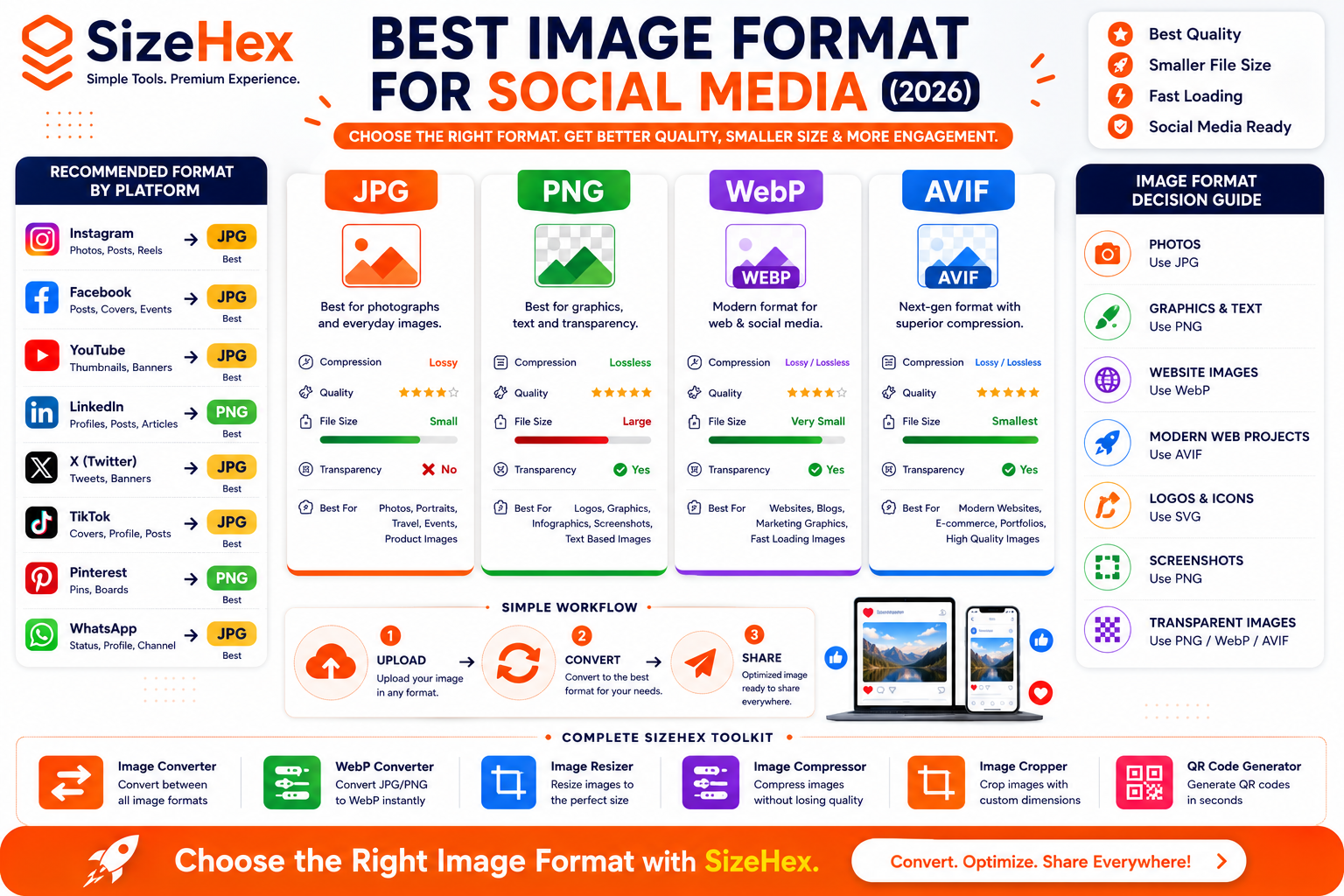
Best Image Format for Social Media (2026)
Creating eye-catching social media content is no longer just about great design—it also depends on choosing the right image format. Whether you're sharing product photos on Instagram, promotional banners on Facebook, thumbnails on YouTube, or infographics on LinkedIn, the format you choose directly impacts image quality, loading speed, and user engagement.
Many people upload images without considering their file format. As a result, photos may appear blurry, graphics can lose transparency, and files may become unnecessarily large. These issues can affect both the appearance of your content and the overall experience for your audience.
Today, there are several popular image formats available, including JPG, PNG, WebP, AVIF, and SVG. Each format has its own strengths, making it suitable for different types of content. Understanding when to use each one helps you create sharper images while keeping file sizes under control.
In this guide, you'll learn the differences between the most common image formats, understand how they work, and discover which format is best for each type of social media content in 2026.
What Is an Image Format?
An image format is the way a digital image is stored and encoded.
Each format uses different compression techniques and supports different features, such as:
- Image quality
- File size
- Transparency
- Animation
- Color depth
- Browser compatibility
Choosing the right format ensures your images display correctly while remaining optimized for speed and quality.
For example:
- A high-quality photograph is usually better saved as JPG or WebP.
- A logo with a transparent background works best as PNG or SVG.
- Modern websites often benefit from AVIF because of its excellent compression.
Why Choosing the Right Image Format Matters
The image format you choose affects more than just appearance. It influences how quickly your content loads, how much storage it uses, and how professional it looks across different platforms.
1. Better Image Quality
Different formats preserve image details differently.
Using the right format helps maintain:
- Sharp text
- Vibrant colors
- Clear edges
- Better overall appearance
2. Faster Uploads
Smaller file sizes upload faster.
This is especially useful when publishing:
- Multiple Instagram posts
- Facebook albums
- Pinterest pins
- Marketing campaigns
3. Better User Experience
Fast-loading images improve the browsing experience for users on both desktop and mobile devices.
Visitors are less likely to abandon slow-loading content.
4. Improved Website Performance
If you share social media graphics on your website, optimized image formats can improve:
- Page speed
- Core Web Vitals
- SEO performance
5. Better Storage Efficiency
Using modern image formats reduces storage requirements without significantly affecting visual quality.
This is useful for:
- Content creators
- Agencies
- Online stores
- Bloggers
Understanding Lossy vs Lossless Compression
Before comparing image formats, it's important to understand the two main types of image compression.
Lossy Compression
Lossy compression reduces file size by permanently removing some image data.
Benefits:
- Smaller file sizes
- Faster uploads
- Faster downloads
Possible drawbacks:
- Slight quality loss after compression
- Repeated editing and saving can reduce quality further
Formats that commonly use lossy compression include:
- JPG
- WebP (lossy mode)
- AVIF (lossy mode)
Lossy compression is ideal for photographs and everyday social media posts.
Lossless Compression
Lossless compression reduces file size without permanently removing image data.
Benefits:
- Preserves original quality
- Better for editing
- Sharp edges and text remain clear
Common lossless formats include:
- PNG
- WebP (lossless mode)
- AVIF (lossless mode)
Lossless compression is ideal for graphics, screenshots, logos, and images containing text.
Overview of Popular Image Formats
Let's look at the strengths and best use cases for each major image format.
JPG (JPEG)
JPG is one of the oldest and most widely supported image formats.
It uses lossy compression to create relatively small file sizes.
Advantages
- Universal compatibility
- Small file size
- Excellent for photographs
- Fast uploads
Limitations
- No transparency support
- Quality decreases after repeated editing and saving
Best For
- Portrait photography
- Travel photos
- Food photography
- Lifestyle content
- Social media photos
PNG
PNG uses lossless compression and supports transparent backgrounds.
Advantages
- Excellent image quality
- Transparency support
- Sharp text and graphics
- Perfect for editing
Limitations
- Larger file sizes compared to JPG and WebP
Best For
- Logos
- Infographics
- Screenshots
- Social media graphics
- Transparent images
WebP
WebP is a modern image format developed to provide excellent quality with smaller file sizes.
It supports both lossy and lossless compression.
Advantages
- Smaller than JPG
- Supports transparency
- Supports animation
- Excellent web performance
Limitations
- Some older software may not fully support WebP
Best For
- Websites
- Blogs
- Marketing graphics
- Product images
- Online portfolios
AVIF
AVIF is one of the newest image formats available.
It delivers outstanding image quality while producing very small file sizes.
Advantages
- Superior compression
- Excellent image quality
- HDR support
- Transparency support
Limitations
- Not all editing tools fully support AVIF yet
Best For
- High-quality website images
- Product catalogs
- Portfolio websites
- Future-ready workflows
SVG
SVG is a vector-based image format.
Unlike JPG or PNG, it doesn't rely on pixels.
Instead, it uses mathematical paths, allowing it to scale infinitely without losing quality.
Advantages
- Infinite scalability
- Extremely small file sizes for simple graphics
- Perfectly sharp at any size
Limitations
- Not suitable for photographs
Best For
- Logos
- Icons
- Illustrations
- Charts
- Simple graphics
Common Mistakes When Choosing Image Formats
Avoid these common mistakes when creating images for social media.
Using PNG for Every Image
PNG provides excellent quality but often creates larger files than necessary for photographs.
For most photos, JPG or WebP is a better choice.
Uploading Large JPG Files Without Compression
High-resolution JPG files can still be quite large.
Compress them before uploading to improve loading speed.
Ignoring Transparency Requirements
If your design includes a transparent background, avoid JPG because it doesn't support transparency.
Use PNG, WebP, or AVIF instead.
Using SVG for Photos
SVG is designed for vector graphics, not photographs.
Use JPG, WebP, or AVIF for photo-based content.
Choosing Old Formats for Modern Websites
Modern formats such as WebP and AVIF often provide better quality-to-size ratios than older formats.
Quick Comparison Table
| Format | Compression | Transparency | Best For | File Size |
|---|---|---|---|---|
| JPG | Lossy | ❌ | Photos | ⭐⭐⭐⭐☆ |
| PNG | Lossless | ✅ | Graphics & Logos | ⭐⭐☆☆☆ |
| WebP | Lossy & Lossless | ✅ | Websites & Social Graphics | ⭐⭐⭐⭐⭐ |
| AVIF | Lossy & Lossless | ✅ | High-Quality Modern Images | ⭐⭐⭐⭐⭐ |
| SVG | Vector | ✅ | Logos & Icons | ⭐⭐⭐⭐⭐ |
Key Takeaways
- Every image format serves a different purpose.
- JPG is excellent for photographs and everyday social media images.
- PNG is the preferred choice for graphics, screenshots, and transparent backgrounds.
- WebP offers an excellent balance of quality and file size for modern web and social media workflows.
- AVIF delivers outstanding compression and image quality, making it ideal for future-ready content.
- SVG is the best option for logos and icons because it scales without losing quality.
Best Image Format for Every Social Media Platform
Now that you understand how different image formats work, the next step is choosing the best format for each social media platform.
While platforms often convert uploaded images internally, starting with the right format helps preserve quality and reduce unnecessary file size. It also gives you better control over how your content looks before the platform processes it.
Let's explore the best image format for every major social network.
Best Image Format for Instagram
Instagram is a highly visual platform where image quality plays a significant role in engagement.
Recommended Format
JPG – Best for photographs
PNG – Best for graphics with text
Why JPG?
Instagram is optimized for photos.
JPG provides:
- Small file size
- Fast uploads
- Excellent photo quality
Perfect for:
- Portraits
- Travel photos
- Food photography
- Lifestyle content
- Product photography
When to Use PNG
PNG works well for:
- Quotes
- Infographics
- Promotional banners
- Designs containing text
- Transparent graphics before export
Recommended Size
1080 × 1080 px
or
1080 × 1350 px
Best Image Format for Facebook
Facebook supports multiple image types but generally performs best with optimized photos.
Recommended Format
JPG
Best for:
- Feed posts
- Cover photos
- Event banners
Use PNG When
- Uploading infographics
- Images with lots of text
- Logos
- Graphics
Recommended Size
1200 × 630 px
Best Image Format for YouTube
YouTube thumbnails are one of the most important elements influencing click-through rates.
Recommended Format
JPG
Reasons:
- Smaller file size
- High compatibility
- Fast loading
PNG
Choose PNG if your thumbnail includes:
- Bold typography
- Logos
- Sharp graphics
PNG helps preserve crisp edges.
Recommended Size
1280 × 720 px
Best Image Format for LinkedIn
LinkedIn emphasizes professional branding and business content.
Recommended Format
PNG
Best for:
- Company graphics
- Business infographics
- Reports
- Marketing visuals
JPG
Use JPG for:
- Professional photography
- Team photos
- Event images
Recommended Size
1200 × 627 px
Best Image Format for X (Twitter)
X supports both JPG and PNG effectively.
Recommended Format
JPG
Ideal for:
- News images
- Event photos
- Personal branding
PNG
Recommended for:
- Charts
- Infographics
- Graphics containing text
Recommended Size
1600 × 900 px
Best Image Format for TikTok
Although TikTok focuses on video, profile images and cover images should still be optimized.
Recommended Format
JPG
Perfect for:
- Cover images
- Promotional graphics
- Profile images
PNG
Useful for:
- Branded promotional graphics
- Text-heavy designs
Recommended Size
1080 × 1920 px
Best Image Format for Pinterest
Pinterest relies heavily on high-quality vertical images.
Recommended Format
PNG
Pinterest graphics often include:
- Text overlays
- Product mockups
- Blog graphics
- Infographics
PNG preserves sharp text exceptionally well.
JPG
Suitable for:
- Photography
- Recipes
- Lifestyle pins
- Travel images
Recommended Size
1000 × 1500 px
Best Image Format for WhatsApp
WhatsApp automatically compresses uploaded media, so starting with optimized images is beneficial.
Recommended Format
JPG
Perfect for:
- Profile pictures
- Status updates
- Shared photos
PNG
Recommended for:
- Logos
- Business graphics
- Product catalogs
- Promotional posters
Recommended Size
1080 × 1920 px
Which Format Is Best?
JPG
Choose JPG if you're uploading:
- Photos
- Selfies
- Portraits
- Food photography
- Product photos
- Travel pictures
Advantages:
✔ Small file size
✔ Excellent compatibility
✔ Fast upload
PNG
Choose PNG if your image contains:
- Text
- Logos
- Graphics
- Screenshots
- Transparent backgrounds
Advantages:
✔ Crystal-clear text
✔ Transparency support
✔ Excellent editing quality
WebP
Choose WebP when:
- Publishing images on websites
- Sharing optimized marketing assets
- Embedding images in blogs
- Reducing storage usage
Advantages:
✔ Smaller than JPG
✔ Supports transparency
✔ Excellent quality
AVIF
Choose AVIF when:
- Building modern websites
- Optimizing portfolios
- Publishing product catalogs
- Reducing bandwidth
Advantages:
✔ Outstanding compression
✔ Superior image quality
✔ HDR support
SVG
Choose SVG for:
- Logos
- Icons
- Simple illustrations
- Brand graphics
Advantages:
✔ Infinite scalability
✔ Tiny file size
✔ Always sharp
Platform Recommendation Table
Platform Best Format Alternative Best For Instagram JPG PNG Photos & Graphics Facebook JPG PNG Posts & Covers YouTube JPG PNG Thumbnails LinkedIn PNG JPG Business Graphics X (Twitter) JPG PNG News & Posts TikTok JPG PNG Covers & Profiles Pinterest PNG JPG Pins & Infographics WhatsApp JPG PNG Status & Business Graphics
Image Format Decision Guide
Use this quick reference to choose the right format for your content.
Content Type Recommended Format Portrait Photography JPG Product Photos JPG Travel Images JPG Social Media Graphics PNG Infographics PNG Screenshots PNG Transparent Graphics PNG Logos SVG Website Images WebP Modern Web Projects AVIF
How to Convert Images with SizeHex
If your image is in the wrong format, you can quickly convert it using SizeHex Image Converter.
Step 1
Upload your image.
Supported formats include:
- JPG
- PNG
- WebP
- AVIF
- GIF
- BMP
- TIFF
Step 2
Choose your desired output format.
Examples:
- JPG → PNG
- PNG → WebP
- JPG → AVIF
- WebP → PNG
Step 3
Convert the image in seconds.
Step 4
Download the converted image and upload it to your preferred social media platform.
Pro Tips
- Use JPG for photographs and everyday social posts.
- Use PNG for graphics, text-heavy designs, and transparent backgrounds.
- Use WebP for website content to reduce file size while maintaining quality.
- Use AVIF for modern websites that prioritize speed and image quality.
- Use SVG for logos and icons whenever the platform or workflow supports it.
- Resize images before converting to achieve the best balance of quality and performance.
Complete Social Media Image Format Optimization Guide
Choosing the right image format is one of the easiest ways to improve image quality, reduce file size, and create a more professional presence across social media platforms.
In this final section, you'll learn the best practices for selecting image formats, common mistakes to avoid, and how to optimize your images before publishing.
Best Practices for Choosing Image Formats
Following these best practices helps your images remain sharp, load quickly, and display correctly across different platforms.
1. Use JPG for Photographs
JPG remains one of the best formats for photographs because it offers an excellent balance between image quality and file size.
Perfect for:
- Portraits
- Food photography
- Travel photos
- Product images
- Lifestyle content
Benefits:
- Small file size
- Fast uploads
- Universal compatibility
2. Use PNG for Graphics
PNG preserves sharp edges and text better than JPG.
Choose PNG when creating:
- Infographics
- Quotes
- Social media posters
- Promotional graphics
- Screenshots
PNG also supports transparent backgrounds.
3. Use WebP for Websites
If you're publishing the same social media graphics on your website, WebP is an excellent choice.
Benefits include:
- Smaller file sizes
- Excellent image quality
- Transparency support
- Faster page loading
4. Use AVIF for Modern Projects
AVIF delivers impressive image quality while keeping file sizes very small.
It's ideal for:
- Portfolio websites
- E-commerce
- Landing pages
- Modern web applications
5. Use SVG for Logos
Logos should remain sharp at every size.
SVG provides:
- Infinite scalability
- Tiny file sizes
- Crisp edges
Perfect for:
- Brand logos
- Icons
- Simple illustrations
6. Resize Before Converting
A recommended workflow is:
Original Image
↓
Resize
↓
Convert Format
↓
Compress
↓
Upload
Following this order typically produces the best quality and performance.
7. Optimize File Size
Even if your image uses the correct format, large file sizes can still slow uploads and reduce website performance.
Compress images after resizing and converting.
Common Image Format Mistakes
Avoid these common mistakes to improve the quality of your social media content.
Using PNG for Every Photo
PNG files are generally much larger than JPG files.
For most photographs, JPG provides excellent quality with a smaller file size.
Saving Graphics as JPG
Graphics with:
- Text
- Logos
- Sharp edges
can lose clarity when saved as JPG.
PNG is usually the better choice.
Ignoring Transparency
JPG doesn't support transparent backgrounds.
If transparency is needed, choose:
- PNG
- WebP
- AVIF
Enlarging Small Images
Changing a small image into a large one doesn't create new detail.
Always start with the highest-resolution original available.
Uploading Large Files
Oversized images:
- Upload more slowly
- Consume more bandwidth
- May be recompressed by social platforms
Resize and compress them before uploading.
Choosing the Wrong Format for Logos
Never save logos as low-quality JPG files.
SVG or PNG typically produces much better results.
Before Upload Checklist
Use this checklist before publishing your images.
✅ Correct image dimensions
✅ Appropriate image format
✅ Image resized
✅ Image compressed
✅ Correct aspect ratio
✅ High-resolution source
✅ Text remains readable
✅ Transparent background preserved (if required)
✅ Previewed on desktop
✅ Previewed on mobile
Frequently Asked Questions (FAQ)
1. Which image format is best for Instagram?
JPG works well for photographs, while PNG is better for graphics with text and logos.
2. Which format is best for Facebook?
JPG is suitable for most posts and cover images. PNG is useful for graphics and infographics.
3. Is WebP better than JPG?
For websites, WebP often provides similar or better visual quality with smaller file sizes. For social media uploads, JPG remains widely compatible and practical.
4. Is AVIF better than WebP?
AVIF can achieve even smaller file sizes while maintaining high quality, but support in editing software and workflows is still growing.
5. Should I use PNG for photos?
Usually not. JPG is generally more efficient for photographs because it creates much smaller files.
6. Can PNG have transparent backgrounds?
Yes. PNG supports transparency, making it ideal for logos and graphics.
7. Does JPG support transparency?
No. Transparent areas are replaced with a solid background.
8. Which format is best for logos?
SVG is ideal because it scales without losing quality. If SVG isn't supported, PNG is a good alternative.
9. Which format is best for screenshots?
PNG preserves sharp text and interface details, making it a strong choice for screenshots.
10. What is the smallest image format?
AVIF often provides the smallest file sizes while maintaining excellent quality. WebP is also highly efficient.
11. Should I convert images before uploading?
Yes. Converting to an appropriate format before uploading helps improve quality and reduce file size.
12. Does converting reduce quality?
It depends on the conversion. Repeated lossy conversions may reduce quality, while lossless conversions preserve image data.
13. Which format loads fastest?
Smaller, well-optimized files generally load faster. Modern formats like WebP and AVIF are designed with efficiency in mind.
14. Should I resize before converting?
Yes. Resizing first usually results in a more efficient workflow and better overall optimization.
15. Which tool can convert all image formats?
An image converter that supports formats such as JPG, PNG, WebP, AVIF, GIF, BMP, and TIFF can simplify your workflow.
Conclusion
Selecting the right image format helps your content look professional while improving upload speed, storage efficiency, and user experience.
As a general rule:
- JPG is excellent for photographs.
- PNG works well for graphics, screenshots, and transparent backgrounds.
- WebP is a great option for websites because of its balance between quality and file size.
- AVIF offers excellent compression for modern workflows.
- SVG is the preferred choice for logos and icons.
Combining the right format with proper resizing and compression ensures your images look their best on every platform.
Why Choose SizeHex Image Converter?
SizeHex Image Converter makes changing image formats fast and simple.
Features
- Convert between JPG, PNG, WebP, AVIF, GIF, BMP, and TIFF
- Fast browser-based conversion
- Beginner-friendly interface
- No software installation required
- Supports high-quality output
- Works on desktop and mobile devices
- Free to use
Whether you're preparing images for Instagram, Facebook, YouTube, LinkedIn, TikTok, Pinterest, or your website, SizeHex helps you choose the right format in just a few clicks.
Related Tools
Image Converter
https://www.sizehex.com/image-converter.html
Convert images between popular formats quickly and easily.
WebP Converter
https://www.sizehex.com/webp-converter.html
Convert JPG and PNG images into efficient WebP files.
Image Resizer
https://www.sizehex.com/image-resizer.html
Resize images to the exact dimensions required for websites and social media.
Image Compressor
Reduce image file sizes while maintaining excellent visual quality.
Image Cropper
https://www.sizehex.com/image-crop.html
Crop images to custom dimensions or popular aspect ratios.
QR Code Generator
https://www.sizehex.com/qr-generator.html
Generate QR codes for websites, contact information, Wi-Fi credentials, and more.