July 28, 2026
Best Image Format for Websites in 2026 (Complete Guide)
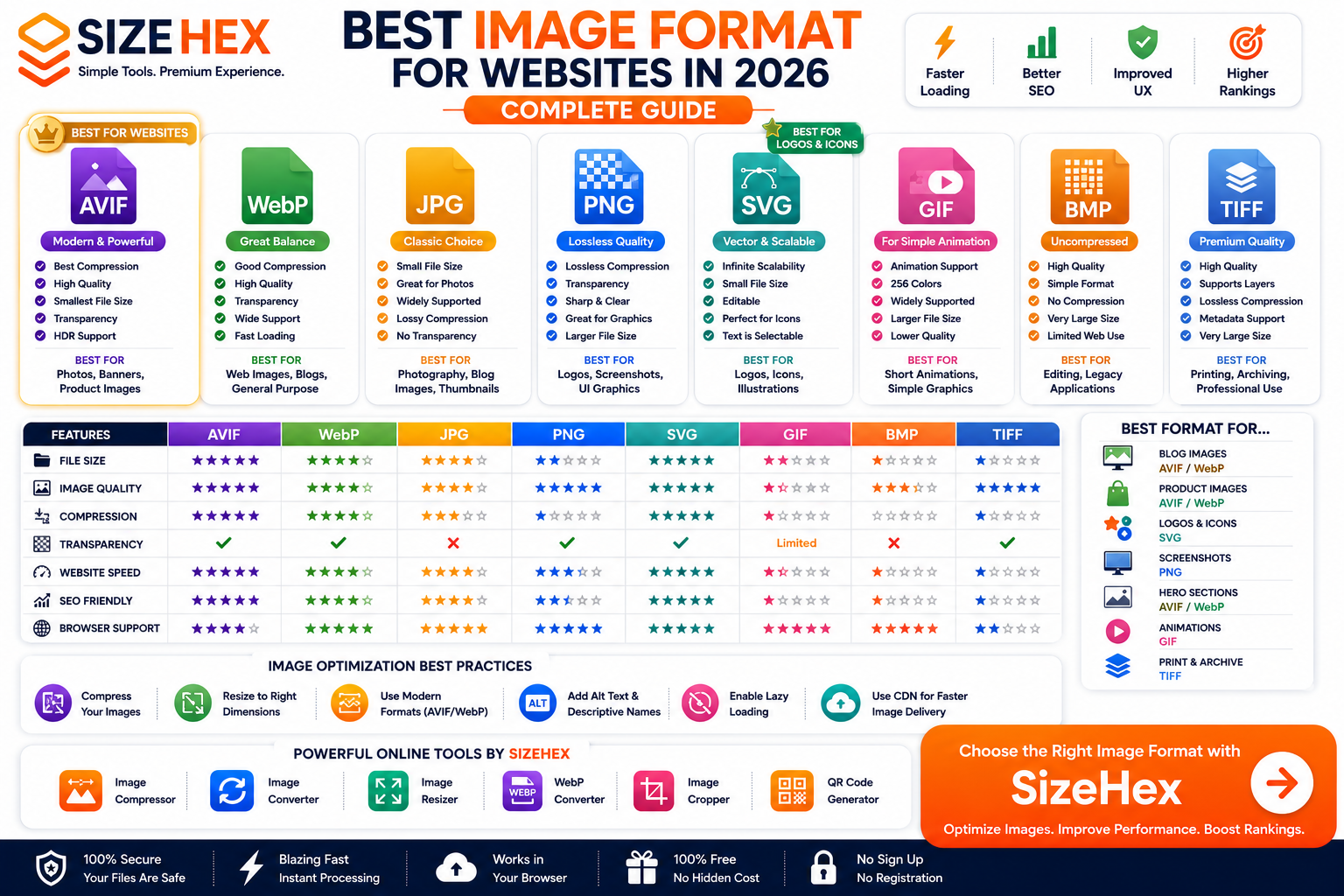
Best Image Format for Websites in 2026
Images play a crucial role in modern website design. They make content more engaging, improve user experience, showcase products, explain concepts, and strengthen a brand's identity. However, using the wrong image format can slow down your website, increase bandwidth usage, and negatively impact search engine rankings.
Today, website owners have more image format options than ever before. Traditional formats like JPG and PNG are still widely used, while newer formats such as WebP and AVIF offer significantly better compression and performance. Vector formats like SVG remain the best choice for logos and icons, while formats like GIF, BMP, and TIFF serve more specialized purposes.
Choosing the right format isn't just about image quality—it's also about balancing performance, compatibility, and user experience.
A fast-loading website benefits everyone:
- Visitors enjoy a smoother browsing experience.
- Mobile users consume less data.
- Search engines can reward faster websites with better rankings.
- Businesses often see improved engagement and conversion rates.
In this complete guide, we'll compare the most popular image formats used on websites, explain their strengths and weaknesses, and help you choose the best format for every type of image.
Why Image Formats Matter for Websites
Many people upload images directly from their camera or design software without considering the format. While this may seem convenient, it can significantly affect your website's performance.
A single large image can add several megabytes to a page, increasing loading time and reducing responsiveness.
Choosing the right image format helps improve:
- Website speed
- User experience
- Mobile performance
- Storage efficiency
- Bandwidth usage
- SEO
- Core Web Vitals
For example, replacing an unoptimized PNG photo with an AVIF or WebP version can dramatically reduce file size while maintaining similar visual quality. This means visitors spend less time waiting for pages to load, especially on slower mobile networks.
How Images Affect SEO
Search engines aim to provide users with fast, reliable, and high-quality websites. Large, unoptimized images can slow page loading, which may affect technical SEO.
Well-optimized images can help improve:
- Page Speed
- Largest Contentful Paint (LCP)
- Core Web Vitals
- Mobile usability
- Crawl efficiency
- User engagement
- Bounce rate
Image optimization isn't only about choosing the right format. It also involves:
- Compressing images
- Resizing them to the correct dimensions
- Using descriptive filenames
- Adding meaningful alt text
- Implementing responsive images
- Serving modern formats where appropriate
By combining these practices with the right image format, you can create faster and more search-engine-friendly websites.
What Makes a Good Website Image Format?
Not every image format is suitable for the web. A good website image format should provide an excellent balance between visual quality and performance.
Here are the most important characteristics to consider.
1. Small File Size
Smaller image files load faster and consume less bandwidth.
Benefits include:
- Faster websites
- Better mobile experience
- Lower hosting costs
- Reduced CDN bandwidth
- Improved page speed
Modern formats like AVIF and WebP are designed specifically to reduce file sizes without significantly affecting image quality.
2. High Image Quality
Images should remain clear and visually appealing even after compression.
A good web image format should preserve:
- Sharp details
- Natural colors
- Smooth gradients
- Readable text
- Fine textures
Maintaining quality is especially important for product photography, banners, and marketing images.
3. Browser Compatibility
A website image format should work reliably across different browsers and devices.
Good browser support ensures visitors can view your images without compatibility issues, regardless of whether they're using a desktop computer, tablet, or smartphone.
4. Transparency Support
Some website graphics require transparent backgrounds.
Examples include:
- Company logos
- Icons
- UI elements
- Product cutouts
- Overlay graphics
Formats such as PNG, WebP, AVIF, and SVG support transparency, making them ideal for these use cases.
5. Efficient Compression
Compression reduces file size while attempting to preserve image quality.
There are two primary types:
Lossy Compression
Lossy compression removes some image data to achieve much smaller file sizes.
Best for:
- Website photos
- Blog images
- Product photography
- Marketing banners
Formats:
- JPG
- WebP
- AVIF
Lossless Compression
Lossless compression preserves every pixel of the original image.
Best for:
- Logos
- Screenshots
- Graphics
- UI elements
- Images with text
Formats:
- PNG
- SVG (vector-based)
- TIFF
6. Responsive Design Support
Modern websites display images on a wide range of screen sizes.
A good image format should work well on:
- Desktop monitors
- Tablets
- Smartphones
- High-resolution displays
Combined with responsive image techniques, the right format helps deliver appropriately sized images to different devices, improving performance and user experience.
7. Fast Loading Performance
Website visitors expect pages to load quickly.
An efficient image format helps:
- Reduce loading times
- Improve user satisfaction
- Lower bandwidth consumption
- Enhance overall site performance
For image-heavy websites such as online stores, blogs, and portfolios, choosing the right format can make a noticeable difference.
Raster vs Vector Images
Before selecting an image format, it's important to understand the difference between raster and vector images.
Raster Images
Raster images are made up of thousands (or millions) of tiny pixels.
Each pixel stores color information, creating the final image.
Common raster formats include:
- JPG
- PNG
- WebP
- AVIF
- GIF
- BMP
- TIFF
Raster images are best suited for:
- Photographs
- Product images
- Digital artwork
- Social media graphics
- Website banners
However, enlarging raster images beyond their original dimensions can result in a loss of quality and visible pixelation.
Vector Images
Vector images are created using mathematical paths instead of pixels.
Because vectors are resolution-independent, they can be scaled to any size without losing quality.
The primary vector format used on websites is:
- SVG
Vector graphics are ideal for:
- Company logos
- Icons
- Illustrations
- Charts
- Simple diagrams
They remain crisp on all screen sizes, making them a preferred choice for branding elements and interface graphics.
Overview of Every Image Format
JPG (JPEG)
Purpose: General photography
Strengths
- Small file sizes
- Excellent compatibility
- Great for photographs
- Fast loading
Weaknesses
- No transparency support
- Lossy compression
- Quality decreases after repeated editing
Best For
- Blog images
- Product photos
- News websites
- General web photography
PNG
Purpose: Lossless graphics
Strengths
- Excellent image quality
- Transparency support
- Sharp text
- Ideal for screenshots
Weaknesses
- Larger file sizes
- Less efficient compression
Best For
- Logos
- Screenshots
- UI elements
- Graphics with text
WebP
Purpose: Modern web images
Strengths
- Small file sizes
- Excellent quality
- Transparency support
- Wide browser support
Weaknesses
- Slightly slower encoding than JPG
Best For
- Websites
- Blogs
- E-commerce
- Marketing graphics
AVIF
Purpose: Next-generation web images
Strengths
- Outstanding compression
- Excellent quality
- HDR support
- Transparency support
- Very small file sizes
Weaknesses
- Older software may have limited support
- Encoding can be slower
Best For
- High-performance websites
- Product photography
- Hero banners
- Large image galleries
SVG
Purpose: Vector graphics
Strengths
- Infinite scalability
- Tiny file sizes for simple graphics
- Editable
- Sharp at any resolution
Weaknesses
- Not suitable for photographs
Best For
- Logos
- Icons
- Charts
- Illustrations
GIF
Purpose: Simple animations
Strengths
- Animation support
- Universal compatibility
Weaknesses
- Limited to 256 colors
- Large animated files
- Lower image quality
Best For
- Short animations
- Simple graphics
- Memes
BMP
Purpose: Uncompressed images
Strengths
- High quality
- Simple structure
Weaknesses
- Extremely large files
- Poor web performance
Best For
- Temporary editing
- Legacy Windows applications
TIFF
Purpose: Professional image storage
Strengths
- Excellent quality
- Supports layers and metadata
- Preferred for printing and archiving
Weaknesses
- Very large files
- Not suitable for websites
Best For
- Professional photography
- Printing
- Archival storage
Best Image Format for Blog Images
Blog images should look sharp while loading quickly. Since blogs often contain multiple images, choosing an efficient format can significantly improve page speed and user experience.
AVIF
AVIF is one of the best choices for blog images because it provides excellent image quality with very small file sizes.
Best for:
- Featured images
- Article banners
- In-content images
- Travel blogs
- Food blogs
- Technology blogs
WebP
WebP is another excellent option that balances quality, compatibility, and compression.
It is widely supported and works well for almost every type of blog.
JPG
JPG remains a reliable option for photographs but usually produces larger files than AVIF or WebP.
Winner
🏆 AVIF
Best Image Format for Product Images
Product images need to be visually appealing while loading quickly, especially for e-commerce websites.
AVIF
Ideal for:
- Product galleries
- Zoom images
- Fashion products
- Electronics
- Furniture
- Food photography
Benefits:
- Outstanding quality
- Small file sizes
- Better page speed
- Reduced bandwidth
WebP
Excellent alternative if AVIF isn't available in your workflow.
PNG
Useful when product images require transparent backgrounds.
Winner
🏆 AVIF
Best Image Format for Hero Sections
Hero images are often the largest visual element on a webpage and have a major impact on loading speed and Largest Contentful Paint (LCP).
Recommended Formats
- AVIF ⭐⭐⭐⭐⭐
- WebP ⭐⭐⭐⭐☆
- JPG ⭐⭐⭐☆☆
Avoid using PNG for large hero banners unless transparency is essential, as PNG files are typically much larger.
Winner
🏆 AVIF
Best Image Format for Logos
Logos should remain sharp at every screen size.
SVG
SVG is the preferred format because it is vector-based.
Advantages:
- Infinite scalability
- Tiny file sizes for simple graphics
- Retina-ready
- Editable
- Perfectly sharp
PNG
PNG is useful when a raster version is required, especially for transparent logos.
Winner
🏆 SVG
Best Image Format for Icons
Icons should be lightweight and remain crisp on all devices.
SVG
Ideal for:
- Navigation icons
- App icons
- Social icons
- UI icons
PNG
Suitable when SVG isn't available.
Winner
🏆 SVG
Best Image Format for Screenshots
Screenshots contain sharp text and interface elements that require lossless quality.
PNG
Advantages:
- Crisp text
- Pixel-perfect quality
- Lossless compression
- Excellent readability
AVIF
AVIF can also store screenshots efficiently, but some compression settings may soften fine text if not configured carefully.
Winner
🏆 PNG
Best Image Format for Photography
Photography requires rich colors, fine detail, and efficient compression.
AVIF
Ideal for:
- Landscape photography
- Portraits
- Product photography
- Travel photography
- Food photography
Benefits:
- Rich colors
- HDR support
- Excellent detail retention
- Smaller files
JPG
Still widely used due to universal compatibility.
Winner
🏆 AVIF
Best Image Format for UI Graphics
User interface graphics need sharp edges and clean typography.
PNG
Best for:
- Buttons
- Mockups
- UI components
- Dashboard screenshots
- Interface graphics
SVG
Excellent for scalable interface icons and simple UI elements.
Winner
🏆 PNG
Best Image Format for Illustrations
Illustrations vary depending on their style.
SVG
Best for:
- Flat illustrations
- Icons
- Vector artwork
- Infographics
- Line art
PNG
Best for:
- Digital paintings
- Complex raster artwork
- Textured illustrations
Winner
🏆 SVG (for vector illustrations)
Best Image Format for Infographics
Infographics often combine text, charts, and icons.
SVG
The best choice when the infographic is vector-based because it remains perfectly sharp at any size.
PNG
A good option for raster-based infographics that require transparency.
Winner
🏆 SVG
Website Performance Comparison
Website performance depends heavily on image size and compression.
Format Loading Speed Compression File Size Overall Performance AVIF ⭐⭐⭐⭐⭐ ⭐⭐⭐⭐⭐ ⭐⭐⭐⭐⭐ ⭐⭐⭐⭐⭐ WebP ⭐⭐⭐⭐☆ ⭐⭐⭐⭐☆ ⭐⭐⭐⭐☆ ⭐⭐⭐⭐☆ JPG ⭐⭐⭐⭐☆ ⭐⭐⭐☆☆ ⭐⭐⭐☆☆ ⭐⭐⭐☆☆ PNG ⭐⭐⭐☆☆ ⭐⭐☆☆☆ ⭐⭐☆☆☆ ⭐⭐☆☆☆ SVG ⭐⭐⭐⭐⭐ Vector Very Small* ⭐⭐⭐⭐⭐ *For simple vector graphics such as logos and icons.
Overall Winner
🏆 AVIF
SEO Comparison
Choosing the right image format contributes to technical SEO by improving page performance and user experience.
AVIF
Advantages:
- Smaller image sizes
- Faster loading
- Better Core Web Vitals
- Improved Largest Contentful Paint (LCP)
- Lower bandwidth usage
WebP
Offers excellent SEO benefits with broad browser compatibility.
JPG
Good for general photography but generally less efficient than AVIF and WebP.
PNG
Useful for specific image types but should be optimized to avoid unnecessary file size.
SEO Best Practices
- Compress images before uploading.
- Resize images to their display dimensions.
- Use descriptive filenames.
- Add meaningful alt text.
- Enable lazy loading.
-
Use responsive images with
srcsetwhere appropriate. - Specify image width and height to reduce layout shifts.
- Serve images through a CDN for faster delivery.
- Prefer AVIF or WebP for photographic content.
- Use SVG for logos and icons whenever possible.
Winner
🏆 AVIF
Browser Support
Compatibility is essential to ensure all visitors can view your images.
Format Browser Support JPG ⭐⭐⭐⭐⭐ PNG ⭐⭐⭐⭐⭐ GIF ⭐⭐⭐⭐⭐ SVG ⭐⭐⭐⭐⭐ WebP ⭐⭐⭐⭐⭐ AVIF ⭐⭐⭐⭐☆ BMP ⭐⭐⭐⭐⭐ TIFF ⭐⭐☆☆☆ Most modern browsers support AVIF, but older browsers or legacy systems may not. Providing fallback formats where necessary is still a good practice.
Mobile Performance
Mobile users often browse on slower networks, making image optimization even more important.
Modern formats such as AVIF and WebP can:
- Reduce mobile data usage
- Improve loading speed
- Enhance user experience
- Increase battery efficiency by transferring less data
- Improve Core Web Vitals on mobile devices
For mobile-first websites, AVIF is an excellent choice for photographic content.
CDN Optimization
Content Delivery Networks (CDNs) can further improve image delivery.
Modern CDNs often:
- Automatically compress images
- Convert images to WebP or AVIF when supported
- Resize images for different devices
- Cache images closer to users
- Reduce server load
Combining a CDN with efficient image formats results in faster, more reliable websites.
Best Practices
To achieve the best balance of performance, quality, and compatibility:
- Use AVIF for photographs, banners, and product images whenever possible.
- Use WebP as an excellent fallback or primary format if AVIF isn't practical.
- Use SVG for logos, icons, and vector illustrations.
- Use PNG for screenshots, UI graphics, and raster images requiring transparency.
- Use JPG only when broad compatibility is needed or legacy workflows require it.
- Compress and resize every image before uploading.
- Enable lazy loading for off-screen images.
-
Use responsive images (
srcset) for different screen sizes. - Deliver images through a CDN to reduce latency.
- Regularly audit your website for oversized or unoptimized images.
Which Image Format Should You Choose?
There isn't a single image format that's perfect for every situation. The best choice depends on the type of image, your website's purpose, and your performance goals.
Modern websites often use a combination of formats to achieve the best balance between image quality, loading speed, and compatibility.
Here's a simple decision guide.
If You're Building a Blog
A blog typically includes featured images, article illustrations, screenshots, and banners.
Recommended Formats
- Featured Images: AVIF
- Article Photos: AVIF
- Screenshots: PNG
- Icons: SVG
Why?
Blogs benefit from faster loading pages, improved Core Web Vitals, and reduced bandwidth usage. AVIF helps keep image sizes small while maintaining excellent visual quality.
🏆 Best Choice: AVIF
If You're Building an E-commerce Website
Online stores rely heavily on high-quality product images.
Recommended Formats
- Product Images: AVIF
- Category Banners: AVIF
- Brand Logos: SVG
- Transparent Product Assets: PNG
- Icons: SVG
Why?
Fast-loading product pages improve the shopping experience and may contribute to better search rankings and conversion rates.
🏆 Best Choice: AVIF + SVG
If You're Building a Business Website
Business websites often include team photos, office images, service illustrations, and logos.
Recommended Formats
- Hero Images → AVIF
- Service Images → AVIF
- Team Photos → AVIF
- Company Logo → SVG
- UI Graphics → PNG
🏆 Best Choice: AVIF + SVG
If You're Building a SaaS Website
SaaS websites usually contain dashboards, UI screenshots, feature graphics, and marketing visuals.
Recommended Formats
- Screenshots → PNG
- Hero Images → AVIF
- Product Graphics → AVIF
- Icons → SVG
- Dashboard Illustrations → SVG
🏆 Best Choice: AVIF + SVG + PNG
If You're Building a Portfolio Website
Portfolio websites often showcase photography, artwork, or creative projects.
Photography Portfolio
- Gallery Images → AVIF
- Hero Banner → AVIF
Designer Portfolio
- Logos → SVG
- Mockups → PNG
- Artwork → AVIF or PNG (depending on the artwork type)
🏆 Best Choice: AVIF + SVG
If You're Building a News Website
News websites publish large volumes of content every day.
Recommended Formats
- Article Images → AVIF
- Breaking News Photos → AVIF
- Infographics → SVG
- Charts → SVG
- Screenshots → PNG
🏆 Best Choice: AVIF
Website Image Format Decision Table
Website Type Best Image Format Blog 🏆 AVIF E-commerce 🏆 AVIF + SVG Business Website 🏆 AVIF + SVG SaaS 🏆 AVIF + SVG + PNG Photography Portfolio 🏆 AVIF Designer Portfolio 🏆 SVG + AVIF News Website 🏆 AVIF Landing Page 🏆 AVIF Educational Website 🏆 AVIF + SVG Personal Portfolio 🏆 AVIF + SVG
Final Comparison Table
Feature JPG PNG WebP AVIF SVG GIF BMP TIFF Website Speed ⭐⭐⭐ ⭐⭐ ⭐⭐⭐⭐ ⭐⭐⭐⭐⭐ ⭐⭐⭐⭐⭐ ⭐⭐ ⭐ ⭐ File Size ⭐⭐⭐ ⭐⭐ ⭐⭐⭐⭐ ⭐⭐⭐⭐⭐ Very Small* ⭐⭐ ⭐ ⭐ Image Quality ⭐⭐⭐⭐ ⭐⭐⭐⭐⭐ ⭐⭐⭐⭐ ⭐⭐⭐⭐⭐ Infinite ⭐⭐ ⭐⭐⭐⭐⭐ ⭐⭐⭐⭐⭐ Transparency ❌ ✅ ✅ ✅ ✅ Limited ❌ Optional Photography ⭐⭐⭐⭐ ⭐⭐⭐ ⭐⭐⭐⭐ ⭐⭐⭐⭐⭐ ❌ ❌ ⭐⭐⭐ ⭐⭐⭐⭐⭐ Logos ⭐ ⭐⭐⭐⭐ ⭐⭐⭐ ⭐⭐⭐ ⭐⭐⭐⭐⭐ ⭐ ⭐ ⭐ Browser Support ⭐⭐⭐⭐⭐ ⭐⭐⭐⭐⭐ ⭐⭐⭐⭐⭐ ⭐⭐⭐⭐ ⭐⭐⭐⭐⭐ ⭐⭐⭐⭐⭐ ⭐⭐⭐⭐⭐ ⭐⭐ SEO ⭐⭐⭐ ⭐⭐⭐ ⭐⭐⭐⭐ ⭐⭐⭐⭐⭐ ⭐⭐⭐⭐⭐ ⭐⭐ ⭐ ⭐ *SVG file size depends on the complexity of the vector graphic.
Frequently Asked Questions (FAQ)
1. Which image format is best for websites?
For most modern websites, AVIF is the best choice for photographs and large visual content because it offers excellent image quality with very small file sizes.
2. Is AVIF better than WebP?
AVIF generally provides better compression and can produce smaller files at similar visual quality. However, WebP remains an excellent option with broad compatibility and a mature ecosystem.
3. Should I still use JPG?
Yes. JPG is still useful for compatibility with older systems and workflows, but for new websites, AVIF or WebP are often better choices for photographic content.
4. Is PNG outdated?
No. PNG is still one of the best formats for screenshots, interface graphics, and transparent raster images. It simply isn't the most efficient option for large photographs.
5. Which format loads fastest?
AVIF usually provides the fastest loading experience for photographic images because of its advanced compression.
6. Which format is best for SEO?
SEO depends on overall image optimization, but AVIF and WebP can improve page speed, which supports technical SEO.
7. Which format is best for logos?
SVG is the best format because it scales without losing quality and is typically very lightweight for simple graphics.
8. Which format supports transparency?
PNG, WebP, AVIF, and SVG all support transparency.
9. Should I use AVIF or PNG?
Use AVIF for photos, banners, and product images. Use PNG for screenshots, UI graphics, and transparent raster assets.
10. Is WebP still worth using?
Yes. WebP offers an excellent balance of quality, compression, and compatibility, making it a strong choice for many websites.
11. Which format is best for product images?
AVIF is generally the best option for product photography because it combines high quality with small file sizes.
12. Which format is best for screenshots?
PNG remains the preferred format because it preserves sharp text and interface details without quality loss.
13. Can I use multiple image formats on one website?
Absolutely. Many websites combine AVIF, WebP, PNG, and SVG to optimize different types of content.
14. Do image formats affect Core Web Vitals?
Yes. Efficient image formats can improve loading speed and contribute to better Core Web Vitals, especially Largest Contentful Paint (LCP).
15. Should I convert my existing images?
If your website contains many large JPG or PNG photos, converting suitable images to AVIF or WebP can reduce file sizes and improve performance.
Conclusion
Selecting the best image format is about using the right tool for the right job.
- AVIF is the leading choice for modern websites thanks to its exceptional compression and image quality.
- WebP is a versatile alternative with wide support and strong performance.
- SVG is unmatched for logos, icons, and vector illustrations.
- PNG remains essential for screenshots and transparent raster graphics.
- JPG continues to be useful for compatibility with older workflows.
- GIF, BMP, and TIFF have specialized uses but are generally not ideal for everyday web content.
By choosing the appropriate format for each type of image, you can create a faster, more engaging website that delivers a better experience for visitors and supports strong technical SEO.
Try SizeHex Today
Optimize your images with SizeHex—a fast, secure, and free online image toolkit built for creators, developers, bloggers, and businesses.
With SizeHex, you can:
- Compress images without noticeable quality loss.
- Convert between popular image formats.
- Resize images for websites and social media.
- Crop images to custom dimensions.
- Generate QR codes in seconds.
Whether you're preparing images for a blog, an online store, or a professional portfolio, SizeHex helps you optimize them directly in your browser—no software installation required.
Related Tools
Image Compressor
Compress JPG, PNG, WebP, AVIF, GIF, BMP, TIFF, and other formats while maintaining excellent visual quality.
Image Converter
https://www.sizehex.com/image-converter.html
Convert images between JPG, PNG, WebP, AVIF, SVG, BMP, GIF, TIFF, and more.
Image Resizer
https://www.sizehex.com/image-resizer.html
Resize images for websites, blogs, online stores, presentations, and social media.
WebP Converter
https://www.sizehex.com/webp-converter.html
Convert JPG and PNG images into WebP for faster-loading websites.
Image Cropper
https://www.sizehex.com/image-crop.html
Crop images online using custom dimensions or preset aspect ratios.
QR Code Generator
Generate QR codes for websites, contact information, Wi-Fi, email addresses, and more.