August 6, 2026
Complete Image Optimization Checklist (2026): The Ultimate Step-by-Step Guide
Complete Image Optimization Checklist (2026): The Ultimate Step-by-Step Guide
Images are one of the most important elements of modern websites. They improve visual appeal, explain complex ideas, showcase products, and increase user engagement. However, poorly optimized images are also one of the biggest reasons websites become slow, consume excessive bandwidth, and provide a poor user experience.
Large image files can increase loading times, negatively impact Core Web Vitals, reduce search visibility, and even discourage visitors from staying on your website.
Image optimization is the process of preparing images so they load quickly, maintain excellent visual quality, and work efficiently across all devices and browsers.
Successful image optimization isn't just about compressing files. It involves selecting the right format, using responsive images, implementing lazy loading, improving accessibility, configuring browser caching, optimizing delivery through a CDN, and following technical SEO best practices.
This guide combines everything you need into one complete checklist. Whether you're a blogger, developer, designer, photographer, e-commerce business, marketer, or SaaS founder, you'll learn the complete workflow for preparing images for modern websites in 2026.
What Is Image Optimization?
Image optimization is the process of reducing image file sizes while preserving visual quality and ensuring images load efficiently on every device.
The goal is to deliver images that are:
- Fast
- Lightweight
- Responsive
- Accessible
- Search-engine friendly
A properly optimized image improves both website performance and user experience.
Why Image Optimization Matters
Images often represent the largest files downloaded by a webpage.
Without optimization:
- Pages load slowly.
- Visitors wait longer.
- Mobile users consume more data.
- Core Web Vitals decline.
- Search visibility may suffer.
Optimized images create a faster, smoother browsing experience for everyone.
Benefits for SEO
Image optimization supports technical SEO in many ways.
Benefits include:
- Faster page loading
- Better Core Web Vitals
- Improved Google Images visibility
- Better crawl efficiency
- Reduced bounce rates
- Improved mobile performance
Combined with descriptive filenames, alt text, structured data, and image sitemaps, optimized images contribute to stronger search performance.
Benefits for Performance
Performance improvements include:
- Smaller downloads
- Lower bandwidth usage
- Faster rendering
- Reduced server load
- Better caching efficiency
- Improved global delivery
Modern image optimization helps websites scale more efficiently.
Benefits for User Experience
Visitors expect websites to load quickly.
Optimized images provide:
- Faster page loads
- Better mobile experience
- Smoother scrolling
- Clear visuals
- Lower data usage
- Higher engagement
Better user experience often leads to longer sessions and improved visitor satisfaction.
Complete Image Optimization Workflow
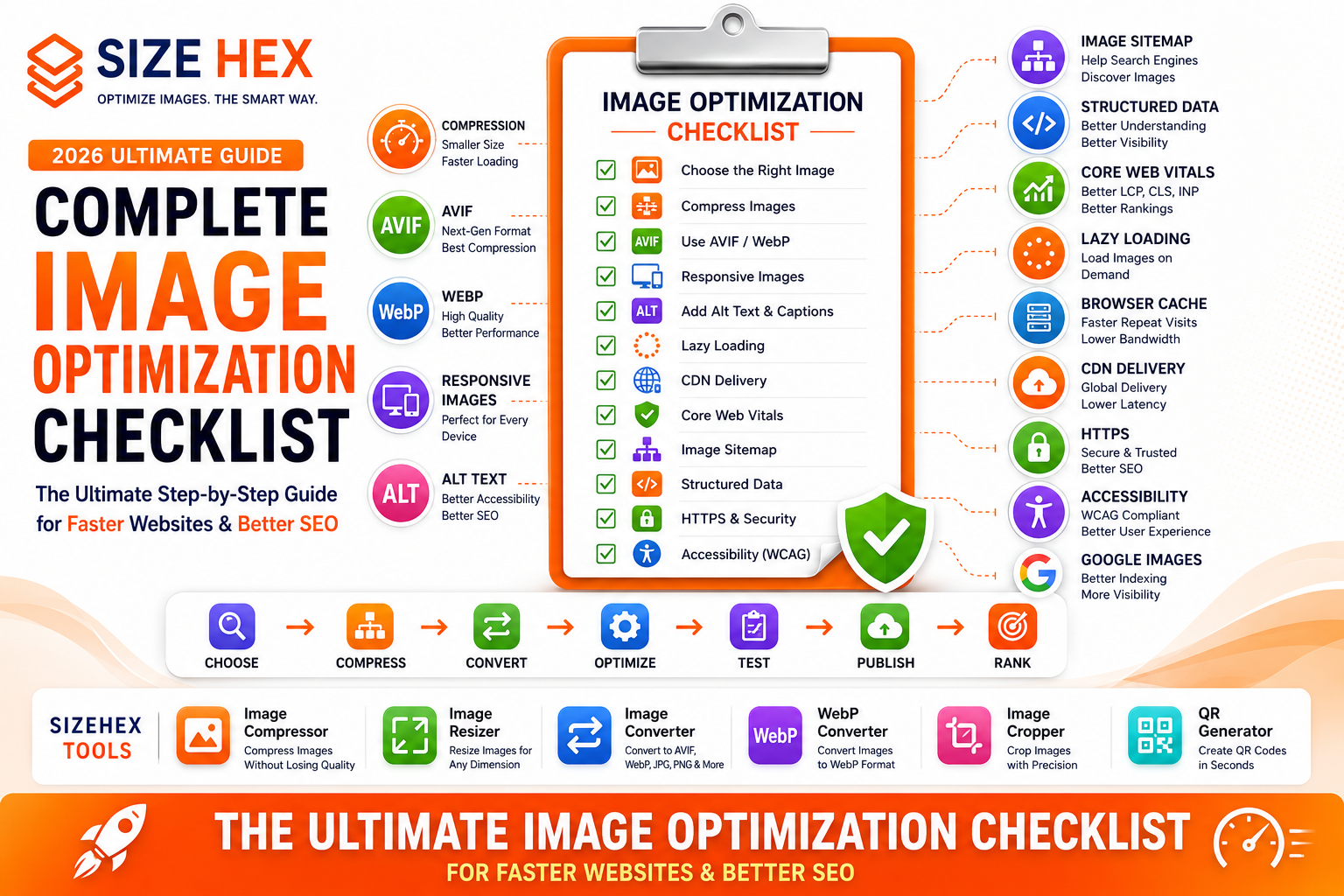
A complete workflow typically looks like this:
Choose the right image
↓
Resize to appropriate dimensions
↓
Compress the image
↓
Convert to AVIF or WebP
↓
Generate responsive image sizes
↓
Add descriptive filenames
↓
Write meaningful alt text
↓
Include captions where appropriate
↓
Implement lazy loading
↓
Preload hero images
↓
Enable browser caching
↓
Deliver through a CDN
↓
Update Image Sitemap
↓
Monitor Core Web Vitals
↓
Test regularly
Following this workflow helps ensure every published image is optimized for performance, accessibility, and SEO.
Common Image Optimization Myths
Let's clear up some common misconceptions.
Myth 1: Compression always ruins image quality.
Reality: Modern compression tools can dramatically reduce file sizes while maintaining excellent visual quality.
Myth 2: PNG is always the best format.
Reality: PNG is useful for graphics and transparency, but photographs are often better served as AVIF, WebP, or JPEG.
Myth 3: Bigger images always improve SEO.
Reality: High-quality images matter, but unnecessarily large files slow websites and negatively affect performance.
Myth 4: Image optimization only matters for photographers.
Reality: Every website that uses images—including blogs, online stores, SaaS platforms, educational websites, and business sites—benefits from optimization.
Myth 5: Compressing images is enough.
Reality: Effective image optimization combines compression, responsive images, modern formats, lazy loading, accessibility, browser caching, CDNs, and technical SEO.
Real-World Examples
Example 1: E-commerce Store
An online retailer optimizes product photos using AVIF, responsive images, lazy loading, and a CDN.
Customers experience faster product pages and smoother shopping.
Example 2: Travel Blog
A travel blogger compresses destination photos, writes descriptive alt text, and adds images to an XML Image Sitemap.
The blog gains better visibility in Google Images.
Example 3: Educational Website
An educational platform publishes optimized diagrams with captions and accessible descriptions.
Students enjoy faster loading pages and improved accessibility.
Example 4: SaaS Website (SizeHex)
SizeHex provides browser-based tools that help users compress, resize, crop, convert, and optimize images before publishing.
When combined with responsive images, accessibility best practices, structured data, Core Web Vitals optimization, and CDN delivery, websites become faster, more accessible, and easier for search engines to understand.
Key Takeaways
- Image optimization involves much more than compression—it includes format selection, responsive delivery, accessibility, performance, and technical SEO.
- Properly optimized images improve page speed, Core Web Vitals, user experience, and search visibility.
- Modern formats like AVIF and WebP reduce file sizes while maintaining excellent quality.
- Responsive images, lazy loading, browser caching, and CDNs work together to deliver images efficiently across devices and locations.
- Accessibility features such as meaningful alt text and captions improve usability while supporting image SEO.
- Following a consistent optimization workflow helps create faster, more user-friendly websites that perform well in search results.
Complete Image Optimization Checklist (2026)
Now that you understand why image optimization is important, let's go through a complete step-by-step checklist. Following this workflow helps you create images that are fast, responsive, accessible, and optimized for search engines.
Planning
1. Choose the Right Image
Image optimization starts before uploading anything.
Choose images that:
- Match your content
- Are high quality
- Support your message
- Load quickly
- Work across all devices
Avoid adding images simply for decoration unless they improve the user experience.
2. Use Original Images
Original images provide more value than generic stock photos.
Examples:
- Product photography
- Custom illustrations
- Screenshots
- Infographics
- Tutorials
- Team photos
Benefits include:
- Better branding
- Higher trust
- Improved uniqueness
- Stronger Google Images visibility
3. Select the Correct Dimensions
Uploading oversized images wastes bandwidth.
Example:
Don't upload:
6000 × 4000 pxif your webpage displays:
1200 × 800 pxResize images before publishing.
Recommended approach:
- Mobile
- Tablet
- Laptop
- Desktop
Responsive sizing improves loading speed.
Optimization
4. Compress Images
Compression reduces file size without significantly affecting quality.
Benefits:
- Faster loading
- Reduced bandwidth
- Better Core Web Vitals
- Improved mobile performance
Compress every image before uploading.
5. Choose the Best Format
Different formats serve different purposes.
Format Best For AVIF Maximum compression and modern browsers WebP Excellent compatibility and quality JPEG Photographs PNG Graphics with transparency SVG Logos and icons GIF Simple animations Choose the format that best matches your image type.
6. AVIF vs WebP vs JPG vs PNG
AVIF
✔ Smallest files
✔ Excellent quality
WebP
✔ Great compatibility
✔ Excellent compression
JPEG
✔ Widely supported
✔ Good for photos
PNG
✔ Transparency support
✔ Graphics and illustrations
Recommended priority:
AVIF
↓
WebP
↓
JPEG / PNG fallback
7. Generate Responsive Images
Create multiple image sizes.
Example:
- 480px
- 768px
- 1200px
- 1600px
Responsive images allow browsers to download only the most appropriate size.
Benefits:
- Faster mobile loading
- Lower bandwidth
- Better performance
8. Optimize File Names
Use descriptive filenames.
Good:
image-optimization-checklist-2026.avifBad:
IMG_45872.jpgBest practices:
- Lowercase letters
- Hyphens instead of spaces
- Descriptive words
- Relevant keywords naturally
9. Add Alt Text
Alt text improves:
- Accessibility
- Image understanding
- Search engine context
Example:
Infographic showing a complete image optimization workflow for websites.Avoid keyword stuffing.
10. Add Captions
Captions provide additional context.
Example:
"Checklist covering every major image optimization technique used in modern websites."
Captions improve readability and user understanding.
Performance
11. Lazy Loading
Delay loading off-screen images.
Benefits:
- Faster initial page load
- Reduced bandwidth
- Improved Core Web Vitals
Only lazy load below-the-fold images.
12. Preload Hero Images
Hero images often become the Largest Contentful Paint (LCP) element.
Preloading helps browsers prioritize these important assets.
Best practices:
- Preload above-the-fold hero images.
- Do not lazy load hero images.
13. Browser Caching
Browser caching stores images locally after the first visit.
Benefits:
- Faster repeat visits
- Lower bandwidth usage
- Reduced server requests
Configure appropriate cache durations for static images.
14. CDN Delivery
Serve images through an Image CDN.
Benefits:
- Lower latency
- Global delivery
- Reduced server load
- Better reliability
Visitors receive images from the nearest edge server.
15. Core Web Vitals
Image optimization directly influences:
- Largest Contentful Paint (LCP)
- Cumulative Layout Shift (CLS)
- Interaction to Next Paint (INP)
Compress images, define dimensions, use responsive delivery, and preload critical images for the best results.
Technical SEO
16. Image Sitemap
Include important images in your XML Image Sitemap.
Benefits:
- Faster discovery
- Better crawl efficiency
- Improved image indexing
17. Structured Data
Use schema markup where appropriate.
Examples:
- Product
- Article
- Recipe
- Organization
Structured data helps search engines better understand your content.
18. HTTPS
Always serve images securely.
Benefits:
- User trust
- Browser compatibility
- Modern SEO standards
Avoid mixed-content warnings.
19. Internal Linking
Connect related content.
Example:
This guide links to:
- AVIF Guide
- WebP Guide
- Lazy Loading Guide
- Core Web Vitals Guide
- Image Accessibility Guide
Strong internal linking builds topical authority.
20. Google Search Console
Monitor image performance using Google Search Console.
Review:
- Indexed pages
- Crawl status
- Core Web Vitals
- Search performance
- Image indexing issues
Regular monitoring helps identify opportunities for improvement.
Accessibility
21. Follow WCAG Best Practices
Accessible images improve usability for everyone.
Use:
- Meaningful alt text
- Proper captions
- Semantic HTML
- Good contrast
Accessibility complements SEO.
22. Decorative Images
Decorative images should not distract assistive technologies.
Use:
<img src="divider.svg" alt="">Screen readers will ignore decorative visuals.
23. Functional Images
Buttons and icons should describe their purpose.
Good:
Download ReportBad:
Blue buttonDescribe the action rather than the appearance.
24. Color Contrast
Ensure sufficient contrast between text and backgrounds.
Never rely only on color to communicate meaning.
Combine:
- Icons
- Labels
- Text
- Visual indicators
25. Accessibility Testing
Review:
- Screen reader compatibility
- Keyboard navigation
- Mobile accessibility
- Color contrast
- Alt text
Regular testing improves usability.
Maintenance
26. Monitor Performance
Track:
- Core Web Vitals
- Loading speed
- Image traffic
- Google Images performance
Performance monitoring helps identify optimization opportunities.
27. Update Older Images
Replace outdated assets.
Examples:
- Better compression
- AVIF versions
- WebP versions
- Improved graphics
Refreshing older images keeps websites modern.
28. Remove Unused Images
Delete unnecessary files.
Benefits:
- Lower storage
- Better organization
- Easier maintenance
Keep only images that provide value.
29. Test Regularly
Review your website after:
- New blog posts
- Design updates
- Hosting changes
- Performance optimizations
Continuous testing maintains quality.
30. Continuous Improvement
Image optimization isn't a one-time task.
Continue improving:
- Compression
- Accessibility
- Responsive delivery
- Core Web Vitals
- Image SEO
Small improvements accumulate over time.
Complete Image Optimization Checklist
Task Status Right Image Selected ✅ Original Image Used ✅ Correct Dimensions ✅ Image Compressed ✅ Best Format Selected ✅ AVIF/WebP Generated ✅ Responsive Images Created ✅ SEO-Friendly Filename ✅ Alt Text Added ✅ Caption Added ✅ Lazy Loading Enabled ✅ Hero Image Preloaded ✅ Browser Caching Configured ✅ CDN Enabled ✅ Core Web Vitals Optimized ✅ Image Sitemap Updated ✅ Structured Data Added ✅ HTTPS Enabled ✅ Internal Links Added ✅ WCAG Accessibility Checked ✅ Decorative Images Handled ✅ Functional Images Labeled ✅ Good Color Contrast ✅ Accessibility Tested ✅ Performance Monitored ✅ Older Images Updated ✅ Unused Images Removed ✅ Regular Testing Completed ✅
Pro Tips
- Optimize images before uploading rather than after they're already on your website.
- Combine compression, modern formats (AVIF/WebP), responsive images, lazy loading, and CDN delivery for the best balance of speed and quality.
- Include descriptive filenames, meaningful alt text, and relevant captions to support accessibility and image SEO.
- Regularly monitor Google Search Console, Core Web Vitals, and PageSpeed Insights to identify opportunities for improvement.
- Treat image optimization as an ongoing process—review older content periodically and update images as new technologies and best practices become available.
Advanced Image Optimization Strategies, FAQs & Publishing Checklist
You've now learned the complete image optimization workflow—from choosing the right image to compression, responsive delivery, accessibility, Core Web Vitals, and technical SEO.
In this final section, we'll explore advanced optimization strategies, common mistakes, frequently asked questions, and a complete publishing checklist to help you consistently deliver high-performing images.
Remember, image optimization isn't a one-time task. It's an ongoing process that improves website performance, SEO, accessibility, and user experience over time.
Before Publishing Checklist
Before publishing any page, verify every item below.
Image Quality
✅ High-quality image selected
✅ Correct dimensions used
✅ Original image preferred
Image Optimization
✅ Image compressed
✅ AVIF/WebP generated
✅ Responsive image sizes created
✅ File size minimized
SEO
✅ SEO-friendly filename
Example:
image-optimization-checklist-2026.avif✅ Meaningful alt text
✅ Caption added (where appropriate)
✅ Relevant surrounding content
Performance
✅ Lazy loading enabled
✅ Hero image preloaded
✅ Browser caching configured
✅ CDN enabled
✅ Core Web Vitals tested
Technical SEO
✅ HTTPS enabled
✅ Structured data added
✅ Image Sitemap updated
✅ Internal links created
Accessibility
✅ WCAG compliant
✅ Decorative images handled
✅ Functional images labeled
✅ Color contrast verified
Testing
✅ Google Search Console checked
✅ Google PageSpeed Insights tested
✅ Lighthouse audit completed
✅ Mobile devices tested
✅ Desktop devices tested
Advanced Image Optimization Strategies
1. Build an Optimization Workflow
Instead of optimizing images manually every time, create a repeatable workflow.
Recommended sequence:
Choose Image
↓
Resize
↓
Compress
↓
Convert to AVIF/WebP
↓
Generate Responsive Images
↓
Add Alt Text
↓
Upload
↓
Test
↓
Publish
A consistent workflow reduces mistakes and saves time.
2. Optimize Images Before Uploading
Many websites upload large images and optimize them later.
A better approach:
- Resize first
- Compress second
- Convert format
- Upload optimized version
This reduces server storage and bandwidth usage.
3. Combine Multiple Techniques
Don't rely on only one optimization.
Use together:
- Compression
- Responsive images
- AVIF/WebP
- Lazy loading
- Browser caching
- CDN
- Accessibility
- Image Sitemap
- Structured data
These techniques work best when combined.
4. Review Older Images
As your website grows:
- Replace old JPEGs with AVIF/WebP.
- Compress legacy uploads.
- Update outdated graphics.
- Remove unnecessary images.
Regular maintenance keeps performance high.
5. Monitor Performance
Review performance after:
- Publishing blogs
- Website redesigns
- Hosting changes
- Adding new tools
- Updating themes
Continuous monitoring helps detect problems early.
6. Build Image SEO Together
Image optimization works alongside:
- High-quality content
- Internal linking
- Fast hosting
- Mobile-friendly design
- Strong technical SEO
Think of image optimization as one part of a complete SEO strategy.
7. Keep Testing
Technology evolves.
Regularly test:
- Core Web Vitals
- Browser compatibility
- Accessibility
- Mobile performance
- Google Images visibility
Continuous improvement creates better long-term results.
Common Image Optimization Mistakes
Avoid these common issues.
❌ Uploading oversized images
❌ Using PNG for every image
❌ Missing alt text
❌ Generic filenames
❌ No responsive images
❌ Lazy loading hero images
❌ Ignoring browser caching
❌ Missing Image Sitemap
❌ Skipping accessibility testing
❌ Never reviewing older content
Frequently Asked Questions (FAQ)
1. What is image optimization?
Image optimization reduces file sizes while maintaining quality to improve website performance, SEO, and user experience.
2. Why is image optimization important?
Optimized images load faster, consume less bandwidth, improve Core Web Vitals, and provide a better browsing experience.
3. Which image format is best?
Generally:
- AVIF for maximum compression
- WebP for broad compatibility
- JPEG for photographs where needed
- PNG for transparency
- SVG for logos and icons
4. Does compression reduce quality?
Modern compression tools can significantly reduce file sizes while preserving excellent visual quality.
5. Should every image have alt text?
Informative images should.
Decorative images should generally use empty alt attributes.
6. What is lazy loading?
Lazy loading delays off-screen images until they are needed, improving initial page load performance.
7. Should hero images be lazy loaded?
No.
Hero images should load immediately because they often affect Largest Contentful Paint (LCP).
8. What are responsive images?
Responsive images allow browsers to download the most appropriate image size for each device.
9. Does image optimization help SEO?
Yes.
Optimized images support technical SEO, Google Images visibility, and overall website performance.
10. What is an Image Sitemap?
An XML sitemap that helps search engines discover important images more efficiently.
11. What is Core Web Vitals?
Google's metrics that evaluate loading performance, responsiveness, and visual stability.
12. Why use AVIF or WebP?
They provide better compression than traditional formats while maintaining high visual quality.
13. Should I use a CDN?
Yes.
A CDN delivers images from servers closer to visitors, reducing latency and improving loading speed.
14. How often should images be reviewed?
Review older images periodically, especially after introducing new optimization techniques or formats.
15. Which tools help optimize images?
Image compression, resizing, format conversion, cropping, responsive image generation, and performance testing tools all contribute to an effective workflow.
16. Does accessibility matter?
Yes.
Accessible images improve usability for people using assistive technologies and complement SEO best practices.
17. Can Google rank images separately?
Yes.
Well-optimized images may appear in Google Images and contribute additional organic traffic.
18. Should filenames contain keywords?
Yes, but naturally.
Use descriptive filenames without keyword stuffing.
19. Is browser caching important?
Yes.
Caching reduces repeat downloads and improves return-visit performance.
20. What's the biggest optimization mistake?
Uploading large, uncompressed images without responsive delivery, accessibility, or technical SEO.
Conclusion
Image optimization is one of the most effective ways to improve website speed, user experience, accessibility, and SEO. By following a structured workflow—from choosing the right image and selecting modern formats to implementing responsive delivery, lazy loading, browser caching, CDNs, and accessibility—you create websites that perform well across devices and networks.
Rather than focusing on a single technique, combine multiple best practices to build a fast, reliable, and search-friendly website. Consistent optimization and regular testing ensure your images continue to deliver value as technologies and search engines evolve.
Why Choose SizeHex?
SizeHex provides a complete browser-based image optimization toolkit designed for modern websites.
Features
- Compress images without noticeable quality loss
- Resize images for every screen size
- Convert between AVIF, WebP, JPG, PNG, GIF, BMP, and TIFF
- Crop images with precision
- Browser-based processing
- Privacy-friendly workflow
- No software installation required
Whether you're a blogger, developer, designer, marketer, photographer, or business owner, SizeHex helps you prepare optimized images for faster websites and better SEO.
Related Tools
Image Compressor
Compress images while maintaining quality.
Image Resizer
https://www.sizehex.com/image-resizer.html
Resize images for desktop, tablet, and mobile.
Image Converter
https://www.sizehex.com/image-converter.html
Convert images into modern formats.
WebP Converter
https://www.sizehex.com/webp-converter.html
Generate lightweight WebP images for better performance.
Image Cropper
https://www.sizehex.com/image-crop.html
Crop images accurately for websites and social media.
QR Generator
https://www.sizehex.com/qr-generator.html
Create QR codes instantly for marketing and websites.