July 31, 2026
Core Web Vitals for Images: Complete Optimization Guide (2026)
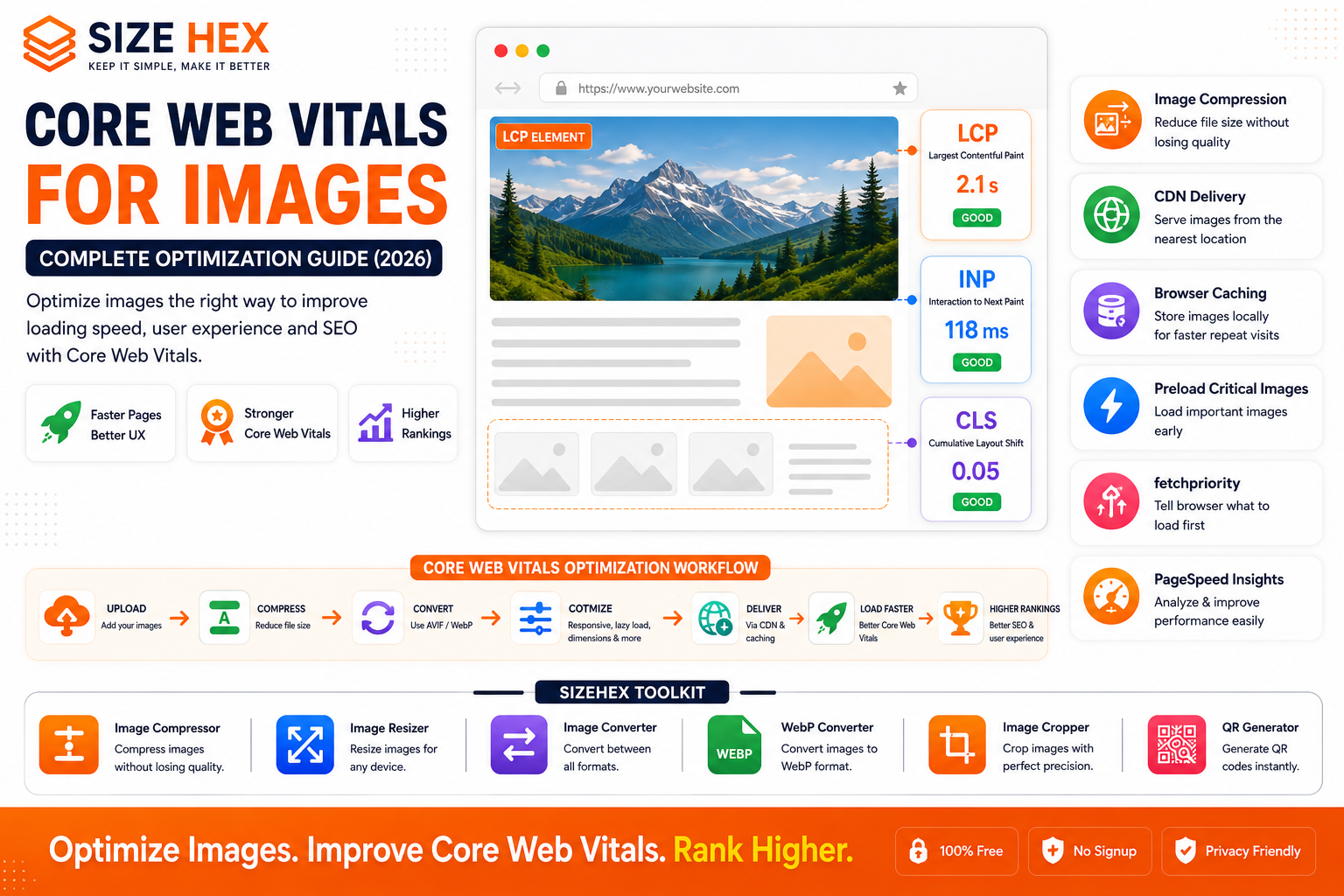
Core Web Vitals for Images: Complete Optimization Guide (2026)
Website speed has become one of the most important factors in delivering an excellent user experience. Visitors expect websites to load quickly, respond instantly, and remain visually stable while they browse. If a page feels slow or elements unexpectedly move around, users are more likely to leave before interacting with your content.
One of the biggest contributors to website performance is images. High-resolution photos, banners, product galleries, and blog illustrations enhance visual appeal, but if they are not properly optimized, they can significantly slow down your website and create a poor browsing experience.
To help website owners measure real-world user experience, Google introduced Core Web Vitals—a set of performance metrics that evaluate how quickly a page loads, how responsive it feels, and how visually stable it remains during loading.
Although Core Web Vitals evaluate the overall webpage, images have a direct impact on each of these metrics. A large hero image can delay loading, oversized image files can consume unnecessary bandwidth, and images without defined dimensions can cause unexpected layout shifts.
Optimizing images is therefore one of the most effective ways to improve website performance.
In this comprehensive guide, you'll learn what Core Web Vitals are, how images influence each metric, why these measurements matter for SEO, common misconceptions, and the best practices for optimizing images in 2026.
What Are Core Web Vitals?
Core Web Vitals are Google's standardized metrics that measure the real-world experience users have when visiting a webpage.
These metrics focus on three key aspects:
- Loading performance
- Interactivity
- Visual stability
Rather than simply measuring how fast a page technically loads, Core Web Vitals evaluate whether users actually perceive the website as fast and responsive.
Google currently focuses on three primary metrics:
- Largest Contentful Paint (LCP)
- Interaction to Next Paint (INP)
- Cumulative Layout Shift (CLS)
Together, these provide a comprehensive view of page performance.
Why Images Affect Core Web Vitals
Images are often the largest assets downloaded by a webpage.
Examples include:
- Hero banners
- Product photos
- Portfolio images
- Featured blog images
- Infographics
- Team photos
- Gallery images
If these assets are oversized or poorly optimized, they increase loading time and can negatively affect all three Core Web Vitals metrics.
Fortunately, images are also among the easiest website assets to optimize.
Using modern formats like AVIF and WebP, compressing files, resizing images appropriately, implementing responsive images, and applying lazy loading where suitable can dramatically improve website performance.
Understanding Largest Contentful Paint (LCP)
Largest Contentful Paint measures how long it takes for the largest visible content element to appear within the user's viewport.
In many cases, this element is:
- Hero image
- Featured image
- Large banner
- Main product image
Google recommends that the LCP element appear within approximately 2.5 seconds after the page begins loading for a good user experience.
If your hero image is very large or poorly optimized, LCP becomes slower.
Improving LCP often involves:
- Compressing images
- Using AVIF or WebP
- Serving responsive images
- Using fast hosting
- Delivering images through a CDN
- Avoiding lazy loading for above-the-fold hero images
Understanding Interaction to Next Paint (INP)
Interaction to Next Paint measures how quickly a webpage responds after a user interacts with it.
Examples of interactions include:
- Clicking buttons
- Opening menus
- Expanding accordions
- Selecting product filters
- Adding items to a shopping cart
While images do not directly control INP, heavy image processing can increase browser workload.
Large image downloads and excessive rendering may compete for browser resources, making interactions feel slower.
Optimized images reduce this workload and contribute to smoother page responsiveness.
Understanding Cumulative Layout Shift (CLS)
Cumulative Layout Shift measures visual stability.
Have you ever tried clicking a button only to have the page suddenly shift because an image loaded late?
That's a layout shift.
Common causes include:
- Images without width and height attributes
- Unknown image dimensions
- Advertisements loading late
- Dynamic content insertion
CLS can be minimized by reserving space for images before they load.
Always specify:
- Width
- Height
- Aspect ratio
This ensures browsers know exactly how much space each image will occupy.
How Google Measures Core Web Vitals
Google collects Core Web Vitals using real user data from millions of Chrome users through the Chrome User Experience Report (CrUX).
Website owners can also measure performance using tools such as:
- Google PageSpeed Insights
- Lighthouse
- Chrome DevTools
- Google Search Console (Core Web Vitals Report)
These tools provide recommendations for improving image performance and overall website speed.
Why Core Web Vitals Matter for SEO
Core Web Vitals are part of Google's broader Page Experience signals.
While great content remains the most important ranking factor, a fast and user-friendly website provides a better experience for visitors.
Improving image optimization can help:
- Reduce loading time
- Improve user satisfaction
- Lower bounce rates
- Enhance mobile performance
- Support better search visibility
Remember, Core Web Vitals alone will not guarantee higher rankings, but they strengthen your overall technical SEO strategy when combined with high-quality content.
Common Myths About Core Web Vitals
Let's address some common misconceptions.
Myth 1: Core Web Vitals are only about page speed.
Reality: They measure loading performance, responsiveness, and visual stability—not just speed.
Myth 2: Only developers need to care.
Reality: Bloggers, marketers, business owners, designers, and SEO professionals all benefit from understanding Core Web Vitals because they directly affect user experience.
Myth 3: Compressing images is enough.
Reality: Compression helps, but you should also use responsive images, modern formats, lazy loading (for below-the-fold content), proper dimensions, browser caching, and efficient delivery.
Myth 4: Larger images always improve quality.
Reality: Oversized images often waste bandwidth without providing noticeable visual improvements on most screens.
Myth 5: Core Web Vitals are the only SEO factor.
Reality: High-quality content, relevance, backlinks, crawlability, and many other technical and on-page SEO factors continue to play significant roles.
Real-World Examples
Example 1: E-commerce Website
An online clothing store uses 6 MB product images for every product page.
After resizing images, converting them to AVIF, and serving responsive versions, page loading becomes faster and shoppers can browse products more smoothly.
Example 2: News Website
A news publisher optimizes featured images and specifies image dimensions.
Readers experience fewer layout shifts while scrolling through articles.
Example 3: Portfolio Website
A photographer converts high-resolution galleries into responsive WebP and AVIF images while preserving visual quality.
The portfolio loads significantly faster across desktop and mobile devices.
Example 4: SaaS Website (SizeHex)
The SizeHex website helps users prepare images before publishing by providing browser-based tools for image compression, resizing, format conversion, and cropping.
When combined with responsive delivery, lazy loading, and modern formats like AVIF and WebP, these optimizations help websites achieve stronger Core Web Vitals performance.
Complete Core Web Vitals Optimization Guide
Now that you understand what Core Web Vitals are and why images play such an important role, let's explore practical techniques to improve your website's performance. Whether you're running a blog, an e-commerce store, a portfolio, or a business website, these optimization strategies will help you create a faster, more responsive, and user-friendly experience.
1. Largest Contentful Paint (LCP) Explained
Largest Contentful Paint (LCP) measures how long it takes for the largest visible element on a webpage to appear.
In most websites, the LCP element is:
- Hero image
- Featured blog image
- Product image
- Large promotional banner
Google's Recommendation
- Good: 2.5 seconds or less
- Needs Improvement: 2.5–4 seconds
- Poor: More than 4 seconds
A slow-loading hero image is one of the most common reasons for poor LCP scores.
2. Image Optimization for Better LCP
Improving your largest image has the biggest impact on LCP.
Best Practices
- Compress large images before uploading.
- Use AVIF whenever possible.
- Fall back to WebP or JPEG for compatibility.
- Resize images to match their display size.
- Deliver images through a CDN.
- Avoid unnecessary image sliders.
- Use fast hosting.
Remember: Never lazy load your LCP image. It should load immediately.
3. Interaction to Next Paint (INP) and Images
Interaction to Next Paint (INP) measures how quickly a webpage responds after a visitor interacts with it.
Images can affect INP when:
- Huge image files block browser resources.
- Heavy JavaScript image galleries delay interactions.
- Large animations overload rendering.
Improve INP by:
- Compressing images.
- Avoiding oversized image galleries.
- Loading only necessary images.
- Reducing JavaScript-heavy image effects.
- Using efficient image formats.
4. Reducing Layout Shifts (CLS)
Unexpected page movement frustrates users and harms the CLS metric.
Common Causes
- Images without dimensions
- Ads loading late
- Dynamic content insertion
- Fonts swapping unexpectedly
Fixes
Always define:
<img
  src="hero.avif"
  width="1200"
  height="630"
  alt="Website Performance">
This reserves space before the image loads, preventing layout shifts.
5. Responsive Images
Different devices require different image sizes.
Serving one large desktop image to every device wastes bandwidth.
Use responsive images so browsers choose the most appropriate file.
Benefits include:
- Faster mobile loading
- Lower bandwidth usage
- Better LCP
- Better user experience
6. AVIF & WebP Optimization
Modern image formats reduce file size without sacrificing visual quality.
Recommended Format Order
- AVIF
- WebP
- JPEG/PNG fallback
Advantages:
- Smaller downloads
- Faster rendering
- Improved performance
- Better Core Web Vitals
7. Image Compression Best Practices
Compression removes unnecessary image data while preserving appearance.
Tips
- Compress before uploading.
- Avoid multiple rounds of compression.
- Balance quality and file size.
- Choose the right format for each image type.
- Test visual quality after compression.
Even small reductions across many images can significantly improve page performance.
8. Lazy Loading Strategy
Lazy loading reduces initial page weight by delaying off-screen images.
Use Lazy Loading For
- Product grids
- Gallery images
- Related posts
- Footer images
- Blog illustrations
Do NOT Lazy Load
- Hero banners
- Logo
- Featured image
- Main product image
Only defer images users don't immediately see.
9. Browser Caching
Caching stores previously downloaded images on visitors' devices.
Benefits include:
- Faster repeat visits
- Reduced bandwidth
- Lower server load
- Improved performance
Configure appropriate cache headers for static image assets.
10. Content Delivery Networks (CDNs)
A CDN stores copies of your images on servers around the world.
When visitors access your website, images are delivered from the nearest location.
Benefits:
- Lower latency
- Faster loading
- Reduced hosting load
- Better global performance
Many CDNs also offer automatic image optimization.
11. Preloading Critical Images
Critical images that appear immediately should be prioritized.
Preloading tells browsers:
"Download this important image first."
Good candidates include:
- Hero banner
- Landing page image
- Main product photo
Avoid preloading images users won't see immediately.
12. Image Dimensions & Aspect Ratios
Always specify image dimensions.
Example:
- Width
- Height
- Aspect ratio
Benefits:
- Prevents layout shifts
- Improves CLS
- Creates smoother page rendering
Modern CSS also supports the aspect-ratio property for responsive layouts.
13. Priority Hints (fetchpriority)
Modern browsers support the fetchpriority attribute.
Example:
<img
  src="hero.avif"
  fetchpriority="high"
  alt="Hero Banner">
Use it for:
- Hero images
- Above-the-fold banners
- Main product images
Avoid assigning high priority to every image, as it defeats the purpose.
14. Common Core Web Vitals Mistakes
Avoid these common issues:
❌ Uploading oversized images
❌ Forgetting image compression
❌ Missing width and height attributes
❌ Lazy loading hero images
❌ Ignoring responsive images
❌ Using PNG for large photos unnecessarily
❌ Serving desktop images to mobile users
❌ Not testing PageSpeed Insights
❌ Ignoring browser caching
❌ Never monitoring Search Console
15. Measuring Performance with PageSpeed Insights
Google PageSpeed Insights analyzes both lab and real-world performance.
It reports:
- LCP
- INP
- CLS
- Opportunities
- Diagnostics
Use the suggestions to identify image-related improvements.
16. Lighthouse Audits
Lighthouse provides an in-depth technical audit.
It highlights issues such as:
- Oversized images
- Missing modern formats
- Inefficient caching
- Slow rendering
- Accessibility concerns
Regular Lighthouse audits help maintain a healthy website.
17. Chrome DevTools Analysis
Chrome DevTools lets developers inspect:
- Network requests
- Image loading times
- Rendering performance
- Resource sizes
- Performance timeline
Use it to verify that image optimizations are working as expected.
18. Mobile Performance Optimization
Most visitors now browse on mobile devices.
Optimize for mobile by:
- Using responsive images
- Compressing files
- Serving AVIF/WebP
- Avoiding oversized hero banners
- Testing on real devices
Mobile-first optimization often leads to better overall performance.
19. Advanced Performance Strategies
For maximum performance, combine multiple optimization techniques.
Recommended workflow:
- Compress images
- Convert to AVIF/WebP
- Generate responsive image sizes
- Preload critical images
- Lazy load below-the-fold images
- Enable browser caching
- Use a CDN
- Monitor Core Web Vitals regularly
No single technique is enough on its own—the best results come from combining them.
20. Complete Core Web Vitals Optimization Checklist
| Task | Status |
|---|---|
| Hero Image Optimized | ✅ |
| AVIF/WebP Used | ✅ |
| Images Compressed | ✅ |
| Responsive Images Enabled | ✅ |
| Width & Height Defined | ✅ |
| Lazy Loading Configured | ✅ |
| Critical Images Preloaded | ✅ |
fetchpriority Applied | ✅ |
| Browser Caching Enabled | ✅ |
| CDN Configured | ✅ |
| PageSpeed Insights Tested | ✅ |
| Lighthouse Audit Completed | ✅ |
| Search Console Reviewed | ✅ |
| Mobile Performance Verified | ✅ |
Pro Tips
- Optimize your Largest Contentful Paint (LCP) image first—it often delivers the biggest performance improvement.
- Use AVIF for maximum compression and WebP as a fallback where appropriate.
- Combine responsive images, lazy loading, and browser caching for a balanced optimization strategy.
-
Assign
fetchpriority="high"only to critical above-the-fold images. - Monitor PageSpeed Insights, Lighthouse, and Google Search Console regularly, especially after redesigns or adding new content.
- Test your site on real mobile devices as well as desktop to ensure images load quickly and layouts remain stable.
Advanced Core Web Vitals Strategies, FAQs & Publishing Checklist
You've now learned what Core Web Vitals are, how images influence Google's performance metrics, and the practical techniques to optimize them. In this final section, we'll explore advanced optimization strategies, common mistakes, frequently asked questions, and a comprehensive publishing checklist to help you consistently achieve excellent website performance.
Remember, improving Core Web Vitals isn't about applying a single technique—it's about combining multiple best practices, including image compression, responsive images, modern image formats, lazy loading, browser caching, and efficient delivery.
Before Publishing Checklist
Before publishing any webpage, ensure the following items are complete.
Image Optimization
✅ Images compressed
✅ Correct dimensions used
✅ AVIF/WebP generated
✅ Responsive image versions created
Performance
✅ Hero image preloaded
✅ Hero image not lazy loaded
✅ Below-the-fold images lazy loaded
✅ Browser caching enabled
SEO
✅ Descriptive filenames
Example:
core-web-vitals-images-guide.avif✅ Alt text added
✅ Captions included where appropriate
Technical SEO
✅ HTTPS enabled
✅ Images crawlable
✅ XML Image Sitemap updated
✅ No broken image URLs
Testing
✅ Google PageSpeed Insights checked
✅ Lighthouse audit completed
✅ Chrome DevTools tested
✅ Google Search Console reviewed
✅ Mobile devices tested
Advanced Core Web Vitals Strategies
1. Optimize the Largest Contentful Paint (LCP) Image First
The LCP image usually has the biggest impact on performance.
Prioritize:
- Hero banners
- Featured images
- Product hero photos
- Landing page banners
Always:
- Compress
- Resize
- Convert to AVIF/WebP
- Preload when appropriate
- Avoid lazy loading
2. Use Multiple Image Sizes
Don't serve one huge image to every device.
Generate multiple versions:
- Mobile
- Tablet
- Laptop
- Desktop
- Retina displays
Responsive images reduce unnecessary downloads and improve loading times.
3. Combine Multiple Optimization Techniques
Instead of relying on a single optimization, combine:
- Image compression
- Responsive images
- AVIF/WebP
- Lazy loading
- Browser caching
- CDN
- Preloading
- Priority hints
These techniques complement one another for maximum performance.
4. Monitor Real User Experience
Synthetic testing is useful, but real-user data provides the most accurate picture.
Monitor:
- Chrome User Experience Report (CrUX)
- Google Search Console
- PageSpeed Insights
- Analytics
Review trends after publishing new content or redesigning pages.
5. Optimize Third-Party Content
Images inside:
- Embedded widgets
- Social media feeds
- Reviews
- Advertisements
can also impact performance.
Whenever possible:
- Delay loading non-essential widgets.
- Optimize embedded media.
- Limit unnecessary third-party scripts.
6. Keep Image Libraries Organized
As your website grows:
- Remove unused images.
- Replace outdated assets.
- Compress older uploads.
- Convert legacy JPEGs to AVIF/WebP.
- Audit image quality regularly.
A clean image library improves both performance and maintainability.
7. Continuously Test Performance
Website optimization is an ongoing process.
After every major update:
- Run PageSpeed Insights.
- Review Lighthouse reports.
- Test on real mobile devices.
- Check Core Web Vitals in Search Console.
- Compare performance before and after changes.
Common Core Web Vitals Mistakes
Avoid these common issues.
❌ Uploading 5–10 MB hero images
❌ Missing width & height attributes
❌ No responsive images
❌ Using only PNG for large photographs
❌ Lazy loading the hero image
❌ Ignoring browser caching
❌ Not using a CDN
❌ Never checking Search Console
❌ Skipping PageSpeed Insights
❌ Optimizing only desktop performance
Frequently Asked Questions (FAQ)
1. What are Core Web Vitals?
Core Web Vitals are Google's user experience metrics that measure loading performance (LCP), responsiveness (INP), and visual stability (CLS).
2. Do Core Web Vitals affect SEO?
Yes. They are part of Google's Page Experience signals and contribute to overall technical SEO, though high-quality, relevant content remains the most important ranking factor.
3. Which Core Web Vital is most affected by images?
Largest Contentful Paint (LCP), because the largest visible element is often an image.
4. What is a good LCP score?
Google recommends an LCP of 2.5 seconds or less for a good user experience.
5. Can images affect INP?
Yes. Heavy image processing, large galleries, and image-related JavaScript can increase browser workload and reduce responsiveness.
6. What causes CLS?
Images without predefined dimensions, late-loading advertisements, dynamic content insertion, and unexpected layout changes are common causes.
7. Should I lazy load all images?
No. Only below-the-fold images should typically be lazy loaded. Hero images and other critical above-the-fold content should load eagerly.
8. Which image format is best for performance?
AVIF generally offers the best compression, followed by WebP, with JPEG or PNG used as fallbacks where necessary.
9. Does compression reduce image quality?
Modern compression tools can significantly reduce file size while maintaining excellent visual quality when configured properly.
10. Should I preload hero images?
Yes. Critical above-the-fold images often benefit from preloading to improve LCP.
11. What is
fetchpriority?The
fetchpriorityattribute tells the browser which resources should receive higher download priority. It's useful for critical images like hero banners.
12. Do responsive images improve Core Web Vitals?
Yes. They ensure browsers download only the image size appropriate for the user's device, reducing bandwidth usage and improving loading performance.
13. Which tools measure Core Web Vitals?
Popular tools include:
- Google PageSpeed Insights
- Lighthouse
- Chrome DevTools
- Google Search Console
- Chrome User Experience Report (CrUX)
14. Can a CDN improve Core Web Vitals?
Yes. A CDN delivers images from servers closer to users, reducing latency and improving loading speed.
15. How often should I monitor Core Web Vitals?
Review your metrics regularly—especially after redesigns, adding new content, changing hosting, or updating image optimization workflows.
Conclusion
Core Web Vitals help measure the real-world experience your visitors have when interacting with your website. Images are often the largest assets on a page, making them one of the most important areas to optimize.
By compressing images, using responsive image techniques, adopting modern formats like AVIF and WebP, defining image dimensions, preloading critical assets, implementing lazy loading correctly, and leveraging browser caching and CDNs, you can significantly improve loading performance and create a faster, more enjoyable browsing experience.
Remember that Core Web Vitals are just one part of technical SEO. Combining strong performance with high-quality content, accessible design, and a well-structured website creates the best foundation for long-term success.
Why Choose SizeHex?
SizeHex is built to simplify image optimization with fast, browser-based tools that help you prepare images for modern websites.
Key Features
- Compress images without noticeable quality loss
- Resize images for desktop, tablet, and mobile
- Convert between AVIF, WebP, JPG, PNG, GIF, BMP, and TIFF
- Crop images with precision
- Browser-based processing
- No software installation required
- Privacy-friendly workflow
Whether you're a blogger, developer, designer, marketer, photographer, or business owner, SizeHex helps you optimize images for better performance, user experience, and SEO.
Related Tools
Image Compressor
Compress images while preserving visual quality.
Image Resizer
https://www.sizehex.com/image-resizer.html
Resize images for every screen size.
Image Converter
https://www.sizehex.com/image-converter.html
Convert images to modern formats like AVIF and WebP.
WebP Converter
https://www.sizehex.com/webp-converter.html
Create lightweight WebP images for faster websites.
Image Cropper
https://www.sizehex.com/image-crop.html
Crop images accurately for blogs, websites, and social media.
QR Generator
https://www.sizehex.com/qr-generator.html
Generate QR codes instantly for websites and marketing campaigns.