July 29, 2026
How to Optimize Images for Google Discover (2026 Guide)
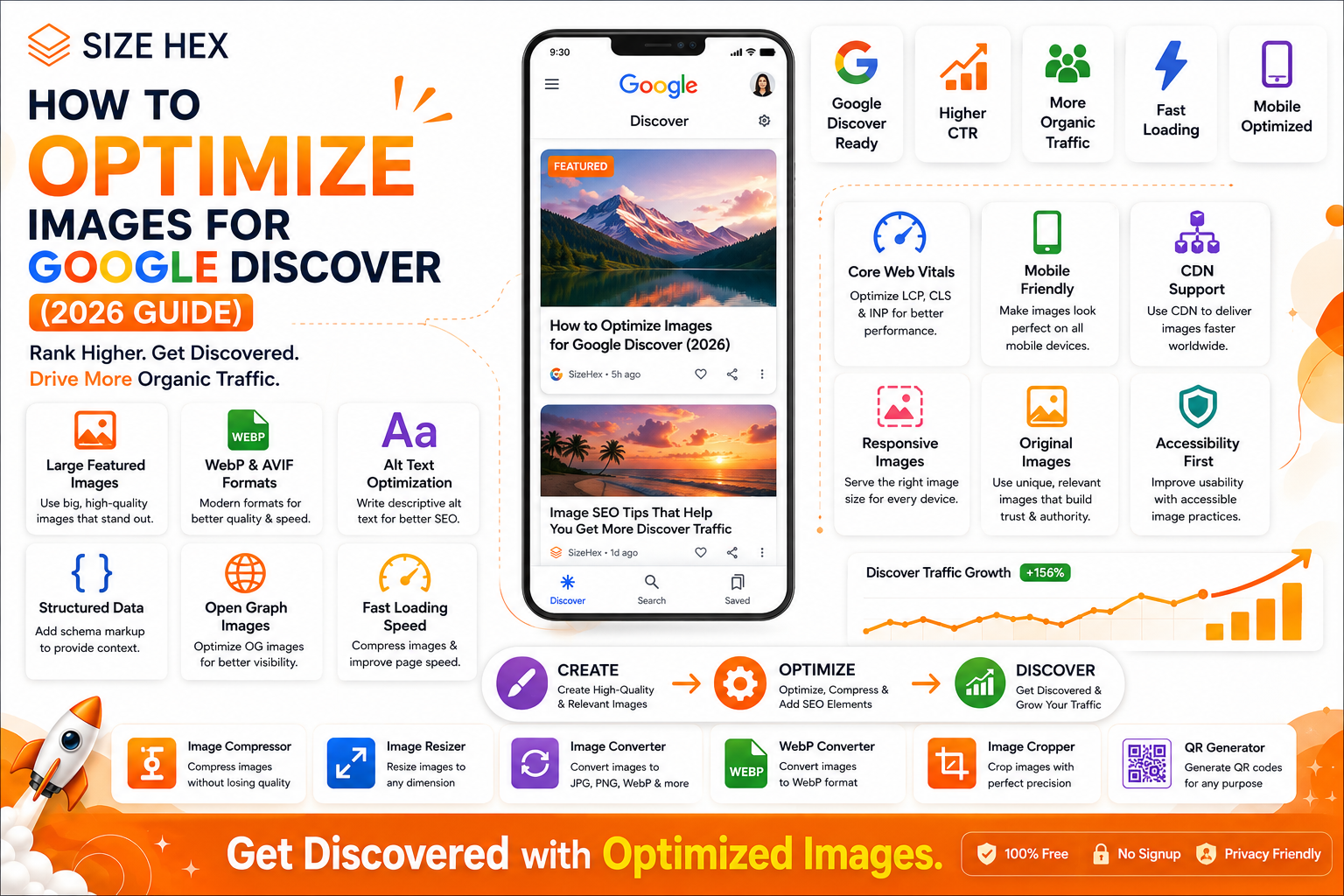
How to Optimize Images for Google Discover (2026)
Google Discover has become one of the most powerful traffic sources for publishers, bloggers, businesses, and content creators. Unlike traditional Google Search, where users actively search for information, Google Discover recommends personalized content based on a user's interests, browsing history, and engagement patterns.
A single article featured in Google Discover can attract thousands—or even millions—of visitors within a short period. However, appearing in Discover isn't just about writing great content. Images play a major role in determining whether users notice and click your article.
Large, high-quality, visually appealing images help articles stand out in the Discover feed. On the other hand, blurry, low-resolution, or poorly optimized images reduce the chances of getting featured.
Many websites focus only on text optimization while ignoring image optimization. They upload oversized files, use generic filenames, skip alt text, or choose unsuitable image formats. These mistakes can negatively affect page speed, user experience, and Discover eligibility.
In this guide, you'll learn how Google Discover uses images, why image optimization matters, and the essential practices that can improve your chances of appearing in Discover in 2026.
What Is Google Discover?
Google Discover is a personalized content recommendation feed available on Android devices, the Google app, and the Chrome mobile browser.
Instead of requiring users to search for information, Discover proactively shows articles, videos, and other content based on their interests.
The feed is powered by Google's understanding of:
- Search history
- Browsing activity
- Followed topics
- Device usage
- Content engagement
- Location signals (where appropriate)
This means your content can reach users even if they never search for your target keyword.
How Google Discover Works
Google Discover continuously analyzes user interests and recommends content that is likely to be useful or engaging.
When selecting articles, Google evaluates many signals, including:
- Content quality
- Originality
- E-E-A-T (Experience, Expertise, Authoritativeness, Trustworthiness)
- Freshness
- User engagement
- Mobile usability
- Page speed
- Image quality
Images are one of the first things users notice in the Discover feed. Strong visuals can increase the likelihood that users will stop scrolling and open your article.
Why Images Matter in Google Discover
Unlike standard search results, Discover is highly visual.
Every article competes for attention in a feed filled with attractive images.
A compelling featured image can:
- Increase visibility
- Improve click-through rate (CTR)
- Encourage user engagement
- Build trust
- Strengthen brand recognition
Poor-quality images often receive less attention, even if the article itself contains valuable information.
Benefits of Optimizing Images for Google Discover
Proper image optimization provides several advantages.
Higher Click-Through Rates
People naturally notice images before reading headlines.
An eye-catching featured image can significantly improve CTR.
Better User Experience
Optimized images load faster and display correctly across different devices.
Visitors enjoy a smoother browsing experience.
Improved Mobile Performance
Since Discover primarily appears on mobile devices, mobile-friendly images are essential.
Optimized images help pages load quickly even on slower connections.
Better Page Speed
Large image files slow websites down.
Compressing and resizing images improves loading speed while maintaining visual quality.
Increased Organic Traffic
Articles featured in Discover can generate substantial traffic without users performing a traditional search.
For many publishers, Discover becomes one of their largest traffic sources.
Google Discover vs Google Search
Although both are powered by Google, they serve users differently.
| Google Search | Google Discover |
|---|---|
| User enters a query | Google recommends content |
| Keyword-focused | Interest-focused |
| Intent-driven | Personalized recommendations |
| Results depend on search terms | Results depend on user interests |
| Users search first | Content appears automatically |
Because Discover focuses on recommendations, visual quality becomes even more important.
How Google Selects Images for Discover
Google evaluates multiple signals when deciding which image to display.
1. Image Quality
High-resolution images perform better than blurry or pixelated visuals.
Choose images that are:
- Sharp
- Well-lit
- Professionally designed
- Relevant to the topic
2. Image Size
Google recommends using large images that look attractive across different devices.
Small thumbnails are less likely to stand out in the Discover feed.
3. Relevance
Images should directly support the article's topic.
For example:
If the article discusses Image Compression, the featured image should illustrate compression concepts rather than unrelated stock photography.
4. Originality
Unique images help differentiate your content from similar articles.
Original:
- Infographics
- Screenshots
- Charts
- Custom illustrations
often perform better than generic stock images.
5. Page Context
Google analyzes surrounding text, headings, and metadata to understand how the image relates to the page.
The closer the relationship between the image and the article topic, the stronger the relevance signals.
Common Image Optimization Mistakes
Many websites accidentally reduce their chances of appearing in Discover.
Avoid these common mistakes.
Using Small Featured Images
Tiny featured images often appear less attractive in mobile feeds.
Use large, high-quality visuals instead.
Uploading Uncompressed Images
Large files slow page loading.
Always resize and compress images before uploading.
Generic File Names
Avoid:
IMG_12345.jpg
Instead use:
google-discover-image-optimization-guide.webp
Descriptive filenames provide useful context.
Missing Alt Text
Alt text helps search engines understand your images while improving accessibility.
Every informative image should include meaningful alt text.
Using the Wrong Image Format
Different image types require different formats.
For example:
- JPG for photographs
- PNG for graphics
- WebP for modern websites
- AVIF for advanced optimization
- SVG for logos
Choosing the right format improves both quality and performance.
Ignoring Mobile Users
Because Discover is primarily mobile-focused, images must display correctly on smartphones and tablets.
Test your pages on multiple screen sizes.
Google Discover Image Requirements
Although there isn't a guaranteed formula for appearing in Discover, following these best practices improves your chances.
High Resolution
Use clear, high-quality images.
Large Featured Image
Prominent featured images attract more attention in the Discover feed.
Fast Loading
Optimize images to reduce loading time without sacrificing quality.
Mobile Friendly
Ensure images scale properly across different devices.
Relevant Content
Images should accurately represent the article topic.
Avoid misleading or unrelated visuals.
Original Graphics
Whenever possible, create your own graphics rather than relying exclusively on stock photos.
Image Optimization Workflow for Google Discover
Following a consistent workflow helps ensure every image is Discover-ready.
Create High-Quality Image
        ↓
Crop to Proper Composition
        ↓
Resize for Featured Image
        ↓
Choose Best Format
(JPG / WebP / AVIF)
        ↓
Compress Image
        ↓
Use SEO-Friendly File Name
        ↓
Write Descriptive Alt Text
        ↓
Upload to Website
        ↓
Optimize Mobile Experience
        ↓
Test Page Speed
        ↓
Publish Article
Key Takeaways
- Google Discover is a personalized content recommendation platform where visual appeal is essential.
- High-quality, relevant, and original images improve the chances of attracting user attention.
- Optimized images contribute to faster loading times, better mobile performance, and a stronger user experience.
- Avoid common mistakes such as small featured images, oversized files, generic filenames, and missing alt text.
- A consistent image optimization workflow can improve your content's readiness for Google Discover.
Complete Google Discover Image Optimization Guide
Now that you understand how Google Discover works, it's time to optimize your images using proven best practices.
Unlike traditional SEO, Google Discover places significant emphasis on visual quality. Your featured image is often the first thing users notice before they even read the headline.
Follow this complete optimization checklist to improve your chances of appearing in Google Discover.
1. Use Large Featured Images
One of the biggest factors for Discover visibility is using a large, high-quality featured image.
Large images:
- Attract more attention
- Increase click-through rate (CTR)
- Improve the appearance of your article
- Create a premium reading experience
Small thumbnails rarely stand out in the Discover feed.
2. Use High Resolution Images
Always upload crisp, high-resolution images.
Avoid:
- Blurry photos
- Pixelated graphics
- Low-quality screenshots
- Compressed stock photos
Instead, use professional-quality visuals.
Good quality builds trust.
3. Choose the Right Image Format
Different image types require different formats.
Image Type Best Format Photographs JPG Graphics PNG Website Images WebP Modern Websites AVIF Logos SVG Modern formats like WebP help reduce file size without noticeably reducing quality.
4. Compress Images
Large files slow page loading.
Before uploading:
- Compress images
- Maintain visual quality
- Reduce unnecessary metadata
Benefits include:
- Faster loading
- Better mobile experience
- Improved Core Web Vitals
5. Resize Images Properly
Don't upload images that are much larger than necessary.
Example:
Original
4500 × 3000 px
↓
Resize
1600 × 900 px
↓
Compress
↓
Upload
Proper sizing improves loading speed.
6. Write Descriptive Alt Text
Alt text helps search engines understand images.
Good Example
Infographic explaining Google Discover image optimization techniques.
Poor Example
image1
Keep alt text:
- Natural
- Descriptive
- Helpful
Avoid stuffing keywords.
7. Use SEO-Friendly File Names
Instead of:
IMG_8452.jpgUse:
google-discover-image-optimization-guide.webpBest practices:
- Lowercase letters
- Hyphens
- Relevant keywords
- Descriptive names
8. Add Structured Data
Structured data helps Google better understand your content.
Useful schema includes:
- Article
- ImageObject
- Organization
- Breadcrumb
- FAQ
Although schema doesn't guarantee Discover inclusion, it provides valuable context.
9. Optimize Open Graph Images
When your article is shared on:
- X (Twitter)
the Open Graph image becomes the preview.
Recommended size:
1200 × 630 px
Make sure it's:
- High quality
- Branded
- Readable
10. Improve Page Speed
Google Discover strongly favors pages that load quickly.
Focus on:
- Image compression
- Browser caching
- CDN
- Modern image formats
- Efficient CSS and JavaScript
11. Optimize Core Web Vitals
Images directly influence Google's page experience metrics.
Improve:
Largest Contentful Paint (LCP)
Reduce image size.
Cumulative Layout Shift (CLS)
Always specify image dimensions.
Interaction to Next Paint (INP)
Avoid heavy JavaScript that delays rendering.
12. Make Images Mobile Friendly
Most Discover users browse on smartphones.
Your images should:
- Scale correctly
- Maintain aspect ratio
- Display clearly on smaller screens
Test on multiple devices before publishing.
13. Use Original Images
Original graphics perform better than generic stock images.
Examples:
- Infographics
- Charts
- Tutorials
- Product screenshots
- Comparison graphics
Unique visuals strengthen your content.
14. Build Consistent Branding
Your featured images should maintain a recognizable visual identity.
For example:
- Consistent colors
- Similar typography
- Brand logo
- Uniform layout
This helps users recognize your content instantly.
15. Use a CDN
A Content Delivery Network serves images from servers closer to users.
Benefits:
- Faster loading worldwide
- Better reliability
- Reduced server load
This is especially valuable for websites with international audiences.
16. Use Responsive Images
Different devices require different image sizes.
Responsive images allow browsers to download the most suitable version.
Benefits:
- Faster mobile loading
- Better performance
- Reduced bandwidth usage
17. Enable Lazy Loading Carefully
Lazy loading improves initial page speed by loading images only when needed.
However, avoid lazy-loading the main featured image or above-the-fold hero image, since that image is important for both users and performance metrics like LCP.
18. Improve Accessibility
Accessible images help all users.
Checklist:
✔ Descriptive alt text
✔ Readable text inside graphics
✔ Good color contrast
✔ Decorative images marked appropriately
Accessibility also supports better SEO.
19. Publish Fresh Content Regularly
Google Discover often surfaces recent, relevant content.
Keep your website active by:
- Publishing consistently
- Updating older articles
- Refreshing images
- Replacing outdated screenshots
Freshness increases the likelihood of repeat visibility.
20. Strengthen E-E-A-T Signals
Google Discover favors trustworthy content.
Improve your content by:
- Showing real expertise
- Citing reliable sources when appropriate
- Maintaining accurate information
- Creating original graphics
- Providing genuine value to readers
Complete Google Discover Optimization Checklist
Task Status Large Featured Image ✅ High Resolution ✅ Correct Format ✅ Image Compression ✅ Proper Resize ✅ Alt Text ✅ SEO File Name ✅ Structured Data ✅ Open Graph Image ✅ Fast Page Speed ✅ Core Web Vitals ✅ Mobile Friendly ✅ Original Images ✅ Consistent Branding ✅ CDN Enabled ✅ Responsive Images ✅ Lazy Loading (below the fold) ✅ Accessibility ✅ Fresh Content ✅ Strong E-E-A-T ✅
Pro Tips
- Use a visually striking featured image that accurately reflects the article.
- Compress and resize every image before uploading.
- Prefer WebP for website images when your workflow supports it.
- Keep your branding consistent across all featured images.
- Test page speed after publishing to ensure images aren't slowing down the page.
- Combine image optimization with high-quality content and a good mobile experience for the best chance of earning Google Discover traffic.
Advanced Google Discover Image Optimization, FAQs & Publishing Checklist
You've learned how Google Discover works and how to optimize your images using proven SEO techniques. In this final section, we'll cover advanced strategies, common mistakes, and a practical checklist you can follow before publishing every article.
By consistently applying these practices, you can improve your chances of appearing in Google Discover while also enhancing user experience, page performance, and overall SEO.
Before Publishing Checklist
Use this checklist before publishing every article.
Featured Image
✅ High-resolution image
✅ Original design
✅ Relevant to the article
✅ Eye-catching composition
Image Optimization
✅ Correct dimensions
✅ Compressed
✅ Proper image format
- JPG
- PNG
- WebP
- AVIF
SEO
✅ SEO-friendly filename
Example:
google-discover-image-optimization-guide.webp✅ Descriptive Alt Text
✅ Helpful caption (if appropriate)
Technical SEO
✅ Open Graph image added
✅ Structured Data implemented
✅ Width and height specified
✅ Responsive image
Performance
✅ CDN enabled
✅ Browser caching enabled
✅ PageSpeed tested
✅ Core Web Vitals passed
Mobile
✅ Looks great on phones
✅ Fast loading
✅ Readable text
Advanced Google Discover Tips
1. Design Featured Images for Humans
Google Discover is highly visual.
Your image should make users stop scrolling.
Good images have:
- Clear focal point
- Strong contrast
- Simple composition
- Easy-to-read typography
Avoid overcrowded graphics.
2. Use Consistent Branding
Every featured image should be instantly recognizable.
For SizeHex:
- White background
- Orange accent (#ff6b00)
- Official SIZE HEX logo
- Premium SaaS design
- Glassmorphism cards
- Clean typography
Consistent branding builds trust and recognition.
3. Publish Original Visuals
Instead of generic stock photos, create:
- Infographics
- Comparison tables
- Step-by-step illustrations
- Workflow diagrams
- Custom UI mockups
Original visuals help differentiate your content.
4. Improve Click-Through Rate (CTR)
Even if your article appears in Discover, users still need a reason to click.
Combine:
- Attractive headline
- High-quality featured image
- Clear value proposition
Example:
Image SEO Checklist (2026)
25 Proven Tips to Rank Higher in Google Images
5. Refresh Older Articles
Don't focus only on new content.
Update older articles by:
- Replacing featured images
- Compressing old images
- Converting JPG → WebP
- Improving alt text
- Updating screenshots
Fresh content often performs better over time.
6. Build Topical Authority
Google Discover tends to favor websites that consistently publish useful content within a specific niche.
For SizeHex, continue building content around:
- Image SEO
- Image Compression
- WebP
- AVIF
- Image Formats
- Core Web Vitals
- Google Images
- Social Media Images
Publishing related content strengthens your site's authority.
7. Monitor Performance
Track your Discover performance regularly using Google Search Console.
Review:
- Clicks
- Impressions
- CTR
- Top-performing pages
Use these insights to refine future content and images.
Common Google Discover Mistakes
Avoid these common mistakes.
❌ Small featured images
❌ Generic stock photos
❌ Blurry graphics
❌ Oversized image files
❌ Missing alt text
❌ Poor mobile experience
❌ Slow-loading pages
❌ Keyword-stuffed filenames
❌ Duplicate featured images
❌ Inconsistent branding
Frequently Asked Questions (FAQ)
1. What is Google Discover?
Google Discover is a personalized content feed that recommends articles, videos, and other content based on a user's interests rather than search queries.
2. Does Google Discover require SEO?
Yes. While Discover isn't keyword-driven in the same way as Search, strong SEO, helpful content, and excellent user experience improve your chances of being featured.
3. Do images affect Discover rankings?
Images don't guarantee inclusion, but high-quality, relevant visuals can improve engagement and click-through rates, making your content more competitive.
4. Which image format is best for Discover?
WebP is often a great choice for websites because it balances quality and file size. JPG remains suitable for many photographs, while PNG works well for graphics.
5. Should I use WebP?
Yes. WebP typically reduces file size while maintaining excellent visual quality.
6. Does image size matter?
Yes. Large, high-quality featured images generally provide a better visual experience than small thumbnails.
7. Is alt text important?
Yes. Alt text improves accessibility and helps search engines understand image content.
8. Should every article have a featured image?
Yes. A relevant, high-quality featured image improves presentation and can encourage more clicks.
9. Does page speed matter?
Absolutely. Faster pages provide a better user experience and support overall SEO performance.
10. Is mobile optimization important?
Yes. Google Discover is primarily experienced on mobile devices, so mobile-friendly pages are essential.
11. Can old articles appear in Google Discover?
Yes. Older content can still appear if it remains relevant, useful, and engaging.
12. Does structured data help?
Structured data gives search engines additional context about your content and can support better understanding.
13. How often should I update images?
Review important articles periodically and refresh images when they become outdated or can be improved.
14. Can duplicate featured images hurt branding?
Using unique featured images makes your articles easier to distinguish and strengthens brand consistency.
15. Can Google Discover bring significant traffic?
Yes. Many publishers receive substantial traffic from Discover when they consistently publish high-quality content with compelling visuals.
Conclusion
Google Discover rewards content that is useful, visually appealing, mobile-friendly, and trustworthy.
Optimizing your images isn't just about reducing file size—it's about creating visuals that attract attention, load quickly, and accurately represent your content. Combined with strong page experience, original graphics, and consistent branding, optimized images can improve engagement and increase your chances of reaching more readers through Discover.
Focus on quality over quantity, keep your content fresh, and make image optimization part of your publishing workflow.
Why Choose SizeHex?
SizeHex provides everything you need to prepare images for websites, blogs, and Google Discover.
Features
- Compress images without noticeable quality loss
- Resize images for websites and social media
- Convert between JPG, PNG, WebP, AVIF, GIF, BMP, and TIFF
- Crop images with precision
- Browser-based tools with no installation required
- Fast, privacy-friendly, and free to use
Whether you're a blogger, marketer, developer, or business owner, SizeHex helps simplify image optimization for modern websites.
Related Tools
Image Compressor
Reduce image file size while preserving quality.
Image Resizer
https://www.sizehex.com/image-resizer.html
Resize images for websites, blogs, and social media.
Image Converter
https://www.sizehex.com/image-converter.html
Convert images between popular formats in seconds.
WebP Converter
https://www.sizehex.com/webp-converter.html
Create efficient WebP images for faster websites.
Image Cropper
https://www.sizehex.com/image-crop.html
Crop images to the perfect dimensions for any platform.
QR Generator
https://www.sizehex.com/qr-generator.html
Generate QR codes for websites, business cards, and more.