July 29, 2026
How to Write SEO-Friendly Alt Text for Images (Complete Guide – 2026
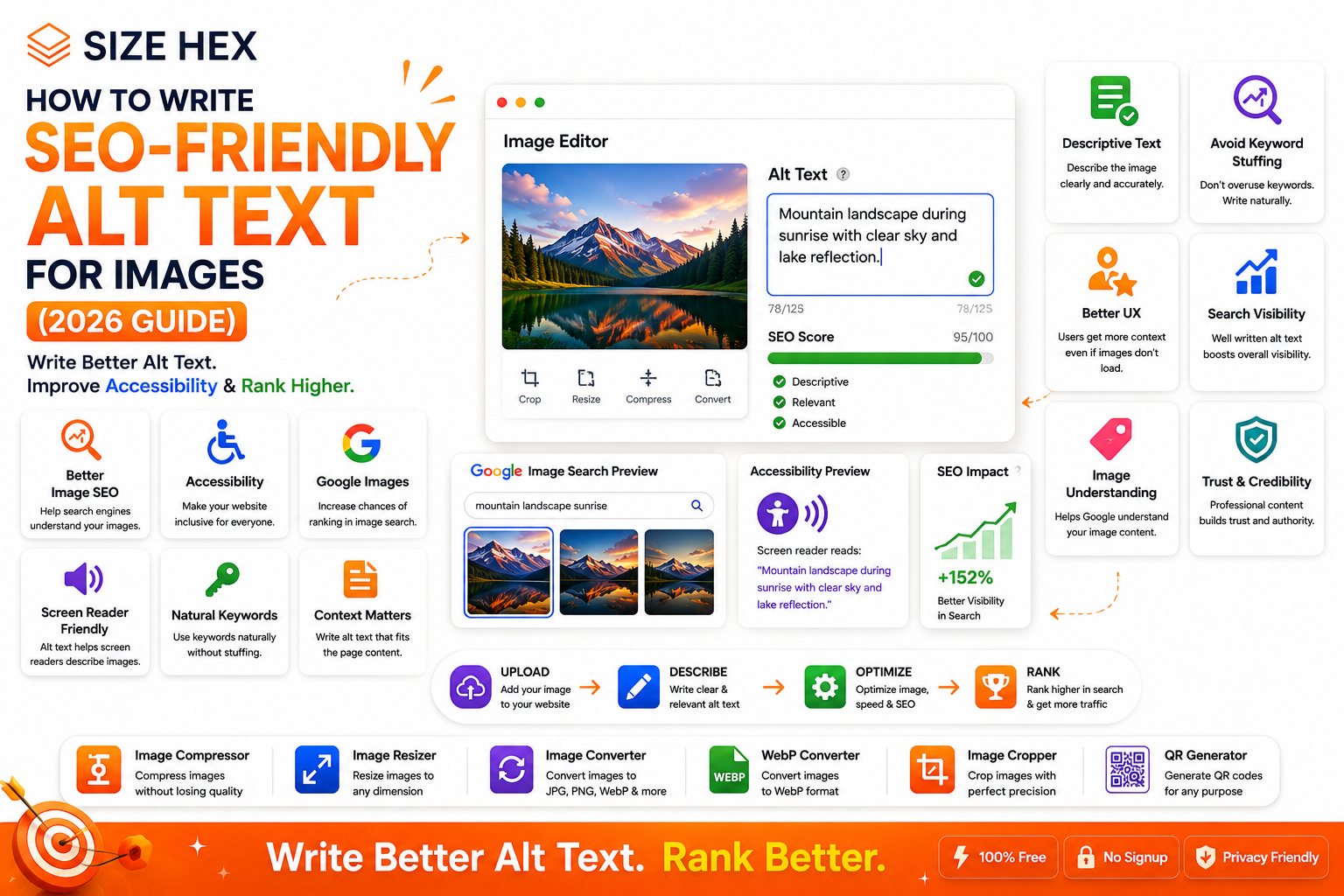
How to Write SEO-Friendly Alt Text for Images
Images make websites more engaging, easier to understand, and visually appealing. However, search engines cannot "see" images the way humans do. Instead, they rely on text-based signals to understand what an image represents. One of the most important of these signals is alt text.
Alt text, short for alternative text, is a brief description added to an image's HTML. It helps screen readers describe images to people with visual impairments and gives search engines valuable context about the image.
Many website owners either leave the alt text field blank or fill it with unnecessary keywords. Both approaches can reduce the effectiveness of image optimization. Well-written alt text should accurately describe the image while fitting naturally into the page's context.
Whether you're a blogger, business owner, developer, e-commerce seller, or digital marketer, learning how to write effective alt text can improve accessibility, enhance user experience, and support your overall SEO strategy.
In this guide, you'll learn what alt text is, why it matters, how search engines use it, and the best practices for writing SEO-friendly alt text in 2026.
What Is Alt Text?
Alt text (alternative text or alt attribute) is a written description of an image that appears in the image's HTML code.
Example:
<img src="image-compressor-tool.webp" alt="Online image compressor tool interface for reducing image size without losing quality">
Its primary purpose is to describe an image for users who cannot see it and to help search engines understand what the image contains.
Why Alt Text Matters
Alt text is much more than an SEO feature.
It serves three important purposes:
- Improves website accessibility
- Helps search engines understand images
- Provides context if an image fails to load
Good alt text benefits both users and search engines.
How Search Engines Understand Images
Unlike humans, search engines cannot interpret images by simply looking at them. They analyze multiple signals to determine what an image represents.
These signals include:
- Alt text
- Image filename
- Surrounding page content
- Captions
- Structured data
- Page title
- Headings
- Internal links
The more relevant context you provide, the better search engines can understand your images.
Why Accessibility Is Important
Accessibility ensures that websites are usable for everyone, including people who rely on screen readers.
When a screen reader encounters an image, it reads the alt text aloud.
For example:
Image: A person using an online image compressor.
Good alt text:
Person compressing an image using an online image optimization tool.
Poor alt text:
Image123
The first description helps users understand the image, while the second provides no useful information.
SEO Benefits of Alt Text
Writing descriptive alt text can support your overall image SEO strategy.
Benefits include:
- Better image understanding by search engines
- Increased chances of appearing in Google Images
- Improved accessibility
- Better user experience
- Stronger topical relevance
- Additional context for page content
Remember, alt text alone won't guarantee higher rankings, but it works together with other optimization practices to improve image SEO.
Alt Text and Google Image Search
Google uses several signals to understand images, and alt text is one of them.
When combined with:
- Relevant page content
- High-quality images
- Descriptive filenames
- Proper image formats
- Good page experience
alt text helps search engines better understand and index your images.
If your images are optimized correctly, they may become eligible to appear in Google Images and other image-rich search features.
Alt Text vs Image Title
Many beginners confuse alt text with the image title attribute.
| Alt Text | Image Title |
|---|---|
| Describes the image | Provides additional information |
| Used by screen readers | Usually shown as a tooltip in some browsers |
| Important for accessibility | Less important for SEO |
| Helps search engines understand images | Primarily enhances user experience in specific situations |
For most websites, writing good alt text is far more important than using the image title attribute.
Good vs Bad Alt Text Examples
Example 1
Image: A laptop displaying an image compression tool.
❌ Bad Alt Text
laptop
✅ Good Alt Text
Laptop displaying an online image compression tool for reducing file size.
Example 2
Image: A woman editing photos on a desktop computer.
❌ Bad Alt Text
woman computer image SEO website digital marketing online
✅ Good Alt Text
Woman editing website images for SEO on a desktop computer.
Example 3
Image: A SizeHex Image Resizer interface.
❌ Bad Alt Text
image resizer image resizer online image resizer best image resizer free image resizer
✅ Good Alt Text
SizeHex Image Resizer interface for resizing images without losing quality.
Common Myths About Alt Text
There are many misconceptions about alt text. Let's clear up some of the most common ones.
Myth 1: Alt text is only for SEO.
Reality: Its primary purpose is accessibility. SEO is an added benefit.
Myth 2: Every alt text should include keywords.
Reality: Keywords should only be used when they naturally describe the image.
Myth 3: Longer alt text is always better.
Reality: Keep descriptions concise while providing enough context.
Myth 4: Decorative images need detailed alt text.
Reality: Purely decorative images typically don't require descriptive alt text.
Myth 5: AI-generated alt text is always accurate.
Reality: AI can help generate descriptions, but every alt text should be reviewed to ensure it accurately represents the image and fits the page context.
Common Alt Text Mistakes
Avoid these common errors.
❌ Leaving the alt text blank for informative images
❌ Keyword stuffing
❌ Writing overly long descriptions
❌ Using vague terms like "image" or "photo"
❌ Copying the same alt text across multiple unrelated images
❌ Ignoring the page context
❌ Describing information that isn't visible in the image
How Alt Text Fits Into Image SEO
Alt text is just one part of a complete image optimization strategy.
A well-optimized image should include:
- Descriptive filename
- Appropriate file format
- Compression
- Responsive sizing
- Relevant alt text
- Fast loading
- Mobile-friendly display
- Structured data (when appropriate)
When these elements work together, your images are easier for both users and search engines to understand.
Key Takeaways
- Alt text is a short description that helps screen readers and search engines understand images.
- The primary purpose of alt text is accessibility, with SEO as an important secondary benefit.
- Good alt text is clear, relevant, and naturally describes the image.
- Avoid keyword stuffing, vague descriptions, and duplicate alt text.
- Alt text works best as part of a broader image SEO strategy that includes proper filenames, compression, responsive images, and fast page performance.
Complete SEO-Friendly Alt Text Optimization Guide
Now that you understand what alt text is and why it matters, let's explore the best practices for writing alt text that improves accessibility, supports image SEO, and provides a better user experience.
Remember, the goal of alt text isn't to "rank" an image by stuffing keywords—it's to accurately describe the image in a way that's useful for both people and search engines.
1. Describe the Image Clearly
Your first priority should always be describing what the image actually shows.
Imagine explaining the image to someone over the phone.
Good Example
Person editing website images using an online image compression tool.
Bad Example
SEO image website optimization best tool
The first example is useful and descriptive. The second is just a list of keywords.
2. Keep It Short and Meaningful
Alt text should be concise while still providing enough context.
Aim for one short sentence whenever possible.
Good:
Blue sports shoes displayed on a white background.
Too Long:
A pair of beautiful blue sports shoes designed with comfortable foam cushioning, breathable mesh, premium sole, and attractive styling suitable for men and women who enjoy walking and running every day.
Only include details that matter.
3. Add Keywords Naturally
If your target keyword genuinely describes the image, include it naturally.
For example, if your article is about image compression:
Good:
Image compression tool reducing file size without losing quality.
Avoid forcing keywords into unrelated images.
4. Avoid Keyword Stuffing
Keyword stuffing makes alt text difficult to read.
❌ Bad
image compressor online image compressor free image compressor best image compressor
✅ Good
Online image compressor used to reduce photo file size.
Always write for people first.
5. Don't Start with "Image of…" or "Picture of…"
Screen readers already announce that the element is an image.
Avoid:
- Image of...
- Picture of...
- Photo showing...
Instead, describe the subject directly.
Good:
Mountain landscape during sunrise.
6. Include Context
The same image may need different alt text depending on the page.
Example:
Image: Laptop on a desk
For an SEO article:
Laptop displaying website analytics dashboard.
For an e-commerce page:
Silver laptop with a 15-inch display.
Context matters.
7. Write for Humans First
Search engines are becoming better at understanding natural language.
Write alt text as if you're helping another person understand the image.
Ask yourself:
"If someone couldn't see this image, would my description help them understand it?"
8. Decorative Images Don't Need Descriptive Alt Text
Some images don't provide meaningful information.
Examples:
- Background patterns
- Decorative icons
- Divider graphics
- Abstract shapes
For decorative images, use an empty alt attribute:
<img src="divider.svg" alt="">This prevents screen readers from announcing unnecessary content.
9. Product Images
For e-commerce websites, include the important identifying details.
Good:
Black leather backpack with padded shoulder straps and front zipper pocket.
Avoid including promotional language such as:
- Best backpack
- Cheap backpack
- Buy now
Describe the product instead.
10. Infographics
Infographics often contain valuable information.
Provide a concise description of the infographic's purpose.
Example:
Infographic comparing JPG, PNG, WebP, and AVIF image formats.
If the infographic contains important data, make sure that information is also available in the article text.
11. Logos
Company logos usually need simple alt text.
Example:
SizeHex logo.
Avoid:
Best image optimization company logo.
Keep it straightforward.
12. Charts and Graphs
Describe the key takeaway rather than every detail.
Example:
Line chart showing steady growth in organic website traffic over six months.
Readers should understand the main message without seeing the chart.
13. Social Media Images
For social media graphics, describe both the visual and the topic.
Example:
Instagram post explaining image optimization tips for faster website performance.
This provides context for users and search engines.
14. Blog Featured Images
Featured images summarize the topic of an article.
Example:
Illustration explaining how to write SEO-friendly alt text for website images.
Avoid copying the article title word-for-word unless it accurately describes the image.
15. E-commerce Product Galleries
Each product image should have unique alt text.
Instead of repeating:
Running shoes
Use:
- Front view of blue running shoes.
- Side view of blue running shoes.
- Sole of blue running shoes.
- Blue running shoes being worn outdoors.
Unique descriptions help users distinguish between images.
16. AI-Generated Images
If you use AI-generated visuals, ensure the alt text describes the final image, not how it was created.
Good:
Illustration of a marketer optimizing website images for search engines.
The focus should remain on what users see.
17. Test Accessibility
Review your website with accessibility tools or screen readers to ensure alt text is helpful and natural.
Questions to ask:
- Does the description make sense?
- Is it concise?
- Does it accurately represent the image?
- Would it help someone who can't see the image?
18. Follow CMS Best Practices
Most content management systems provide an alt text field when uploading images.
Before publishing:
- Fill in alt text for informative images.
- Leave decorative images with an empty alt attribute.
- Review existing alt text during content updates.
Making this part of your publishing workflow helps maintain consistency.
19. Common Mistakes to Avoid
Avoid these frequent errors:
❌ Keyword stuffing
❌ Missing alt text
❌ Writing essays
❌ Using the same alt text for multiple unrelated images
❌ Describing details that aren't visible
❌ Ignoring accessibility
❌ Using filenames as alt text
Good alt text should always be relevant, accurate, and easy to understand.
20. Alt Text Optimization Checklist
Use this checklist before publishing.
Task Status Image clearly described ✅ Natural language used ✅ Relevant keyword included (if appropriate) ✅ No keyword stuffing ✅ Concise description ✅ Context matches the page ✅ Decorative images use empty alt ✅ Product images uniquely described ✅ Charts summarize key insight ✅ Logos have simple alt text ✅ Accessibility reviewed ✅ CMS alt text completed ✅
Pro Tips
- Think about the user before the search engine.
- Describe the image, not the page.
- Use keywords only when they naturally fit.
- Keep descriptions concise and informative.
- Review older content to improve weak or missing alt text.
- Combine strong alt text with image compression, responsive design, descriptive filenames, and fast page performance for the best image SEO results.
Advanced Alt Text Strategies, FAQs & Publishing Checklist
You've learned what alt text is and how to write it effectively. In this final section, we'll explore advanced best practices, common mistakes, a publishing checklist, and frequently asked questions to help you build an accessible, SEO-friendly website.
Good alt text isn't about adding keywords everywhere—it's about providing meaningful descriptions that improve the experience for both users and search engines.
Before Publishing Checklist
Use this checklist before publishing any webpage or blog post.
Image Quality
✅ High-quality image
✅ Relevant to the content
✅ Properly compressed
✅ Responsive image
Alt Text
✅ Describes the image accurately
✅ Short and meaningful
✅ Includes keywords naturally (only if relevant)
✅ No keyword stuffing
SEO
✅ SEO-friendly filename
Example:
seo-friendly-alt-text-guide.webp✅ Correct image format
- JPG
- PNG
- WebP
- AVIF
Accessibility
✅ Decorative images use empty alt (
alt="")✅ Informative images include descriptive alt text
✅ Charts and infographics summarize key information
Performance
✅ Image compressed
✅ Lazy loading enabled (for below-the-fold images)
✅ Mobile-friendly
✅ Fast page loading
Advanced Alt Text Tips
1. Think Like Your Audience
Imagine someone cannot see the image.
Ask yourself:
"Would this description help them understand what is important?"
If yes, your alt text is probably effective.
2. Focus on the Purpose of the Image
Different images serve different purposes.
Example:
A product image should describe the product.
A chart should summarize the insight.
A featured image should explain the topic.
Always write alt text that matches the image's purpose on the page.
3. Match the Page Context
The same image may require different alt text depending on where it appears.
Example:
Image: Person using a laptop.
On a technology blog:
Person using website analytics software on a laptop.
On an online learning website:
Student attending an online programming class on a laptop.
Context improves relevance.
4. Keep Branding Natural
For company logos, simple descriptions are enough.
Example:
SizeHex logo.
Avoid promotional wording such as:
Best image optimization software logo.
Logos identify brands—they don't need marketing copy.
5. Update Old Alt Text
Older articles often contain:
- Missing alt text
- Generic descriptions
- Keyword stuffing
- Duplicate descriptions
Reviewing and improving older content can enhance accessibility and support long-term image SEO.
6. Use AI as an Assistant, Not a Replacement
AI tools can generate useful drafts, but always review the final alt text.
Check that it:
- Matches the image
- Fits the page context
- Uses natural language
- Doesn't invent details that aren't visible
Human review remains important.
7. Combine Alt Text with Complete Image SEO
Alt text works best alongside other optimization techniques.
For every image, consider:
- Descriptive filename
- Appropriate image format
- Compression
- Responsive sizing
- Fast loading
- Structured data (where appropriate)
- Mobile optimization
A complete image SEO strategy delivers the best results.
Common Alt Text Mistakes
Avoid these mistakes.
❌ Leaving informative images without alt text
❌ Writing keyword-stuffed descriptions
❌ Copying the same alt text across multiple unrelated images
❌ Writing descriptions that are too long
❌ Describing information that isn't visible
❌ Using filenames as alt text
❌ Forgetting accessibility
Frequently Asked Questions (FAQ)
1. What is alt text?
Alt text (alternative text) is a written description of an image used by screen readers and search engines to understand image content.
2. Is alt text important for SEO?
Yes. Alt text helps search engines understand images and supports overall image SEO, while also improving accessibility.
3. Should every image have alt text?
Informative images should have descriptive alt text. Decorative images should typically use an empty alt attribute (
alt="") so screen readers can ignore them.
4. How long should alt text be?
Keep it concise while including the important details. One clear sentence is often enough.
5. Can I use keywords in alt text?
Yes, but only when they naturally describe the image. Avoid keyword stuffing.
6. Should I write "Image of" or "Picture of"?
Usually no. Screen readers already identify the element as an image.
7. Does alt text help Google Images?
Alt text is one of several signals Google uses to understand images, along with filenames, surrounding content, and page context.
8. What about decorative images?
Decorative images don't need descriptive alt text. Use an empty alt attribute so assistive technologies skip them.
9. Can AI generate alt text?
AI can assist, but always review the output for accuracy and relevance.
10. What is keyword stuffing in alt text?
It's the practice of repeating keywords unnaturally, which reduces readability and doesn't help users.
11. Should product images have unique alt text?
Yes. Each product image should describe the specific view or feature shown.
12. Should logos have alt text?
Yes. A simple description, such as the company name, is usually sufficient.
13. Does alt text improve accessibility?
Yes. It allows screen readers to describe images for users with visual impairments.
14. Should I update old alt text?
Yes. Improving weak or missing alt text can enhance accessibility and strengthen your image optimization efforts.
15. Is alt text enough for image SEO?
No. Alt text is one important factor, but it should be combined with image compression, descriptive filenames, responsive design, fast loading, and high-quality content.
Conclusion
Alt text is a small detail that makes a meaningful difference. It improves accessibility, helps search engines understand your images, and contributes to a better user experience.
The most effective alt text is accurate, concise, and written with the user in mind. Rather than focusing on keywords alone, describe what the image shows and why it's relevant to the page. Combined with proper image optimization, this creates a stronger foundation for long-term image SEO.
Why Choose SizeHex?
SizeHex offers fast, browser-based tools that help you optimize images before publishing.
Features
- Compress images without noticeable quality loss
- Resize images for websites and social media
- Convert between JPG, PNG, WebP, AVIF, GIF, BMP, and TIFF
- Crop images with precision
- Privacy-friendly processing
- Free and easy to use
Whether you're managing a blog, online store, portfolio, or business website, SizeHex helps simplify your image optimization workflow.
Related Tools
Image Compressor
Reduce image file size while maintaining excellent quality.
Image Resizer
https://www.sizehex.com/image-resizer.html
Resize images for websites, blogs, and social media.
Image Converter
https://www.sizehex.com/image-converter.html
Convert images between popular formats quickly.
WebP Converter
https://www.sizehex.com/webp-converter.html
Convert images to the efficient WebP format.
Image Cropper
https://www.sizehex.com/image-crop.html
Crop images to the perfect size for any platform.
QR Generator
https://www.sizehex.com/qr-generator.html
Create QR codes for websites, business cards, and marketing materials.