August 4, 2026
Image CDN Optimization Guide: How to Deliver Images Faster Worldwide (2026)
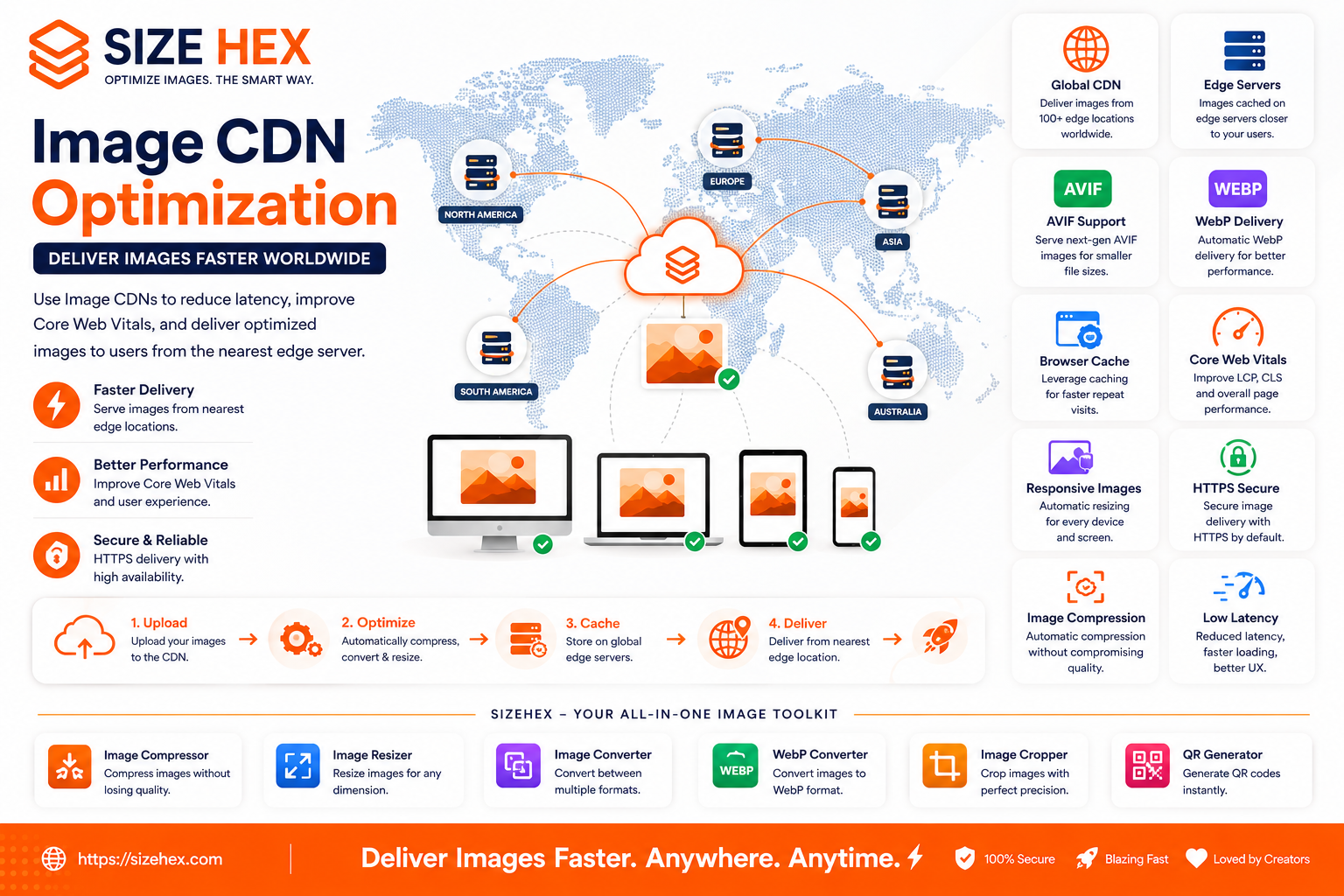
Image CDN Optimization Guide: How to Deliver Images Faster Worldwide (2026)
Modern websites serve visitors from every corner of the world. Whether someone accesses your website from India, the United States, Germany, Australia, or Brazil, they expect pages to load quickly and images to appear instantly.
However, when all your website files are hosted on a single server, visitors located far from that server may experience slower loading times due to increased network distance and latency.
Images are often the largest files downloaded by a webpage. Hero banners, product photos, blog featured images, infographics, and gallery images consume significant bandwidth. Delivering these images efficiently is essential for providing a fast and enjoyable user experience.
This is where an Image Content Delivery Network (Image CDN) becomes valuable.
An Image CDN stores copies of your images across multiple servers around the world. Instead of downloading images from one central location, visitors automatically receive them from the nearest available server. Many Image CDNs also optimize images by compressing them, converting them to modern formats like AVIF and WebP, resizing them for different devices, and caching them for faster repeat visits.
In this guide, you'll learn what an Image CDN is, how it works, how it differs from traditional hosting, why it matters for SEO, common misconceptions, and how to use an Image CDN to improve website performance in 2026.
What Is an Image CDN?
An Image CDN (Content Delivery Network) is a distributed network of servers that stores and delivers image files from locations close to website visitors.
Instead of serving every image from a single web server, the CDN automatically selects the nearest server to deliver the requested image.
This reduces:
- Network latency
- Download time
- Server workload
- Bandwidth consumption
The result is faster image loading across the globe.
How an Image CDN Works
Here's a simplified workflow:
- You upload an image to your website.
- The Image CDN stores copies across multiple global edge servers.
- A visitor opens your webpage.
- The CDN identifies the server closest to the visitor.
- The optimized image is delivered from that nearby location.
For example:
- A visitor in Mumbai receives images from an Indian edge server.
- A visitor in London receives images from a European server.
- A visitor in New York receives images from a North American server.
This process happens automatically and helps reduce the physical distance data must travel.
Why Image CDNs Matter
Without a CDN, every visitor downloads images from the same origin server.
For users located far away, this can lead to:
- Higher latency
- Slower page loading
- Longer image download times
- Reduced user satisfaction
Image CDNs solve these issues by distributing image delivery geographically.
Benefits include:
- Faster global performance
- Lower bandwidth usage
- Reduced server load
- Better scalability
- Improved reliability
These advantages become increasingly important for websites with international audiences.
CDN vs Traditional Hosting
Let's compare the two approaches.
| Feature | Traditional Hosting | Image CDN |
|---|---|---|
| Image Delivery | Single Server | Global Edge Servers |
| Loading Speed | Depends on Server Location | Faster Worldwide |
| Latency | Higher | Lower |
| Scalability | Limited | Excellent |
| Server Load | Higher | Lower |
| Global Performance | Moderate | Excellent |
| Reliability | Moderate | High |
Traditional hosting works well for smaller websites, but CDNs provide significant advantages as traffic and geographic reach increase.
Image CDN vs Regular CDN
Although the terms are often used interchangeably, there are important differences.
Regular CDN
Primarily caches static website assets such as:
- CSS
- JavaScript
- Fonts
- Images
- Documents
Image CDN
Specializes in image delivery and often includes additional optimization features.
Examples include:
- Automatic resizing
- Image compression
- AVIF conversion
- WebP conversion
- Responsive image generation
- Format negotiation
- Smart caching
Image CDNs focus specifically on improving image performance.
Benefits for SEO
An Image CDN does not directly improve search rankings.
However, it supports technical SEO by improving website performance.
Benefits include:
- Faster image loading
- Better Core Web Vitals
- Improved Largest Contentful Paint (LCP)
- Lower latency
- Better mobile experience
- Reduced bounce rates
- Faster international performance
Combined with image compression, responsive images, lazy loading, and descriptive alt text, an Image CDN becomes an important part of a modern image SEO strategy.
Browser Support
Image CDNs work independently of browsers.
Modern browsers automatically benefit from CDN delivery.
Many Image CDNs also detect browser capabilities and serve:
- AVIF to supported browsers
- WebP where appropriate
- JPEG or PNG as fallback formats
Visitors receive the best compatible image automatically.
Common Myths About Image CDNs
Let's clear up a few misconceptions.
Myth 1: CDNs are only for large companies.
Reality: Small businesses, blogs, portfolios, and personal websites can also benefit from faster image delivery.
Myth 2: A CDN replaces image optimization.
Reality: A CDN complements image optimization. Compressing images, using responsive images, and modern formats remain important.
Myth 3: Every CDN automatically optimizes images.
Reality: Some CDNs only cache files. Image optimization features depend on the CDN service you choose.
Myth 4: CDNs only improve desktop performance.
Reality: Mobile users often benefit even more because efficient image delivery reduces download times on slower networks.
Myth 5: CDNs only matter for international websites.
Reality: Even visitors within the same country can benefit from edge servers located closer to them.
Real-World Examples
Example 1: E-commerce Website
An online clothing store serves thousands of product images every day.
Using an Image CDN:
- Product images load faster.
- Mobile shoppers experience smoother browsing.
- Server bandwidth usage decreases.
Example 2: News Website
A global news publisher delivers large featured images to readers worldwide.
An Image CDN ensures international visitors receive images from nearby servers, reducing loading time.
Example 3: Photography Portfolio
A photographer displays high-resolution galleries.
An Image CDN automatically serves optimized AVIF or WebP versions while maintaining excellent visual quality.
Example 4: SaaS Website (SizeHex)
SizeHex helps website owners prepare images through compression, resizing, cropping, and format conversion before delivery.
When those optimized images are served through an Image CDN, visitors benefit from lower latency, faster loading speeds, improved Core Web Vitals, and a smoother browsing experience regardless of their location.
Key Takeaways
- An Image CDN delivers images from servers located closer to website visitors.
- Image CDNs reduce latency, improve loading speed, and decrease server workload.
- Many Image CDNs automatically compress, resize, and convert images into modern formats such as AVIF and WebP.
- CDNs complement other optimization techniques like responsive images, lazy loading, and browser caching.
- Although Image CDNs are not direct ranking factors, they support SEO by improving website performance, user experience, and Core Web Vitals.
- Combining an Image CDN with modern image optimization practices creates a fast, scalable, and globally optimized website.
Complete Image CDN Optimization Guide
Now that you understand what an Image CDN is and why it matters, let's explore how it improves website performance and how to configure it effectively. Whether you run a blog, e-commerce store, portfolio, SaaS platform, or business website, these techniques will help you deliver images faster to visitors around the world.
1. Why CDNs Improve Website Speed
When a visitor requests an image, the distance between the visitor and your server affects loading time.
Without a CDN:
- Images travel from one origin server.
- Long distances increase latency.
- Visitors wait longer.
With a CDN:
- Images are delivered from the nearest edge server.
- Travel distance is reduced.
- Downloads begin faster.
This creates a noticeably faster browsing experience.
2. Global Image Delivery
One of the biggest advantages of a CDN is worldwide image delivery.
Imagine your server is located in India.
Visitors from:
- United States
- Canada
- Germany
- Australia
- Japan
would normally request images from India.
With a CDN:
Each visitor receives images from a nearby regional server instead.
This reduces latency across continents.
3. Reducing Latency
Latency is the delay before data begins transferring.
High latency causes:
- Slow page loading
- Delayed image rendering
- Poor user experience
A CDN minimizes latency by shortening the network path between visitors and image files.
Lower latency means pages feel more responsive.
4. CDN Edge Servers
Edge servers are distributed servers located in different regions worldwide.
Instead of relying on a single origin server:
- Images are cached on multiple edge locations.
- Visitors automatically connect to the closest one.
- Traffic is distributed efficiently.
This improves:
- Reliability
- Speed
- Scalability
5. Browser Caching
CDNs work exceptionally well with browser caching.
After a visitor downloads an image:
- The browser stores it locally.
- Future visits reuse the cached copy.
- Fewer downloads occur.
Benefits include:
- Faster repeat visits
- Reduced bandwidth
- Lower server requests
- Better user experience
6. Automatic Image Compression
Many modern Image CDNs automatically optimize uploaded images.
Features often include:
- Lossless compression
- Smart lossy compression
- Metadata removal
- File size reduction
Smaller files travel faster across the internet while maintaining good visual quality.
7. AVIF & WebP Delivery
Modern CDNs can automatically serve different image formats based on browser support.
Typical workflow:
- Chrome → AVIF
- Firefox → AVIF/WebP
- Safari → AVIF/WebP (supported versions)
- Older browsers → JPEG/PNG
Visitors receive the most efficient format available without manual intervention.
8. Responsive Image Transformation
Image CDNs can generate multiple image sizes automatically.
Instead of uploading:
- 320px
- 640px
- 768px
- 1200px
- 1920px
The CDN creates optimized versions dynamically.
Benefits:
- Lower storage requirements
- Faster mobile loading
- Better bandwidth efficiency
9. Lazy Loading + CDN
Lazy loading and CDNs complement each other.
Workflow:
- Browser loads visible images.
- CDN serves optimized files.
- Off-screen images remain deferred.
- Additional images load while scrolling.
This combination minimizes initial downloads while ensuring fast delivery when images are needed.
10. Cache-Control Headers
Cache-Control headers tell browsers how long images should remain cached.
Examples:
- One week
- One month
- One year
Proper cache settings reduce unnecessary downloads and improve repeat visit performance.
11. Image Versioning
Sometimes images change after being cached.
Versioning solves this.
Example:
Instead of:
logo.pngUse:
logo-v2.pngor
logo.png?v=2Browsers recognize the updated version and download the new image without serving stale cached files.
12. HTTPS & Security
Modern CDNs support HTTPS by default.
Benefits include:
- Secure image delivery
- Encrypted connections
- Better user trust
- Browser compatibility
HTTPS is also recommended for modern SEO and user privacy.
13. Common CDN Mistakes
Avoid these mistakes:
❌ Uploading oversized images
❌ Assuming a CDN replaces image compression
❌ Ignoring responsive images
❌ Forgetting browser caching
❌ Missing cache invalidation
❌ Not testing global performance
❌ Serving original images unnecessarily
❌ Ignoring Core Web Vitals
❌ Forgetting alt text
❌ Using outdated formats only
14. Image CDN Best Practices
Follow these recommendations.
- Compress images before upload.
- Prefer AVIF and WebP where supported.
- Enable responsive image delivery.
- Configure browser caching.
- Use lazy loading for below-the-fold images.
- Preload critical hero images.
- Monitor cache performance.
- Test worldwide loading speed.
- Review Core Web Vitals regularly.
- Audit image delivery periodically.
15. Testing CDN Performance
After enabling a CDN, verify:
- Global loading speed
- Mobile performance
- Desktop performance
- Cache behavior
- Image quality
- Response times
- Core Web Vitals
Useful testing tools include:
- Google PageSpeed Insights
- Lighthouse
- Chrome DevTools
- GTmetrix
- WebPageTest
16. CDN for E-commerce
Online stores often display thousands of images.
CDNs improve:
- Product image delivery
- Category pages
- Product galleries
- Customer review photos
- Promotional banners
This creates a faster shopping experience for customers worldwide.
17. CDN for Blogs
Blogs benefit from CDNs by accelerating:
- Featured images
- Infographics
- Tutorial screenshots
- Comparison charts
- Author photos
Readers experience quicker page rendering and smoother scrolling.
18. CDN for SaaS Websites
SaaS platforms frequently use:
- Dashboard graphics
- Documentation screenshots
- Feature illustrations
- Knowledge base images
- Marketing assets
Serving these assets through a CDN improves performance for users across different regions.
19. Troubleshooting
If your CDN isn't delivering expected improvements:
- Verify DNS configuration.
- Confirm images are served from CDN URLs.
- Check cache headers.
- Purge outdated cache when needed.
- Test from multiple geographic locations.
- Compare origin vs CDN response times.
- Inspect image formats served to different browsers.
Systematic testing usually identifies configuration issues quickly.
20. Complete Image CDN Optimization Checklist
Task Status CDN Enabled ✅ Images Compressed ✅ AVIF/WebP Delivery Enabled ✅ Responsive Images Configured ✅ Browser Caching Enabled ✅ Lazy Loading Configured ✅ Hero Images Preloaded ✅ HTTPS Enabled ✅ Cache-Control Headers Configured ✅ Image Versioning Implemented ✅ Core Web Vitals Tested ✅ Global Performance Verified ✅
Pro Tips
- Choose a CDN with built-in image optimization features rather than caching alone.
- Combine responsive images, AVIF/WebP, browser caching, and lazy loading for the best performance.
- Purge CDN caches whenever important image assets change.
- Monitor performance from multiple countries to ensure global consistency.
- Regularly review Core Web Vitals after adding new pages or media.
Advanced Image CDN Optimization, FAQs & Publishing Checklist
You've now learned what an Image CDN is, how it works, and how it improves website performance. In this final section, we'll explore advanced optimization strategies, common mistakes, frequently asked questions, and a complete publishing checklist to help you maximize image delivery speed and provide a consistently fast experience for visitors around the world.
Remember, an Image CDN works best when combined with responsive images, AVIF/WebP, image compression, browser caching, lazy loading, and proper Core Web Vitals optimization.
Before Publishing Checklist
Before publishing your website, verify these items.
Image Optimization
✅ Images compressed
✅ AVIF/WebP versions available
✅ Correct dimensions used
✅ Responsive image sizes generated
CDN Configuration
✅ CDN enabled
✅ HTTPS active
✅ Edge caching configured
✅ Cache-Control headers set
Performance
✅ Hero images preloaded
✅ Lazy loading enabled for below-the-fold images
✅ Browser caching configured
SEO
✅ Descriptive filenames
Example:
image-cdn-optimization-guide.avif✅ Alt text added
✅ XML Image Sitemap updated
Testing
✅ PageSpeed Insights checked
✅ Lighthouse audit completed
✅ Chrome DevTools tested
✅ Mobile devices tested
✅ Multiple geographic regions tested
Advanced Image CDN Optimization Strategies
1. Use Smart Image Transformation
Many modern CDNs automatically:
- Resize images
- Compress images
- Convert formats
- Adjust quality
- Optimize for different devices
Instead of creating multiple image files manually, let the CDN generate optimized versions dynamically.
2. Deliver Different Formats Automatically
Modern browsers support different image formats.
A good Image CDN automatically serves:
- AVIF when supported
- WebP when AVIF isn't available
- JPEG/PNG as fallbacks
Visitors always receive the smallest compatible image.
3. Cache Images Near Your Users
Edge caching stores frequently requested images close to visitors.
Benefits:
- Faster repeat requests
- Lower latency
- Reduced origin server traffic
- Improved reliability
Frequently accessed images remain available without repeatedly contacting the origin server.
4. Optimize Hero Images Separately
Hero images often become the Largest Contentful Paint (LCP) element.
Best practices:
- Compress carefully
- Use AVIF or WebP
- Preload important images
- Avoid lazy loading
- Deliver through CDN
This has a significant impact on Core Web Vitals.
5. Monitor Cache Hit Ratio
A cache hit means the CDN serves the image directly.
A cache miss means the CDN requests the file from the origin server.
Higher cache hit ratios generally improve:
- Speed
- Reliability
- Bandwidth savings
Review CDN analytics regularly.
6. Purge Cache After Updates
When replacing images:
- Product photos
- Logos
- Marketing banners
- Blog featured images
Always purge or invalidate outdated CDN cache so visitors receive the newest version.
7. Review Performance Regularly
Website performance changes over time.
After:
- Publishing new pages
- Uploading large images
- Redesigning layouts
- Changing hosting
Test your CDN performance again.
Continuous optimization keeps websites fast.
Common Image CDN Mistakes
Avoid these common problems.
❌ Uploading huge original images
❌ Assuming CDN replaces compression
❌ Ignoring responsive images
❌ Lazy loading hero banners
❌ No browser caching
❌ Missing cache invalidation
❌ Not testing international performance
❌ No HTTPS
❌ Missing image dimensions
❌ Never monitoring Core Web Vitals
Frequently Asked Questions (FAQ)
1. What is an Image CDN?
An Image CDN stores and delivers images from servers located closer to website visitors, reducing latency and improving loading speed.
2. Does a CDN improve SEO?
Not directly.
However, faster loading speeds, improved Core Web Vitals, and a better user experience support technical SEO.
3. Can small websites use a CDN?
Yes.
Blogs, portfolios, business websites, and personal projects all benefit from faster image delivery.
4. Does a CDN compress images automatically?
Many modern Image CDNs offer automatic compression, but features vary depending on the provider.
5. Should I still compress images before uploading?
Yes.
Uploading optimized images reduces storage, bandwidth usage, and processing time.
6. Can a CDN serve AVIF and WebP automatically?
Yes.
Many Image CDNs detect browser support and deliver the most efficient compatible format automatically.
7. Does a CDN reduce server load?
Yes.
Frequently requested images are served from edge servers instead of repeatedly accessing the origin server.
8. Can a CDN improve Core Web Vitals?
Yes.
Faster image delivery can improve Largest Contentful Paint (LCP) and overall page performance.
9. Should I use lazy loading with a CDN?
Absolutely.
Lazy loading reduces initial downloads while the CDN ensures fast delivery when images are requested.
10. Do CDNs improve mobile performance?
Yes.
Mobile users benefit from smaller image files, lower latency, and faster loading on slower networks.
11. What is an edge server?
An edge server is a CDN server located close to users that stores cached copies of website assets.
12. Is HTTPS important?
Yes.
HTTPS secures image delivery, improves browser compatibility, and supports modern SEO best practices.
13. Can I use a CDN with responsive images?
Yes.
Responsive images and CDNs work together to deliver the correct image size efficiently.
14. How often should I purge the CDN cache?
Whenever important images change, such as updated logos, product photos, or promotional graphics.
15. Which websites benefit most?
Almost every image-heavy website, including:
- E-commerce stores
- Blogs
- News websites
- SaaS platforms
- Photography portfolios
- Educational websites
Conclusion
An Image CDN is one of the most effective ways to deliver images quickly to users around the world. By distributing images across global edge servers, reducing latency, and supporting modern optimization features like AVIF, WebP, responsive images, and intelligent caching, CDNs help create a faster and more reliable browsing experience.
When combined with image compression, lazy loading, browser caching, and proper Core Web Vitals optimization, an Image CDN becomes an essential component of a high-performance website.
Whether you're running a small blog or a global e-commerce platform, investing in efficient image delivery helps improve user satisfaction, supports technical SEO, and prepares your website for long-term growth.
Why Choose SizeHex?
SizeHex helps you prepare images before they're delivered through your CDN.
Features
- Compress images without noticeable quality loss
- Resize images for every screen size
- Convert images to AVIF and WebP
- Crop images precisely
- Browser-based processing
- Privacy-friendly workflow
- No software installation required
From bloggers and developers to designers and business owners, SizeHex simplifies image optimization for modern websites.
Related Tools
Image Compressor
Reduce image file sizes while maintaining quality.
Image Resizer
https://www.sizehex.com/image-resizer.html
Generate optimized image dimensions for every device.
Image Converter
https://www.sizehex.com/image-converter.html
Convert between AVIF, WebP, JPG, PNG, GIF, BMP, and TIFF.
WebP Converter
https://www.sizehex.com/webp-converter.html
Create lightweight WebP images for faster websites.
Image Cropper
https://www.sizehex.com/image-crop.html
Crop images accurately for websites and social media.
QR Generator
https://www.sizehex.com/qr-generator.html
Generate QR codes instantly for websites and marketing campaigns.