August 7, 2026
Image Preloading & fetchpriority Guide (2026): Improve LCP & Website Performance
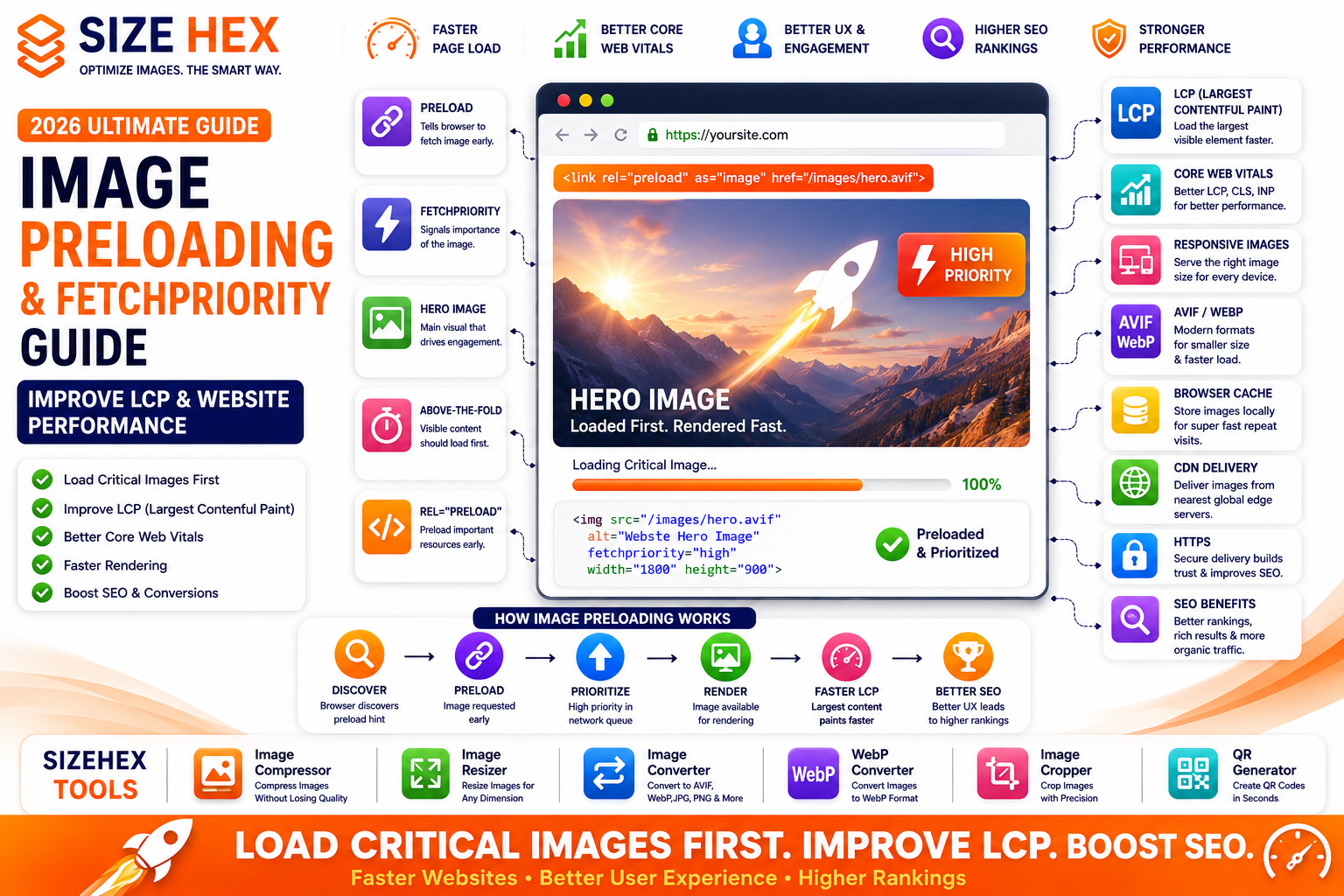
Image Preloading & fetchpriority Guide (2026): Improve LCP & Website Performance
Modern websites compete for one thing above all else—speed. Visitors expect webpages to load almost instantly, and even small delays can affect user experience, engagement, conversions, and search performance.
One of the biggest contributors to slow loading pages is how browsers prioritize resources. By default, browsers discover images as they parse HTML, but important images—especially hero images—may compete with many other files such as JavaScript, CSS, fonts, and additional images.
If your most important image loads too late, it often becomes the Largest Contentful Paint (LCP) element, increasing loading time and negatively affecting Core Web Vitals.
Image preloading and the fetchpriority attribute help browsers identify critical images earlier, allowing them to download these resources sooner and display meaningful content faster.
In this guide, you'll learn what image preloading is, how fetchpriority works, when to use each technique, how they differ from lazy loading, and how they improve website performance and SEO in 2026.
What Is Image Preloading?
Image preloading is a browser optimization technique that tells the browser to download an important image as early as possible.
Instead of waiting until the browser naturally discovers an image inside the HTML document, preloading gives the browser an early hint that the resource is important.
Typical workflow:
Browser starts loading page
↓
Browser discovers preload instruction
↓
Critical image begins downloading immediately
↓
HTML continues parsing
↓
Image already available when needed
This reduces waiting time for important visual content.
Why Image Preloading Matters
Every webpage contains multiple resources.
Examples include:
- CSS files
- JavaScript
- Fonts
- Images
- Videos
- Icons
Browsers must decide which resources should load first.
Without guidance, an important hero image may be delayed while other resources download.
Preloading ensures that critical images receive higher priority during page loading.
Benefits include:
- Faster Largest Contentful Paint (LCP)
- Better Core Web Vitals
- Improved perceived speed
- Better user experience
- Faster rendering
What Is fetchpriority?
The fetchpriority attribute provides a hint to the browser about how important a resource is.
Example:
<img src="hero-image.avif"
     alt="Modern website hero banner"
     fetchpriority="high">
The browser understands that this image should receive higher loading priority.
Possible values include:
-
high -
auto(default) -
low
Use fetchpriority="high" only for truly important images.
How Browsers Load Images
Browsers don't download every image immediately.
The loading process generally looks like this:
Download HTML
↓
Parse HTML
↓
Discover CSS
↓
Discover JavaScript
↓
Discover Images
↓
Schedule Downloads
↓
Render Page
If an important image isn't discovered until later, rendering may be delayed.
Preloading and fetchpriority help browsers prioritize these critical assets earlier.
Preloading vs Lazy Loading
Although both techniques optimize loading performance, they solve opposite problems.
Image Preloading
Purpose:
Load important images earlier.
Best for:
- Hero images
- Above-the-fold images
- Largest Contentful Paint element
Lazy Loading
Purpose:
Delay non-critical images until needed.
Best for:
- Gallery images
- Blog images lower on the page
- Product recommendations
- Footer images
These techniques work together rather than replacing each other.
Benefits for Performance
Proper image preloading offers several performance advantages.
Faster Hero Images
Visitors see the most important visual content sooner.
Improved Largest Contentful Paint
Critical images appear earlier, reducing LCP time.
Better Rendering
The browser spends less time waiting for important resources.
Better Mobile Experience
Preloading helps mobile users by prioritizing essential images on slower networks.
Better Perceived Speed
Even if total page load time stays similar, users perceive the page as loading faster because meaningful content appears sooner.
Benefits for SEO
Image preloading supports technical SEO indirectly.
Benefits include:
- Better Core Web Vitals
- Faster LCP
- Improved user experience
- Reduced abandonment
- Better page performance
Google recommends optimizing important resources to improve loading performance and user experience.
Common Myths
Let's clear up some misconceptions.
Myth 1: Every image should be preloaded.
Reality: Only critical images should be preloaded.
Preloading every image wastes bandwidth and can actually reduce performance.
Myth 2: Preloading replaces lazy loading.
Reality: They solve different problems.
Preloading speeds up important images.
Lazy loading delays unimportant images.
Myth 3: fetchpriority automatically preloads images.
Reality: fetchpriority changes download priority but doesn't replace preload instructions when preloading is appropriate.
Myth 4: Preloading only helps desktop users.
Reality: Mobile users often benefit even more because network resources are limited.
Myth 5: Preloading guarantees better rankings.
Reality: Preloading improves performance and user experience, which support technical SEO, but it doesn't directly guarantee higher rankings.
Real-World Examples
Example 1: E-commerce Store
An online store preloads the main product image.
Customers see products faster, improving the shopping experience.
Example 2: News Website
A news website preloads the featured article image shown at the top of the homepage.
Readers immediately see the headline and featured visual.
Example 3: SaaS Landing Page
A SaaS company preloads the hero illustration.
Visitors immediately understand the product before scrolling.
Example 4: SizeHex
SizeHex uses optimized AVIF/WebP images, responsive image delivery, browser caching, and carefully prioritized hero images to create fast-loading webpages.
Combining image compression, modern formats, browser caching, responsive images, and selective preloading provides an excellent balance between speed, user experience, and SEO.
Key Takeaways
- Image preloading helps browsers download critical images earlier during page loading.
-
The
fetchpriorityattribute allows developers to signal the relative importance of image downloads. - Hero images and above-the-fold visuals are the best candidates for preloading.
- Preloading and lazy loading complement each other by prioritizing important resources while delaying non-critical ones.
- Faster loading of critical images contributes to better Largest Contentful Paint (LCP), Core Web Vitals, and overall user experience.
- Image preloading works best when combined with compression, responsive images, browser caching, CDNs, and modern formats such as AVIF and WebP.
Complete Image Preloading &
fetchpriorityGuideNow that you understand what image preloading is and why it matters, let's explore how modern browsers prioritize images and how developers can improve loading performance using preload hints,
fetchpriority, responsive images, and related optimization techniques.
Preloading Fundamentals
1. Critical Images
Critical images are those users should see immediately after a webpage begins loading.
Examples:
- Hero banners
- Featured article images
- Product hero photos
- Landing page illustrations
These images directly affect the visitor's first impression.
Always prioritize them.
2. Hero Images
Hero images are usually the largest visual elements at the top of a webpage.
Examples:
- Homepage banner
- SaaS product showcase
- Travel destination photo
- E-commerce featured product
Since hero images often become the Largest Contentful Paint (LCP) element, loading them quickly is extremely important.
3. Above-the-Fold Images
Above-the-fold content appears before users scroll.
Images visible immediately after page load should receive higher priority than images lower on the page.
Examples:
- Hero image
- Logo
- Featured product
- Article thumbnail
These images should load as quickly as possible.
4.
rel="preload"HTML preload allows browsers to begin downloading important resources early.
Example:
<link rel="preload"
      as="image"
      href="hero-image.avif">
Benefits:
- Earlier resource discovery
- Faster downloads
- Better rendering
- Improved LCP
Use preload only for truly critical resources.
5.
fetchpriority="high"The browser can also prioritize images using:
<img
src="hero-image.avif"
alt="Website hero banner"
fetchpriority="high">
This tells the browser:
"This image is important."
Avoid applying:
fetchpriority="high"to every image.
Only critical images deserve high priority.
Performance
6. Largest Contentful Paint (LCP)
LCP measures how quickly the largest visible content loads.
In many websites:
Largest visible element
↓
Hero image
↓
LCP
Optimizing hero image loading directly improves this Core Web Vitals metric.
7. Core Web Vitals
Image preloading helps support:
- Faster LCP
- Better perceived loading
- Smoother rendering
Combined with image compression and browser caching, it contributes to a faster user experience.
8. Resource Prioritization
Browsers download multiple resources simultaneously.
Without optimization:
CSS
↓
JavaScript
↓
Fonts
↓
Images
↓
Hero image may load late
With preloading:
HTML
↓
Preload hero image
↓
Download immediately
↓
Continue parsing page
The important image becomes available sooner.
9. Network Scheduling
Modern browsers schedule downloads intelligently.
Preload helps browsers allocate network bandwidth toward important resources first.
Benefits include:
- Reduced waiting
- Better responsiveness
- Faster rendering
10. Rendering Optimization
Rendering depends on resource availability.
When the hero image finishes downloading earlier:
Layout becomes complete sooner.
Users immediately see meaningful visual content.
Best Practices
11. When to Preload
Good candidates:
- Homepage hero image
- Landing page banner
- Main product image
- Featured article image
- Above-the-fold illustrations
Only preload assets that are immediately visible.
12. When NOT to Preload
Avoid preloading:
- Gallery images
- Blog images lower on the page
- Footer graphics
- Advertisement images
- Hidden images
These should load naturally or use lazy loading.
13. Combine with Lazy Loading
Modern websites often use both.
Example:
Hero image
↓
Preload
↓
fetchpriority="high"↓
Load immediately
Other images
↓
Lazy loading
↓
Load when needed
This creates an efficient loading strategy.
14. Responsive Images
Preloading also works with responsive image setups.
When serving multiple image sizes:
- Mobile
- Tablet
- Desktop
Ensure the browser downloads the appropriate version.
Responsive delivery prevents unnecessary bandwidth usage.
15. AVIF & WebP Support
Critical images should also use modern formats.
Recommended workflow:
Compress
↓
Convert to AVIF
↓
Generate WebP fallback
↓
Preload hero image
↓
Display quickly
Modern formats reduce download size while maintaining image quality.
Technical SEO
16. HTTPS
Serve preloaded images over HTTPS.
Benefits:
- Secure delivery
- Browser trust
- Modern SEO standards
Avoid mixed-content issues.
17. Browser Caching
Combine:
Preload
Browser Cache
↓
Excellent repeat visits
First visit:
Preloaded
Future visits:
Loaded instantly from cache
18. CDN Delivery
Deliver preloaded images through a CDN.
Benefits:
- Lower latency
- Faster downloads
- Better global performance
Visitors receive images from nearby edge servers.
19. Image Compression
Never preload oversized images.
Workflow:
Resize
↓
Compress
↓
Convert
↓
Preload
↓
Deliver
Compression should always happen before preloading.
20. Testing Preloaded Images
Verify your implementation using:
- Chrome DevTools
- Lighthouse
- Google PageSpeed Insights
Check:
- LCP
- Network priority
- Resource waterfall
- Render timing
Testing confirms whether preloading provides measurable improvements.
Maintenance
21. Monitor LCP
Review Largest Contentful Paint after:
- New hero images
- Design updates
- CDN changes
- Hosting migrations
Track performance over time.
22. Debug Preload Issues
If preloading doesn't appear to help:
Review:
- HTML preload tags
-
fetchpriority - Browser DevTools
- Resource timing
- Duplicate downloads
Correct implementation matters.
23. Performance Testing
Regularly test:
- Mobile performance
- Desktop performance
- Slow network conditions
- Repeat visits
Performance changes over time.
24. Update Critical Assets
Replace outdated:
- Hero images
- Landing banners
- Product photos
When replacing:
Use optimized formats and maintain proper preload configuration.
25. Image Preloading Checklist
Task Status Critical Images Identified ✅ Hero Image Optimized ✅ Above-the-Fold Images Prioritized ✅ rel="preload"Added✅ fetchpriority="high"Used Correctly✅ LCP Optimized ✅ Core Web Vitals Reviewed ✅ Resource Prioritization Verified ✅ Network Scheduling Improved ✅ Rendering Optimized ✅ Only Critical Images Preloaded ✅ Lazy Loading Combined ✅ Responsive Images Configured ✅ AVIF/WebP Generated ✅ HTTPS Enabled ✅ Browser Caching Enabled ✅ CDN Configured ✅ Images Compressed ✅ Performance Tested ✅ LCP Monitored ✅
Pro Tips
- Preload only the most important above-the-fold images to avoid wasting bandwidth and competing with other critical resources.
-
Combine
rel="preload",fetchpriority="high", AVIF/WebP, browser caching, and CDN delivery for the best performance. - Never preload images that are below the fold—those are better suited for lazy loading.
- Measure the impact of preloading using Chrome DevTools, Lighthouse, and Google PageSpeed Insights instead of assuming it improves performance.
- Review your preload strategy after major design changes to ensure you're still prioritizing the correct images.
Advanced Image Preloading Strategies, FAQs & Publishing Checklist
You've now learned what image preloading is, how
rel="preload"andfetchprioritywork, and how they improve Largest Contentful Paint (LCP) and Core Web Vitals.In this final section, we'll cover advanced optimization strategies, common mistakes, frequently asked questions, and a complete publishing checklist that helps you consistently deliver fast-loading, high-performance websites.
Image preloading is most effective when combined with image compression, responsive images, browser caching, CDN delivery, and modern image formats such as AVIF and WebP.
Before Publishing Checklist
Before publishing your webpage, verify every item below.
Critical Images
✅ Hero image identified
✅ Above-the-fold images identified
✅ Largest visual element optimized
Preloading
✅
rel="preload"added✅
fetchpriority="high"added only to critical image✅ No unnecessary preloaded resources
Performance
✅ Hero image compressed
✅ AVIF/WebP generated
✅ Responsive image sizes created
✅ Browser caching enabled
✅ CDN enabled
Technical SEO
✅ HTTPS enabled
✅ Image Sitemap updated
✅ Internal links verified
✅ Structured data checked
Testing
✅ Chrome DevTools tested
✅ Lighthouse audit completed
✅ Google PageSpeed Insights checked
✅ LCP measured
✅ Mobile tested
Advanced Image Preloading Strategies
1. Preload Only Critical Resources
Every preload consumes bandwidth.
Only preload:
- Homepage hero image
- Landing page banner
- Main product image
- Primary article image
Avoid excessive preload usage.
2. Combine Preload with
fetchpriorityExample workflow:
Hero Image

↓

Preload

↓

fetchpriority="high"

↓

Early Download

↓

Faster Rendering
These techniques complement each other.
3. Optimize Before Preloading
Never preload large, uncompressed images.
Recommended workflow:
Resize
↓
Compress
↓
Convert to AVIF/WebP
↓
Generate Responsive Images
↓
Preload
↓
Render
4. Combine with Browser Cache
First Visit
↓
Preloaded
↓
Browser stores image
↓
Repeat Visit
↓
Instant loading
This provides excellent performance for returning visitors.
5. Use CDN Delivery
Preloaded images download even faster when delivered through a CDN.
Benefits:
- Lower latency
- Global delivery
- Faster first visit
- Better mobile experience
6. Monitor Core Web Vitals
Regularly review:
- Largest Contentful Paint (LCP)
- Cumulative Layout Shift (CLS)
- Interaction to Next Paint (INP)
Changes in hero images can significantly affect these metrics.
7. Keep Testing
Whenever you:
- Redesign pages
- Change hero images
- Update hosting
- Change CDN
- Improve image compression
Test preloading again.
Performance optimization is continuous.
Common Preloading Mistakes
Avoid these mistakes.
❌ Preloading every image
❌ Preloading below-the-fold images
❌ Using
fetchpriority="high"everywhere❌ Forgetting image compression
❌ Ignoring responsive images
❌ No browser caching
❌ Missing CDN
❌ Never measuring LCP
❌ No performance testing
❌ Treating preload as a replacement for lazy loading
Frequently Asked Questions (FAQ)
1. What is image preloading?
Image preloading tells browsers to begin downloading important images earlier during page loading.
2. What is
fetchpriority?The
fetchpriorityattribute provides a hint that helps browsers prioritize resource downloads.
3. Which images should be preloaded?
Only critical above-the-fold images.
Examples:
- Hero banners
- Main product image
- Featured article image
4. Should every image use
fetchpriority="high"?No.
Reserve it for the most important image on the page.
5. Does preloading replace lazy loading?
No.
Preloading speeds up critical resources.
Lazy loading delays non-critical resources.
6. Does preloading improve LCP?
Yes.
Properly implemented preloading often helps reduce Largest Contentful Paint by allowing critical images to start downloading earlier.
7. Can preloading improve SEO?
Indirectly, yes.
Faster pages and improved Core Web Vitals contribute to a better user experience, which aligns with Google's performance recommendations.
8. Should hero images be lazy loaded?
No.
Hero images should load immediately because they're typically visible as soon as the page opens.
9. Can responsive images be preloaded?
Yes.
Ensure the browser receives the correct image size for the user's device.
10. Does preloading work with AVIF?
Yes.
AVIF images can be preloaded like other image formats.
11. Does preloading work with WebP?
Yes.
WebP supports image preloading as well.
12. Should preloaded images also be compressed?
Absolutely.
Compression should always occur before preloading.
13. Does browser caching still matter?
Yes.
Browser caching speeds up repeat visits after the first download.
14. Does CDN improve preloading?
Yes.
A CDN reduces latency during the initial download of preloaded resources.
15. How can I test image preloading?
Use:
- Chrome DevTools
- Lighthouse
- Google PageSpeed Insights
Review network priority and LCP.
16. What happens if I preload too many resources?
The browser may compete for bandwidth, delaying truly critical assets.
17. Is preloading useful on mobile devices?
Yes.
Mobile users often benefit the most because network bandwidth is limited.
18. Can preload harm performance?
Yes.
Incorrect implementation or overusing preload may reduce performance.
19. Should preload be used on every page?
No.
Only pages with important above-the-fold images typically benefit.
20. What's the best preloading strategy?
Combine:
- Compression
- AVIF/WebP
- Responsive images
-
rel="preload" -
fetchpriority - Browser caching
- CDN
- Performance testing
Conclusion
Image preloading and the
fetchpriorityattribute help browsers prioritize critical images, reducing loading delays and improving the visibility of meaningful content. When used selectively and combined with responsive images, modern formats, browser caching, and CDN delivery, they contribute to faster pages and stronger Core Web Vitals.Rather than preloading every image, focus on the few assets that matter most to users during the first moments of a page load. Regular testing and performance monitoring ensure your optimization strategy remains effective as your website evolves.
Why Choose SizeHex?
SizeHex provides a complete browser-based image optimization toolkit for modern websites.
Features
- Compress images without noticeable quality loss
- Resize images for every screen size
- Convert between AVIF, WebP, JPG, PNG, GIF, BMP, and TIFF
- Crop images precisely
- Privacy-friendly browser processing
- No software installation required
Whether you're a blogger, developer, designer, marketer, photographer, or business owner, SizeHex helps you prepare fast, optimized, and SEO-friendly images.
Related Tools
Image Compressor
Compress images while preserving quality.
Image Resizer
https://sizehex.com/image-resizer.html
Resize images for desktop, tablet, and mobile.
Image Converter
https://sizehex.com/image-converter.html
Convert images into modern formats.
WebP Converter
https://sizehex.com/webp-converter.html
Generate lightweight WebP images.
Image Cropper
https://sizehex.com/image-crop.html
Crop images accurately for websites and social media.
QR Generator
Create QR codes instantly for websites and marketing.