July 24, 2026
JPG vs WebP: Which Image Format Is Better? (Complete 2026 Guide)
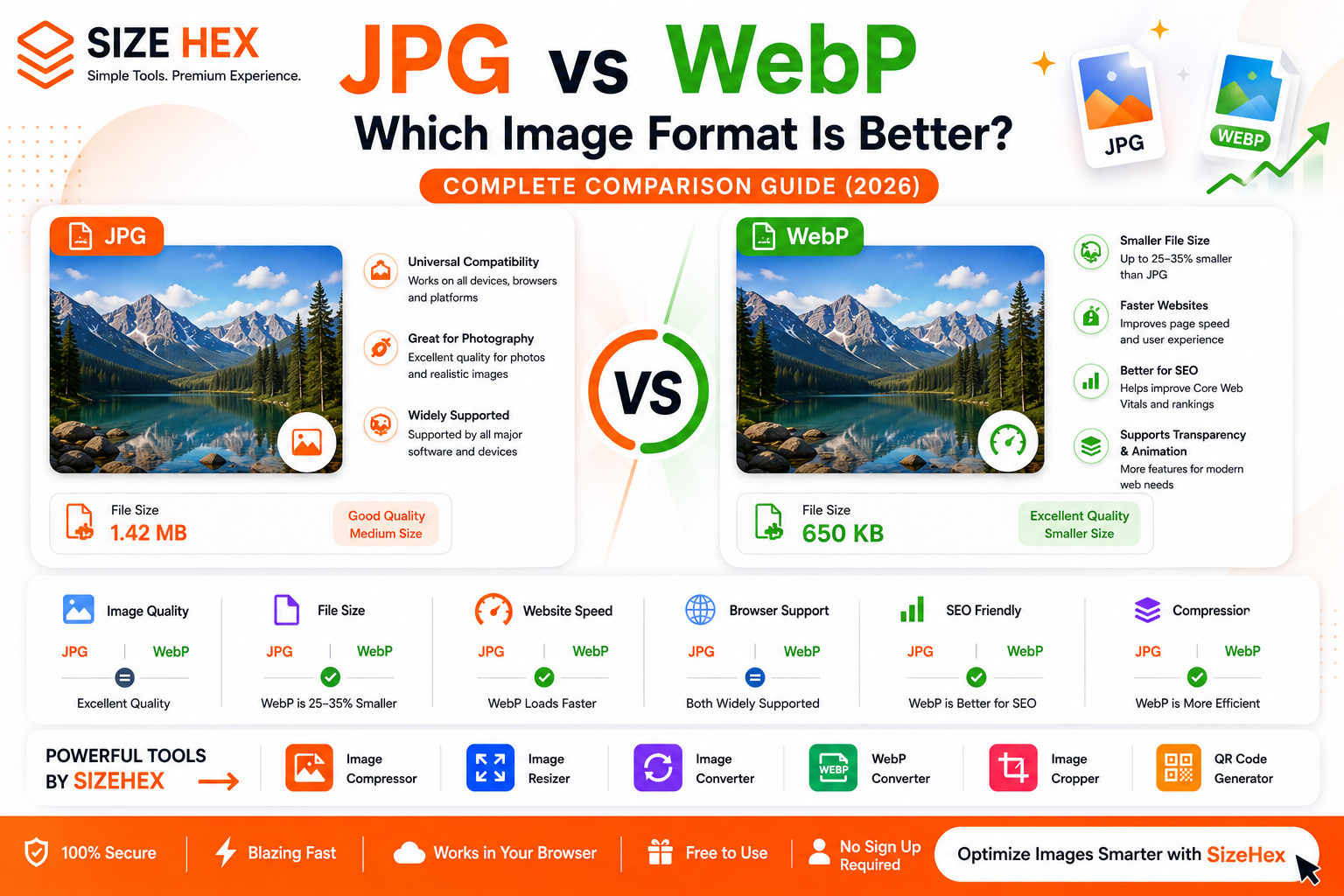
JPG vs WebP: Which Image Format Is Better?
When it comes to optimizing images for websites, blogs, and online businesses, JPG and WebP are two of the most popular image formats available today. Both formats are widely used across the web, but they serve different purposes and offer unique advantages.
JPG has been the industry standard for digital photography for decades because it provides excellent image quality with relatively small file sizes. It is supported by virtually every browser, device, image editor, and operating system, making it one of the most compatible image formats ever created.
WebP, developed by Google, is a newer image format designed specifically for the modern web. It offers significantly smaller file sizes while maintaining excellent visual quality, helping websites load faster and perform better.
If you're wondering whether you should continue using JPG or switch to WebP, this guide will help you make the right decision.
In this complete comparison, you'll learn the differences between JPG and WebP, including image quality, file size, compression, browser compatibility, website performance, SEO benefits, and the best use cases for each format.
What Is JPG (JPEG)?
JPG, also known as JPEG (Joint Photographic Experts Group), is one of the most widely used image formats in the world. It was developed to efficiently store photographic images by reducing file sizes through lossy compression.
Instead of storing every pixel exactly as it appears, JPG removes visual information that is less noticeable to the human eye. This significantly reduces file size while preserving good overall image quality.
Because of this balance between quality and storage efficiency, JPG has become the preferred format for:
- Digital photography
- Website images
- Blog featured images
- Social media photos
- Product photography
- Travel photography
- News websites
- Portfolio galleries
Advantages of JPG
- Small file sizes
- Excellent compatibility
- Fast uploads
- Fast downloads
- Great for photographs
- Supported by all major browsers
- Easy to share and store
Limitations of JPG
- Does not support transparent backgrounds
- Image quality decreases after repeated editing and saving
- Compression artifacts may appear at lower quality settings
Despite these limitations, JPG remains one of the most practical image formats for everyday use.
What Is WebP?
WebP is a modern image format developed by Google to improve website performance without sacrificing image quality.
Unlike JPG, WebP supports both lossy and lossless compression. This flexibility allows developers and website owners to choose between maximum quality or maximum file size reduction depending on their needs.
WebP also supports advanced features such as:
- Lossy compression
- Lossless compression
- Transparent backgrounds
- Animation support
- Better compression efficiency
- Faster loading speeds
- Lower bandwidth consumption
One of WebP's biggest advantages is that it typically produces images that are 25–35% smaller than JPG while maintaining very similar visual quality.
Because of these benefits, WebP has become the preferred image format for modern websites, blogs, SaaS platforms, online stores, and web applications.
JPG vs WebP: Key Differences
Although JPG and WebP may look similar at first glance, there are several important differences between them.
| Feature | JPG | WebP |
|---|---|---|
| Compression | Lossy | Lossy & Lossless |
| File Size | Small | ✅ Smaller |
| Image Quality | Excellent | Excellent |
| Transparency | ❌ No | ✅ Yes |
| Animation | ❌ No | ✅ Yes |
| Website Performance | Good | ✅ Excellent |
| SEO Benefits | Good | ✅ Better |
| Browser Support | Universal | Excellent |
| Mobile Performance | Good | ✅ Better |
The biggest difference is efficiency.
JPG focuses on delivering high-quality photographs with reasonable file sizes, while WebP is designed to provide similar or better visual quality using significantly less storage.
Image Quality Comparison
Image quality is one of the most important factors when choosing an image format.
JPG has been trusted for years because it produces excellent photographic quality while keeping file sizes relatively small. However, because JPG uses lossy compression, some image data is permanently removed during compression.
Every time a JPG image is edited and saved again, additional quality may be lost.
WebP, on the other hand, uses more advanced compression algorithms that preserve visual quality more efficiently.
WebP offers two compression modes:
Lossy WebP
Lossy WebP removes unnecessary image data while maintaining excellent visual quality. In many cases, viewers cannot distinguish between a high-quality JPG and a WebP image.
Lossless WebP
Lossless WebP preserves every detail without losing image quality and often still produces smaller files than JPG.
For most websites, WebP delivers virtually identical image quality while reducing file size considerably.
File Size Comparison
File size directly affects website speed, storage requirements, and bandwidth usage.
Here's a typical comparison:
| Format | Typical File Size |
|---|---|
| JPG | 1.4 MB |
| WebP (Lossy) | 900 KB |
| WebP (Optimized) | 650 KB |
Although the exact numbers depend on the image, WebP consistently creates smaller files than JPG.
Smaller images provide several advantages:
- Faster page loading
- Better mobile browsing
- Lower hosting bandwidth
- Improved Core Web Vitals
- Better user experience
- Faster downloads
This is one of the primary reasons why many modern websites are switching from JPG to WebP.
Understanding Compression
Compression determines how efficiently an image's file size can be reduced while maintaining visual quality.
JPG Compression
JPG uses lossy compression, permanently removing image data to reduce file size.
Higher compression produces smaller files but may introduce visible artifacts and reduce image quality.
WebP Compression
WebP supports both:
- Lossy Compression – Produces very small file sizes while maintaining excellent image quality.
- Lossless Compression – Preserves all image details while still often producing smaller files than JPG.
This flexibility allows WebP to adapt to a wider variety of use cases than JPG.
Browser Support
Compatibility is essential when publishing images online.
JPG is supported by virtually every browser, operating system, smartphone, image editor, and digital camera. It has been the universal standard for decades.
WebP is also supported by all modern browsers, including:
- Google Chrome
- Microsoft Edge
- Mozilla Firefox
- Safari
- Opera
- Android browsers
- Most modern web applications
Today, WebP support is excellent across the web, making it a reliable choice for most websites.
JPG vs WebP for Websites
Choosing the right image format can have a major impact on your website's speed, user experience, and search engine performance.
Images often account for the largest portion of a webpage's size. Large image files slow down loading times, increase bandwidth usage, and negatively affect Core Web Vitals.
This is where WebP has a significant advantage.
WebP delivers excellent image quality while producing much smaller files than JPG, making it ideal for modern websites.
Benefits of Using WebP on Websites
- Faster page loading
- Better Core Web Vitals
- Lower bandwidth consumption
- Improved mobile performance
- Better user experience
- Reduced hosting costs
- Faster image delivery
JPG is still an excellent option for photography and remains universally supported. However, for new websites, WebP is generally the better long-term choice.
Winner for Websites: ✅ WebP
JPG vs WebP for SEO
Google does not rank pages based solely on whether they use JPG or WebP.
However, image optimization plays an important role in improving website performance, which contributes to a better user experience.
Since WebP images are significantly smaller, they help improve:
- Largest Contentful Paint (LCP)
- Page Speed
- Mobile Performance
- User Experience
- Core Web Vitals
To maximize image SEO:
- Compress every image.
- Use descriptive filenames.
- Add meaningful alt text.
- Resize images before uploading.
- Use responsive images.
- Prefer WebP for website content whenever possible.
These best practices help search engines understand your content while improving loading speed.
Winner for SEO: ✅ WebP
Speed Comparison
Website speed is one of the biggest reasons developers are moving from JPG to WebP.
Here's a typical comparison:
| Format | Average File Size | Loading Speed |
|---|---|---|
| JPG | 1.4 MB | Good |
| WebP | 650 KB | Excellent |
Smaller image files provide several benefits:
- Faster page rendering
- Reduced bandwidth usage
- Better browsing on slower internet connections
- Improved mobile experience
- Higher user satisfaction
For websites focused on speed and performance, WebP clearly outperforms JPG.
Winner: ✅ WebP
Best Format for Photography
Photography is where JPG built its reputation.
For years, photographers have relied on JPG because it provides:
- Excellent color reproduction
- Small file sizes
- Universal compatibility
- Easy sharing
- Fast uploads
Today, WebP offers similar visual quality with significantly smaller file sizes.
Many photographers now:
- Capture photos in RAW.
- Edit in professional software.
- Export JPG for compatibility.
- Export WebP for websites.
If you're publishing photos online, WebP is usually the better choice.
If you're delivering files to clients or using older software, JPG remains an excellent option.
Winner: ✅ WebP (Website)
Winner: ✅ JPG (Compatibility)
Best Format for Social Media
Most social media platforms automatically compress uploaded images.
Whether you upload JPG or WebP, platforms like Facebook, Instagram, LinkedIn, and X often reprocess the files.
For most users:
- JPG remains a reliable choice because it's universally supported.
- WebP uploads are supported on many modern platforms and can reduce upload times, but compatibility may vary depending on the platform.
If you're creating images specifically for your own website, WebP is preferable. For broad sharing across many services, JPG is still a safe option.
Winner: 🟰 Both, depending on the platform.
Best Format for Blogging
Blogs usually contain:
- Featured images
- Inline images
- Screenshots
- Infographics
- Banners
Large images can slow blog pages considerably.
Using WebP for blog images helps:
- Improve page speed
- Increase SEO performance
- Enhance user experience
- Reduce hosting bandwidth
For most blogs, WebP is the recommended format.
Winner: ✅ WebP
Best Format for E-commerce
E-commerce websites often display hundreds or thousands of product images.
Large image libraries can slow category pages and product listings.
Using WebP offers several benefits:
- Faster product pages
- Better shopping experience
- Improved mobile browsing
- Reduced hosting costs
- Better Core Web Vitals
Recommended workflow:
- Edit original images in high quality.
- Export optimized product images as WebP.
- Keep JPG copies if compatibility with external marketplaces or legacy systems is required.
Winner: ✅ WebP
JPG vs WebP: Pros and Cons
WebP Advantages
- Smaller file sizes
- Excellent image quality
- Faster websites
- Supports transparency
- Supports animation
- Better Core Web Vitals
- Lower bandwidth usage
- Ideal for modern web development
WebP Disadvantages
- Some older software has limited support.
- Legacy systems may still require JPG.
- Editing workflows can be less convenient than JPG in certain applications.
JPG Advantages
- Universal compatibility
- Excellent for photography
- Easy to share
- Supported everywhere
- Smaller than many older image formats
- Works with almost every image editor and device
JPG Disadvantages
- Larger file sizes than WebP
- No transparency support
- Lossy compression only
- Lower efficiency for modern websites
Best Practices
To get the best balance of quality and performance:
- Use WebP for most website images.
- Keep original high-quality files for editing and archiving.
- Export images at appropriate dimensions.
- Compress images before uploading.
- Add descriptive filenames and alt text.
- Use responsive images to serve the right size on different devices.
- Avoid uploading oversized JPG files directly to your website.
- Test image quality after optimization to ensure it meets your visual standards.
JPG vs WebP: Which One Should You Choose?
The best image format depends on where and how you plan to use your images.
Choose WebP if you need:
- Faster website loading
- Better Core Web Vitals
- Improved SEO performance
- Smaller file sizes
- Blog featured images
- E-commerce product images
- Landing pages
- Portfolio websites
- Faster mobile browsing
- Lower bandwidth usage
WebP is the ideal choice for modern websites where performance and speed are top priorities.
Choose JPG if you need:
- Universal compatibility
- Professional photography
- Camera exports
- Easy sharing across devices
- Client deliveries
- Offline storage
- Printing photographs
- Legacy software support
JPG remains one of the most reliable image formats because nearly every device, browser, and application supports it.
JPG vs WebP: Final Comparison
Category Best Choice Website Performance ✅ WebP SEO ✅ WebP File Size ✅ WebP Image Quality 🟰 Both Photography 🟰 Both Transparency ✅ WebP Browser Compatibility ✅ JPG Mobile Performance ✅ WebP Editing Compatibility ✅ JPG Website Speed ✅ WebP Storage Efficiency ✅ WebP
Frequently Asked Questions (FAQ)
Is WebP better than JPG?
For websites, yes.
WebP typically provides much smaller file sizes while maintaining excellent visual quality, making it a better option for website performance.
Which format has better image quality?
Both formats can deliver excellent image quality.
However, WebP achieves similar quality with smaller file sizes thanks to more advanced compression.
Is WebP better for SEO?
Yes.
Although Google doesn't rank pages based solely on image format, WebP contributes to faster page loading and better Core Web Vitals, which improve the overall user experience.
Can WebP replace JPG?
In many web-related use cases, yes.
Many websites now use WebP instead of JPG for published images while keeping original high-quality files for editing and backups.
Is JPG still useful?
Absolutely.
JPG remains one of the most widely supported image formats and is still an excellent choice for photography, sharing, and compatibility across different devices and software.
Which format is smaller?
WebP.
In most cases, WebP images are 25–35% smaller than comparable JPG images while maintaining similar visual quality.
Can I convert JPG to WebP?
Yes.
Converting JPG to WebP is one of the easiest ways to improve website performance and reduce image file sizes.
Which format is better for blogs?
WebP.
Smaller images help blogs load faster, improve user experience, and reduce bandwidth usage without noticeably affecting image quality.
Conclusion
Both JPG and WebP are excellent image formats, but they are optimized for different purposes.
If your priority is maximum compatibility, photography, and easy file sharing, JPG is still a dependable option.
If your goal is faster websites, improved Core Web Vitals, smaller file sizes, and better overall web performance, WebP is the clear winner.
A smart workflow is to:
- Keep your original images in a high-quality format for editing and backups.
- Export optimized WebP versions for your website.
- Use JPG when broad compatibility is required.
Choosing the right format for each situation helps create websites that are fast, visually appealing, and user-friendly.
Try SizeHex Today
Optimize your images in seconds with SizeHex.
Whether you need to compress, resize, convert, crop, or generate QR codes, SizeHex provides fast, secure, and free online tools that work directly in your browser—no software installation required.
Related Tools
Image Compressor
Reduce image file size without noticeable quality loss. Perfect for websites, blogs, e-commerce stores, and social media.
Image Resizer
https://www.sizehex.com/image-resizer.html
Resize images for websites, Instagram, Facebook, YouTube, LinkedIn, and more.
Image Converter
https://www.sizehex.com/image-converter.html
Convert images between JPG, PNG, WebP, BMP, GIF, TIFF, and other popular image formats.
WebP Converter
https://www.sizehex.com/webp-converter.html
Convert images to and from WebP for faster website loading and better performance.
Image Cropper
https://www.sizehex.com/image-crop.html
Crop images online using custom dimensions or preset aspect ratios without installing any software.
QR Code Generator
https://www.sizehex.com/qr-generator.html
Generate QR codes for URLs, Wi-Fi, contact details, emails, phone numbers, and more.