July 31, 2026
Lazy Loading Images Guide: How to Improve Website Speed & SEO (2026 Guide)
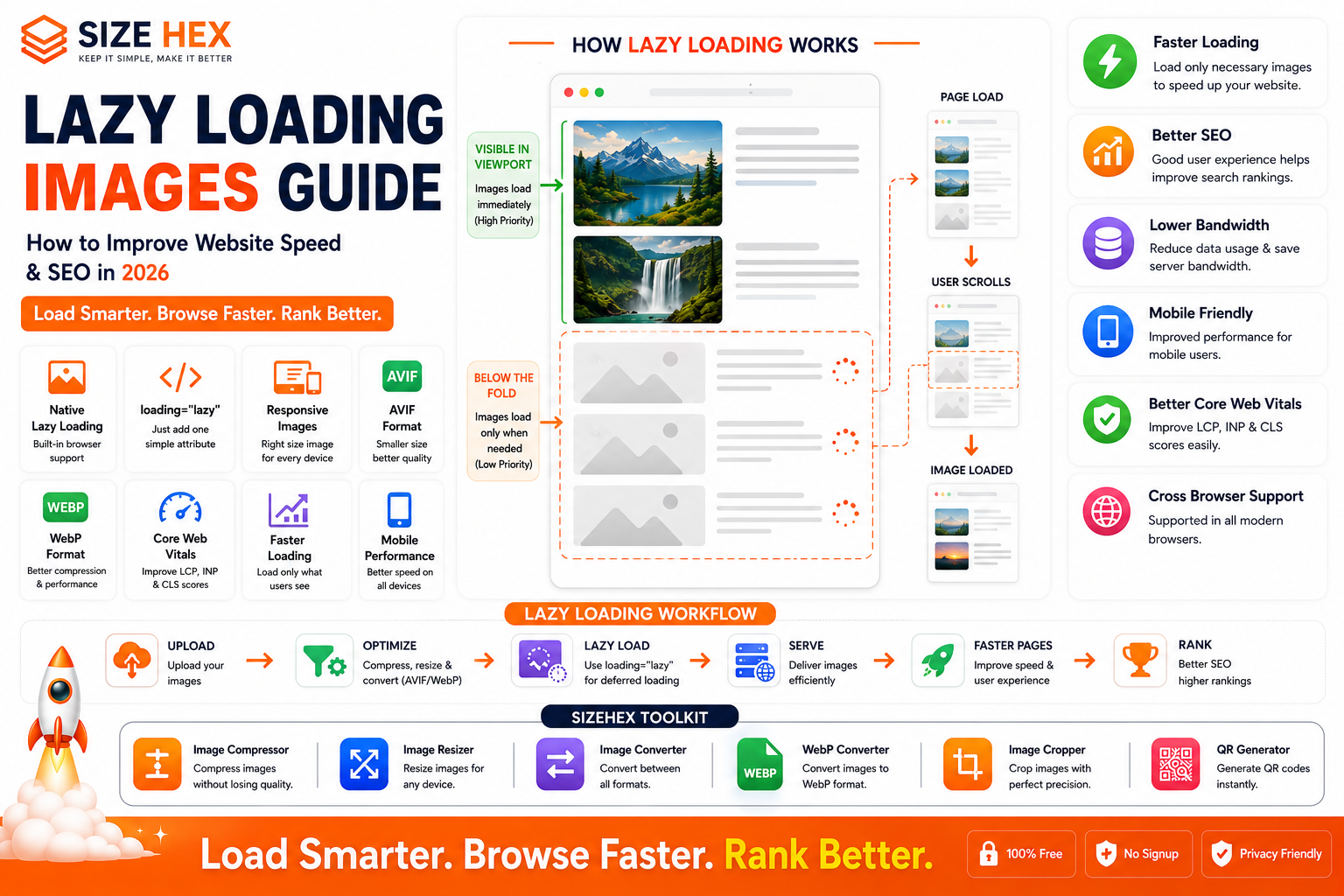
Lazy Loading Images Guide: How to Improve Website Speed & SEO (2026)
Website visitors expect pages to load almost instantly. Whether they're shopping online, reading a blog, or browsing a portfolio, slow-loading websites often lead to frustration, higher bounce rates, and lower engagement.
One of the biggest reasons websites become slow is that they load every image on a page immediately, even images that users may never scroll down to see.
Imagine a product category page with 100 product images. If the browser downloads all 100 images as soon as the page opens, users waste bandwidth, consume more mobile data, and wait longer before they can interact with the page.
This is where lazy loading becomes valuable.
Lazy loading delays the loading of non-visible images until they are close to entering the user's viewport. Instead of downloading every image immediately, the browser prioritizes only the content the user can currently see.
The result is a faster initial page load, lower bandwidth usage, improved user experience, and better overall website performance.
In this guide, you'll learn what lazy loading is, how it works, the difference between lazy and eager loading, browser support, SEO considerations, and how to use lazy loading effectively in 2026.
What Is Lazy Loading?
Lazy loading is a performance optimization technique that delays loading images until they are actually needed.
Instead of downloading every image immediately, the browser waits until an image approaches the visible area of the page.
For example:
When a visitor opens a blog post:
- The featured image loads immediately.
- Images near the top of the article load normally.
- Images farther down the page load only as the visitor scrolls.
This reduces unnecessary network requests during the initial page load.
Why Lazy Loading Matters
Many modern webpages contain dozens—or even hundreds—of images.
Examples include:
- E-commerce websites
- News portals
- Photography portfolios
- Travel blogs
- Social media feeds
- Educational websites
Without lazy loading:
- Every image downloads immediately.
- Mobile users consume more data.
- Initial loading becomes slower.
- Browsers perform more work before the page becomes interactive.
Lazy loading solves these problems by loading images only when they're likely to be viewed.
How Lazy Loading Works
When a webpage first loads:
- Visible images load immediately.
- Images outside the viewport remain unloaded.
- Placeholder space is reserved for deferred images.
- As users scroll, additional images are fetched automatically.
Modern browsers handle this process efficiently, helping pages become usable more quickly.
Native Lazy Loading (loading="lazy")
Modern browsers support native lazy loading using the HTML loading attribute.
Example:
<img
  src="product-image.jpg"
  alt="Wireless Headphones"
  loading="lazy"
  width="800"
  height="600">
In this example:
- Images near the top of the page load immediately if needed.
- Images farther down are deferred until the user scrolls closer to them.
Native lazy loading is simple to implement and requires no additional JavaScript for many websites.
Lazy Loading vs Eager Loading
| Feature | Lazy Loading | Eager Loading |
|---|---|---|
| Initial Page Load | Faster | Slower |
| Bandwidth Usage | Lower | Higher |
| Mobile Performance | Better | Moderate |
| Above-the-Fold Images | Usually Loaded Immediately | Loaded Immediately |
| Below-the-Fold Images | Deferred | Loaded Immediately |
| User Experience | Better for long pages | Better for critical content |
Eager loading is still appropriate for important above-the-fold images, such as hero banners or logos, while lazy loading is generally better suited for images farther down the page.
Benefits for SEO
Lazy loading is not a direct Google ranking factor, but it supports many aspects of technical SEO.
Benefits include:
- Faster page loading
- Better mobile performance
- Lower bandwidth usage
- Improved user experience
- Better Core Web Vitals
- Reduced server load
- Improved perceived performance
When combined with responsive images, AVIF or WebP formats, descriptive alt text, and image compression, lazy loading becomes an important part of a modern image SEO strategy.
Browser Support
Native lazy loading is supported by all major modern browsers, including:
- Google Chrome
- Microsoft Edge
- Mozilla Firefox
- Apple Safari
- Opera
- Android Browser
Older browsers that don't support native lazy loading can use JavaScript-based solutions if necessary.
Common Myths About Lazy Loading
Let's clear up a few misconceptions.
Myth 1: Lazy loading improves Google rankings automatically.
Reality: Lazy loading improves performance and user experience, which can support SEO, but it does not directly increase rankings.
Myth 2: Every image should be lazy loaded.
Reality: Images visible immediately when the page loads—such as hero images—should generally load eagerly to avoid delaying important content.
Myth 3: Lazy loading always improves Largest Contentful Paint (LCP).
Reality: Lazy loading images above the fold can actually delay LCP. Reserve lazy loading for images outside the initial viewport.
Myth 4: JavaScript is always required.
Reality: Modern browsers support native lazy loading using the loading="lazy" attribute, reducing the need for custom JavaScript.
Myth 5: Lazy loading negatively affects SEO.
Reality: When implemented correctly and search engines can still discover your images, lazy loading is compatible with modern SEO best practices.
Real-World Examples
Example 1: E-commerce Website
An online electronics store displays hundreds of product images across category pages.
By lazy loading below-the-fold products:
- Initial page load becomes faster.
- Mobile users download fewer images.
- Browsing feels smoother.
Example 2: News Website
A news portal contains long articles with multiple embedded images.
Only the images readers are about to view are downloaded, improving page responsiveness.
Example 3: Photography Portfolio
A photographer showcases dozens of high-resolution images in a gallery.
Visitors see the first images immediately while the remaining gallery loads progressively during scrolling.
Example 4: SaaS Website (SizeHex)
SizeHex uses lazy loading for blog illustrations, tutorial screenshots, comparison graphics, and tool previews.
Combined with responsive images, AVIF, WebP, and image compression, lazy loading helps reduce bandwidth consumption, improve loading speed, and provide a smoother browsing experience across desktop and mobile devices.
Key Takeaways
- Lazy loading delays the loading of images until they are close to entering the viewport.
-
Native lazy loading is easy to implement using the
loading="lazy"attribute. - Above-the-fold images should usually load eagerly, while below-the-fold images are good candidates for lazy loading.
- Lazy loading reduces unnecessary downloads, improves perceived performance, and lowers bandwidth usage.
- Although it is not a direct ranking factor, lazy loading supports SEO by improving page performance and user experience.
- Combining lazy loading with responsive images, AVIF, WebP, descriptive alt text, and proper image compression creates a modern, efficient image optimization strategy.
Complete Lazy Loading Images Guide
Now that you understand what lazy loading is and why it matters, let's explore how to implement it effectively to improve website performance, user experience, and your overall SEO strategy.
1. Why Lazy Loading Improves Website Speed
When a webpage contains many images, downloading every image immediately increases:
- Initial page load time
- Network requests
- Mobile data usage
- Server bandwidth
- Browser rendering time
Lazy loading reduces this burden by downloading only the images that users are likely to see first.
Example
Imagine an e-commerce page with 100 product images.
Without lazy loading:
- All 100 images begin downloading immediately.
With lazy loading:
- Only the first 10–15 visible images load initially.
- The remaining images load as users scroll.
This makes the page interactive much sooner.
2. Lazy Loading & Core Web Vitals
Google uses Core Web Vitals to measure real-world user experience.
Proper lazy loading can support these metrics.
Largest Contentful Paint (LCP)
LCP measures how quickly the largest visible element appears.
Important:
Do not lazy load the main hero image or other above-the-fold content.
Those images should load immediately.
Lazy load only images below the fold.
Interaction to Next Paint (INP)
Loading fewer resources during the initial page render helps reduce browser workload.
This often improves page responsiveness.
Cumulative Layout Shift (CLS)
Lazy loading itself doesn't prevent layout shifts.
Always specify:
- Width
- Height
- Aspect ratio
This reserves space before images load.
3. Above-the-Fold vs Below-the-Fold Images
Understanding this difference is essential.
Above-the-Fold Images
These appear immediately when the page opens.
Examples:
- Hero banner
- Logo
- Featured image
- First product image
These should usually not use lazy loading.
Below-the-Fold Images
These require scrolling.
Examples:
- Gallery images
- Related posts
- Product grids
- Blog illustrations
- Footer graphics
These are ideal candidates for lazy loading.
4. Native
loading="lazy"Modern HTML includes built-in support for lazy loading.
Example:
<img
  src="gallery-image.avif"
  alt="Mountain Landscape"
  loading="lazy"
  width="1200"
  height="800">
Advantages:
- Extremely simple
- No JavaScript required
- Supported by modern browsers
- Easy to maintain
For many websites, this is the recommended approach.
5. JavaScript Lazy Loading
Before browsers introduced native support, developers relied on JavaScript libraries.
Common techniques include:
- Intersection Observer API
- Scroll event listeners
- Lazy loading libraries
JavaScript remains useful when:
- Supporting older browsers
- Creating advanced animations
- Loading background images
- Building custom galleries
For most websites today, native lazy loading is sufficient.
6. Lazy Loading with Responsive Images
Lazy loading works perfectly with responsive images.
Example workflow:
- Browser selects the correct image size.
- Image remains unloaded.
- User scrolls.
- Browser downloads only the appropriate image.
Benefits:
- Smaller downloads
- Faster loading
- Lower bandwidth
- Better mobile experience
7. Lazy Loading + AVIF & WebP
Modern image formats make lazy loading even more effective.
Recommended order:
- AVIF
- WebP
- JPG fallback
This combination provides:
- Maximum compression
- Faster downloads
- Better performance
- Modern browser support
8. Lazy Loading and CDNs
Content Delivery Networks (CDNs) improve image delivery.
Many CDNs automatically:
- Resize images
- Compress images
- Convert to AVIF/WebP
- Cache optimized files
- Deliver images from nearby servers
Combining a CDN with lazy loading significantly improves global performance.
9. Lazy Loading in WordPress
WordPress includes native lazy loading for images in modern versions.
Many optimization plugins also provide:
- Image compression
- AVIF conversion
- WebP generation
- Responsive image support
- CDN integration
Always test after enabling optimization plugins to ensure critical images still load correctly.
10. Lazy Loading Videos & Iframes
Lazy loading isn't limited to images.
It also benefits:
- YouTube videos
- Google Maps
- Embedded forms
- Social media embeds
- Advertising iframes
These elements often consume substantial resources and can delay page rendering if loaded eagerly.
11. Lazy Loading Background Images
CSS background images cannot use the
loading="lazy"attribute directly.Common approaches include:
- JavaScript
- Intersection Observer
- Deferred CSS loading
This is particularly useful for:
- Large banners
- Decorative sections
- Full-screen backgrounds
12. Common SEO Mistakes
Avoid these mistakes.
❌ Lazy loading hero images
❌ Missing width and height attributes
❌ Forgetting alt text
❌ Oversized image dimensions
❌ Blocking image crawling
❌ Ignoring responsive images
❌ No fallback formats
❌ Never testing Core Web Vitals
❌ Loading decorative images unnecessarily
❌ Using JavaScript when native loading is sufficient
13. Lazy Loading Best Practices
Follow these recommendations.
- Lazy load only below-the-fold images.
- Keep hero images eager.
- Use AVIF or WebP where appropriate.
- Enable responsive images.
- Compress images before uploading.
- Include descriptive alt text.
- Specify width and height.
- Test on mobile devices.
- Monitor Core Web Vitals regularly.
- Review image performance after updates.
14. Testing Lazy Loading
After implementation, verify:
- Initial page speed
- Mobile loading
- Desktop loading
- Browser compatibility
- Image quality
- Scroll behavior
- Core Web Vitals
Tools to use:
- Google PageSpeed Insights
- Lighthouse
- Chrome DevTools
- Google Search Console
15. Accessibility Considerations
Performance should never come at the expense of accessibility.
Ensure:
- Images include meaningful alt text.
- Placeholder elements don't interfere with keyboard navigation.
- Important content remains available to assistive technologies.
-
Decorative images use empty
alt=""where appropriate.
A fast website should also be an accessible website.
16. E-commerce Optimization
Online stores benefit significantly from lazy loading.
Examples:
- Product listings
- Customer reviews
- Related products
- Recommendation sections
- Image galleries
This reduces initial page weight and improves browsing performance.
17. Blog Optimization
Blogs often include:
- Featured images
- Tutorial screenshots
- Infographics
- Comparison charts
Lazy loading keeps long-form articles lightweight while ensuring readers see images as they reach them.
18. Troubleshooting
If lazy loading isn't working:
-
Verify
loading="lazy"is applied correctly. - Check browser compatibility.
- Test with browser developer tools.
- Confirm images are not blocked by CSS or JavaScript.
- Clear browser and CDN caches.
- Inspect network requests while scrolling.
These checks resolve most common issues.
19. Advanced Optimization Techniques
Combine lazy loading with:
-
Responsive images (
srcset) - AVIF
- WebP
- CDN optimization
- Image compression
- Browser caching
- HTTP/2 or HTTP/3
- Modern hosting infrastructure
These techniques complement each other to create a fast, scalable image delivery strategy.
20. Complete Lazy Loading Checklist
Task Status Hero Images Load Eagerly ✅ Below-the-Fold Images Lazy Loaded ✅ loading="lazy"Implemented✅ Responsive Images Enabled ✅ AVIF/WebP Used ✅ Width & Height Specified ✅ Alt Text Added ✅ Images Compressed ✅ CDN Configured (if used) ✅ Core Web Vitals Tested ✅ Mobile Devices Tested ✅ Browser Compatibility Verified ✅
Pro Tips
- Never lazy load your Largest Contentful Paint (LCP) image, such as the main hero banner.
- Pair lazy loading with responsive images so the browser downloads the correct image size only when needed.
- Use modern formats like AVIF and WebP to further reduce file sizes.
- Test long pages on real mobile devices to ensure images appear smoothly as users scroll.
- Recheck PageSpeed Insights and Core Web Vitals after implementing lazy loading to confirm measurable performance improvements.
Advanced Lazy Loading Strategies, FAQs & Publishing Checklist
You've now learned what lazy loading is, how it works, and how to implement it effectively. In this final section, we'll explore advanced optimization strategies, common mistakes, frequently asked questions, and a complete publishing checklist to help you maximize website performance and support your overall SEO strategy.
Lazy loading is most effective when combined with responsive images, modern image formats like AVIF and WebP, image compression, browser caching, and a fast Content Delivery Network (CDN).
Before Publishing Checklist
Before publishing your webpage, verify the following.
Images
✅ Images optimized
✅ Correct dimensions
✅ AVIF/WebP generated
✅ Compression applied
Lazy Loading
✅ Below-the-fold images use
loading="lazy"✅ Hero images load eagerly
✅ Width & height specified
SEO
✅ Descriptive filenames
Example:
lazy-loading-images-guide.avif✅ Alt text added
✅ Image captions where appropriate
Technical SEO
✅ HTTPS enabled
✅ Images crawlable
✅ XML Image Sitemap updated
✅ No broken image URLs
Testing
✅ Mobile devices tested
✅ Desktop tested
✅ Core Web Vitals checked
✅ PageSpeed Insights reviewed
Advanced Lazy Loading Strategies
1. Prioritize Critical Images
Not every image should be lazy loaded.
Always prioritize:
- Hero banners
- Logos
- Featured images
- Primary product photos
These should load immediately because they contribute directly to the user's first impression.
2. Lazy Load Image Galleries
Large galleries often contain dozens of images.
Instead of downloading everything:
- Load the first visible images.
- Download additional images only while scrolling.
This dramatically reduces initial page weight.
3. Combine Lazy Loading with Responsive Images
One of the best optimization strategies is:
Responsive Images
Lazy Loading
This ensures:
- Correct image size
- Deferred download
- Lower bandwidth
- Faster rendering
4. Use Modern Image Formats
Lazy loading becomes even more effective when images are already compressed.
Recommended order:
AVIF
↓
WebP
↓
JPG fallback
This combination maximizes performance across browsers.
5. Optimize Infinite Scroll
Social feeds and product listings often use infinite scrolling.
Lazy loading ensures newly added images download only when they approach the viewport.
This creates a smoother browsing experience without overwhelming the browser.
6. Monitor Performance Regularly
Performance optimization isn't a one-time task.
Review:
- Core Web Vitals
- PageSpeed Insights
- Lighthouse reports
- Search Console
- Real-user analytics
Identify new opportunities as your website grows.
7. Audit Images Periodically
As new content is published:
- Remove unused images.
- Replace oversized files.
- Regenerate optimized versions.
- Check responsive image variants.
- Verify lazy loading behavior.
Regular audits help maintain consistent performance.
Common Lazy Loading Mistakes
Avoid these mistakes.
❌ Lazy loading hero banners
❌ Missing width & height attributes
❌ No responsive images
❌ Not compressing images
❌ Forgetting AVIF/WebP
❌ Generic filenames
❌ Missing alt text
❌ Ignoring browser testing
❌ Blocking image indexing
❌ Never monitoring Core Web Vitals
Frequently Asked Questions (FAQ)
1. What is lazy loading?
Lazy loading delays loading images until they are close to entering the user's viewport.
2. Does lazy loading improve SEO?
Not directly.
It supports SEO by improving page speed, user experience, and Core Web Vitals.
3. Should every image be lazy loaded?
No.
Above-the-fold images should generally load eagerly.
4. What is
loading="lazy"?It's a native HTML attribute that tells modern browsers to defer loading eligible images until they are needed.
5. Is JavaScript required?
Not for most websites.
Modern browsers support native lazy loading.
6. Can lazy loading improve Core Web Vitals?
Yes.
When implemented correctly, it reduces unnecessary downloads and improves initial page performance.
7. Does lazy loading reduce bandwidth?
Yes.
Only images likely to be viewed are downloaded initially.
8. Can I combine lazy loading with responsive images?
Yes.
This is one of the best performance optimization strategies.
9. Can I combine lazy loading with AVIF?
Absolutely.
AVIF reduces image size while lazy loading delays downloads.
Together they significantly improve performance.
10. Does WordPress support lazy loading?
Yes.
Modern WordPress versions include native lazy loading for images by default.
11. Should I lazy load background images?
Background images cannot use the
loadingattribute directly.They typically require CSS and JavaScript techniques.
12. Does lazy loading affect image indexing?
When implemented correctly and images remain discoverable, search engines can still crawl and index them.
13. Can lazy loading improve mobile performance?
Yes.
It reduces downloads, saves mobile data, and speeds up initial page rendering.
14. What is the biggest mistake?
Lazy loading the Largest Contentful Paint (LCP) image or other critical above-the-fold content.
15. Which tool should I use?
A browser-based optimization platform like SizeHex can help compress, resize, and convert images before implementing lazy loading.
Conclusion
Lazy loading is one of the simplest and most effective ways to improve website performance. By loading images only when they're needed, you reduce unnecessary downloads, improve initial page speed, and create a smoother browsing experience.
When paired with responsive images, AVIF, WebP, proper image compression, descriptive alt text, and modern caching strategies, lazy loading becomes a powerful part of a complete image optimization workflow.
Although lazy loading is not a direct ranking factor, its positive impact on page performance, Core Web Vitals, and user experience makes it an essential best practice for modern websites in 2026.
Why Choose SizeHex?
SizeHex helps you optimize images for faster, more efficient websites with simple browser-based tools.
Features
- Compress images without noticeable quality loss
- Resize images for desktop, tablet, and mobile
- Convert between AVIF, WebP, JPG, PNG, GIF, BMP, and TIFF
- Crop images with precision
- Browser-based processing
- No software installation
- Privacy-friendly workflow
Whether you're a developer, blogger, designer, photographer, digital marketer, or business owner, SizeHex makes preparing SEO-friendly images quick and easy.
Related Tools
Image Compressor
Reduce image file sizes while preserving quality.
Image Resizer
https://www.sizehex.com/image-resizer.html
Create optimized image sizes for every device.
Image Converter
https://www.sizehex.com/image-converter.html
Convert images between modern formats like AVIF, WebP, JPG, and PNG.
WebP Converter
https://www.sizehex.com/webp-converter.html
Convert images to WebP for better web performance.
Image Cropper
https://www.sizehex.com/image-crop.html
Crop images precisely for responsive layouts.
QR Generator
https://www.sizehex.com/qr-generator.html
Generate QR codes instantly for websites and marketing materials.