July 28, 2026
PNG vs WebP vs JPG: Complete Image Format Comparison (2026 Guide)
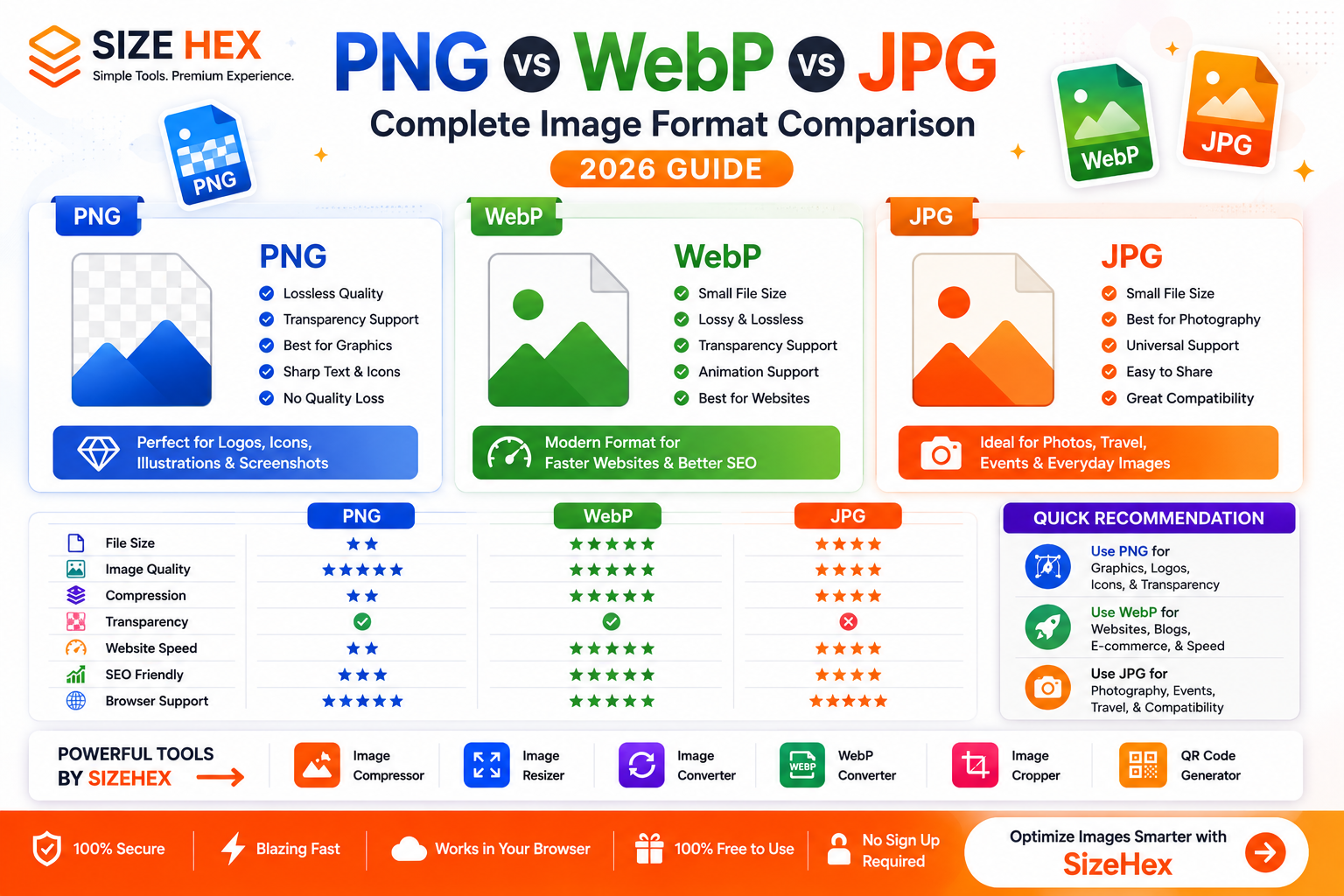
PNG vs WebP vs JPG: Which Image Format Is Better?
Choosing the right image format is one of the easiest ways to improve your website's performance, user experience, and search engine optimization (SEO). Images make up a large portion of a webpage's total size, so selecting the right format can significantly reduce loading times and bandwidth usage.
Among the most popular image formats on the web are PNG, WebP, and JPG. Each format has unique strengths and is designed for different purposes.
- PNG is known for its lossless quality and transparency support.
- WebP is a modern format that offers excellent compression with high image quality.
- JPG (or JPEG) has been the standard format for photographs and digital images for decades due to its small file sizes and universal compatibility.
So, which one should you choose?
The answer depends on your specific needs. Whether you're building a website, running an e-commerce store, sharing images on social media, or publishing blog posts, understanding the differences between these formats will help you make the right decision.
In this comprehensive guide, we'll compare PNG vs WebP vs JPG based on image quality, file size, compression, transparency, browser support, SEO, website performance, and the best use cases for each format.
What Is PNG?
PNG (Portable Network Graphics) is a lossless image format introduced to provide high-quality images without sacrificing detail.
Unlike JPG, PNG preserves every pixel during compression, making it an excellent choice for graphics, illustrations, logos, and screenshots.
Key Features of PNG
- Lossless compression
- Supports transparent backgrounds
- High image quality
- Sharp text and graphics
- Ideal for logos and icons
- No quality loss after editing and saving
Because PNG retains all image data, its files are generally larger than JPG and WebP. While this ensures exceptional quality, it can also slow down websites if large PNG images are used without optimization.
What Is WebP?
WebP is a modern image format developed by Google to improve website performance.
It supports both lossy and lossless compression, allowing users to achieve significantly smaller file sizes while maintaining impressive image quality.
WebP has become increasingly popular because it combines many of the advantages of PNG and JPG into a single format.
Key Features of WebP
- Smaller file sizes
- Lossy and lossless compression
- Transparency support
- Animation support
- Excellent image quality
- Faster website loading
- Better bandwidth efficiency
Today, WebP is supported by all major modern browsers and is widely recommended for websites focused on speed and performance.
What Is JPG?
JPG (also known as JPEG) is one of the oldest and most widely used image formats.
It uses lossy compression, which reduces file size by permanently removing some image data. While this results in smaller files, excessive compression can reduce image quality.
Despite this limitation, JPG remains the preferred format for photographs because it offers an excellent balance between quality and storage efficiency.
Key Features of JPG
- Small file sizes
- Universal compatibility
- Excellent for photographs
- Fast loading
- Supported by virtually every browser and device
- Easy to share across platforms
JPG does not support transparent backgrounds, making it less suitable for logos, icons, and graphics that require transparency.
Quick Comparison Table
| Feature | PNG | WebP | JPG |
|---|---|---|---|
| Compression | Lossless | Lossy & Lossless | Lossy |
| File Size | Large | Small | Medium |
| Image Quality | Excellent | Excellent | Very Good |
| Transparency | ✅ Yes | ✅ Yes | ❌ No |
| Animation | ❌ No | ✅ Yes | ❌ No |
| Photography | Good | Excellent | ✅ Best |
| Logos & Graphics | ✅ Best | Excellent | Poor |
| Browser Support | Excellent | Excellent | Excellent |
| Website Performance | Good | ✅ Best | Good |
At a glance, WebP offers the best balance between image quality and file size, PNG excels in graphics and transparency, while JPG remains the go-to choice for photography.
Image Quality Comparison
Image quality is one of the most important factors when selecting an image format.
PNG
PNG uses lossless compression, meaning every detail is preserved. It delivers crisp edges, sharp text, and perfect image quality, making it ideal for graphics, user interfaces, and illustrations.
WebP
WebP provides excellent image quality while significantly reducing file size. At comparable compression levels, WebP often looks nearly identical to PNG and JPG but requires much less storage.
JPG
JPG offers very good image quality for photographs. However, because it uses lossy compression, repeated editing and saving can gradually reduce image quality.
Winner
- Graphics: ✅ PNG
- Balanced Quality & Size: ✅ WebP
- Photography: ✅ JPG
File Size Comparison
Smaller file sizes improve page speed and reduce bandwidth usage.
Here's a typical comparison using the same image:
| Format | Typical File Size |
|---|---|
| PNG | 2.5 MB |
| JPG | 950 KB |
| WebP | 650 KB |
While actual sizes vary depending on the image, WebP consistently delivers the smallest files without a noticeable loss in quality.
Benefits of smaller file sizes include:
- Faster page loading
- Better mobile performance
- Lower hosting costs
- Reduced bandwidth usage
- Improved Core Web Vitals
- Better user experience
For websites focused on speed, WebP is usually the best choice.
Winner: ✅ WebP
Understanding Compression
Compression determines how image data is stored and how much the file size can be reduced.
PNG Compression
PNG uses lossless compression, which preserves all image data. This results in perfect quality but larger file sizes.
Best for:
- Logos
- Icons
- UI elements
- Screenshots
- Graphics with text
WebP Compression
WebP supports both lossy and lossless compression. This flexibility allows it to produce much smaller files while maintaining excellent visual quality.
Best for:
- Websites
- Blogs
- E-commerce
- Social media images
- General web graphics
JPG Compression
JPG uses lossy compression, permanently removing some image information to reduce file size.
When used with moderate compression settings, JPG offers a great balance between quality and storage efficiency, especially for photographs.
Best for:
- Photography
- Travel blogs
- Product photos
- Event galleries
- News websites
Website Performance
Website speed is one of the most important ranking and user experience factors. Images often account for the largest portion of a webpage's size, so choosing the right image format can significantly improve loading times.
Let's compare how PNG, WebP, and JPG perform on modern websites.
PNG
PNG files are usually much larger because they use lossless compression. While they provide excellent quality, large PNG images can slow down websites if they aren't optimized.
PNG is best reserved for graphics, icons, logos, and images that require transparency.
WebP
WebP was specifically designed to improve website performance.
It delivers:
- Smaller file sizes
- Faster page loading
- Reduced bandwidth usage
- Better mobile performance
- Improved Core Web Vitals
Because WebP balances quality and compression so well, it has become the preferred image format for many modern websites.
JPG
JPG files are generally smaller than PNG but larger than well-optimized WebP images.
For photographs, JPG still performs very well and remains widely used because of its universal compatibility.
Winner for Website Performance
🥇 WebP
🥈 JPG
🥉 PNG
SEO Comparison
Google doesn't rank websites based solely on image format. However, optimized images contribute to better page speed, which improves user experience and Core Web Vitals.
Here's how each format compares:
PNG
- Excellent image quality
- Larger file sizes
- Slower loading pages if overused
WebP
- Smaller images
- Faster loading
- Better performance scores
- Excellent choice for SEO
JPG
- Good balance of quality and size
- Ideal for photo-heavy websites
- Still SEO-friendly when properly compressed
Image SEO Best Practices
- Compress every image before uploading.
- Use descriptive filenames.
- Write meaningful alt text.
- Resize images to their display dimensions.
- Use responsive images.
- Choose the most appropriate format for each image type.
Winner for SEO: ✅ WebP
Best Format for Photography
Photography requires realistic colors, natural gradients, and efficient file sizes.
PNG
PNG preserves every detail but creates very large files. It's rarely the best choice for photographs on websites.
WebP
WebP provides outstanding photo quality while significantly reducing file size.
Many websites now use WebP instead of JPG for online photo galleries.
JPG
JPG has been the standard for photography for decades.
It offers:
- Small file sizes
- Excellent quality
- Universal support
- Easy sharing
Professional photographers often keep original images in RAW or TIFF formats and export JPG or WebP versions for the web.
Winner for Photography
🥇 JPG
🥈 WebP
🥉 PNG
Best Format for Logos & Graphics
Logos require:
- Sharp edges
- Crisp text
- Transparent backgrounds
- High-quality graphics
PNG
PNG is the traditional choice for logos because it supports lossless quality and transparent backgrounds.
WebP
WebP also supports transparency and produces much smaller files.
Many modern websites now use WebP versions of logos to improve loading speed.
JPG
JPG does not support transparency.
Compression artifacts can also make logos and text appear blurry.
Winner for Logos
🥇 PNG
🥈 WebP
🥉 JPG
Best Format for Screenshots
Screenshots usually contain:
- Text
- Buttons
- Icons
- Menus
- Code
- Charts
PNG
PNG preserves every pixel, keeping text and interface elements crisp and readable.
WebP
WebP offers an excellent balance between quality and file size. High-quality WebP screenshots remain sharp while taking up much less storage.
JPG
JPG often introduces visible compression artifacts around text and UI elements, making it less suitable for screenshots.
Winner for Screenshots
🥇 PNG
🥈 WebP
🥉 JPG
Best Format for Social Media
Most social media platforms automatically compress uploaded images.
Even if you upload PNG or WebP, many platforms convert images into their own optimized formats.
PNG
Best for:
- Graphics
- Memes
- Infographics
- Posts with text
WebP
Great for images hosted on your own website before sharing links on social media.
JPG
Still the most commonly accepted format across almost every social platform and messaging app.
Winner
🟰 PNG for graphics
🟰 JPG for photos
🟰 WebP for website-hosted content
Best Format for E-commerce
E-commerce websites contain hundreds or even thousands of product images.
Choosing the right format directly affects:
- Website speed
- Mobile experience
- Conversion rates
- Storage costs
- SEO
PNG
Ideal for:
- Product logos
- Icons
- Transparent product images
WebP
Best for:
- Product galleries
- Category pages
- Homepage banners
- Product thumbnails
Its smaller file sizes help pages load faster, improving the shopping experience.
JPG
Still widely used for high-quality product photographs, especially when compatibility with older systems is required.
Winner for E-commerce
🥇 WebP
🥈 JPG
🥉 PNG
Pros & Cons
PNG
Pros
- Lossless quality
- Transparency support
- Perfect for logos and graphics
- Sharp text
- Excellent editing quality
Cons
- Large file sizes
- Slower websites if overused
- Not ideal for photographs
WebP
Pros
- Small file sizes
- Excellent quality
- Transparency support
- Animation support
- Great website performance
- Better Core Web Vitals
Cons
- Older software may not fully support it
- Some legacy workflows still rely on PNG or JPG
JPG
Pros
- Small file sizes
- Universal compatibility
- Excellent for photography
- Fast uploads
- Easy sharing
Cons
- No transparency
- Lossy compression
- Quality decreases with repeated editing and saving
Best Practices
To get the best results, use each format where it performs best:
- Use WebP for most website images to maximize speed and performance.
- Use JPG for photographs when broad compatibility is important or when working with older systems.
- Use PNG for logos, icons, illustrations, screenshots, and graphics that require transparency.
- Always compress images before uploading them to your website.
- Resize images to match their display dimensions.
- Add descriptive filenames and alt text to improve SEO.
- Test image quality after compression to ensure a good user experience.
PNG vs WebP vs JPG: Which One Should You Choose?
Choosing the best image format depends on the type of image you're working with and where it will be used. There isn't a single format that's perfect for every situation.
Here's a quick guide to help you decide.
Choose PNG if you need:
- Transparent backgrounds
- Logos
- Icons
- Screenshots
- UI elements
- Illustrations
- Graphics with text
- Lossless image quality
- Frequent image editing without quality loss
PNG is the best option when image clarity and transparency are more important than file size.
Choose WebP if you need:
- Faster website loading
- Better SEO performance
- Smaller file sizes
- Modern website optimization
- E-commerce product images
- Blog featured images
- Landing pages
- Portfolio websites
- General website graphics
WebP provides the best balance between image quality and compression, making it the preferred choice for most modern websites.
Choose JPG if you need:
- Photographs
- Travel images
- Event galleries
- Product photography
- Universal compatibility
- Easy sharing across devices
- Email attachments
- Print-ready photo exports
JPG remains one of the most practical formats for photographs because of its small file sizes and broad support.
Final Comparison Table
Category PNG WebP JPG File Size ⭐⭐ ⭐⭐⭐⭐⭐ ⭐⭐⭐⭐ Image Quality ⭐⭐⭐⭐⭐ ⭐⭐⭐⭐⭐ ⭐⭐⭐⭐ Transparency ✅ ✅ ❌ Photography ⭐⭐⭐ ⭐⭐⭐⭐ ⭐⭐⭐⭐⭐ Logos ⭐⭐⭐⭐⭐ ⭐⭐⭐⭐ ⭐⭐ Graphics ⭐⭐⭐⭐⭐ ⭐⭐⭐⭐ ⭐⭐ Screenshots ⭐⭐⭐⭐⭐ ⭐⭐⭐⭐ ⭐⭐ Website Speed ⭐⭐ ⭐⭐⭐⭐⭐ ⭐⭐⭐⭐ SEO ⭐⭐⭐ ⭐⭐⭐⭐⭐ ⭐⭐⭐⭐ Browser Support ⭐⭐⭐⭐⭐ ⭐⭐⭐⭐⭐ ⭐⭐⭐⭐⭐ Compression ⭐⭐ ⭐⭐⭐⭐⭐ ⭐⭐⭐⭐ Overall Web Performance ⭐⭐⭐ ⭐⭐⭐⭐⭐ ⭐⭐⭐⭐ Overall Winners
🥇 Best for Websites: WebP
🥇 Best for Photography: JPG
🥇 Best for Logos & Graphics: PNG
Frequently Asked Questions (FAQ)
Which image format is best for websites?
For most modern websites, WebP is the best choice because it offers excellent image quality with much smaller file sizes than PNG and JPG. Smaller images help pages load faster and improve user experience.
Is WebP better than PNG?
It depends on the use case.
WebP usually produces much smaller files while maintaining excellent quality. However, PNG remains the preferred option for graphics that require perfect lossless quality or transparent backgrounds during editing.
Is WebP better than JPG?
For web use, WebP often provides similar or better visual quality at a smaller file size than JPG. JPG, however, is still widely used for photography because of its universal compatibility.
Should I convert PNG to WebP?
If the image is intended for a website, converting PNG to WebP can reduce file size and improve loading speed while preserving good visual quality.
Does JPG support transparent backgrounds?
No.
JPG does not support transparency. If you need a transparent background, use PNG or WebP.
Which format is best for logos?
PNG is traditionally the best choice for logos because it supports lossless quality and transparency. For websites, WebP versions of logos can help reduce file size while maintaining good quality.
Which format loads the fastest?
WebP generally loads the fastest because it creates smaller files without a noticeable loss in image quality.
Can I convert JPG to WebP?
Yes.
Converting JPG images to WebP is a common way to reduce file size and improve website performance, especially for blogs, e-commerce stores, and business websites.
Conclusion
Each image format has its own strengths, and using the right one can improve both website performance and visual quality.
- PNG is ideal for logos, icons, graphics, illustrations, and screenshots that require transparency or lossless quality.
- WebP is the best all-around format for websites thanks to its excellent compression, high image quality, and fast loading speeds.
- JPG remains a reliable choice for photographs, offering a good balance between quality, file size, and universal compatibility.
Rather than relying on a single format for every image, consider using the most appropriate format for each type of content. This approach helps optimize website speed, enhance user experience, and support better SEO performance.
Try SizeHex Today
Optimize your images quickly and securely with SizeHex.
Whether you need to compress, resize, convert, crop, or generate QR codes, SizeHex provides fast, browser-based tools to help you prepare images for websites, blogs, e-commerce stores, and social media—without installing any software.
Related Tools
Image Compressor
Compress JPG, PNG, WebP, and other image formats while maintaining excellent quality.
Image Resizer
https://www.sizehex.com/image-resizer.html
Resize images for websites, Instagram, Facebook, LinkedIn, YouTube, and more.
Image Converter
https://www.sizehex.com/image-converter.html
Convert images between JPG, PNG, WebP, AVIF, BMP, GIF, TIFF, and other popular formats.
WebP Converter
https://www.sizehex.com/webp-converter.html
Convert images to and from WebP for better website performance and reduced file sizes.
Image Cropper
https://www.sizehex.com/image-crop.html
Crop images online with custom dimensions or preset aspect ratios in just a few clicks.
QR Code Generator
https://www.sizehex.com/qr-generator.html
Create QR codes for websites, Wi-Fi networks, contact information, phone numbers, emails, and more.