July 28, 2026
Social Media Image Sizes Guide (2026): Instagram, Facebook, YouTube & More
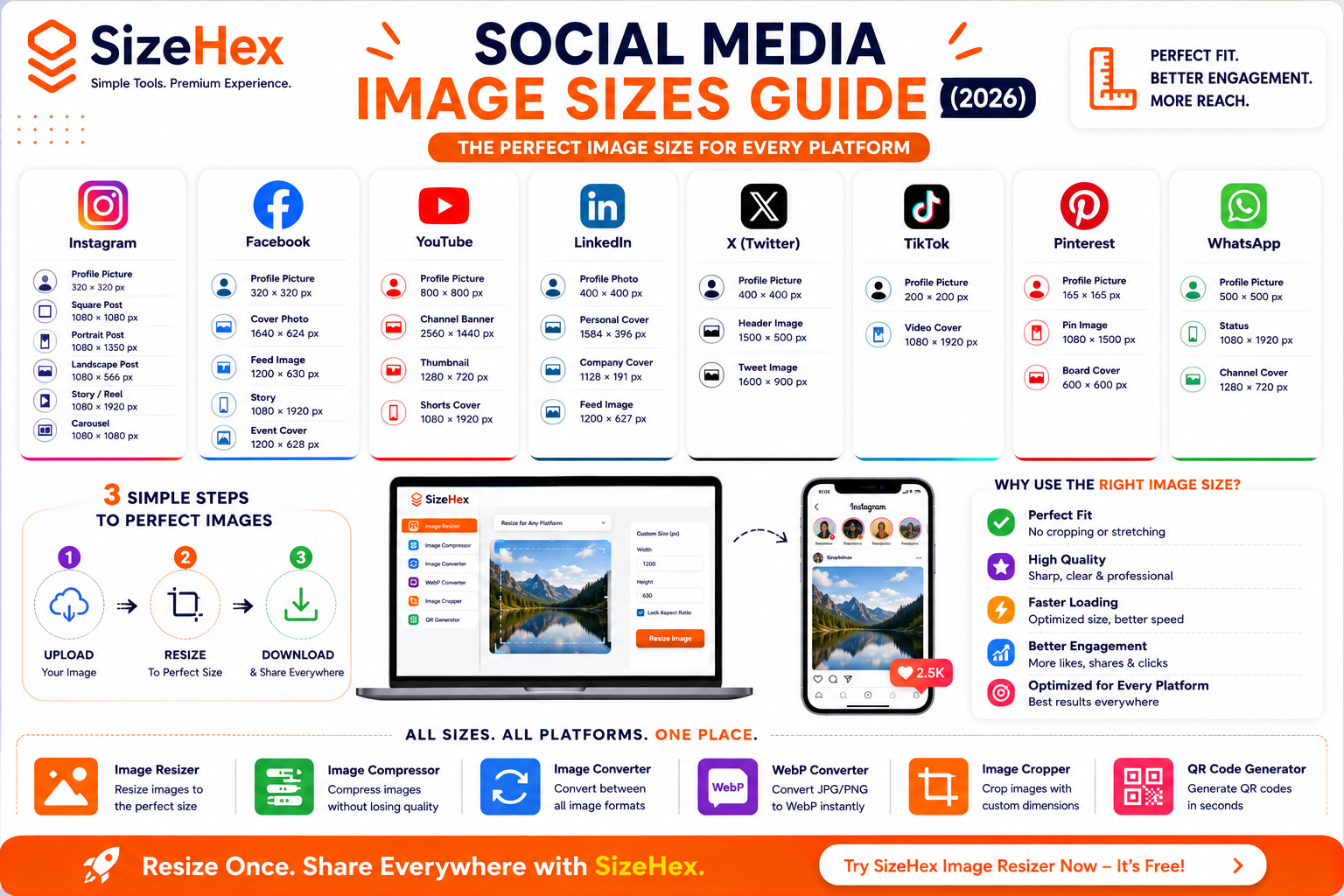
Social Media Image Sizes Guide (2026)
Social media platforms have become one of the most powerful ways to connect with audiences, build a brand, and drive traffic to websites. Whether you're a content creator, business owner, marketer, or blogger, using the correct image dimensions is essential for creating professional-looking posts.
Unfortunately, many people upload images without checking the recommended sizes. The result? Blurry photos, cropped graphics, stretched images, or important text getting cut off. These issues can reduce engagement and make your content appear less polished.
Every social media platform uses different image dimensions because each platform has its own layout, feed design, and display requirements. An image that looks perfect on Instagram might appear cropped on Facebook or lose quality when uploaded to LinkedIn.
The good news is that these problems are easy to avoid. By resizing your images before uploading them, you can ensure they look sharp, load quickly, and display correctly across all devices.
In this guide, you'll learn the recommended image sizes for the most popular social media platforms in 2026, understand why image dimensions matter, and discover best practices for optimizing your visuals using SizeHex Image Resizer.
Why Every Social Media Platform Uses Different Image Sizes
Each social media platform is designed with a unique layout and user experience in mind.
For example:
- Instagram focuses on square, portrait, and vertical content.
- Facebook supports a variety of post formats and cover photos.
- YouTube emphasizes landscape thumbnails and channel banners.
- LinkedIn prioritizes professional profile and company branding.
- TikTok is built around full-screen vertical videos.
- Pinterest favors tall, vertical images for discovery.
- WhatsApp uses compact profile photos and vertical status updates.
Because of these differences, one image size cannot fit every platform.
Using the recommended dimensions ensures your content displays exactly as intended without unwanted cropping or distortion.
Why Correct Image Sizes Matter
Using the correct image dimensions isn't just about appearance—it directly affects performance, engagement, and user experience.
1. Better Visual Quality
Properly sized images appear:
- Sharper
- More professional
- More attractive
- Easier to read
Visitors are more likely to engage with visually appealing content.
2. Prevents Cropping
Uploading an incorrectly sized image often causes platforms to crop important parts automatically.
This can cut off:
- Faces
- Logos
- Headlines
- Product images
- Call-to-action buttons
Using the correct dimensions ensures the entire image remains visible.
3. Improves Engagement
High-quality visuals attract more attention in crowded social media feeds.
Well-optimized images can help increase:
- Likes
- Comments
- Shares
- Saves
- Click-through rates
A clear and properly formatted image encourages users to interact with your content.
4. Faster Loading
Images with the correct dimensions and optimized file sizes load more quickly on mobile devices and slower internet connections.
Benefits include:
- Better user experience
- Reduced data usage
- Faster uploads
- Improved viewing speed
5. Consistent Brand Identity
Maintaining consistent image sizes across platforms helps create a professional and recognizable brand presence.
This is especially important for:
- Businesses
- Influencers
- Agencies
- Online stores
- Personal brands
6. Better Mobile Experience
Most social media users browse on smartphones.
Optimized images ensure that your posts look great on:
- Android devices
- iPhones
- Tablets
- Foldable devices
How Incorrect Image Sizes Affect Your Content
Uploading images with the wrong dimensions can create several problems.
Blurry Images
If the uploaded image is too small, the platform may enlarge it automatically.
This can reduce sharpness and make the image look pixelated.
Cropped Content
An incorrect aspect ratio can cause parts of your image to be removed automatically.
Important information like logos, text, or product details may no longer be visible.
Stretched or Squashed Images
Changing the width and height without maintaining the aspect ratio can distort your images, making them appear unprofessional.
Slower Uploads
Oversized images take longer to upload and consume more storage and bandwidth than necessary.
Lower User Engagement
Poor-quality visuals often receive fewer interactions because they don't stand out in users' feeds.
Understanding Aspect Ratio
Aspect ratio is the relationship between an image's width and height.
It determines the shape of your image rather than its actual size.
Here are some common aspect ratios used on social media:
| Aspect Ratio | Common Use |
|---|---|
| 1:1 | Square Instagram and Facebook posts |
| 4:5 | Instagram portrait posts |
| 16:9 | YouTube thumbnails and Facebook videos |
| 9:16 | Stories, Reels, Shorts, TikTok videos |
| 1.91:1 | Facebook and LinkedIn link previews |
Keeping the correct aspect ratio ensures your images display without stretching or unexpected cropping.
Resolution vs Image Dimensions
These two terms are often confused, but they have different meanings.
Image Dimensions
Image dimensions refer to the width and height of an image measured in pixels.
Examples:
- 1080 × 1080 px
- 1200 × 630 px
- 1280 × 720 px
For social media, dimensions are the most important factor.
Resolution
Resolution is measured in PPI (Pixels Per Inch) for digital screens and DPI (Dots Per Inch) for printing.
For online platforms, social media apps focus on pixel dimensions rather than DPI values.
As long as your image uses the recommended pixel dimensions, it will display correctly on most platforms.
Common Social Media Image Mistakes
Avoid these common mistakes to ensure your content looks professional.
Uploading Oversized Images
Uploading extremely large images doesn't improve quality on social media.
Instead, it increases upload time and may still be compressed by the platform.
Ignoring Aspect Ratio
Changing only the width or height can stretch your image.
Always keep the aspect ratio locked while resizing.
Using Low-Resolution Images
Small images enlarged by the platform often appear blurry.
Start with a high-quality source image whenever possible.
Using the Wrong File Format
Different formats are suitable for different types of content.
- JPG – Great for photos and everyday social posts.
- PNG – Best for graphics, logos, and images with transparency.
- WebP – Excellent for modern web sharing and websites.
- SVG – Ideal for scalable logos and icons (where supported).
Forgetting Mobile Users
Since most people access social media from mobile devices, always preview your content on a smartphone before publishing.
Quick Comparison Table
| Platform | Common Post Size | Aspect Ratio |
|---|---|---|
| 1080 × 1080 px | 1:1 | |
| 1200 × 630 px | 1.91:1 | |
| YouTube | 1280 × 720 px | 16:9 |
| 1200 × 627 px | 1.91:1 | |
| X (Twitter) | 1600 × 900 px | 16:9 |
| TikTok | 1080 × 1920 px | 9:16 |
| 1000 × 1500 px | 2:3 | |
| WhatsApp Status | 1080 × 1920 px | 9:16 |
Key Takeaways
- Every social media platform uses different image dimensions.
- Correct image sizes help prevent cropping, stretching, and pixelation.
- Using the right dimensions improves engagement and strengthens your brand's visual consistency.
- Maintain the correct aspect ratio when resizing images.
- Choose the appropriate file format based on your content.
- Optimize images before uploading to ensure faster loading and a better viewing experience.
Complete Social Media Image Sizes Guide (2026)
Now that you understand why image dimensions matter, it's time to explore the recommended image sizes for every major social media platform.
Using the correct dimensions helps your content look professional, prevents unwanted cropping, and ensures the best viewing experience across desktop and mobile devices.
Instagram Image Sizes
Instagram is one of the most visual social media platforms, making properly sized images essential.
Instagram Profile Picture
Specification Size Recommended Size 320 × 320 px Display Shape Circle Tips
- Keep important elements in the center.
- Avoid placing text near the edges.
- Use a high-resolution logo or headshot.
Instagram Square Post
Size Aspect Ratio 1080 × 1080 px 1:1 Best For
- Product photos
- Quotes
- Brand posts
- Promotional graphics
Instagram Portrait Post
Size Aspect Ratio 1080 × 1350 px 4:5 Portrait posts occupy more vertical space in users' feeds, often making them more eye-catching.
Instagram Landscape Post
Size Aspect Ratio 1080 × 566 px 1.91:1 Ideal for:
- Wide photography
- Website screenshots
- Travel images
Instagram Stories
Size Aspect Ratio 1080 × 1920 px 9:16 Perfect for:
- Promotions
- Behind-the-scenes content
- Polls
- Interactive stickers
Instagram Reels Cover
Size Aspect Ratio 1080 × 1920 px 9:16 Keep important text centered because parts of the cover may be cropped in profile grids.
Instagram Carousel
Size 1080 × 1080 px Maintain consistent dimensions across all carousel slides for a polished appearance.
Facebook Image Sizes
Facebook supports a wide range of image formats.
Facebook Profile Picture
Size 320 × 320 px Displayed as a circle.
Facebook Cover Photo
Size 1640 × 624 px Use high-quality images with centered text and branding.
Facebook Feed Image
Size 1200 × 630 px This is one of the most commonly used Facebook image sizes.
Facebook Story
Size 1080 × 1920 px Perfect for full-screen mobile viewing.
Facebook Event Cover
Size 1200 × 628 px Ideal for webinars, launches, and community events.
YouTube Image Sizes
YouTube branding relies heavily on thumbnails and banners.
YouTube Thumbnail
Size 1280 × 720 px Tips
- Use large readable text.
- Maintain high contrast.
- Keep faces prominent.
YouTube Channel Banner
Size 2560 × 1440 px Keep important elements within the safe area so they remain visible on all devices.
YouTube Profile Picture
Size 800 × 800 px Typically displays as a circle.
YouTube Shorts Cover
Size 1080 × 1920 px Use clean visuals with minimal text.
LinkedIn Image Sizes
LinkedIn emphasizes professional branding.
LinkedIn Personal Profile Photo
Size 400 × 400 px Professional headshots work best.
LinkedIn Personal Cover
Size 1584 × 396 px Showcase your expertise or brand.
LinkedIn Company Cover
Size 1128 × 191 px Keep branding centered.
LinkedIn Feed Image
Size 1200 × 627 px Recommended for company posts and articles.
X (Twitter) Image Sizes
Visual content helps tweets stand out.
Profile Picture
Size 400 × 400 px
Header Image
Size 1500 × 500 px Avoid placing important text too close to the edges.
Tweet Image
Size 1600 × 900 px Ideal for landscape content.
TikTok Image Sizes
TikTok focuses on vertical mobile content.
Profile Picture
Size 200 × 200 px
Video Cover
Size 1080 × 1920 px Design the cover with clear text and a strong visual focal point.
Pinterest Image Sizes
Pinterest performs best with vertical images.
Standard Pin
Size 1000 × 1500 px Aspect Ratio:
2:3
Board Cover
Size 600 × 600 px
Profile Picture
Size 165 × 165 px
WhatsApp Image Sizes
Profile Picture
Size 500 × 500 px
WhatsApp Status
Size 1080 × 1920 px Vertical full-screen format.
WhatsApp Channel Cover
Size 1280 × 720 px Maintain a clean layout with centered branding.
Complete Social Media Image Size Comparison
Platform Profile Cover/Banner Feed/Post Story/Reel Instagram 320×320 — 1080×1080 / 1080×1350 1080×1920 Facebook 320×320 1640×624 1200×630 1080×1920 YouTube 800×800 2560×1440 Thumbnail 1280×720 Shorts 1080×1920 LinkedIn 400×400 1584×396 1200×627 — X (Twitter) 400×400 1500×500 1600×900 — TikTok 200×200 — Video Cover 1080×1920 1080×1920 Pinterest 165×165 600×600 1000×1500 — WhatsApp 500×500 1280×720 — 1080×1920
Resize Images Easily with SizeHex
Instead of remembering dozens of dimensions, you can resize your images in just a few clicks using SizeHex Image Resizer.
Step 1
Upload your image.
Supported formats include:
- JPG
- PNG
- WebP
- AVIF
- GIF
- BMP
- TIFF
Step 2
Enter the required dimensions for your chosen social media platform.
Step 3
Keep the Aspect Ratio locked whenever possible to avoid stretching.
Step 4
Download the resized image and upload it directly to Instagram, Facebook, YouTube, LinkedIn, TikTok, Pinterest, X (Twitter), or WhatsApp.
Pro Tips for Better Social Media Images
- Resize images before uploading to avoid automatic cropping.
- Use 1080 px or higher for most social platforms to maintain sharpness.
- Keep important text and logos away from the edges.
- Use JPG for photos and PNG for graphics or transparent images.
- Preview your content on both desktop and mobile before publishing.
- Combine resizing with compression to reduce file size while preserving quality.
Social Media Image Optimization Best Practices
Knowing the correct image dimensions is only half the battle. To get the best results on social media, you also need to optimize your images for quality, speed, and engagement.
In this section, you'll learn practical tips to make your images look professional across every platform while keeping file sizes under control.
Best Practices for Social Media Images
Following these best practices will help your content stand out in crowded social media feeds.
1. Resize Images Before Uploading
Most social media platforms automatically resize oversized images.
Automatic resizing can sometimes reduce image quality or crop important content.
Instead:
- Resize images yourself.
- Use the recommended dimensions.
- Preview before uploading.
This gives you complete control over the final appearance.
2. Maintain the Correct Aspect Ratio
Never stretch an image to fit a platform.
Always keep the aspect ratio locked.
Example:
✅ 1080 × 1080 → 1:1
✅ 1080 × 1350 → 4:5
❌ 1080 × 900
Incorrect proportions can make your images appear distorted and unprofessional.
3. Use the Right Image Format
Different formats work better for different types of content.
Content Type Recommended Format Photos JPG or WebP Graphics PNG Logos SVG (where supported) Website Images AVIF or WebP Transparent Images PNG Choosing the right format helps balance quality and file size.
4. Compress Images After Resizing
Even correctly sized images may have larger file sizes than necessary.
A good workflow is:
Original Image
↓
Resize
↓
Compress
↓
Upload
This improves upload speed and reduces storage usage while maintaining good visual quality.
5. Keep Important Content Away from the Edges
Social media apps sometimes crop previews differently across devices.
Keep important elements like:
- Logos
- Headlines
- Faces
- Buttons
- Product images
near the center of the design.
6. Design for Mobile First
Most users access social media through smartphones.
Always check:
- Text readability
- Button visibility
- Image sharpness
- Cropping
before publishing.
7. Use High-Resolution Images
Start with the highest-quality image available.
High-resolution originals produce better results after resizing compared to enlarging small images.
Common Social Media Image Mistakes
Avoid these mistakes to improve your content quality and engagement.
Uploading Extremely Large Images
Large images increase upload time and are usually compressed by the platform anyway.
Resize them first.
Using Small Images
Tiny images often appear blurry after being enlarged by the platform.
Always begin with a sufficiently high-resolution source.
Ignoring Safe Areas
Platform interfaces may overlay icons, profile pictures, or buttons on your images.
Keep important content away from the edges.
Using Too Much Text
Large blocks of text can become difficult to read on smaller screens.
Use short headlines and larger fonts.
Mixing Different Sizes in Carousel Posts
Use the same dimensions for every slide in a carousel to create a clean and consistent look.
Forgetting Compression
Large files take longer to upload and download.
After resizing, compress your images to improve performance.
Before Publishing Checklist
Before posting on social media, make sure your image is ready.
✅ Correct dimensions
✅ Correct aspect ratio
✅ High-resolution source
✅ Properly resized
✅ Compressed for faster loading
✅ Important content centered
✅ Text readable on mobile
✅ Correct image format
✅ Previewed on desktop
✅ Previewed on smartphone
Frequently Asked Questions (FAQ)
1. What is the best image size for Instagram?
For square posts, 1080 × 1080 pixels is commonly recommended. Portrait posts generally perform well at 1080 × 1350 pixels.
2. What is the ideal Facebook post size?
A common recommendation for Facebook feed images is 1200 × 630 pixels.
3. What size should a YouTube thumbnail be?
YouTube thumbnails are typically 1280 × 720 pixels with a 16:9 aspect ratio.
4. Which image size works best for LinkedIn?
Feed images around 1200 × 627 pixels work well for most LinkedIn posts.
5. What is the recommended TikTok image size?
TikTok covers and full-screen content commonly use 1080 × 1920 pixels.
6. Which format is best for social media?
JPG is great for photos, PNG works well for graphics and transparency, while WebP and AVIF are excellent choices for websites and modern workflows.
7. Should I resize or compress first?
Resize first, then compress.
8. Does resizing reduce image quality?
Reducing dimensions usually maintains good quality when done correctly. Enlarging small images may reduce sharpness.
9. Why do social media platforms crop my images?
Cropping usually occurs when the uploaded image doesn't match the platform's recommended aspect ratio.
10. Can I use the same image for every platform?
Not always. Different platforms have different recommended dimensions, so resizing each version usually gives better results.
11. What is aspect ratio?
Aspect ratio describes the proportional relationship between an image's width and height, such as 1:1, 4:5, or 16:9.
12. How can I keep my logo from being cropped?
Place your logo within the central safe area and avoid positioning it close to the edges.
13. Why do my uploaded images look blurry?
The original image may be too small, heavily compressed, or resized incorrectly before upload.
14. Can I resize PNG, JPG, WebP, and AVIF images?
Yes. Modern image resizers support all of these formats.
15. What tool should I use to resize images?
A dedicated image resizer that lets you choose custom dimensions and preserve the aspect ratio is the best option for preparing images for social media.
Conclusion
Every social media platform has its own recommended image sizes, and using the correct dimensions can significantly improve how your content looks and performs.
By resizing your images before uploading, maintaining the correct aspect ratio, choosing the right format, and compressing files when necessary, you can create visuals that load faster, appear sharper, and deliver a consistent brand experience.
Whether you're posting on Instagram, Facebook, YouTube, LinkedIn, TikTok, Pinterest, X (Twitter), or WhatsApp, taking a few extra moments to optimize your images can lead to better engagement and a more professional online presence.
Why Choose SizeHex Image Resizer?
SizeHex Image Resizer makes preparing social media images quick and hassle-free.
Features
- One-click image resizing
- Supports JPG, PNG, WebP, AVIF, GIF, BMP, and TIFF
- Maintain aspect ratio automatically
- Fast browser-based processing
- No software installation required
- Mobile and desktop friendly
- Beginner-friendly interface
- Free to use
With SizeHex, you can create perfectly sized images for every major social media platform in just a few clicks.
Related Tools
Image Resizer
https://www.sizehex.com/image-resizer.html
Resize images to the exact dimensions required for websites and social media.
Image Compressor
Reduce image file size while maintaining excellent visual quality.
Image Converter
https://www.sizehex.com/image-converter.html
Convert between JPG, PNG, WebP, AVIF, GIF, BMP, and TIFF formats.
WebP Converter
https://www.sizehex.com/webp-converter.html
Convert JPG and PNG images into efficient WebP format.
Image Cropper
https://www.sizehex.com/image-crop.html
Crop images to custom dimensions or popular aspect ratios.
QR Code Generator
Generate QR codes for websites, contact information, Wi-Fi access, and more.