July 28, 2026
SVG vs WebP: Which Image Format Is Better? (Complete 2026 Guide)
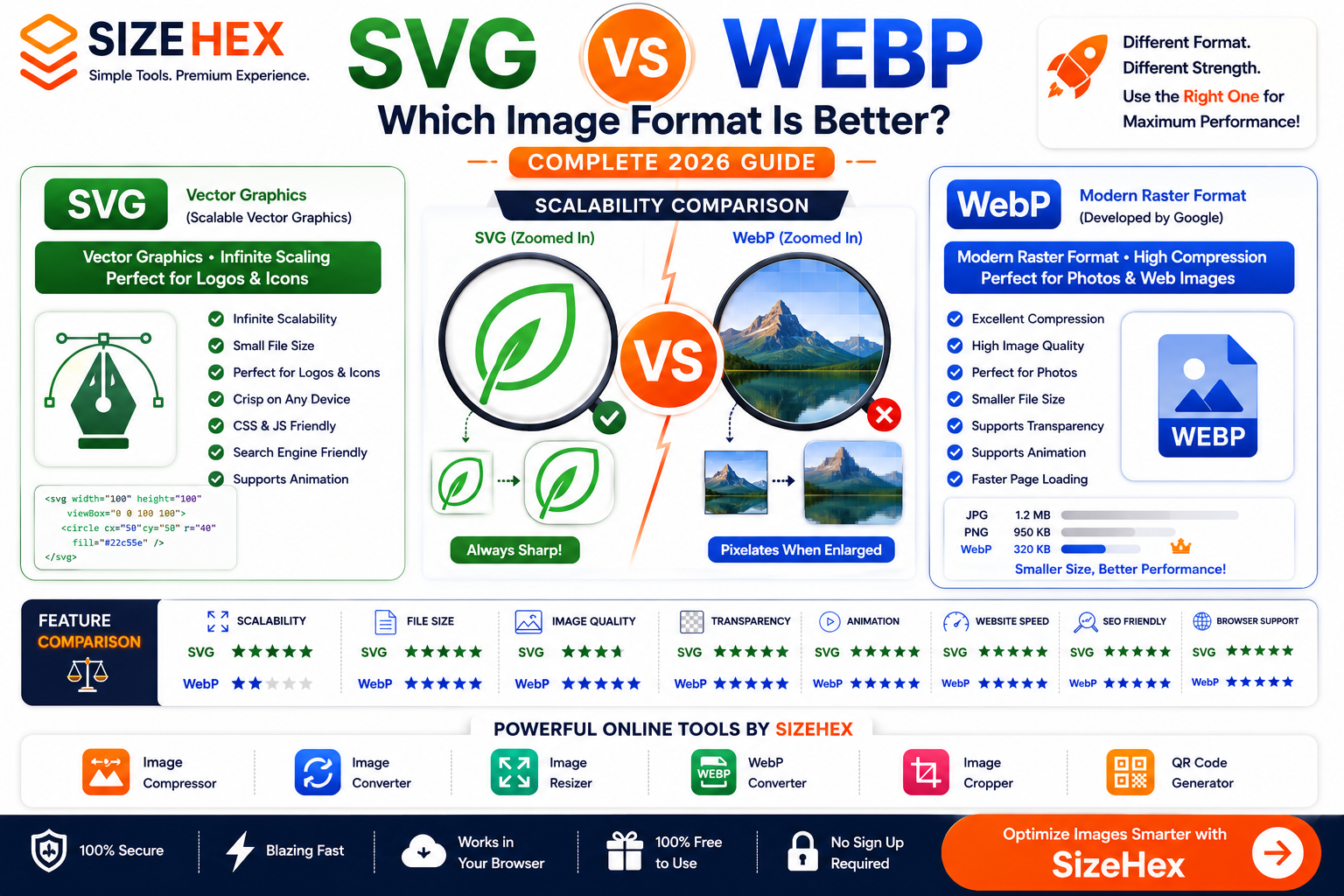
SVG vs WebP: Which Image Format Is Better? (Complete 2026 Guide)
Primary Keyword: SVG vs WebP
URL Slug: svg-vs-webp
Meta Title: SVG vs WebP: Which Image Format Is Better? (Complete 2026 Guide)
Meta Description: Compare SVG vs WebP to discover which image format is best for websites, logos, icons, illustrations, SEO, image quality, file size, and performance. Learn when to use SVG or WebP in this complete 2026 guide.
SVG vs WebP: Which Image Format Is Better?
Choosing the right image format is one of the easiest ways to improve your website's performance, user experience, and search engine rankings. A well-optimized image loads faster, looks sharper, and helps reduce bandwidth usage across desktops and mobile devices.
Among the most popular modern image formats are SVG and WebP. Although both are excellent for the web, they serve completely different purposes.
- SVG (Scalable Vector Graphics) is a vector-based image format that uses mathematical paths instead of pixels. It is ideal for logos, icons, illustrations, and graphics that need to remain perfectly sharp at any size.
- WebP is a modern raster image format developed by Google. It uses advanced compression to produce significantly smaller file sizes while maintaining high image quality, making it an excellent choice for photographs and web graphics.
Many beginners wonder whether they should use SVG or WebP for their websites.
The answer depends entirely on the type of image you're displaying.
In this guide, we'll compare SVG vs WebP based on image quality, scalability, file size, website performance, SEO, browser support, and real-world use cases to help you choose the right format.
What Is SVG?
SVG (Scalable Vector Graphics) is an XML-based vector image format designed for displaying graphics on the web.
Unlike raster image formats such as JPG, PNG, or WebP, SVG images are not made up of pixels. Instead, they use mathematical equations to define shapes, lines, curves, and colors.
This means an SVG can be enlarged or reduced to any size without losing quality.
Whether it's displayed as a 16×16 favicon, a website logo, or a large billboard, an SVG remains perfectly crisp.
Key Features of SVG
- Vector-based graphics
- Infinite scalability
- Small file sizes for simple graphics
- Supports transparency
- Search-engine friendly
- Editable with code
- Supports CSS styling
- Supports JavaScript interactions
- Can be animated
Common Uses of SVG
SVG is widely used for:
- Company logos
- Website icons
- Navigation menus
- UI elements
- Charts
- Infographics
- Brand illustrations
- Line art
- Interactive graphics
Because of its flexibility and scalability, SVG has become the industry standard for logos and interface graphics.
What Is WebP?
WebP is a modern image format developed by Google to improve web performance.
Unlike SVG, WebP is a raster image format, meaning it stores images as pixels.
Its biggest advantage is advanced compression.
WebP supports both:
- Lossy compression
- Lossless compression
This allows WebP images to achieve significantly smaller file sizes than traditional formats like JPG and PNG while maintaining excellent visual quality.
WebP also supports transparency and animation, making it a versatile choice for websites.
Key Features of WebP
- Modern raster format
- Excellent compression
- Small file sizes
- High image quality
- Supports transparency
- Supports animation
- Faster page loading
- Ideal for responsive websites
Common Uses of WebP
WebP is commonly used for:
- Blog images
- Product photos
- Hero banners
- E-commerce websites
- Portfolio galleries
- Social media graphics
- Website backgrounds
- Marketing images
Today, WebP is one of the most recommended image formats for improving website speed and Core Web Vitals.
Vector vs Raster Images
Understanding the difference between vector and raster graphics is essential when choosing between SVG and WebP.
SVG (Vector Graphics)
Vector graphics are created using mathematical paths instead of pixels.
An SVG stores instructions for drawing shapes rather than storing every individual pixel.
This allows SVG files to:
- Scale infinitely
- Remain perfectly sharp
- Stay lightweight for simple graphics
- Be edited easily
Vector graphics are ideal for:
- Logos
- Icons
- UI graphics
- Illustrations
- Diagrams
WebP (Raster Graphics)
Raster graphics are made up of tiny colored pixels.
Every WebP image has a fixed resolution.
Examples include:
- 800 × 600
- 1920 × 1080
- 4000 × 3000
If a raster image is enlarged beyond its original dimensions, it begins to lose sharpness and may appear blurry or pixelated.
Raster images are best suited for:
- Photographs
- Detailed artwork
- Product images
- Complex digital graphics
- Textured illustrations
Quick Comparison Table
| Feature | SVG | WebP |
|---|---|---|
| Image Type | Vector | Raster |
| Compression | Mathematical Paths | Lossy & Lossless |
| Scalability | ✅ Infinite | Fixed Resolution |
| Transparency | ✅ Yes | ✅ Yes |
| Animation | ✅ Yes | ✅ Yes |
| Photography | ❌ Not Suitable | ✅ Excellent |
| Logos | ✅ Best | Good |
| Icons | ✅ Best | Good |
| Website Performance | Excellent | Excellent |
| SEO | Excellent | Excellent |
| Browser Support | Excellent | Excellent |
The biggest difference is that SVG is vector-based, while WebP is a pixel-based raster format optimized for modern web images.
Image Quality Comparison
Both SVG and WebP deliver high-quality visuals, but they achieve this in different ways.
SVG
SVG graphics remain perfectly sharp regardless of size.
Whether displayed as a tiny icon or a large banner, SVG files never lose quality because they are rendered mathematically.
SVG is ideal for:
- Logos
- Icons
- Brand graphics
- UI illustrations
- Line art
However, SVG is not suitable for photographs because it cannot efficiently represent millions of color variations.
WebP
WebP provides excellent image quality while keeping file sizes small.
It is designed to preserve visual detail even after compression, making it an excellent choice for:
- Product photography
- Blog images
- Website banners
- Portfolio galleries
- Marketing visuals
While WebP images can be resized within reasonable limits, enlarging them beyond their original resolution will eventually reduce image quality because they are pixel-based.
Winner
- Logos & Icons: ✅ SVG
- Photography: ✅ WebP
- Illustrations: Depends on the artwork (SVG for vector illustrations, WebP for detailed raster illustrations)
File Size Comparison
File size has a major impact on website speed and user experience.
For simple graphics such as logos and icons, SVG files are often much smaller than WebP because they store mathematical instructions instead of pixels.
Typical examples:
| Image Type | SVG | WebP |
|---|---|---|
| Simple Logo | 12 KB | 35 KB |
| Navigation Icon | 3 KB | 10 KB |
| Line Illustration | 25 KB | 80 KB |
For photographs and highly detailed images, WebP is significantly more efficient.
Example:
| Image Type | SVG | WebP |
|---|---|---|
| Landscape Photo | Not Practical | 180 KB |
| Product Photo | Not Practical | 120 KB |
| Portrait | Not Practical | 150 KB |
Winner
- Simple graphics: 🏆 SVG
- Photographs: 🏆 WebP
Understanding Scalability
Scalability determines how well an image maintains its quality when displayed at different sizes.
SVG Scalability
SVG offers infinite scalability.
Whether displayed as:
- A website favicon
- A mobile app icon
- A desktop logo
- A billboard
the image remains perfectly sharp because it is recreated mathematically every time it is rendered.
WebP Scalability
WebP images have a fixed resolution.
They look excellent at their intended size, but enlarging them beyond their original dimensions causes visible quality loss, including blurriness or pixelation.
For responsive websites, developers often generate multiple WebP sizes to ensure optimal quality across different devices.
Winner
🏆 SVG
SVG vs WebP for Websites
When building a modern website, choosing the right image format can significantly improve loading speed, user experience, and search engine performance.
Although SVG and WebP are both excellent web formats, they are optimized for different types of content.
SVG
SVG is ideal for graphics that need to remain perfectly sharp on every screen size.
Best website uses include:
- Company logos
- Navigation icons
- UI elements
- Buttons
- Charts
- Diagrams
- Simple illustrations
Because SVG files are lightweight and scalable, they help create responsive websites without sacrificing image quality.
WebP
WebP is designed to optimize raster images while maintaining excellent visual quality.
It is perfect for:
- Blog featured images
- Product photos
- Hero banners
- Portfolio galleries
- Background images
- Marketing graphics
Compared to older formats like JPG and PNG, WebP usually delivers smaller file sizes, helping pages load faster.
Winner for Websites
🏆 Tie
- SVG for logos, icons, and interface graphics.
- WebP for photographs and large visual content.
Most modern websites use both formats together for the best balance of quality and performance.
SEO Comparison
Image optimization is an important part of technical SEO.
While Google doesn't rank a page simply because it uses SVG or WebP, optimized images contribute to:
- Faster page speed
- Better Core Web Vitals
- Improved user experience
- Lower bounce rates
- Higher mobile performance
SVG
SVG files are often extremely small for simple graphics.
Advantages include:
- Faster loading
- Crisp images on every device
- Responsive scaling
- CSS customization
- Search-engine friendly structure
Because SVG is XML-based, developers can style and optimize it directly in code.
WebP
WebP reduces image file sizes while maintaining high visual quality.
Benefits include:
- Faster image loading
- Reduced bandwidth usage
- Improved Largest Contentful Paint (LCP)
- Better mobile performance
- Lower hosting and CDN bandwidth consumption
For image-heavy websites, WebP can dramatically improve loading speed.
SEO Best Practices
Regardless of the image format:
- Compress images before uploading.
- Use descriptive filenames.
- Add meaningful alt text.
- Resize images to the required dimensions.
- Enable lazy loading for large images.
- Avoid uploading unnecessarily large files.
Winner for SEO
🏆 Tie
SVG improves SEO for vector graphics, while WebP improves SEO for photographs and raster images.
Best Format for Logos & Branding
A logo should remain sharp across all devices, from small favicons to large banners.
SVG
SVG is the industry standard for logos because it:
- Scales infinitely
- Remains perfectly crisp
- Has small file sizes
- Supports transparency
- Can be recolored with CSS
- Works on Retina displays
WebP
WebP logos look good at their original resolution but lose quality if enlarged beyond their intended size.
For static website logos, WebP is generally not the preferred choice.
Winner
🏆 SVG
Best Format for Icons
Icons are an essential part of modern user interfaces.
Examples include:
- Navigation menus
- Buttons
- Mobile apps
- Dashboards
- Settings panels
SVG
SVG icons offer several advantages:
- Infinite scalability
- Crisp display on all screens
- Lightweight files
- Easy color customization
- CSS animations
- JavaScript interactions
WebP
WebP icons work well as raster images but cannot match SVG's flexibility.
Different resolutions may be needed to ensure sharpness across various devices.
Winner
🏆 SVG
Best Format for Photography
Photography contains millions of colors, textures, and gradients.
SVG
SVG is not designed for photographs.
Converting a photo into SVG would create an unnecessarily large and complex file that offers no practical benefit.
WebP
WebP excels at displaying photographs.
It offers:
- Excellent compression
- High visual quality
- Transparency support
- Smaller file sizes than JPG and PNG in many cases
This makes WebP one of the best formats for:
- Product photography
- Travel blogs
- E-commerce stores
- Food photography
- Real estate websites
Winner
🏆 WebP
Best Format for Illustrations
The ideal format depends on the style of the illustration.
SVG
Best for:
- Flat illustrations
- Character vectors
- Brand artwork
- Icons
- Diagrams
- Infographics
SVG keeps illustrations sharp regardless of screen size.
WebP
Best for:
- Digital paintings
- Detailed artwork
- Textured illustrations
- Concept art
- Raster graphics
WebP preserves visual detail while keeping file sizes relatively small.
Winner
🏆 Depends on the artwork
- Vector illustrations: SVG
- Raster illustrations: WebP
Browser Support
Both SVG and WebP are supported by all major modern browsers, making them reliable choices for today's websites.
SVG
Supported by:
- Google Chrome
- Mozilla Firefox
- Microsoft Edge
- Apple Safari
- Opera
SVG has been a web standard for many years and works consistently across desktop and mobile browsers.
WebP
WebP is also supported by:
- Google Chrome
- Mozilla Firefox
- Microsoft Edge
- Apple Safari
- Opera
- Android browsers
- Most modern mobile browsers
Older browsers that predate WebP may require fallback images, but this is rarely necessary for modern web development.
Winner
🏆 Tie
Pros & Cons
SVG
Pros
- Infinite scalability
- Lightweight for vector graphics
- Perfect for logos and icons
- Supports transparency
- CSS customizable
- JavaScript support
- Animation support
- Retina-ready
Cons
- Not suitable for photographs
- Less effective for highly detailed raster artwork
- Requires vector artwork to realize its full benefits
WebP
Pros
- Excellent compression
- High image quality
- Small file sizes
- Supports transparency
- Supports animation
- Great for websites
- Ideal for photography
- Improves page speed
Cons
- Pixel-based format
- Loses quality when enlarged beyond its original resolution
- Less suitable for logos and scalable graphics
Best Practices
To achieve the best balance between quality and performance:
- Use SVG for logos, icons, buttons, charts, and vector illustrations.
- Use WebP for photographs, product images, blog banners, and other raster graphics.
- Optimize all images before uploading them to your website.
- Include descriptive alt text and SEO-friendly filenames.
- Serve appropriately sized images for different screen sizes.
- Combine SVG and WebP in the same project to take advantage of each format's strengths.
SVG vs WebP: Which One Should You Choose?
Both SVG and WebP are excellent image formats, but they are designed for different types of content. Rather than choosing one over the other, it's important to use each format where it performs best.
Here's a quick guide to help you decide.
Choose SVG if you need:
- Company logos
- Website icons
- UI elements
- Buttons
- Navigation graphics
- Infographics
- Charts
- Simple illustrations
- Scalable brand assets
SVG is the best choice when an image needs to remain perfectly sharp at every size.
Choose WebP if you need:
- Product photos
- Blog featured images
- Hero banners
- Portfolio galleries
- Background images
- Marketing graphics
- Social media visuals
- E-commerce product images
WebP is the better choice for photographs and detailed raster graphics where maintaining high quality with smaller file sizes is important.
Final Comparison Table
Category SVG WebP Image Type Vector Raster Scalability ⭐⭐⭐⭐⭐ ⭐⭐ File Size ⭐⭐⭐⭐⭐ (Simple Graphics) ⭐⭐⭐⭐⭐ (Photos) Transparency ✅ ✅ Animation ✅ ✅ Logos ⭐⭐⭐⭐⭐ ⭐⭐⭐ Icons ⭐⭐⭐⭐⭐ ⭐⭐⭐ Photography ⭐ ⭐⭐⭐⭐⭐ Illustrations ⭐⭐⭐⭐⭐ (Vector) ⭐⭐⭐⭐ (Raster) Website Performance ⭐⭐⭐⭐⭐ ⭐⭐⭐⭐⭐ SEO ⭐⭐⭐⭐⭐ ⭐⭐⭐⭐⭐ Browser Support ⭐⭐⭐⭐⭐ ⭐⭐⭐⭐⭐ Overall Winners
🏆 Best for Logos: SVG
🏆 Best for Icons: SVG
🏆 Best for UI Elements: SVG
🏆 Best for Photography: WebP
🏆 Best for Blog Images: WebP
🏆 Best for E-commerce: WebP
Frequently Asked Questions (FAQ)
Is SVG better than WebP?
Neither format is universally better.
SVG is ideal for vector graphics like logos and icons, while WebP is designed for photographs and detailed raster images. The right choice depends on the type of image you're using.
Can SVG replace WebP?
No.
SVG cannot efficiently display photographs or highly detailed raster images. For those, WebP is the better option.
Can WebP replace SVG?
Not completely.
WebP works well for raster graphics, but it cannot provide the infinite scalability and flexibility of SVG for logos, icons, and vector artwork.
Which format is smaller?
It depends on the image.
- For logos, icons, and simple illustrations, SVG files are usually much smaller.
- For photographs and detailed graphics, WebP typically produces smaller files than PNG or JPG while maintaining excellent quality.
Which format is better for SEO?
Both formats can support SEO when used correctly.
- SVG helps improve performance for vector graphics because of its lightweight, scalable nature.
- WebP helps improve performance for raster images through advanced compression.
For the best SEO results, use descriptive filenames, add meaningful alt text, and optimize images before uploading them.
Does WebP support transparency?
Yes.
WebP supports transparent backgrounds, making it a strong alternative to PNG for many web graphics.
Does SVG support animation?
Yes.
SVG supports CSS and JavaScript animations, making it ideal for interactive icons, logos, loaders, and other web interface elements.
WebP also supports animation, making it a modern replacement for animated GIFs in many cases.
Which format is better for website logos?
SVG is the preferred format because it scales perfectly to any size without losing quality and is easy to style or animate.
Which format should I use for blog images?
WebP is the recommended choice for blog featured images and article illustrations because it offers excellent compression while preserving image quality.
Conclusion
Both SVG and WebP are essential image formats for modern websites, but they solve different problems.
- SVG is the best choice for logos, icons, buttons, illustrations, and other vector graphics that need to remain sharp at any size.
- WebP is ideal for photographs, product images, blog banners, and other raster graphics where fast loading and high visual quality are priorities.
Instead of choosing one format for everything, use SVG for vector assets and WebP for photographic or detailed images. This combination helps create faster websites, better user experiences, and improved search engine performance.
Try SizeHex Today
Optimize your images with SizeHex—a fast, secure, and free online image toolkit.
Whether you need to compress, resize, convert, crop, or generate QR codes, SizeHex helps you prepare images for websites, blogs, e-commerce stores, and social media directly in your browser.
Related Tools
Image Compressor
Compress JPG, PNG, WebP, AVIF, and other image formats without noticeable quality loss.
Image Converter
https://www.sizehex.com/image-converter.html
Convert images between JPG, PNG, WebP, SVG, AVIF, BMP, GIF, TIFF, and more.
Image Resizer
https://www.sizehex.com/image-resizer.html
Resize images for websites, blogs, social media, online stores, and presentations.
WebP Converter
https://www.sizehex.com/webp-converter.html
Convert JPG and PNG images to WebP to reduce file sizes and improve website performance.
Image Cropper
https://www.sizehex.com/image-crop.html
Crop images online using custom dimensions or preset aspect ratios in seconds.
QR Code Generator
https://www.sizehex.com/qr-generator.html
Generate QR codes for URLs, Wi-Fi networks, contact details, phone numbers, emails, and more.