August 4, 2026
Google Images Ranking Factors: Complete SEO Guide (2026)
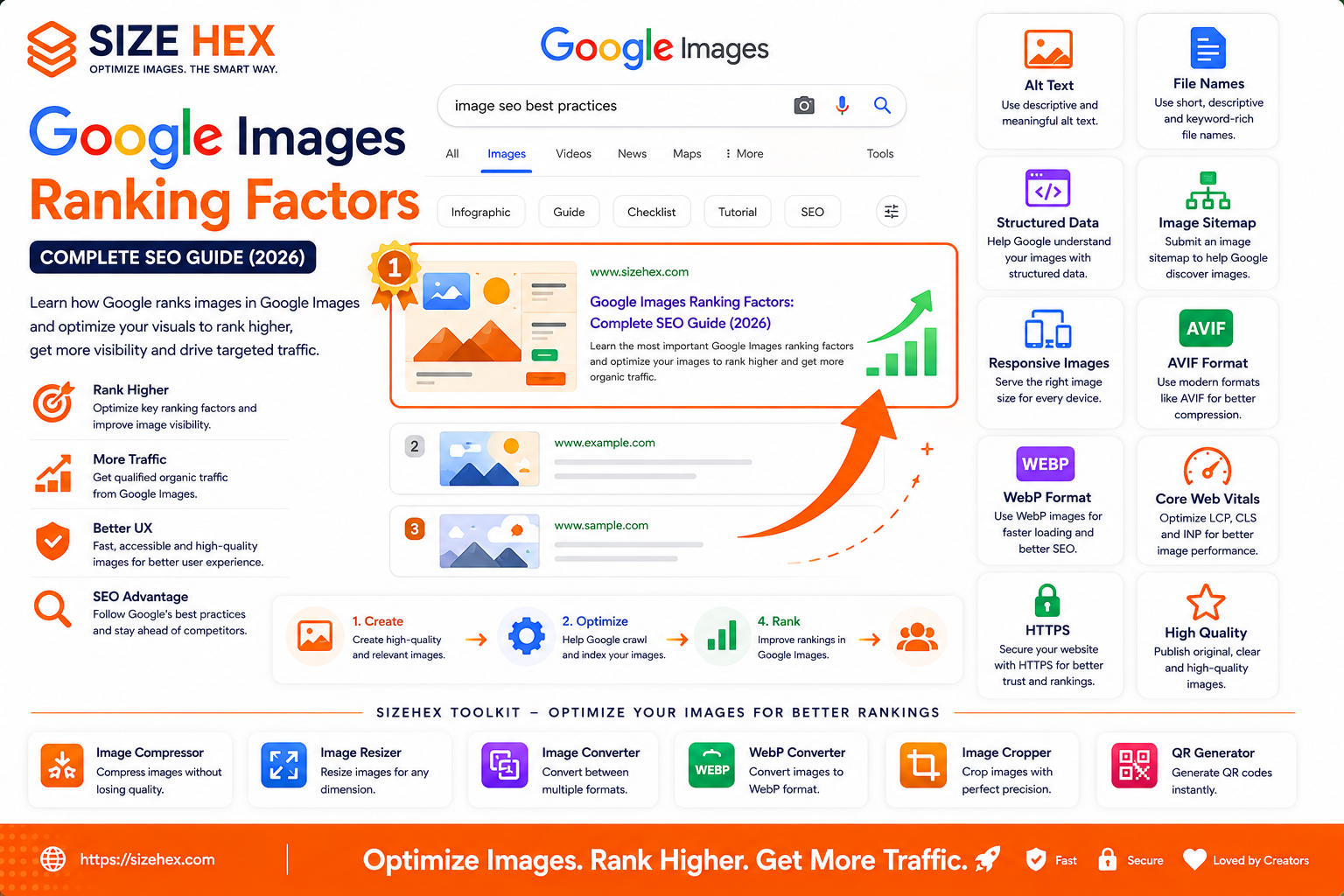
Google Images Ranking Factors: Complete SEO Guide (2026)
Every day, billions of images appear in Google Images, helping users discover products, tutorials, recipes, travel destinations, businesses, and educational content. For many websites, Google Images is an important source of organic traffic that can bring highly engaged visitors.
However, simply uploading an image to your website doesn't guarantee it will appear in Google Images.
Google evaluates many signals before deciding which images deserve to rank. It analyzes the image itself, the surrounding page content, technical optimization, website performance, user experience, and many other factors to determine relevance and quality.
For website owners, bloggers, developers, designers, photographers, e-commerce businesses, and digital marketers, understanding these ranking factors is essential for improving image visibility.
In this guide, you'll learn how Google Images works, how Google discovers and indexes images, the most important image ranking factors, common misconceptions, and the best practices for improving image SEO in 2026.
How Google Images Works
Google Images is a specialized search engine that helps users find relevant visual content.
The process generally involves four stages:
- Crawling
- Indexing
- Understanding
- Ranking
Googlebot visits webpages, discovers image files, analyzes them along with the surrounding content, and decides whether they should appear in Google Images.
When someone searches for an image, Google's ranking systems evaluate numerous signals to determine the most relevant results.
Why Image Rankings Matter
Image search can become a valuable traffic source.
Benefits include:
- More organic visitors
- Better brand visibility
- Increased product discovery
- Higher engagement
- More opportunities for backlinks
- Improved user experience
Many industries receive substantial traffic from image search, including:
- E-commerce
- Food blogs
- Photography
- Travel
- Education
- Interior design
- Fashion
- Healthcare
Optimizing images helps these websites reach more users.
How Google Crawls Images
Google discovers images in several ways.
Common methods include:
-
HTML
<img>elements - Responsive images
- XML Image Sitemaps
- Internal links
- External backlinks
Googlebot downloads images and analyzes:
- File location
- File format
- Alt text
- Surrounding content
- Page structure
- Technical accessibility
Images blocked by robots.txt or inaccessible due to permissions may not be indexed.
Understanding Image Indexing
Crawling and indexing are different processes.
Crawling
Google discovers the image.
Indexing
Google decides whether the image is useful enough to include in its search index.
Not every crawled image is indexed.
Reasons an image may not be indexed include:
- Poor quality
- Duplicate content
- Thin page content
- Missing context
- Blocked resources
- Technical issues
Providing useful, high-quality images within valuable content improves indexing opportunities.
Top Google Image Ranking Factors
Google doesn't rely on a single ranking signal.
Instead, multiple factors work together.
Some of the most important include:
- Relevant page content
- Descriptive filenames
- Helpful alt text
- Image quality
- Mobile friendliness
- Responsive images
- Fast loading speed
- Core Web Vitals
- Structured data
- Image Sitemap
- HTTPS
- Internal linking
- Overall page authority
Optimizing several factors together generally produces better results than focusing on only one.
Direct vs Indirect Ranking Signals
It's helpful to distinguish between direct image-related signals and broader website quality signals.
Direct Signals
These relate specifically to the image itself.
Examples:
- Filename
- Alt text
- Image quality
- Structured data
- Image dimensions
- Image format
- Captions
Indirect Signals
These improve the overall webpage experience.
Examples:
- Core Web Vitals
- HTTPS
- Mobile usability
- Internal linking
- Website authority
- Page relevance
- User engagement
Together, these signals influence how Google evaluates image quality and relevance.
Common Myths About Google Images SEO
Let's address some common misconceptions.
Myth 1: Alt text alone ranks images.
Reality: Alt text is important, but Google considers many additional signals such as surrounding content, page relevance, image quality, and technical optimization.
Myth 2: Bigger images always rank better.
Reality: High-quality images are beneficial, but unnecessarily large files can slow websites and negatively affect performance.
Myth 3: File names don't matter.
Reality: Descriptive filenames help Google understand image content.
Myth 4: Image SEO is only for photographers.
Reality: Almost every website benefits from image optimization.
Blogs, SaaS websites, online stores, educational websites, and business sites can all gain traffic from Google Images.
Myth 5: Google reads images exactly like humans.
Reality: Google uses computer vision, surrounding text, metadata, structured data, and other signals to interpret images.
Real-World Examples
Example 1: E-commerce Store
A clothing retailer uploads optimized product images with descriptive filenames, helpful alt text, responsive delivery, and structured data.
Customers searching Google Images discover products directly from image search.
Example 2: Travel Blog
A travel blogger publishes high-quality destination photos with descriptive captions and relevant surrounding content.
These images begin appearing for destination-related searches.
Example 3: Educational Website
An educational platform includes original diagrams and infographics with descriptive alt text and supporting explanations.
Students searching for educational visuals find the content through Google Images.
Example 4: SaaS Website (SizeHex)
SizeHex helps users prepare images for search visibility by providing browser-based tools for compression, resizing, cropping, and format conversion.
Combined with descriptive filenames, responsive images, structured data, and optimized page content, these improvements help create images that are easier for Google to crawl, index, and rank.
Key Takeaways
- Google Images uses crawling, indexing, understanding, and ranking to deliver relevant visual search results.
- Image rankings depend on multiple factors, including page relevance, image quality, descriptive filenames, alt text, structured data, Core Web Vitals, and technical SEO.
- High-quality, original images combined with valuable surrounding content have better opportunities to rank.
- Fast-loading images, responsive delivery, HTTPS, and mobile-friendly design contribute to a stronger image SEO strategy.
- Image optimization should be viewed as part of a comprehensive SEO approach rather than a standalone tactic.
- Consistently applying image SEO best practices increases the likelihood of earning long-term organic traffic from Google Images.
Complete Google Images SEO Guide
Now that you understand how Google discovers, crawls, and indexes images, let's explore the ranking factors you can optimize. While no single factor guarantees top rankings, combining these best practices helps Google better understand your images and increases their chances of appearing in Google Images.
1. Descriptive File Names
Google looks at image filenames to understand what an image represents.
Instead of generic filenames like:
IMG_12345.jpgUse descriptive names:
google-images-ranking-factors-guide.avifGood filenames:
- Describe the image accurately.
- Use lowercase letters.
-
Separate words with hyphens (
-). - Include relevant keywords naturally.
Avoid:
❌ image1.jpg
❌ photo-final-new.png
❌ screenshot123.webp
2. SEO-Friendly Alt Text
Alt text (alternative text) describes an image for search engines and assistive technologies.
Example:
<img src="google-images-ranking-factors.avif"
alt="Google Images ranking factors infographic showing image SEO techniques">
Good alt text should:
- Describe the image naturally.
- Be specific.
- Help visually impaired users.
- Include keywords only when relevant.
Avoid keyword stuffing.
Bad example:
Google Images SEO Google Images SEO Image SEO Google Images
3. Image Context
Google doesn't evaluate images in isolation.
It also analyzes:
- Page title
- Headings
- Paragraphs
- Captions
- Nearby text
An image about Image SEO should appear inside content discussing Image SEO—not on an unrelated page.
Relevant surrounding content strengthens image understanding.
4. High-Quality Images
Google prefers images that provide value to users.
Characteristics include:
- Sharp
- Clear
- Original
- Properly exposed
- High resolution
- Relevant to the content
Avoid:
- Blurry images
- Pixelated graphics
- Watermarked stock photos
- Duplicate visuals across multiple pages
Original images often perform better than reused stock images.
5. Responsive Images
Modern websites should serve appropriately sized images for different devices.
Benefits:
- Faster mobile loading
- Lower bandwidth usage
- Better user experience
- Improved Core Web Vitals
Responsive images help ensure users receive the correct image size for their screen.
6. Image Compression
Large image files slow websites.
Compress images before uploading.
Benefits:
- Faster loading
- Lower bandwidth
- Better mobile performance
- Improved user experience
Aim to reduce file size while maintaining visual quality.
7. AVIF & WebP
Modern formats significantly reduce file size.
Recommended order:
- AVIF
- WebP
- JPEG/PNG fallback
Advantages:
- Smaller downloads
- Faster rendering
- Better Core Web Vitals
- Improved SEO support
Modern browsers automatically benefit from these formats.
8. Structured Data
Structured data helps search engines understand webpage content.
For images, structured data may support:
- Products
- Recipes
- Articles
- Videos
- Organizations
Correct schema increases the likelihood of enhanced search results where applicable.
9. Image Sitemap
An XML Image Sitemap helps Google discover images efficiently.
Especially useful for:
- Large websites
- E-commerce stores
- Galleries
- Photography portfolios
Include important image URLs in your sitemap to improve discoverability.
10. Lazy Loading
Lazy loading improves website performance by delaying off-screen images.
Best practice:
- Lazy load below-the-fold images.
- Load hero images immediately.
Proper implementation supports both user experience and image SEO.
11. Core Web Vitals
Google values fast-loading webpages.
Image optimization contributes significantly to:
- Largest Contentful Paint (LCP)
- Interaction to Next Paint (INP)
- Cumulative Layout Shift (CLS)
Compressing images, using modern formats, defining dimensions, and serving responsive images all contribute to better performance.
12. Mobile Friendliness
Google primarily uses mobile-first indexing.
Your images should display correctly on:
- Smartphones
- Tablets
- Laptops
- Desktop computers
Responsive layouts ensure a consistent experience across devices.
13. HTTPS
Serve images securely.
HTTPS provides:
- Secure connections
- Better browser compatibility
- Improved trust
- Modern web standards
Avoid mixed content where secure pages load images over insecure connections.
14. Internal Linking
Strong internal linking helps Google discover related content.
Example:
A blog about AVIF should link to:
- WebP Guide
- Image Compression Guide
- Responsive Images Guide
- Image Sitemap Guide
These relationships strengthen your topical authority.
15. Page Authority
Even well-optimized images benefit from appearing on authoritative pages.
Factors include:
- High-quality content
- Relevant backlinks
- Internal links
- Helpful user experience
- Topical relevance
Strong pages often help their images rank better.
16. Image Captions
Captions provide additional context.
Example:
"Diagram showing the primary Google Images ranking factors in 2026."
Captions improve usability and help reinforce image relevance.
17. EXIF Metadata
Some images contain EXIF metadata such as:
- Camera model
- Date
- GPS coordinates
While metadata may provide additional context in certain situations, Google has not stated that EXIF data is a primary ranking factor. It should not replace core image SEO practices like descriptive filenames, alt text, and relevant surrounding content.
18. Common SEO Mistakes
Avoid these mistakes:
❌ Generic filenames
❌ Missing alt text
❌ Huge file sizes
❌ No responsive images
❌ No structured data where appropriate
❌ Duplicate images across many pages
❌ Thin page content
❌ Missing image sitemap
❌ Poor mobile optimization
❌ Ignoring Core Web Vitals
19. Testing & Monitoring
Regular testing helps identify opportunities for improvement.
Useful tools include:
- Google Search Console
- Google PageSpeed Insights
- Lighthouse
- Chrome DevTools
Monitor:
- Indexed images
- Performance metrics
- Core Web Vitals
- Mobile usability
- Organic image traffic
Review these reports after publishing new content or making significant changes.
20. Complete Google Images SEO Checklist
Task Status Descriptive Filename ✅ SEO-Friendly Alt Text ✅ Relevant Page Content ✅ High-Quality Image ✅ Responsive Images ✅ Image Compression ✅ AVIF/WebP Used ✅ Structured Data Added ✅ Image Sitemap Updated ✅ Lazy Loading Configured ✅ Core Web Vitals Optimized ✅ Mobile Friendly ✅ HTTPS Enabled ✅ Internal Linking Added ✅ Image Caption Included ✅ Search Console Reviewed ✅
Pro Tips
- Create original images whenever possible instead of relying only on stock photos.
- Keep filenames, alt text, headings, and surrounding content aligned around the same topic.
- Use AVIF or WebP, responsive images, and compression together for the best balance of quality and performance.
- Include important images in your Image Sitemap and verify indexing in Google Search Console.
- Think beyond individual images—building topical authority with interconnected, high-quality content helps both pages and images perform better in search.
Advanced Google Images SEO Strategies, FAQs & Publishing Checklist
You've now learned how Google discovers, crawls, indexes, and ranks images. In this final section, we'll cover advanced optimization strategies, common mistakes, frequently asked questions, and a complete publishing checklist to help maximize your visibility in Google Images.
Image SEO isn't about optimizing one image—it's about creating an ecosystem where your images, pages, technical SEO, and website performance all work together.
Before Publishing Checklist
Before publishing your page, verify every item below.
Image Optimization
✅ Images compressed
✅ AVIF/WebP versions generated
✅ Correct image dimensions
✅ Responsive image sizes created
SEO
✅ Descriptive filename
Example:
google-images-ranking-factors-guide.avif✅ Natural alt text
✅ Relevant captions
✅ Related surrounding content
Technical SEO
✅ HTTPS enabled
✅ XML Image Sitemap updated
✅ Structured data implemented (where appropriate)
✅ Images crawlable
Performance
✅ Lazy loading configured
✅ Hero image loads eagerly
✅ Core Web Vitals tested
✅ Browser caching enabled
Testing
✅ Google Search Console reviewed
✅ Lighthouse audit completed
✅ Mobile testing completed
✅ Desktop testing completed
Advanced Google Images SEO Strategies
1. Create Original Images
Google values unique visual content.
Examples:
- Original infographics
- Custom diagrams
- Product photography
- Charts
- Tutorials
- Screenshots
Original visuals often perform better than reused stock photos.
2. Build Topical Authority
Don't publish isolated articles.
Create connected content.
Example cluster:
- Image SEO Checklist
- Alt Text Guide
- Image Sitemap Guide
- WebP Guide
- AVIF Guide
- Responsive Images
- Lazy Loading
- Core Web Vitals
- CDN Optimization
- Google Images Ranking Factors
This signals topical expertise.
3. Improve Surrounding Content
Google understands images partly through nearby text.
Always include:
- Clear heading
- Helpful paragraph
- Descriptive caption
- Related keywords
Avoid placing unrelated images inside articles.
4. Use Modern Image Formats
Modern formats improve:
- Loading speed
- Mobile experience
- Core Web Vitals
Recommended order:
AVIF
↓
WebP
↓
JPEG fallback
5. Optimize Image Dimensions
Don't upload huge originals.
Instead:
Desktop
↓
Tablet
↓
Mobile
Serve appropriate sizes using responsive images.
6. Strengthen Internal Linking
Every image-related article should connect naturally.
Example:
This article links to:
- Image Compression Guide
- AVIF Guide
- WebP Guide
- Image Sitemap Guide
- Lazy Loading Guide
Strong internal linking helps search engines understand your content relationships.
7. Monitor Performance Continuously
Image SEO isn't finished after publishing.
Review regularly:
- Search Console
- Google Images clicks
- Indexed images
- Core Web Vitals
- Organic traffic
- Lighthouse reports
Update content whenever Google's recommendations evolve.
Common Google Images SEO Mistakes
Avoid these mistakes.
❌ Generic filenames
❌ Missing alt text
❌ Duplicate images
❌ Huge image files
❌ No responsive images
❌ Ignoring mobile users
❌ Missing image sitemap
❌ Thin page content
❌ Slow page speed
❌ No internal linking
Frequently Asked Questions (FAQ)
1. How does Google rank images?
Google evaluates multiple factors including page relevance, image quality, descriptive filenames, alt text, structured data, page authority, user experience, and technical SEO.
2. Is alt text enough?
No.
Alt text is important, but Google also considers surrounding content, page context, image quality, performance, and many other signals.
3. Do filenames matter?
Yes.
Descriptive filenames help Google understand image content before additional analysis.
4. Should I use WebP or AVIF?
Both are excellent.
AVIF generally provides better compression, while WebP offers broad browser compatibility.
5. Does image size affect rankings?
Large files can slow pages.
Optimized images improve user experience and support better performance.
6. Does lazy loading hurt SEO?
No.
When implemented correctly and only applied to below-the-fold images, lazy loading supports performance without preventing indexing.
7. Should every image have alt text?
Informative images should have meaningful alt text.
Decorative images should generally use empty alt attributes (
alt="").
8. Do captions help?
Captions provide additional context and improve user understanding.
9. What is the Image Sitemap?
An XML sitemap that helps Google discover important images more efficiently.
10. Does HTTPS matter?
Yes.
HTTPS improves security and aligns with modern SEO best practices.
11. Are stock photos bad?
Not necessarily.
However, original images often provide more value and can help differentiate your content.
12. How often should I update images?
Review them periodically to ensure they remain relevant, optimized, and aligned with current SEO practices.
13. Can Core Web Vitals affect image visibility?
Core Web Vitals improve overall page experience, which supports technical SEO and user satisfaction.
14. What is the biggest Image SEO mistake?
Publishing large, poorly optimized images without descriptive filenames, alt text, or relevant surrounding content.
15. Which tools should I use?
An optimization toolkit like SizeHex can help compress, resize, convert, and prepare images before publishing.
Conclusion
Ranking in Google Images requires more than uploading attractive visuals. Successful image SEO combines high-quality original images, descriptive filenames, meaningful alt text, responsive delivery, modern image formats, structured data where appropriate, and strong technical SEO.
Google evaluates images within the context of the entire webpage, so image optimization should always be paired with helpful content, fast loading speeds, mobile-friendly design, and a well-structured website.
By consistently applying these best practices, you improve your chances of earning long-term organic visibility from Google Images while creating a better experience for your visitors.
Why Choose SizeHex?
SizeHex provides browser-based tools that help prepare images for modern SEO and web performance.
Features
- Compress images without noticeable quality loss
- Resize images for every device
- Convert to AVIF, WebP, JPG, PNG, GIF, BMP, and TIFF
- Crop images precisely
- Browser-based processing
- Privacy-friendly workflow
- No software installation required
Whether you're a blogger, developer, designer, marketer, photographer, or business owner, SizeHex helps you optimize images efficiently before publishing.
Related Tools
Image Compressor
Reduce image file sizes while preserving quality.
Image Resizer
https://www.sizehex.com/image-resizer.html
Resize images for desktop, tablet, and mobile.
Image Converter
https://www.sizehex.com/image-converter.html
Convert between modern image formats.
WebP Converter
https://www.sizehex.com/webp-converter.html
Generate lightweight WebP images for faster websites.
Image Cropper
https://www.sizehex.com/image-crop.html
Crop images accurately for websites and social media.
QR Generator
https://www.sizehex.com/qr-generator.html
Create QR codes instantly for marketing and websites.