August 13, 2026
Image Alt Text SEO Guide (2026): How to Write Better Alt Text for Google & Accessibility
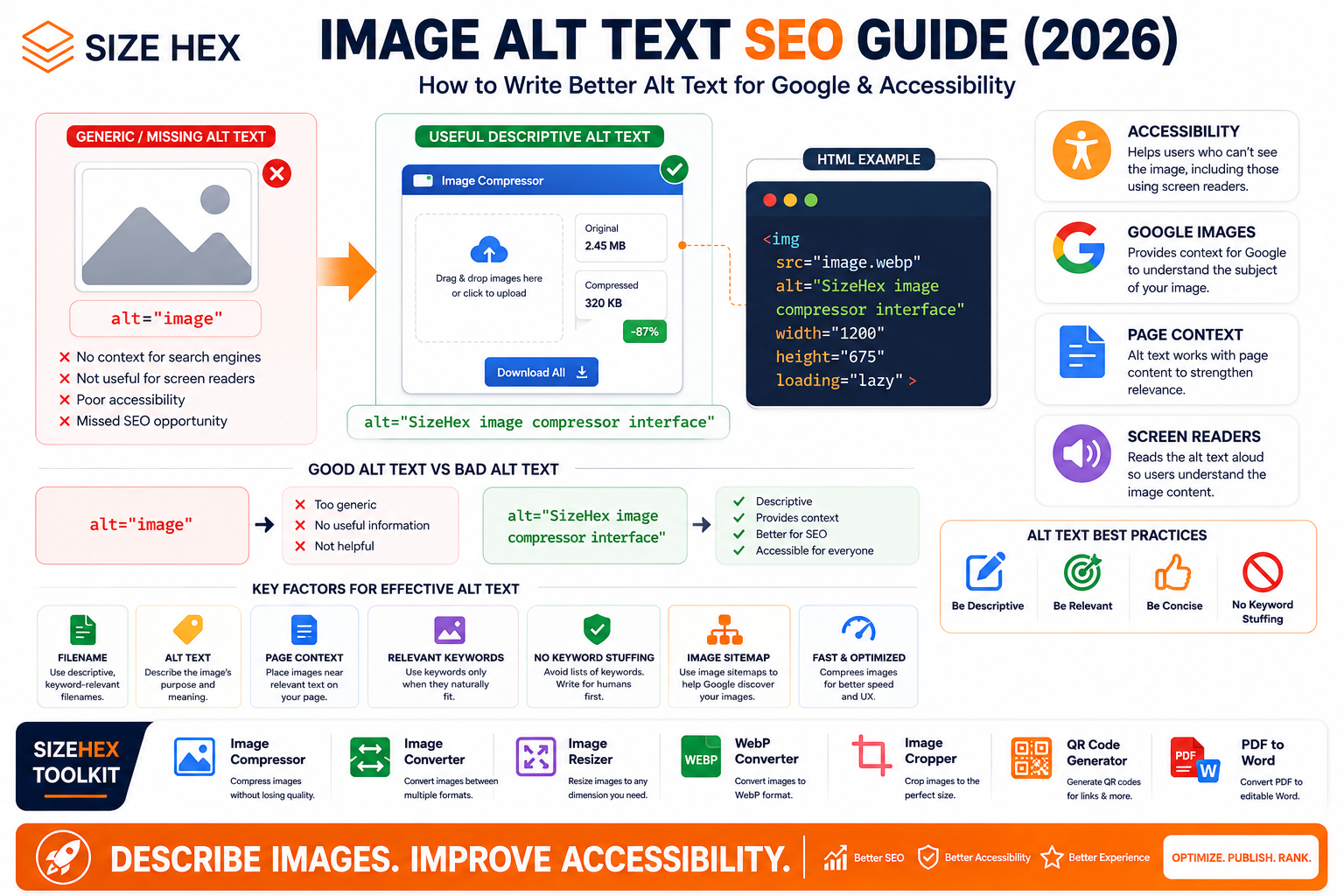
What Is Alt Text and Why Does It Matter?
Images can make a website more useful, but an image by itself doesn't always communicate its meaning to every visitor.
Someone using a screen reader may not be able to see the image. An image may fail to load because of a network problem. And search engines need additional information to understand what an image represents.
This is where alt text comes in.
Alt text, short for alternative text, is text provided through the HTML alt attribute of an image.
For example:
<img src="image-compressor.webp" alt="SizeHex image compressor interface">
The alt attribute tells users and search engines what the image represents.
Google describes alt text as the most important attribute for providing additional metadata about an image, while also emphasizing its accessibility benefits. Google uses alt text together with the page content and computer-vision systems to understand an image.
That makes alt text important for both accessibility and Image SEO.
What Is Image Alt Text?
Alt text is a short textual description associated with an image.
It is written inside the alt attribute:
<img src="image.jpg" alt="Description of the image">
For example, imagine an image showing a person using an image compression tool.
A useful alt text could be:
alt="Person using an online image compression tool"
A poor version would be:
alt="image"
And an even worse version would be a long list of repeated keywords.
Good alt text should communicate the meaning or purpose of the image, not simply mention that an image exists.
Why Does Alt Text Matter for SEO?
Google uses multiple signals to understand images.
These include:
- Alt text
- Page content
- Image filename
- Captions
- Image titles
- Computer vision
- Surrounding text
Google specifically states that alt text is used together with computer vision and page content to understand the subject matter of an image.
For example:
Image
A screenshot of the SizeHex Image Compressor.
Filename
sizehex-image-compressor-interface.webp
Alt text
SizeHex image compressor interface
Page
An article explaining how to compress images online.
All of these signals describe the same subject.
That gives Google much clearer context than a generic image with no description.
1. Alt Text Is Also an Accessibility Feature
SEO isn't the only reason to write good alt text.
Accessibility is one of its most important purposes.
People who use screen readers may rely on alternative text to understand the content of images.
Google explicitly notes that alt text improves accessibility for people who cannot see images, including users who use screen readers or users on low-bandwidth connections.
For example:
<img
  src="image-compression-before-after.webp"
  alt="Before and after comparison showing a reduced image file size"
>
A screen-reader user can understand what the image is communicating without seeing it.
That's much more useful than:
alt="image"
2. Alt Text vs Image Filename
Alt text and filenames serve different purposes.
Filename
image-compression-before-after.webp
Alt text
Before and after comparison showing image compression results
The filename identifies the asset.
The alt text explains the image's meaning.
Google considers both, but alt text provides more direct descriptive metadata about the image.
This is why you shouldn't treat the filename as a replacement for alt text.
3. Alt Text vs Image Title
These are also different.
Alt attribute
alt="SizeHex image compressor interface"
Title attribute
title="Image Compressor"
The alt attribute is specifically intended to provide alternative text for the image.
Don't rely on the title attribute as a replacement for useful alt text.
4. Write Alt Text Based on the Image's Purpose
Before writing alt text, ask:
What information does this image provide?
Suppose an article contains a screenshot showing the upload process in an image compressor.
Bad:
alt="screenshot"
Better:
alt="Image compressor upload interface"
Even better when the brand is genuinely relevant:
alt="SizeHex image compressor upload interface"
The best wording depends on what the image actually communicates.
5. Keep Alt Text Specific
Generic descriptions aren't very useful.
Weak
alt="tool"
Better
alt="Image compression tool"
More specific
alt="SizeHex image compression tool showing uploaded images"
The goal is to provide enough information without turning the alt attribute into a paragraph.
6. Don't Stuff Keywords Into Alt Text
This is one of the biggest Image SEO mistakes.
Bad:
alt="best image compressor free image compressor online image compressor tool image compression website"
This isn't useful to a person using a screen reader.
Google explicitly warns against filling alt attributes with keywords, describing this as keyword stuffing that can create a poor user experience and may cause a site to be considered spam.
Instead:
alt="Online image compression tool"
is much more natural.
The rule is simple:
Describe the image. Don't write a keyword list.
7. Use Natural Language
Alt text should sound like something a human would actually say.
Bad:
alt="image compressor online free best image compression tool"
Natural:
alt="Online image compressor showing reduced file size"
The second version is easier to understand and more useful.
8. Don't Start Every Alt Text With "Image of"
You don't necessarily need:
alt="Image of an image compressor interface"
You can simply write:
alt="Image compressor interface"
The screen reader already identifies the element as an image.
This makes the description more concise.
9. Alt Text Should Match the Page Context
Context matters.
Imagine the image:
image-compressor-interface.webp
On a page about image compression, this makes perfect sense.
But if the same image appears on an unrelated article about website hosting, the filename alone doesn't make it relevant.
Google explains that the content and metadata of the page containing an image can significantly influence how and where the image appears in search results.
A strong combination is:
Relevant Image
Relevant Alt Text
Relevant Page
Relevant Surrounding Content
10. Alt Text for Blog Images
For blog content, describe what the image contributes to the article.
Suppose your article explains image compression.
Image
A before-and-after comparison.
Good alt text
alt="Before and after comparison of image compression file sizes"
Poor alt text
alt="image compression SEO best image compressor online"
The first describes the actual visual.
The second is just keyword stuffing.
11. Alt Text for Featured Images
Featured images often represent the overall topic of the article.
For example, for this article:
Image Alt Text SEO Guide
A suitable alt text could be:
alt="Image alt text SEO guide showing an optimized image and descriptive text"
You don't need to copy the entire article title into the alt attribute.
Keep it descriptive and natural.
12. Alt Text for Screenshots
Screenshots are common on tutorials and SaaS websites.
Suppose you're showing the SizeHex Image Compressor.
Filename
sizehex-image-compressor-interface.webp
Alt text
alt="SizeHex image compressor interface"
If the screenshot specifically shows the compression result:
alt="SizeHex image compressor showing reduced image file size"
The alt text should describe what the screenshot demonstrates.
13. Alt Text for Before-and-After Images
Before-and-after visuals often communicate a specific comparison.
For example:
alt="Before and after comparison showing image compression with a smaller file size"
This is much more informative than:
alt="before after image"
The important information is the comparison being shown.
14. Alt Text for Product Images
For e-commerce websites, product images should identify the product and relevant visible characteristics.
For example:
alt="Black running shoes viewed from the side"
Another angle:
alt="Black running shoes showing the sole"
Don't use the same generic alt text for every product image.
Describe what is actually visible.
15. Alt Text for Logos
Logos require a slightly different approach.
If the logo is functioning as a link to the homepage:
<a href="/">
  <img src="sizehex-logo.svg" alt="SizeHex">
</a>
The alt text identifies the destination/brand.
If the logo is purely decorative and the surrounding text already identifies the company, the implementation may be different.
The important thing is to consider the function and purpose of the image.
16. Alt Text for Charts and Graphs
Charts often contain important information.
A generic alt text such as:
alt="chart"
doesn't communicate much.
Instead:
alt="Chart showing image file size decreasing as compression increases"
If the chart contains complex information, the alt text can provide a concise summary while the surrounding HTML content provides the detailed data.
The goal is to make the important information accessible without requiring the user to see the image.
17. Alt Text for Infographics
Infographics can contain a lot of information.
For example:
alt="Image SEO workflow showing filename, alt text, page context, image optimization, and image sitemap"
For a highly detailed infographic, don't try to reproduce every word inside the image through one enormous alt attribute.
Instead:
- Provide concise alt text.
- Put important information in actual webpage text.
- Use supporting content around the infographic.
This makes the information useful to both users and search engines.
18. Alt Text for Decorative Images
Not every image needs descriptive text.
Some images exist purely for decoration.
Examples:
- Background patterns
- Decorative shapes
- Visual separators
- Design flourishes
For a purely decorative image, an empty alt attribute can be appropriate:
<img src="decorative-line.svg" alt="">
This allows assistive technologies to ignore the decorative image rather than forcing users to listen to unnecessary descriptions.
19. Alt Text for Functional Images
Sometimes an image is actually a button or link.
For example, a clickable search icon:
<a href="/search">
  <img src="search.svg" alt="Search">
</a>
Here the alt text should communicate the function of the image.
Not:
alt="magnifying glass icon"
if the user's goal is to understand what happens when they activate it.
The important question is:
What does this image do?
20. Alt Text for Images Used as Links
Google notes that alt text can also be useful as anchor text when an image is used as a link.
For example:
<a href="/image-compressor">
  <img
    src="image-compressor.webp"
    alt="Image Compressor"
  >
</a>
The alt text tells users what the linked destination represents.
21. Keep the Description Relevant
Avoid adding information that isn't visible or relevant.
Suppose the image shows a laptop displaying a compression tool.
Don't write:
alt="The world's best free image compressor that helps websites rank higher on Google"
The image doesn't prove those claims.
Instead:
alt="Laptop displaying an image compression tool"
Accurate descriptions are more useful.
22. Don't Use Alt Text as an SEO Advertisement
Alt text isn't an advertising field.
Avoid:
alt="Best image compressor online - use SizeHex today for free"
Unless the image itself communicates that exact information, this isn't an appropriate description.
Better:
alt="SizeHex image compressor interface"
Keep promotional copy in the visible webpage content where appropriate.
23. Alt Text and Image File Names Work Together
A strong image implementation could look like this:
Filename
image-compression-before-after.webp
Alt text
alt="Before and after comparison showing reduced image file size"
Page
How to Compress Images Without Losing Quality
Surrounding text
A paragraph explaining how compression reduces file size.
Now the image has multiple consistent contextual signals.
Google states that it extracts information about image subject matter from page content, including captions and image titles, and that filenames provide additional clues.
24. A Simple Alt Text Formula
For many images, this formula works well:
Subject + Action/Context + Important Detail
For example:
SizeHex image compressor + showing uploaded images + reduced file size
Result:
alt="SizeHex image compressor showing uploaded images with reduced file sizes"
You don't need to use this formula for every image, but it can help when you're unsure what to write.
25. The Golden Rule of Alt Text
Before publishing an image, ask:
If the image disappeared, what would I want a user to know about it?
That answer is usually a good starting point for your alt text.
If the image is purely decorative and provides no meaningful information, an empty alt attribute may be appropriate.
If the image communicates important information, describe that information clearly.
Key Takeaways From Part 1
Good alt text should be:
- Descriptive
- Specific
- Natural
- Concise
- Relevant to the image
- Relevant to the page
- Accessible
- Free from keyword stuffing
Google's current Image SEO documentation emphasizes that alt text is important for both image understanding and accessibility, and recommends useful, information-rich descriptions rather than keyword-filled text.
The best approach is not:
"How many keywords can I put in alt text?"
It's:
"What does this image actually communicate?"
Describe that clearly, and you're already on the right track.
Advanced Alt Text Strategies for Different Image Types
Not every image on a website serves the same purpose.
A product photograph, a decorative icon, a chart, a screenshot, a logo, and a clickable image all need to be handled differently.
The most effective alt text strategy starts by asking one simple question:
What purpose does this image serve on the page?
Google recommends useful, information-rich alt text that is relevant to the image and the surrounding page content. It also warns against keyword stuffing.
26. Decorative Images
Some images exist only to improve the visual appearance of a page.
Examples include:
- Decorative shapes
- Background patterns
- Dividers
- Abstract graphics
- Visual flourishes
- Decorative icons
If an image doesn't provide meaningful information, it generally doesn't need a descriptive alt text.
For example:
<img src="orange-gradient-shape.svg" alt="">
The empty alt tells assistive technologies that the image doesn't need to be announced.
Don't write:
alt="orange decorative gradient shape design background"
when the graphic provides no meaningful information.
The goal is to avoid creating unnecessary noise for users relying on assistive technology.
27. Functional Images
Some images perform an action.
For example, an image might function as:
- A search button
- A download button
- A navigation link
- A print button
- A social sharing button
In these situations, alt text should describe the function, not simply the appearance.
Poor
<img src="search-icon.svg" alt="Magnifying glass">
Better
<img src="search-icon.svg" alt="Search">
The user needs to know what the image does, not necessarily what the icon looks like.
28. Images Used as Links
An image can also be used as a link.
For example:
<a href="/image-compressor">
  <img
    src="image-compressor.webp"
    alt="Image Compressor"
  >
</a>
Here, the alt text communicates the destination of the link.
Google specifically notes that alt text can be useful as anchor text when an image is used as a link.
For SizeHex, this could be useful when creating tool cards that use an image as the clickable element.
29. Logos and Brand Images
Logos need to be handled based on their purpose.
If the logo links to the homepage:
<a href="/">
  <img src="sizehex-logo.svg" alt="SizeHex">
</a>
The alt text identifies the destination and brand.
If the logo is purely decorative and the company name is already clearly available as nearby text, an empty alt attribute may sometimes be appropriate.
The important thing is to consider the image's role rather than applying the same rule to every logo.
30. Product Images
Product images should describe the product and relevant visible details.
For example:
<img
  src="black-running-shoes-side.webp"
  alt="Black running shoes viewed from the side"
>
Another image of the same product might be:
<img
  src="black-running-shoes-sole.webp"
  alt="Black running shoes showing the rubber sole"
>
Avoid using identical generic alt text for every image.
The description should reflect what each image adds.
31. E-commerce Alt Text
Large e-commerce websites can have thousands of product images.
A consistent structure can help.
For example:
Product + Color + Important Feature + View
Black leather backpack with front pocket
or:
Blue cotton shirt showing the front view
Avoid turning product descriptions into keyword lists.
Bad
alt="best black leather backpack cheap backpack online buy backpack"
Better
alt="Black leather backpack with front pocket"
The second version describes the actual product.
32. Before-and-After Images
Before-and-after graphics usually communicate a comparison.
For example:
<img
  src="image-compression-before-after.webp"
  alt="Before and after comparison showing a smaller image file after compression"
>
This is much more useful than:
alt="before after image"
The alt text should communicate what changed.
For SizeHex, this is particularly useful for compression-related articles.
33. Screenshots
Screenshots should explain what the screenshot demonstrates.
Suppose you show the SizeHex Image Compressor.
Weak
alt="Screenshot"
Better
alt="SizeHex Image Compressor upload interface"
If the screenshot shows the final result:
alt="SizeHex Image Compressor showing the compressed image file size"
The description should correspond to the visible information.
34. SaaS Product Screenshots
SaaS websites often contain several screenshots showing different stages of a workflow.
For example:
alt="SizeHex Image Compressor upload screen"
Then:
alt="SizeHex Image Compressor showing compression settings"
Then:
alt="SizeHex Image Compressor showing the compressed image result"
This creates a logical sequence.
It also helps users who cannot see the screenshots understand the workflow.
35. Charts and Graphs
Charts can contain important information that shouldn't be lost when the image isn't visible.
Instead of:
alt="Chart"
use:
alt="Chart showing image file size decreasing as compression level increases"
For simple charts, the alt text can summarize the main takeaway.
For complex charts, use the surrounding HTML content to provide the detailed data.
Don't attempt to cram every number and label into one enormous alt attribute.
36. Infographics
Infographics require more consideration because they can contain a large amount of text.
For example:
alt="Image SEO workflow showing filenames, alt text, page context, image optimization, and image sitemaps"
This gives users a concise description.
But if the infographic contains important information that isn't available elsewhere on the page, don't rely solely on alt text.
Instead:
- Provide concise alt text.
- Provide the important information as HTML text.
- Use headings and lists where appropriate.
- Keep the infographic as a visual enhancement.
This makes the content accessible beyond the image itself.
37. Complex Images
Some images communicate complicated concepts.
Examples:
- Technical diagrams
- Architecture diagrams
- Flowcharts
- Process maps
- Scientific illustrations
- Data visualizations
For a complex image, alt text should provide a concise description of its purpose.
For example:
alt="Diagram showing the image optimization workflow from upload through compression, conversion, and website delivery"
Then explain the detailed process in the surrounding page content.
This is better than creating an extremely long alt attribute.
38. Image + Caption
A caption and alt text serve different purposes.
For example:
<img
  src="image-compression-before-after.webp"
  alt="Before and after comparison showing reduced image file size"
>
Caption:
Image compression can significantly reduce file size while maintaining visual quality.
The alt text describes the image.
The caption provides additional context or commentary.
Don't simply copy the caption into the alt attribute.
39. Alt Text for Blog Featured Images
Featured images should represent the main topic of the article.
For this article, a suitable alt text might be:
alt="Image alt text SEO guide showing an image with descriptive alternative text"
Avoid using the complete article title as the alt text unless that is genuinely what the image communicates.
40. Alt Text for Blog Content Images
Content images should describe the specific information they add.
Imagine an article about WebP.
Image:
JPG → WebP conversion
Useful alt text:
alt="Example of converting a JPG image to WebP format"
Not:
alt="best WebP converter online free WebP conversion tool"
The first describes the visual.
41. Alt Text for Icons
Icons can be either informative, functional, or decorative.
Consider a download icon.
If it is a button:
alt="Download"
If it is purely decorative next to visible text saying "Download":
alt=""
The correct choice depends on the function and whether the information is already available elsewhere.
42. Alt Text for Social Media Icons
If social icons are links, alt text should communicate the destination.
For example:
<a href="https://www.linkedin.com/company/sizehex">
  <img src="linkedin.svg" alt="SizeHex on LinkedIn">
</a>
If the icon is purely decorative next to a visible text link, an empty alt attribute may be more appropriate.
43. Alt Text for QR Codes
QR codes are a special case.
If the QR code links to a specific destination, the surrounding text should explain what the QR code is for.
For example:
alt="QR code linking to the SizeHex website"
This is more useful than:
alt="QR code"
However, don't assume the alt text should contain the entire encoded URL if that doesn't help the user.
44. Alt Text for Error and Status Images
Some interfaces use images to communicate status.
For example:
- Success icon
- Warning icon
- Error icon
- Processing icon
If the icon communicates meaningful information, describe that meaning.
Good
alt="Upload completed successfully"
Poor
alt="Green checkmark"
If the visible text already says "Upload completed successfully" and the icon is redundant, the icon may be decorative.
45. Alt Text + Filename
Your filename and alt text should complement each other.
Filename
image-compressor-result.webp
Alt text
alt="SizeHex Image Compressor showing the final compressed image result"
The filename identifies the asset.
The alt text describes its purpose and visible content.
Google recommends descriptive filenames and useful alt text as part of its image SEO guidance.
46. Alt Text + Page Context
The page itself should be relevant to the image.
For example:
Page title:
How to Compress Images Without Losing Quality
Image:
Compression comparison.
Filename:
image-compression-before-after.webp
Alt text:
alt="Before and after comparison showing reduced image file size"
Everything is aligned.
This is much stronger than using the same image on an unrelated page simply because it contains a popular keyword.
Google states that the content and metadata of the page where an image is embedded can have a significant influence on how the image appears in Search.
47. Responsive Images and Alt Text
Using responsive images doesn't mean you need different alt text for every resolution.
For example:
<img
  src="image-compression-guide.webp"
  srcset="
    image-compression-guide-480.webp 480w,
    image-compression-guide-800.webp 800w,
    image-compression-guide-1200.webp 1200w
  "
  sizes="100vw"
  alt="Image compression workflow"
>
The different files represent different resolutions of the same image.
The alt text describes the image itself.
Google recommends providing a fallback src when using srcset or <picture> so crawlers can discover and process the image.
48. Alt Text in <picture>
A responsive implementation can look like:
<picture>
  <source
    type="image/avif"
    srcset="image-compression-guide.avif"
  >

  <source
    type="image/webp"
    srcset="image-compression-guide.webp"
  >

  <img
    src="image-compression-guide.jpg"
    alt="Image compression workflow"
  >
</picture>
The fallback <img> element contains the alt text.
Google specifically recommends including an <img> fallback with a src attribute when using <picture>.
49. Dynamic Alt Text
Large websites often generate image markup automatically.
For example, a CMS might generate:
<img
  src="/images/products/black-running-shoes.webp"
  alt="Black running shoes"
>
The important part is ensuring that automatically generated alt text is actually meaningful.
Don't let your system produce:
alt="image"
for thousands of images.
A good automation system should use available product, article, or asset information to generate a meaningful description.
50. Alt Text at Scale
For a large website, establish rules rather than relying entirely on manual work.
A practical system could be:
Image
   ↓
Identify Purpose
   ↓
Informative / Functional / Decorative
   ↓
Generate Appropriate Alt Text
   ↓
Review Important Images
   ↓
Publish
For SizeHex, this could be integrated into your blog publishing workflow.
For example:
Blog Title
   ↓
Featured Image
   ↓
Generate Filename
   ↓
Generate Alt Text
   ↓
Optimize Image
   ↓
Add Image URL
   ↓
Publish Blog
This is especially useful as your number of articles grows.
51. Alt Text for SizeHex Tools
A consistent structure can work well for SizeHex.
Image Compressor
alt="SizeHex Image Compressor interface"
Image Converter
alt="SizeHex Image Converter interface"
Image Resizer
alt="SizeHex Image Resizer interface"
WebP Converter
alt="SizeHex WebP Converter interface"
Image Cropper
alt="SizeHex Image Cropper interface"
The descriptions should still be adjusted when the screenshot shows a specific workflow.
For example:
alt="SizeHex WebP Converter showing an uploaded JPG image ready for conversion"
52. A Practical Alt Text Framework
For most informative images, use:
Subject + Action + Important Context
For example:
SizeHex Image Compressor + showing compressed output + reduced file size
Result:
alt="SizeHex Image Compressor showing compressed output with a reduced file size"
But don't force this formula onto every image.
A simple image may only need:
alt="SizeHex logo"
A decorative image may need:
alt=""
A functional image may need:
alt="Download"
The image's purpose determines the correct approach.
53. The Golden Rule
Before writing alt text, ask:
If I couldn't see this image, what information would I need to understand its role on this page?
That answer should guide the alt text.
Not the keyword.
Not the filename.
Not the article title.
The image's purpose.
Key Takeaways From Part 2
A strong alt text strategy depends on the type of image.
Informative image
Describe what it communicates.
Functional image
Describe what it does.
Decorative image
Use an empty alt attribute when appropriate.
Linked image
Describe the destination or function.
Product image
Describe the product and relevant visible details.
Chart
Summarize the key information.
Infographic
Provide a concise description and make important information available as text.
Screenshot
Describe what the screenshot demonstrates.
Logo
Describe the brand or function depending on its context.
Google's current guidance emphasizes that alt text should be useful, information-rich, relevant to the page, and free from keyword stuffing.
The best alt text isn't necessarily the longest.
It's the one that gives the right information to the right user at the right time.
Advanced Alt Text SEO Strategy, Common Mistakes, FAQs & Complete Checklist
Writing useful alt text is easy when a page contains only a few images.
The challenge begins when a website has hundreds or thousands of images.
At that point, you need a consistent system that works across blog posts, product pages, tool interfaces, screenshots, illustrations, charts, and decorative graphics.
The goal should always remain the same:
Describe the image according to its purpose and context.
Google recommends useful, information-rich alt text, while warning against keyword stuffing. Google also uses alt text together with page content and computer vision to understand the subject of an image.
Advanced Alt Text SEO Strategy
1. Build an Alt Text System
Instead of writing alt text randomly, create a simple rule for your website.
A practical workflow is:
Image
   ↓
Identify Purpose
   ↓
Informative / Functional / Decorative
   ↓
Understand What the Image Communicates
   ↓
Write Natural Alt Text
   ↓
Check Page Context
   ↓
Remove Unnecessary Keywords
   ↓
Publish
This makes your image workflow much more consistent.
2. Use Different Rules for Different Images
Don't use one alt-text formula for everything.
Informative image
Describe what the image communicates.
alt="Before and after comparison showing reduced image file size"
Functional image
Describe what the image does.
alt="Download"
Decorative image
Use an empty alt attribute.
alt=""
Linked image
Describe the destination or function.
alt="Image Compressor"
Product image
Describe the visible product and important characteristics.
alt="Black leather backpack with front pocket"
The purpose of the image determines the appropriate alt text.
3. Think About the User First
Before thinking about SEO, think about accessibility.
Ask:
If I couldn't see this image, what information would I need from it?
That answer should form the foundation of your alt text.
This approach naturally produces better descriptions than starting with a keyword.
Google's documentation also emphasizes that alt text improves accessibility for people who cannot see images, including screen-reader users.
4. Use Keywords Only When They Naturally Fit
Keywords can appear in alt text when they genuinely describe the image.
For example:
alt="SizeHex image compressor interface"
If the image really shows the SizeHex Image Compressor, this is natural.
But don't force a keyword into every image.
Bad:
alt="best image compressor free online image compressor tool image SEO"
Better:
alt="Online image compressor interface"
Google specifically warns against keyword stuffing in alt attributes.
5. Don't Use the Same Alt Text for Every Image
Imagine a blog contains five screenshots.
Using:
alt="SizeHex image compressor"
for every screenshot doesn't tell users what each screenshot demonstrates.
Instead:
alt="SizeHex Image Compressor upload interface"
alt="SizeHex Image Compressor compression settings"
alt="SizeHex Image Compressor showing the compressed result"
Each description provides unique information.
6. Keep Alt Text Concise
Alt text doesn't need to become a complete paragraph.
Too short
alt="image"
Too long
alt="This image shows the SizeHex online image compressor tool where users can upload JPG PNG and WebP images and adjust quality settings and convert images and download compressed files..."
Better
alt="SizeHex Image Compressor showing compression settings"
Give the user the important information without unnecessary detail.
7. Don't Repeat Visible Text Unnecessarily
Suppose an image sits directly beside a heading:
Image Compressor
and the image is only decorative.
You don't need to make the screen reader announce the same information twice.
Depending on the image's purpose, an empty alt attribute may be more appropriate.
The general accessibility principle is that replacing an image with its alt text should preserve the meaning of the page.
8. Make Alt Text Match the Actual Image
Never describe something that isn't visible or communicated by the image.
For example, if the image shows an interface:
alt="Image compression interface"
is reasonable.
But:
alt="The fastest image compressor in the world"
is a marketing claim, not an image description.
Alt text should describe the visual, not make unsupported claims.
9. Alt Text for SEO Images
For an image specifically created to support a blog topic, use a description that connects the visual to the topic.
For example:
Article:
How to Compress Images Without Losing Quality
Image:
Before-and-after compression comparison.
Alt text:
alt="Before and after comparison showing image compression and reduced file size"
The image, filename, alt text, and page topic all support the same subject.
Google recommends placing images near relevant text and on pages relevant to the image's subject matter.
10. Alt Text and Image Discovery
Good alt text doesn't replace technical image discoverability.
Your images should also be accessible to Google's crawlers.
Google recommends using standard HTML image elements such as:
<img src="image.webp" alt="Image description">
Google can discover images in the src attribute of <img> elements, including images used within <picture>. Google does not index CSS background images in the same way.
For images that may otherwise be difficult to discover, Google also supports image sitemaps.
11. Alt Text and Responsive Images
Responsive images can still use one meaningful alt description.
Example:
<img
  src="image-compression-guide.webp"
  srcset="
    image-compression-guide-480.webp 480w,
    image-compression-guide-800.webp 800w,
    image-compression-guide-1200.webp 1200w
  "
  sizes="100vw"
  alt="Image compression workflow"
>
The different files are different resolutions of the same visual.
The alt text describes the image itself.
Google recommends providing a fallback src when using srcset or <picture> so crawlers can discover the image.
12. Alt Text and Page Context
Alt text works best when the surrounding page makes sense.
For example:
Page: Image Compression Guide
Filename:
image-compression-before-after.webp
Alt:
alt="Before and after comparison showing reduced image file size"
Nearby text:
A paragraph explaining how compression reduces image size.
Everything points to the same topic.
Google says the content and metadata of the page where an image is embedded can significantly influence how and where that image appears in Search.
13. Alt Text and Image Sitemaps
An image sitemap helps Google discover image URLs.
But the sitemap doesn't replace alt text.
Think of the two as serving different purposes:
Image Sitemap
→ Helps Google discover the image.
Alt Text
→ Helps describe what the image represents.
Both can be part of a complete Image SEO implementation.
Google supports image sitemaps specifically for images that Google might not otherwise discover.
14. Keep Image URLs Consistent
If the same image is used on multiple pages, avoid generating unnecessary different URLs for the same asset.
For example, don't unnecessarily create:
/image-compressor.webp
/images/image-compressor.webp
/blog/image-compressor.webp
/assets/image-compressor.webp
for the exact same image.
Google recommends consistently referencing the same image URL across a larger website so it can cache and reuse the image more efficiently.
15. Alt Text for SizeHex Blog Images
For SizeHex, a consistent approach can look like this.
Featured Image
alt="Image alt text SEO guide showing an optimized image description"
Tutorial Screenshot
alt="SizeHex Image Compressor upload interface"
Before-and-After Graphic
alt="Before and after comparison showing reduced image file size"
SEO Diagram
alt="Image SEO workflow showing filename, alt text, page context, and image optimization"
Decorative Brand Graphic
alt=""
The correct description depends on the image's actual purpose.
Common Alt Text Mistakes
Mistake 1: Missing Alt Attribute
Bad:
<img src="image.webp">
Better:
<img src="image.webp" alt="Image compression workflow">
If the image is decorative, use:
alt=""
rather than removing the attribute completely.
Google's accessibility guidance notes that omitting the alt attribute can cause screen readers to read the filename instead.
Mistake 2: Keyword Stuffing
Bad:
alt="best image compressor free image compressor online image compression tool"
Good:
alt="Online image compression tool"
Google explicitly warns against keyword stuffing.
Mistake 3: Writing "Image of..."
You don't normally need:
alt="Image of a laptop showing an image compressor"
You can write:
alt="Laptop showing an image compressor"
The description is cleaner.
Mistake 4: Using the Filename as Alt Text
Bad:
alt="image-compression-before-after.webp"
Better:
alt="Before and after comparison showing reduced image file size"
The filename identifies the asset.
The alt text describes the visual.
Mistake 5: Copying the Article Title
Article title:
Image Alt Text SEO Guide (2026): How to Write Better Alt Text
Don't automatically use the entire title:
alt="Image Alt Text SEO Guide 2026 How to Write Better Alt Text for Google and Accessibility"
Instead, describe what the image actually shows.
Mistake 6: Using the Same Alt Text Everywhere
Every informative image should be described according to its own purpose.
Mistake 7: Describing Decorative Images
A purely decorative image doesn't need a long description.
Use:
alt=""
when appropriate.
Mistake 8: Making Alt Text Too Long
Longer isn't automatically better.
Useful and concise is better.
Mistake 9: Adding Marketing Claims
Alt text shouldn't become an advertising slogan.
Mistake 10: Ignoring Accessibility
An alt text strategy that focuses only on Google misses one of its most important purposes.
Before-Publishing Alt Text Checklist
Image
- Is the image actually useful?
- Does it support the page content?
- Is the image high quality?
Purpose
- Is it informative?
- Functional?
- Decorative?
- A link?
- A product image?
- A screenshot?
- A chart?
Alt Text
- Does it describe the image's purpose?
- Is it concise?
- Is it natural?
- Is it accurate?
- Does it avoid keyword stuffing?
SEO
- Does it match the page context?
- Does the filename make sense?
- Is the image near relevant content?
Technical
- Is the image crawlable?
-
Is it inside an HTML
<img>element? -
Is the
srcavailable? - Is the image URL stable?
- Is an image sitemap useful for the implementation?
Google's Image SEO documentation covers these discovery, context, filename, alt-text, and image-sitemap considerations together.
20 Frequently Asked Questions
1. Does alt text improve SEO?
Alt text provides Google with additional information about an image and helps Google understand its subject alongside page content and computer vision.
2. Is alt text a Google Images ranking factor?
Alt text is one of several signals Google can use to understand an image. It should not be treated as a standalone ranking trick.
3. Should every image have alt text?
Every <img> should have an alt attribute. Informative images need useful descriptions, while decorative images can appropriately use alt="".
4. Should decorative images have alt text?
They can use an empty alt attribute:
alt=""
This prevents unnecessary announcements by assistive technologies.
5. Should I put keywords in alt text?
Use relevant keywords only when they naturally describe the image. Don't stuff keywords into the attribute.
6. How long should alt text be?
There isn't one universal character limit. Make it concise and provide the information necessary to understand the image's purpose.
7. Should alt text match the filename?
No. They should complement each other.
8. Should I use the article title as alt text?
Only if the image genuinely communicates that title. Otherwise, describe the image itself.
9. Should I start alt text with "image of"?
Usually not. The image element already communicates that it is an image.
10. Does alt text help screen readers?
Yes. Alt text can provide users who cannot see the image with a textual equivalent of its meaning.
11. Should logos have alt text?
It depends on their purpose. A linked logo should generally identify the destination or brand.
12. What should alt text for a button icon say?
Describe the action, such as:
alt="Download"
rather than simply describing the icon's appearance.
13. Should product images have different alt text?
Yes, when different images show different views or details.
14. Can I use the same image on multiple pages?
Yes, but use the same image URL consistently where appropriate. Google recommends consistent image URLs for reused images.
15. Does alt text replace image captions?
No. Alt text and captions serve different purposes.
16. Does alt text replace image filenames?
No. Filenames and alt text provide different types of context.
17. Should CSS background images have alt text?
CSS background images aren't equivalent to HTML <img> elements for image indexing. If an image conveys important content, use an appropriate HTML image implementation.
18. Can alt text help Google Images?
Yes. Google uses alt text along with page content and computer vision to understand image subject matter.
19. Can I automate alt text?
Yes, particularly for large websites, but automated descriptions should be reviewed for accuracy.
20. What is the best alt text strategy?
Describe the image according to its purpose, keep the description accurate and useful, connect it naturally to the page context, and avoid keyword stuffing.
Real SEO-Friendly Alt Text Examples
| Image Type | Recommended Alt Text |
|---|---|
| Image Compressor | SizeHex Image Compressor interface |
| Compression Comparison | Before and after comparison showing reduced image file size |
| WebP Converter | SizeHex WebP Converter showing an uploaded JPG image |
| Image Resizer | SizeHex Image Resizer showing custom image dimensions |
| Product Image | Black leather backpack with front pocket |
| Chart | Chart showing image file size decreasing after compression |
| Infographic | Image SEO workflow showing filename, alt text, and page context |
| Download Button | Download |
| Linked Logo | SizeHex |
| Decorative Graphic | "" |
The correct alt text will always depend on the actual image and its role on the page.
SizeHex Image SEO Workflow
For future SizeHex articles, a simple workflow can be used:
Create Blog
    ↓
Create Featured Image
    ↓
Choose Descriptive Filename
    ↓
Write Accurate Alt Text
    ↓
Optimize Image Size
    ↓
Use Correct Image Format
    ↓
Add Image to Relevant Section
    ↓
Add Internal Links
    ↓
Update Sitemap
    ↓
Publish
This combines several of Google's image recommendations into one practical publishing workflow.
Related SizeHex Tools
After writing useful alt text, you can prepare the image itself with the SizeHex toolkit.
Image Compressor
Reduce image file size before publishing.
Image Converter
Convert supported images between formats.
Image Resizer
Resize images to exact dimensions for websites and digital content.
WebP Converter
Convert images to WebP for modern web delivery.
Image Cropper
Crop images to the required composition and dimensions.
QR Code Generator
Create QR codes for URLs, text, Wi-Fi, and other supported uses.
PDF to Word
Convert PDF documents into editable Word documents.
Related SizeHex Articles
Continue building your Image SEO knowledge with the related guides in this cluster:
Google Images Ranking Factors Guide
Learn how Google discovers, understands, and displays images in Search.
Google Images Ranking Factors Guide
Image Structured Data & Schema Guide
Learn how structured data can provide additional context about images.
Image Structured Data & Schema Guide
Image File Naming SEO Guide
Learn how descriptive image filenames can provide additional context and create a scalable media naming system.
Image Licensing & Copyright SEO Guide
Learn how to manage image licensing, attribution, copyright, and image rights metadata.
Image Licensing & Copyright SEO Guide
Image Preloading & fetchpriority Guide
Learn how to prioritize important images and improve image loading performance.
Image Preloading & fetchpriority Guide
Browser Caching for Images Guide
Learn how browser caching can reduce repeated image downloads.
Browser Caching for Images Guide
Conclusion
Alt text isn't just another SEO field.
It's a bridge between your visual content and people who cannot see it.
It also provides search engines with useful information about the subject and context of an image.
The strongest approach is simple:
Describe the image.
Explain its purpose.
Keep it natural.
Match the page context.
Avoid keyword stuffing.
And remember that Image SEO works as a system:
Filename
Alt Text
Relevant Page Content
Image Quality
Technical Discoverability
Accessibility
Google's current documentation emphasizes that descriptive filenames, useful alt text, relevant surrounding content, crawlable image elements, and good image quality all contribute to helping Google understand and surface images.
The objective isn't to write alt text for an algorithm.
The objective is to make your images understandable to both people and search engines.
Why Choose SizeHex?
SizeHex is a browser-based toolkit designed to make everyday file and image preparation faster and simpler.
You can compress, convert, resize, crop, convert to WebP, generate QR codes, and work with supported document tools directly from the browser.