August 12, 2026
Image File Naming SEO Guide (2026): How to Name Images for Better SEO
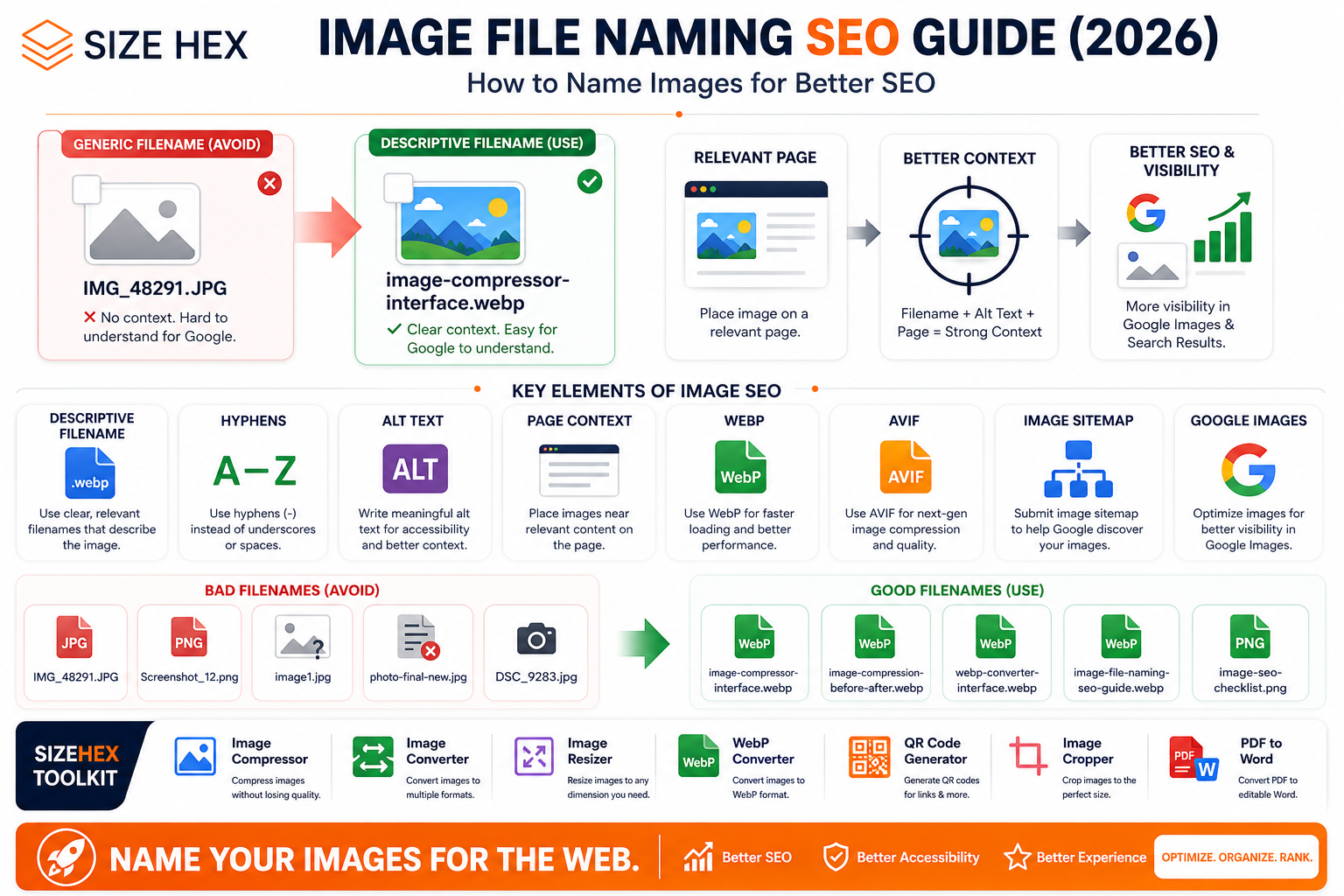
Image Filenames, Google Images & Best Practices
Images are an important part of modern websites.
They make blog posts easier to understand, improve visual appeal, explain products, and can help users find your content through Google Images.
But there is one small detail that many website owners completely ignore:
The image filename.
Uploading an image named:
IMG_48291.jpg
doesn't tell anyone—or search engines—what the image actually represents.
Compare that with:
image-compression-before-after.jpg
The second filename immediately provides useful context.
Google's own Image SEO documentation recommends using filenames that are short and descriptive and avoiding generic names such as image1.jpg, pic.gif, or IMG00023.JPG. Google also explains that filenames provide a light clue about an image's subject, while the surrounding page content and alt text provide additional context.
In this guide, we'll build a practical image-naming strategy that works for blogs, business websites, e-commerce stores, SaaS products, and large websites.
What Is Image File Naming SEO?
Image file naming SEO is the practice of giving image files descriptive, meaningful filenames before uploading them to a website.
Instead of:
IMG_1234.jpg
use:
online-image-compressor.jpg
Instead of:
photo-final-new-2.png
use:
webp-image-converter-interface.png
The goal isn't to stuff keywords into filenames.
The goal is to make the filename accurately describe the image.
A good filename should make sense to:
Search engines
Website developers
Content writers
Designers
Website visitors
Future versions of your website
Why Do Image Filenames Matter?
Google uses multiple sources of information to understand images.
These include:
Image filename
Alt text
Page content
Image captions
Surrounding text
Computer vision
Page metadata
Google specifically states that the filename can provide light clues about the subject of an image. It also recommends placing images near relevant text and on pages that are relevant to the image's subject matter.
That means the filename is useful, but it shouldn't be treated as a standalone ranking factor.
Think of it as one piece of the overall image SEO puzzle.
1. Descriptive vs Generic Filenames
Let's compare some examples.
Generic
IMG00023.JPG
Descriptive
image-compression-tool.jpg
The second filename immediately communicates the subject.
Another example:
Generic
Screenshot_2026_08_12.png
Descriptive
sizehex-image-compressor-interface.png
The descriptive version is easier to understand and manage.
2. Use the Main Subject in the Filename
Your filename should describe what the image actually shows.
For example, if an image shows a laptop displaying an image compression tool:
image-compressor-tool-laptop.jpg
If it shows a before-and-after compression comparison:
image-compression-before-after.jpg
If it shows a WebP conversion workflow:
convert-jpg-to-webp-workflow.jpg
Don't create a filename that describes something the image doesn't contain.
3. Use Relevant Keywords Naturally
You can include a relevant keyword when it genuinely describes the image.
For example:
image-compressor-online.jpg
is reasonable if the image actually represents an online image compressor.
But don't create filenames like:
best-image-compressor-free-online-image-compressor.jpg
just to include more keywords.
Google recommends using useful, information-rich image descriptions and warns against keyword stuffing in related image metadata such as alt text.
The same principle makes sense for filenames:
Describe the image. Don't write an SEO keyword list.
4. Keep Filenames Short and Descriptive
Google recommends filenames that are short but descriptive.
Compare:
image-compressor.jpg
with:
best-free-online-image-compressor-tool-for-compressing-jpeg-png-and-webp-images.jpg
The second filename is unnecessarily long.
A better approach is:
online-image-compressor.jpg
Short.
Clear.
Relevant.
Easy to maintain.
5. Use Hyphens Between Words
For readable filenames, use hyphens:
image-compressor-online.jpg
instead of:
image_compressor_online.jpg
or:
imagecompressoronline.jpg
Hyphens make multi-word filenames easier to read and maintain.
They also create cleaner URLs when the image filename becomes part of the image URL.
6. Avoid Random Numbers
Camera-generated filenames often look like:
DSC_4839.jpg
IMG_9274.jpg
Screenshot_182.png
These filenames may be perfectly valid technically, but they don't communicate what the image represents.
If the image is a SizeHex Image Compressor screenshot, a better filename would be:
sizehex-image-compressor-interface.png
If it's a WebP conversion example:
jpg-to-webp-conversion-example.png
7. Use Lowercase Filenames
A consistent lowercase naming convention makes website management easier.
Prefer:
image-compression-guide.jpg
instead of:
Image-Compression-Guide.JPG
The most important thing is consistency.
If your website uses lowercase filenames throughout the site, continue using the same convention for new images.
8. Avoid Unnecessary Special Characters
Keep filenames simple.
Prefer:
image-compression-guide.jpg
Avoid unnecessarily complicated filenames containing:
image@compression#guide!!.jpg
Simple filenames are easier to manage, link, debug, and migrate.
Google also recommends considering URL encoding requirements when filenames contain non-Latin or special characters.
9. Match the Filename to the Page Context
This is one of the most important concepts in image SEO.
Imagine your blog is about:
How to Compress Images Without Losing Quality
Your featured image could be:
compress-images-without-losing-quality.jpg
That's much more meaningful than:
blog-banner-17.jpg
But the filename alone isn't enough.
The image should also appear on a page whose content is actually about image compression.
Google explains that the content and metadata of the page where an image is embedded can have a significant influence on how and where that image appears in search.
So the ideal relationship is:
Relevant Filename
Relevant Image
Relevant Page
Useful Alt Text
=
Strong Image Context
10. Filename + Alt Text Should Work Together
Don't simply copy the filename into the alt attribute.
For example:
<img
src="image-compressor-interface.webp"
alt="SizeHex image compressor interface"
>
Here:
Filename:
image-compressor-interface.webp
Alt text:
SizeHex image compressor interface
Both describe the image, but they aren't unnecessarily identical.
Google states that alt text is particularly important for providing additional image metadata and accessibility, and that it uses alt text together with computer vision and page content to understand an image.
11. Don't Stuff Keywords Into Filenames
Bad:
best-image-compressor-free-image-compressor-online-best-tool.jpg
Better:
online-image-compressor.jpg
The second version is cleaner and more natural.
Your filename should answer:
What is this image?
It shouldn't answer:
How many keywords can I fit into this filename?
12. Use the Actual Image Subject
Suppose you have three images in a blog.
Image 1
Shows a compressed image comparison.
image-compression-before-after.jpg
Image 2
Shows a WebP conversion interface.
webp-converter-interface.jpg
Image 3
Shows a responsive image layout.
responsive-image-example.jpg
Each filename communicates the actual visual content.
13. Google Images and File Names
Google Images isn't based on filenames alone.
Google can use:
Filename
Alt text
Captions
Surrounding content
Page title
Page metadata
Computer vision
Structured data
Other contextual signals
Google explicitly recommends using descriptive filenames, titles, and alt text, while keeping them relevant to the image and page.
So changing a filename alone won't suddenly make an image rank.
Instead, think of filenames as part of a complete image optimization system.
14. Image Filename Examples
Here are some practical examples.
The goal isn't to make the filename long.
The goal is to make it meaningful.
15. What About WebP and AVIF?
Modern websites commonly use formats such as:
WebP
AVIF
JPEG
PNG
SVG
The file extension should accurately match the actual file type.
Google Search supports images referenced through <img> in formats including BMP, GIF, JPEG, PNG, WebP, SVG, and AVIF. Google also recommends that the filename extension match the file type.
Examples:
image-compression-guide.webp
image-compression-guide.avif
image-compression-guide.jpg
The naming strategy remains the same regardless of the image format.
16. Don't Rename Images Just for SEO Without a Reason
If an image is already correctly named and indexed, changing the filename creates a new URL.
For example:
image-compressor.webp
becoming:
online-image-compressor.webp
changes the image URL.
If you make large-scale filename changes, make sure your website handles the old URLs appropriately and doesn't create unnecessary broken references.
For new images, however, establishing a clean naming convention from the beginning is much easier.
17. Naming Images for SizeHex
For SizeHex, a consistent naming structure could look like:
[topic]-[specific-subject].[format]
Examples:
image-compressor-interface.webp
image-resizer-tool.webp
webp-converter-interface.webp
image-compression-before-after.webp
image-licensing-copyright-guide.webp
google-images-ranking-factors.webp
This creates a clean, scalable system for future blog posts and tool pages.
Key Takeaways From Part 1
A good image filename should be:
Descriptive
Short
Relevant
Easy to read
Consistent
Accurate
Free from unnecessary keyword stuffing
The most important thing to remember is that image filenames are only one part of Image SEO.
Google uses filenames together with page content, alt text, captions, computer vision, and other signals to understand images.
In the next section, we'll take this further and build naming strategies for different types of websites and images.
Advanced Image Naming Strategies for Websites
Choosing a good filename for one image is easy.
Choosing a consistent naming system for hundreds or thousands of images is a different challenge.
As a website grows, you may have blog images, product photos, screenshots, thumbnails, illustrations, tool interfaces, social media graphics, and multiple versions of the same asset.
Without a clear naming system, your media library can quickly become difficult to manage.
A good naming strategy should therefore work for both SEO and website organization.
Google recommends short, descriptive filenames and notes that filenames can provide useful context about an image's subject. Google also recommends keeping the filename extension consistent with the actual image format.
17. JPG Image Naming
JPG remains widely used for photographs and images containing many colors.
A clean filename could be:
image-compression-before-after.jpg
Instead of:
photo-final-2-new.jpg
For a photograph:
website-image-optimization.jpg
For a tutorial screenshot:
image-compressor-workflow.jpg
The filename should describe the visual content rather than the software or device used to create it.
18. PNG Image Naming
PNG is commonly used for:
Screenshots
UI elements
Transparent graphics
Logos
Icons
Diagrams
Examples:
image-compressor-dashboard.png
webp-converter-interface.png
image-seo-checklist.png
Avoid names such as:
Screenshot_2026_08_12_1530.png
unless the timestamp itself is meaningful.
19. WebP Image Naming
WebP is commonly used for web images because it supports efficient compression while maintaining good visual quality.
Examples:
image-compression-guide.webp
webp-converter-interface.webp
responsive-image-example.webp
The filename should still describe the image even though the format is WebP.
Google supports WebP images in Search and recommends that the filename extension match the actual file type.
20. AVIF Image Naming
AVIF is another modern image format that can provide efficient image compression.
A clean naming structure could be:
image-optimization-guide.avif
or:
website-performance-chart.avif
Don't change the extension simply for SEO.
If the actual file is AVIF, use:
example-image.avif
not:
example-image.jpg
Google supports AVIF images in Search.
21. E-commerce Product Image Naming
E-commerce websites can have thousands of product images.
A consistent naming system becomes extremely important.
Instead of:
IMG_7821.jpg
use something like:
black-running-shoes-side-view.jpg
For different product angles:
black-running-shoes-front.jpg
black-running-shoes-side.jpg
black-running-shoes-back.jpg
black-running-shoes-sole.jpg
For product variations:
blue-cotton-shirt-front.jpg
blue-cotton-shirt-back.jpg
The naming structure should remain consistent across the entire product catalog.
22. Blog Featured Image Naming
Blog featured images should describe the article topic.
For an article about image compression:
image-compression-guide.jpg
For an article about WebP:
webp-image-format-guide.jpg
For an article about image copyright:
image-licensing-copyright-guide.jpg
For this article:
image-file-naming-seo-guide.jpg
This is much more useful than:
blog-banner-final-4.jpg
23. Blog Content Image Naming
Don't give every image inside an article the same generic filename.
Suppose your article is about image optimization.
You might have:
image-compression-before-after.webp
webp-file-size-comparison.webp
image-lazy-loading-example.webp
responsive-image-example.webp
Each filename describes a different visual.
This creates a cleaner relationship between the image, its content, and the page.
24. Naming Screenshots
Screenshots are extremely common on tutorials and SaaS websites.
Avoid:
Screenshot_2026-08-12.png
Instead, describe what the screenshot shows.
For example:
sizehex-image-compressor-upload.png
sizehex-image-compressor-settings.png
sizehex-image-compressor-result.png
This is particularly useful when a blog contains several screenshots of the same tool.
25. Naming UI Images
For SaaS websites, UI images can follow a simple hierarchy.
For example:
image-compressor-home-screen.webp
image-compressor-upload-panel.webp
image-compressor-compression-result.webp
This makes the asset library easier to understand.
It also helps developers identify the correct image without opening every file.
26. Dynamic Image Filenames
Large websites often generate image URLs dynamically.
For example:
/product/12345/image.jpg
This can be technically functional, but a descriptive filename can provide more context:
black-running-shoes-front.jpg
If your system automatically generates filenames, build the naming logic into your image-processing pipeline.
For example:
[product-name]-[view]-[variant].[format]
Result:
black-running-shoes-front.webp
27. Automated Image Naming
If your website publishes hundreds or thousands of images, manual naming may not scale.
Google itself suggests that websites with thousands of images may benefit from automating image naming.
A simple automated structure could be:
[topic]-[subject]-[type].[format]
Examples:
image-compression-before-after.webp
webp-converter-interface.webp
image-seo-checklist.webp
Automation reduces inconsistent filenames and makes large media libraries easier to maintain.
28. Naming Images for Large Websites
Large websites should establish naming rules before the media library becomes difficult to manage.
A useful standard might be:
Lowercase + hyphens + descriptive words + correct extension
Example:
image-compression-guide.webp
Avoid mixing conventions such as:
Image_Compression.jpg
image-compression-guide.webp
IMAGECompression-final.PNG
imageCompression2.jpg
Choose one system and use it consistently.
Google's developer documentation also recommends lowercase filenames, hyphens between words, and standard characters for file and directory names.
29. Multilingual Image Filenames
If your website publishes content in multiple languages, you may consider localized filenames.
For example:
image-compression-guide.jpg
English version.
A localized version could use a translated filename where appropriate.
However, filenames should remain readable and technically safe.
For international websites, a simple ASCII-based naming system can often make development and maintenance easier.
Google also notes that localized images can use translated filenames, while non-Latin and special characters require appropriate URL encoding considerations.
30. Image Folder Structure
A good filename is useful, but your folder structure also matters for organization.
For example:
/images/blog/image-seo/
could contain:
image-file-naming-guide.webp
image-file-naming-examples.webp
image-naming-checklist.webp
A tool-based structure could look like:
/images/tools/image-compressor/
with:
image-compressor-interface.webp
image-compressor-result.webp
image-compressor-example.webp
The exact folder structure depends on your website architecture, but consistency is the key.
31. Filename + Alt Text Strategy
Filename and alt text should complement each other.
Example:
Filename:
image-compressor-interface.webp
alt="SizeHex image compressor interface"
The filename describes the asset.
The alt text describes what the image communicates to someone who cannot see it.
Google says alt text is one of the most important sources of additional image metadata and also improves accessibility. Google uses alt text together with computer vision and page content to understand the image.
Don't turn the alt attribute into a keyword list.
Bad:
alt="best image compressor free image compressor online image compression tool"
Better:
alt="SizeHex image compressor interface"
32. Filename + Page Context
A filename becomes more useful when the page itself is relevant.
Imagine this filename:
webp-converter-interface.webp
If it's placed on a page about WebP conversion, the context is clear.
But if the exact same image is placed inside an unrelated article about cooking recipes, the filename doesn't suddenly make the page relevant to WebP.
Google explains that the content and metadata of the page where an image appears can strongly influence how and where the image appears in Search.
The complete relationship should therefore be:
Filename
Image
Alt Text
Page Content
Relevant Context
33. Filename + Image Sitemap
An image filename is only useful if Google can discover the image.
Google supports image sitemaps as a way to provide URLs of images that Google might not otherwise discover, particularly images reached through JavaScript. You can create a separate image sitemap or add image sitemap information to an existing sitemap.
A simplified image sitemap entry looks like:
<url>
<loc>https://example.com/blog/image-seo-guide.html</loc>
<image:image>
<image:loc>https://example.com/images/image-seo-guide.webp</image:loc>
</image:image>
</url>
The filename:
image-seo-guide.webp
doesn't replace the need for proper image discovery.
Both work together:
Good Filename
Crawlable Image
Image Sitemap Where Useful
34. Automated Naming for SizeHex
For SizeHex, a scalable naming system could follow this pattern:
[topic]-[specific-subject]-[context].[format]
For example:
image-compressor-upload-interface.webp
image-compressor-before-after.webp
webp-converter-upload-interface.webp
image-resizer-settings.webp
image-file-naming-checklist.webp
This system works for both tools and blog content.
35. A Practical SizeHex Naming Convention
A simple rule for future SizeHex images:
Blog Images
[primary-topic]-[specific-topic].[format]
Example:
image-file-naming-seo-guide.webp
Tool Screenshots
[tool-name]-[screen-or-action].[format]
Example:
image-compressor-upload.webp
Before/After Images
[topic]-before-after.[format]
Example:
image-compression-before-after.webp
Infographics
[topic]-infographic.[format]
Example:
image-seo-infographic.webp
36. Should You Include the Brand Name?
Including your brand name can be useful when the image specifically represents your product or interface.
For example:
sizehex-image-compressor-interface.webp
is appropriate for a SizeHex screenshot.
But you don't need to put sizehex into every generic blog image.
For example:
image-compression-before-after.webp
is perfectly fine if the image simply demonstrates image compression.
The filename should prioritize the image subject.
37. Don't Use the Same Filename for Different Images
Avoid having several completely different images named:
image-optimization.webp
If they represent different concepts, make the filenames specific:
image-optimization-checklist.webp
image-optimization-workflow.webp
image-optimization-before-after.webp
This is easier for both humans and automated systems to manage.
38. Avoid "Final", "New", and "Latest"
Design workflows often create filenames such as:
banner-final.jpg
banner-final-2.jpg
banner-final-new.jpg
banner-final-new-2.jpg
These names may make sense during design work, but they are poor long-term website asset names.
Instead, describe the actual asset:
image-seo-guide-featured-image.webp
This remains meaningful even months later.
39. Don't Rename Every Existing Image
A common mistake is trying to rename an entire website's media library just for SEO.
If existing images are already correctly named, there may be little reason to change them.
Large-scale renaming can change image URLs and create broken references if not handled properly.
A better strategy is:
Keep good existing filenames.
Improve poor filenames when there is a real reason.
Use the new naming convention for all new images.
This keeps the migration controlled.
40. The Complete Image Naming Framework
A practical image naming system can be reduced to a few rules:
Rule 1
Use descriptive words.
Rule 2
Keep filenames reasonably short.
Rule 3
Use lowercase.
Rule 4
Use hyphens between words.
Rule 5
Avoid unnecessary numbers.
Rule 6
Avoid keyword stuffing.
Rule 7
Describe the actual image.
Rule 8
Keep the extension consistent with the actual file format.
Rule 9
Use a consistent naming structure across your website.
Rule 10
Combine filenames with good alt text and relevant page content.
Google's image SEO documentation supports this overall approach: descriptive filenames are useful, but Google also considers page context, alt text, captions, and other signals when understanding images.
Example: From Messy to SEO-Friendly
Imagine your original media folder looks like this:
IMG_9281.jpg
IMG_9282.jpg
Screenshot_12.png
final-banner-new.png
photo2.webp
image1.jpg
After applying a consistent naming system:
image-compressor-interface.webp
image-compression-before-after.webp
webp-converter-interface.png
image-seo-guide-featured-image.webp
responsive-image-example.webp
image-optimization-checklist.jpg
Now the entire folder is easier to understand.
A developer can identify an image without opening it.
A content writer can find the correct asset quickly.
And search engines receive a small amount of additional context from the filenames.
Key Takeaways From Part 2
A scalable image naming system should work across your entire website, not just individual blog posts.
For SizeHex, a strong approach is:
Lowercase → Hyphens → Descriptive Subject → Relevant Context → Correct Extension
Use filenames such as:
image-compressor-interface.webp
webp-converter-interface.webp
image-compression-before-after.webp
image-file-naming-seo-guide.webp
Then combine them with:
Relevant Page Content
Useful Alt Text
Accessible HTML Images
Image Sitemap Where Appropriate
Google recommends standard HTML <img> elements for discoverable images and supports image sitemaps for helping Google find images it might otherwise miss.
The filename is not a magic ranking trick.
It's one small but useful part of a much larger Image SEO system.
Advanced Image Naming Strategy, FAQs & Complete SEO Checklist
A good image filename is a small detail, but small details matter when you're building a website with hundreds of pages and images.
The goal isn't to create filenames specifically for search engines. The goal is to create clear, descriptive, consistent filenames that accurately represent the image.
Google recommends short, descriptive filenames and says filenames provide a small clue about an image's subject. Google also considers the image's surrounding content, alt text, captions, and other signals when understanding images.
Advanced Image Naming Strategy
1. Build a Naming Convention Before Your Website Gets Bigger
If you only have 20 images, naming them manually isn't difficult.
But imagine having:
- 500 blog images
- 200 tool screenshots
- 1,000 product images
- Multiple image formats
- Mobile and desktop versions
Without a naming convention, your media library becomes difficult to manage.
A simple structure is:
[topic]-[specific-subject]-[context].[format]
For example:
image-compressor-upload.webp
image-compression-before-after.webp
webp-converter-interface.webp
2. Create Different Rules for Different Image Types
You don't need one rigid filename format for everything.
Blog Featured Images
image-file-naming-seo-guide.webp
Blog Content Images
image-filename-best-practices.webp
Tool Screenshots
image-compressor-upload.webp
Before-and-After Images
image-compression-before-after.webp
Infographics
image-seo-checklist-infographic.webp
This makes your media library much easier to navigate.
3. Use the Most Important Concept First
Put the primary subject toward the beginning of the filename.
Instead of:
guide-for-better-seo-image-file-name.webp
use:
image-file-naming-seo-guide.webp
The second version is easier to understand and easier to scan.
4. Don't Turn Filenames Into Titles
A filename doesn't need to contain the entire article title.
Article title:
Image File Naming SEO Guide (2026): How to Name Images for Better SEO
Filename:
image-file-naming-seo-guide.webp
That's enough.
You don't need:
image-file-naming-seo-guide-2026-how-to-name-images-for-better-seo.webp
Keep it concise.
5. Don't Add Dates Unless the Date Matters
For evergreen images:
image-compression-guide.webp
is usually better than:
image-compression-guide-2026.webp
However, a date can make sense when the image genuinely represents a specific year, report, event, or version.
For example:
web-performance-report-2026.webp
The rule is simple:
Use the date when it provides useful information.
6. Keep the Same Image URL Across the Website
If the same image appears on multiple pages, avoid creating unnecessary duplicate URLs.
For example, don't create:
/image-compressor.webp
/images/image-compressor.webp
/blog/image-compressor.webp
/assets/image-compressor.webp
for the exact same asset unless there is a technical reason.
Google recommends consistently referencing the same image URL across a larger website so Google can cache and reuse the image rather than repeatedly requesting different URLs.
7. Don't Change Filenames Frequently
Once an image is live, changing its filename changes its URL.
For example:
image-compressor.webp
becomes:
online-image-compressor.webp
Now the image has a different URL.
If the old URL is referenced elsewhere, you can create broken images.
Therefore:
Choose the filename carefully before publishing.
8. Automate Image Naming
If you're building a system that processes images automatically, naming can be automated too.
Google specifically suggests considering automated image naming when a site has thousands of images.
For example:
Input:
My New Image.png
Your system could generate:
my-new-image.png
A more advanced system could generate:
image-compressor-example.webp
based on the content or tool being used.
9. Build Image Naming Into Your Build Process
For a custom website like SizeHex, image naming can become part of the build workflow.
For example:
Blog Data
   ↓
Featured Image
   ↓
Generate Filename
   ↓
Optimize Image
   ↓
Generate WebP/AVIF
   ↓
Update HTML
   ↓
Update Sitemap
   ↓
Deploy
This is much better than manually renaming every image after publishing.
10. Filename + Alt Text + Page Content
Don't look at these elements separately.
Think of them as a system.
Filename
image-compressor-upload.webp
Alt Text
SizeHex image compressor upload interface
Page
Image Compressor
Surrounding Content
Content explaining how image compression works.
Now all four elements describe the same subject.
Google says it uses alt text together with computer vision and page content to understand an image, while filenames provide additional clues.
11. Don't Use Keyword Stuffing
Bad:
best-image-compressor-free-online-image-compressor-image-compression-tool.webp
Better:
online-image-compressor.webp
Even better when describing a specific visual:
image-compressor-upload-interface.webp
The filename should describe the image, not attempt to manipulate search rankings.
12. Make Filenames Human-Readable
Imagine a developer opens your image directory six months from now.
Which is easier to understand?
asset_7283_final2.webp
or:
webp-converter-interface.webp
The second one wins immediately.
Good SEO-friendly filenames are also good developer-friendly filenames.
13. Image Naming for International Websites
If you have multiple language versions, localized filenames can be useful.
For example:
image-compression-guide.jpg
English.
A localized version could use an appropriate translated filename.
However, keep URLs technically safe and consistent. Google notes that non-Latin and special characters require appropriate URL encoding considerations.
For a primarily English website like SizeHex, a clean lowercase English naming system is simple and practical.
14. Keep the File Extension Correct
The filename extension should match the actual file type.
Examples:
image-compression.webp
for WebP.
image-compression.avif
for AVIF.
image-compression.jpg
for JPEG.
Google supports common image formats including JPEG, PNG, WebP, SVG, and AVIF and recommends matching the filename extension to the actual format.
15. Don't Hide Important Information Inside Images
Image SEO isn't a reason to put important text only inside an image.
For example, don't create an image containing:
"Best Image Compressor Online"
and assume Google will treat that as equivalent to normal webpage text.
Important information should also exist as actual HTML content where appropriate.
Google can use computer vision and OCR-related systems to understand images, but important content should still be accessible as webpage text.
Before-Publishing Image Filename Checklist
Before uploading an image, ask:
Filename
- Is it descriptive?
- Is it short enough?
- Is it lowercase?
- Does it use hyphens?
- Does it accurately describe the image?
- Does the extension match the actual format?
SEO
- Does it naturally describe the image subject?
- Does it match the page topic?
- Is the filename free from keyword stuffing?
Accessibility
- Does the image have appropriate alt text?
- Does the alt text describe what the image communicates?
Technical
- Is the image crawlable?
-
Is it referenced through a normal HTML
<img>element where appropriate? - Is the image URL stable?
- Is the image included in the sitemap where useful?
Google recommends standard HTML image elements for discoverability and supports image sitemaps for images Google might otherwise have difficulty discovering.
Common Image Filename Mistakes
Mistake 1: Using Camera Names
IMG_9283.jpg
Use a descriptive name instead.
Mistake 2: Using Generic Names
image1.jpg
photo.jpg
pic.png
These don't explain the image.
Mistake 3: Keyword Stuffing
best-free-image-compressor-online-image-compression-tool.jpg
Avoid this.
Mistake 4: Extremely Long Filenames
Long filenames are difficult to read and maintain.
Mistake 5: Using Spaces
Prefer:
image-compression-guide.webp
instead of:
image compression guide.webp
Mistake 6: Inconsistent Capitalization
Avoid mixing:
ImageGuide.webp
image-guide.webp
IMAGE_GUIDE.webp
Choose one convention.
Mistake 7: Wrong File Extension
Don't name a WebP file:
image.jpg
if the actual file is WebP.
Mistake 8: Changing URLs Without Planning
Renaming a live image can break existing references.
Mistake 9: Using the Same Generic Filename Everywhere
Avoid:
featured-image.webp
for dozens of unrelated articles.
Mistake 10: Ignoring Page Context
A good filename can't compensate for an unrelated page.
The image, filename, alt text, and page content should make sense together.
20 Frequently Asked Questions
1. Do image filenames affect SEO?
They can provide search engines with additional context about an image, but filenames are only one part of Image SEO.
2. Should image filenames contain keywords?
Use relevant words naturally when they accurately describe the image.
3. Are hyphens better than underscores?
Hyphens are a clean and readable convention for separating words in filenames.
4. Should filenames be lowercase?
Lowercase filenames are recommended for consistency and easier technical management.
5. How long should an image filename be?
Keep it short enough to be readable while including enough information to describe the image.
6. Should I use image1.jpg?
Avoid generic filenames such as image1.jpg when possible. Google specifically recommends descriptive filenames instead.
7. Should I use the article title as the filename?
Not necessarily. Create a shorter filename that accurately represents the image.
8. Should I include the year?
Only when the year is genuinely relevant to the image.
9. Does the filename guarantee Google Images rankings?
No.
Image visibility depends on many signals, including the page, image quality, relevance, alt text, crawlability, and other factors.
10. Should WebP files have .webp extensions?
Yes. The filename extension should match the actual file format.
11. Should AVIF files have .avif extensions?
Yes.
12. Can I change an image filename after publishing?
You can, but changing it changes the image URL and can create broken references if not handled correctly.
13. Should I rename old images?
Only when there's a clear reason. Don't rename an entire media library simply for SEO.
14. Can image filenames contain numbers?
Yes, when numbers provide useful information, such as product IDs or versions. Avoid meaningless random numbers.
15. Can I use brand names in filenames?
Yes, when the image genuinely represents that brand or product.
For example:
sizehex-image-compressor-interface.webp
makes sense for a SizeHex interface screenshot.
16. Should the filename and alt text be identical?
No. They should complement each other naturally.
17. Can filenames help Google Images?
Yes, descriptive filenames can provide Google with additional clues about image subject matter.
18. Should I include image filenames in an image sitemap?
The sitemap should contain the actual image URL. The descriptive filename is simply part of that URL.
19. Can I automate image filenames?
Yes. Google specifically suggests automation for websites with large numbers of images.
20. What is the best image filename format?
A practical format is:
descriptive-subject-context.extension
For example:
image-compressor-upload.webp
SEO-Friendly Filename Examples
Image Compression
image-compression-before-after.webp
WebP
webp-image-format-guide.webp
Image Resizing
image-resizer-interface.webp
Image SEO
image-seo-checklist.webp
Copyright
image-licensing-copyright-guide.webp
File Naming
image-file-naming-seo-guide.webp
Tool Screenshot
sizehex-image-compressor-interface.webp
These filenames are descriptive without becoming unnecessarily long.
SizeHex Image Naming Strategy
For SizeHex, I recommend keeping one consistent convention for all future blog and tool images.
Blog Featured Images
[topic]-[guide-name].webp
Example:
image-file-naming-seo-guide.webp
Blog Content Images
[topic]-[specific-concept].webp
Example:
image-filename-best-practices.webp
Tool Screenshots
[sizehex]-[tool]-[screen].webp
Example:
sizehex-image-compressor-upload.webp
Before/After Graphics
[topic]-before-after.webp
Example:
image-compression-before-after.webp
Infographics
[topic]-infographic.webp
Example:
image-seo-infographic.webp
This gives SizeHex a consistent media architecture as the blog and toolkit continue to grow.
Related SizeHex Tools
The image naming strategy becomes even more useful when combined with image optimization before publishing.
Image Compressor
Reduce image file size before uploading images to your website.
Image Converter
Convert images between supported formats for different workflows.
Image Resizer
Resize images to the dimensions required for your website or content.
WebP Converter
Convert supported images to WebP for modern web delivery.
QR Code Generator
Create QR codes for URLs and other digital use cases.
Image Cropper
Crop images to the composition and dimensions you need.
PDF to Word
Convert PDF documents into editable Word files.
Related SizeHex Blog Articles
Continue building your Image SEO knowledge with these related guides:
Google Images Ranking Factors Guide
Understand how Google discovers and interprets images and which optimization areas matter most.
Google Images Ranking Factors Guide
Image Structured Data (Schema) Guide
Learn how structured data can provide additional context about images and support eligible Google Images features.
Image Structured Data & Schema Guide
Image Licensing & Copyright SEO Guide
Learn how to verify image licenses, understand usage rights, and manage image copyright information.
Image Licensing & Copyright SEO Guide
Image Preloading & fetchpriority Guide
Learn how image loading priority can affect page performance and Core Web Vitals.
Image Preloading & fetchpriority Guide
Browser Caching for Images Guide
Learn how browser caching can reduce repeated image downloads and improve website performance.
Browser Caching for Images Guide
Conclusion
A good image filename won't magically put an image at the top of Google Images.
But it is still worth doing.
A descriptive filename gives search engines another useful clue about the image, while making your website's media library easier for humans to understand and maintain. Google specifically recommends short, descriptive filenames and avoiding generic names such as image1.jpg or IMG00023.JPG.
The strongest approach is:
Descriptive Filename
Useful Alt Text
Relevant Page Content
High-Quality Image
Fast Loading
Crawlable Image URL
Consistent Technical Structure
That's the foundation of a scalable Image SEO strategy.
For SizeHex, establishing this naming system now is especially useful because every new blog post, tool screenshot, infographic, and featured image can follow the same structure instead of creating a messy media library later.
Why Choose SizeHex?
SizeHex provides browser-based tools for preparing and working with digital assets, including image compression, conversion, resizing, WebP conversion, cropping, QR generation, and PDF-to-Word conversion.
The goal is simple:
Prepare better digital assets before publishing them online.