August 11, 2026
Image Licensing & Copyright SEO Guide (2026): How to Use Images Legally
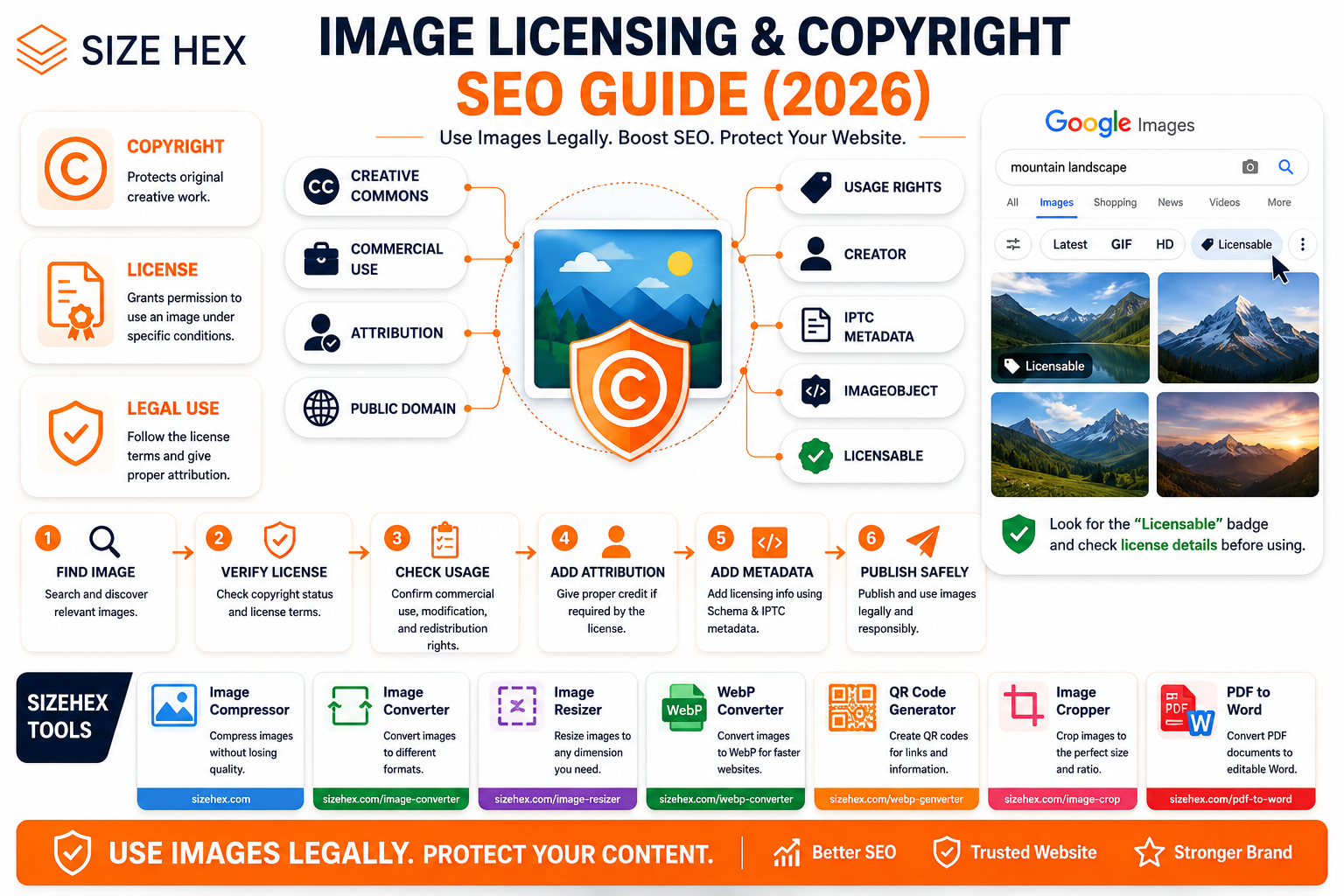
Image Licensing & Copyright SEO Guide (2026): How to Use Images Legally
Images make websites more attractive, informative, and engaging. A well-designed blog post, product page, landing page, or online tool can become much more useful when supported by relevant visuals.
But there is an important question every website owner should ask before publishing an image:
Do I actually have the right to use this image?
Finding an image through Google Images, social media, another website, or an online article does not automatically give you permission to copy and publish it.
Copyright generally belongs to the creator of an original work, and using copyrighted material may require permission or a valid license. Google also specifically recommends checking the exact license terms before reusing images found through Google Images.
For websites that publish large amounts of content, understanding image licensing isn't just a legal consideration. It can also become part of a broader Image SEO and metadata strategy.
Google supports image rights information through structured data and IPTC photo metadata. Correct licensing information can even make eligible images display a Licensable badge in Google Images.
This guide explains image copyright, licensing, Creative Commons, royalty-free images, Google Images usage rights, attribution, commercial use, and image rights metadata.
What Is Image Copyright?
Copyright is a form of intellectual property protection that can apply to original visual works such as photographs, illustrations, graphics, paintings, and other creative images.
In many situations, copyright arises automatically when an original work is created and fixed in a tangible form.
For example, if a photographer takes an original photograph, the photographer may own copyright in that photograph.
The fact that the photograph is publicly visible online doesn't mean everyone can freely copy it.
What Is an Image License?
An image license is permission that specifies how an image may be used.
Depending on the license, it may define:
- Where the image can be used
- Whether commercial use is allowed
- Whether attribution is required
- Whether modifications are permitted
- Whether redistribution is allowed
- Whether the license has additional restrictions
Always read the actual license terms rather than assuming an image is free simply because there is no visible price.
Copyright vs License
These concepts are related but different.
Copyright
Determines who owns the rights to the creative work.
License
Defines what another person is permitted to do with that work.
Think of it this way:
Copyright = Ownership
License = Permission
A person can own an image while granting other people specific rights to use it.
Commercial vs Personal Use
One of the most important licensing distinctions is whether an image can be used commercially.
Personal Use
Examples may include:
- Personal projects
- Private presentations
- Personal websites
Commercial Use
Examples may include:
- Business websites
- Advertising
- Monetized blogs
- E-commerce stores
- Marketing campaigns
- SaaS websites
If you're building a monetized website such as SizeHex, don't assume that an image permitted for personal use can automatically be used commercially.
Check the license before publishing.
Royalty-Free Images
Royalty-free does not necessarily mean copyright-free.
Royalty-free generally refers to a licensing model where you don't have to pay a royalty for every individual use after obtaining the applicable license.
However, the license can still include restrictions.
For example, it may restrict:
- Redistribution
- Reselling
- Logo usage
- Merchandise
- Certain commercial applications
Always check the provider's license.
Creative Commons Images
Creative Commons provides standardized licenses that allow creators to specify how others can reuse their work.
Different Creative Commons licenses can have different requirements.
For example, a license may require:
- Attribution
- Non-commercial use
- No derivatives
- Share-alike licensing
Therefore, "Creative Commons" does not automatically mean "use it however you want."
Google also recommends checking the specific license terms before reusing Creative Commons or other licensed images.
Can You Use Images From Google Images?
No—not automatically.
Google Images is a search engine, not an image licensing service.
An image appearing in Google Search does not mean Google owns it or has granted you permission to reuse it.
Google provides a Usage Rights filter to help users find images that have licensing information, but Google recommends verifying the actual license with the image provider and host website before reuse.
A safe workflow is:
Find Image
↓
Check Usage Rights
↓
Open License Details
↓
Verify Original Source
↓
Read License Terms
↓
Confirm Your Intended Use Is Allowed
↓
Save License Evidence
↓
Publish
Usage Rights Filter
Google Images provides a Usage Rights filter that can help narrow results to images with available license information.
However, this is only a discovery tool.
Google explicitly recommends reviewing the license details and confirming the terms with the license provider and image host.
Don't assume:
"Google says Usage Rights → Creative Commons, therefore I can use it."
Instead, verify the actual license.
How to Verify an Image License
Before using a third-party image, ask:
1. Who created the image?
Identify the creator or rights holder.
2. Where did the image originally come from?
Try to locate the original source rather than relying on a repost.
3. What license applies?
Look for:
- License page
- Terms of use
- Creative Commons license
- Stock-media license
4. Is commercial use allowed?
This is particularly important for monetized websites.
5. Is attribution required?
If yes, follow the specified attribution requirements.
6. Are modifications allowed?
Some licenses restrict editing or derivative works.
7. Can you redistribute the image?
Using an image on your website may be permitted while redistributing the original image file may not be.
Google Licensable Badge
Google Images can display licensing information for eligible images.
Google supports image licensing metadata through:
- Structured data
- IPTC photo metadata
Providing appropriate licensing information can make an image eligible for the Licensable badge in Google Images.
This can provide users with more information about:
- Image creator
- Copyright
- License
- How to obtain a license
Image Rights Metadata
Google supports several image-rights properties.
For structured data, supported information includes properties such as:
-
creator -
creditText -
copyrightNotice -
license -
acquireLicensePage
Google requires contentUrl plus at least one of creator, creditText, copyrightNotice, or license for the relevant ImageObject licensing enhancement. The license property is required for eligibility for the Licensable badge when using structured data.
Example:
{
  "@context": "https://schema.org",
  "@type": "ImageObject",
  "contentUrl": "https://example.com/images/example.webp",
  "creator": {
    "@type": "Person",
    "name": "Example Photographer"
  },
  "copyrightNotice": "© 2026 Example Photographer",
  "license": "https://example.com/image-license"
}
Only use information that is actually accurate for the image.
Structured Data vs IPTC Metadata
Google supports two primary approaches for communicating image licensing information.
Structured Data
Information is associated with the image through webpage markup.
IPTC Metadata
Information is embedded directly into the image file.
Google notes that structured data needs to be added for each instance where an image appears, while IPTC metadata travels with the image itself. If both are provided and conflict, Google uses the structured-data information.
Why Image Licensing Matters for SEO
Copyright compliance is the primary reason to manage image rights correctly.
But licensing metadata can also improve how image information is presented in Google Images.
Correct metadata can communicate:
- Creator
- Copyright owner
- Credit information
- License
- Licensing page
Google can use this information to show additional image details and, where eligible, a Licensable badge.
However, licensing metadata is not a ranking shortcut.
The goal should be accurate rights information first.
Real-World Examples
Example 1: Blog Website
A blogger downloads a photograph from Google Images and publishes it without checking the license.
Problem: The image may still be copyrighted.
Better approach:
Find the original source → verify license → follow attribution requirements → publish.
Example 2: Business Website
A company purchases a stock photograph with commercial-use rights.
The company keeps the purchase/license documentation and uses the image according to the provider's terms.
This creates a much stronger rights-management process.
Example 3: Creative Commons Image
A website finds an image under a Creative Commons license requiring attribution.
The website follows the specific attribution requirements and doesn't use the image beyond the license's permitted scope.
Example 4: SizeHex
For SizeHex, the safest workflow is:
Create original visual
↓
Use properly licensed asset
↓
Verify commercial rights
↓
Add required attribution
↓
Preserve important rights metadata
↓
Publish optimized image
This approach reduces unnecessary copyright risk while supporting a professional Image SEO workflow.
Key Takeaways
- An image being visible on Google does not mean you have permission to use it.
- Always verify the original source and actual license before publishing a third-party image.
- Creative Commons licenses have different conditions, so read the specific license.
- Royalty-free does not necessarily mean copyright-free or unrestricted.
- Commercial websites should verify that their intended use is permitted.
- Google supports image licensing information through structured data and IPTC metadata.
-
Accurate
license,creator,creditText, andcopyrightNoticeinformation can help Google understand image rights. - Eligible images may receive a Licensable badge in Google Images.
- Copyright compliance should come first; SEO benefits are secondary.
mage Sources, Licensing, Attribution & Rights Metadata
Choosing an image for your website is easy. Choosing an image that you can legally use is a different story.
A professional image workflow should answer a few basic questions before an image goes live:
- Who created it?
- Where did it come from?
- What license applies?
- Can it be used commercially?
- Is attribution required?
- Can it be edited?
- Can it be redistributed?
Once these questions are answered, you can safely prepare the image for your website and add relevant licensing information where appropriate.
11. Stock Images
Stock image platforms provide photographs, illustrations, graphics, and other visual assets under specific licensing agreements.
Depending on the provider and plan, a license may allow you to use an image on:
- Websites
- Blogs
- Advertisements
- Social media
- Marketing materials
- Commercial products
However, licensing conditions vary significantly between providers.
Before downloading an image, check:
- Commercial usage rights
- Editorial restrictions
- Attribution requirements
- Modification rights
- Redistribution restrictions
- Print limitations
- Resale restrictions
Never assume that purchasing an image automatically gives you unlimited rights.
12. Free Image Libraries
Free image libraries can be useful for bloggers, developers, designers, and small businesses.
However, "free" doesn't always mean "free for every purpose."
An image may be free to download but still have restrictions regarding:
- Commercial use
- Redistribution
- Modification
- Attribution
- Branding
- Merchandise
Always check the license associated with the specific image rather than relying only on the website's general description.
13. Creative Commons Images
Creative Commons provides standardized licenses that allow creators to define how others can use their work.
Some common Creative Commons licenses include:
License Commercial Use Modification Attribution CC BY Yes Yes Required CC BY-SA Yes Yes Required CC BY-ND Yes Restricted Required CC BY-NC No Yes Required CC BY-NC-SA No Yes Required CC BY-NC-ND No No Required The exact license terms should always be reviewed before using an image.
For example, CC BY-NC restricts commercial use, while CC BY-ND places restrictions on distributing modified versions of the work.
For a monetized website, pay particular attention to licenses containing NC (NonCommercial) restrictions.
14. Public Domain Images
Public-domain works generally aren't protected by copyright restrictions in the same way as copyrighted works.
However, determining whether a particular image is genuinely public domain can sometimes be complicated.
Before using an image, verify:
- Original creator
- Source
- Copyright status
- Country or jurisdiction
- Any additional rights associated with the image
Another commonly encountered option is CC0, which allows creators to dedicate their work to the public domain to the extent permitted by law.
Even when copyright restrictions don't apply, other considerations—such as trademarks, privacy, publicity rights, or recognizable people—may still matter.
15. Original Images
Creating your own images is often the simplest way to avoid third-party licensing problems.
Examples include:
- Product photography
- Website screenshots
- Custom illustrations
- Infographics
- UI mockups
- Original diagrams
- Brand graphics
For a website such as SizeHex, original screenshots and custom graphics are especially useful because they can demonstrate the actual functionality of your tools.
Original visuals also provide a more authentic experience than generic stock photography.
16. AI-Generated Images
AI-generated images introduce additional considerations.
Before using AI-generated visuals commercially, review the terms of the AI service you used.
Important questions include:
- Does the service permit commercial use?
- Are there restrictions on generated content?
- Does the service provide ownership or usage rights?
- Could the image contain recognizable trademarks or characters?
- Could the output create privacy or publicity concerns?
The legal treatment of AI-generated works can also vary by jurisdiction.
Therefore, don't assume that an AI-generated image automatically has the same copyright status as a traditional photograph or illustration.
Licensing & Attribution
17. How to Give Image Credit
When an image license requires attribution, follow the specific attribution requirements provided by the license.
A basic attribution may include:
Image: Creator Name
Source: Website Name
License: CC BY 4.0Depending on the license, attribution may also need:
- A link to the creator
- A link to the original work
- A link to the license
- A statement describing modifications
For CC BY 4.0, appropriate credit, a license link, and an indication of modifications are part of the attribution requirements.
18. When Is Attribution Required?
Attribution depends on the license.
For example:
CC BY
Attribution is required.
CC BY-SA
Attribution is required and additional ShareAlike conditions apply.
CC0
Attribution isn't generally required by the CC0 dedication, although giving credit can still be appropriate.
Always check the specific license rather than assuming all Creative Commons images follow the same rules.
19. Commercial Usage
Commercial use is particularly important for websites that generate revenue.
Examples include:
- Ad-supported blogs
- SaaS websites
- E-commerce stores
- Affiliate websites
- Business websites
- Advertising campaigns
- Paid products
If an image is licensed under a NonCommercial (NC) license, using it on a monetized business website may not be permitted without additional permission.
For SizeHex, every third-party image should therefore be checked for commercial-use permission before publication.
20. Editorial Usage
Some stock images are licensed for editorial use only.
This generally means they may be suitable for reporting, commentary, or news-related contexts but may not be permitted for advertising or commercial promotion.
For example:
A photograph may be licensed for a news article but prohibited in:
- Product advertisements
- Promotional banners
- Marketing campaigns
- Commercial landing pages
Always check the provider's exact definition of editorial use.
21. Modifying Licensed Images
Some licenses allow you to modify an image, while others restrict derivative works.
Possible modifications include:
- Cropping
- Resizing
- Color adjustments
- Adding text
- Removing backgrounds
- Combining images
- Creating illustrations from an original
Licenses containing ND (NoDerivatives) restrictions require particular attention when distributing modified versions.
If you're unsure whether an edit is allowed, check the license before publishing the modified image.
22. Image License Restrictions
A license may include several different restrictions.
Common examples include:
Commercial restriction
The image cannot be used commercially.
Attribution requirement
The creator must be credited.
NoDerivatives
Modified versions cannot be distributed under the applicable license.
ShareAlike
Certain adaptations must be distributed under the same or compatible license conditions.
Redistribution restriction
You may be allowed to use the image on your website but not redistribute the original file.
Editorial-only restriction
The image may be limited to editorial contexts.
This is why reading the actual license is more important than simply looking for a "free" label.
Image Rights Metadata
Image licensing isn't only about legal documentation. Website owners can also communicate image rights information through structured data and IPTC metadata.
Google supports image licensing information through these approaches and can use the information to provide licensing details in Google Images. Eligible images may receive a Licensable badge.
23. The
licensePropertyThe
licenseproperty identifies the license associated with an image.Example:
{
  "@type": "ImageObject",
  "contentUrl": "https://example.com/images/example.webp",
  "license": "https://creativecommons.org/licenses/by/4.0/"
}
The URL should point to the actual license information.
Google's documentation states that the
licenseproperty is required for eligibility for the Licensable badge when using the structured-data implementation.
24. The
acquireLicensePagePropertyThe
acquireLicensePageproperty can identify a page where users can obtain licensing information or acquire a license.Example:
{
  "@type": "ImageObject",
  "contentUrl": "https://example.com/images/photo.webp",
  "license": "https://example.com/license",
  "acquireLicensePage": "https://example.com/license-photo"
}
This can be particularly useful for websites that distribute or license their own images.
25. The
creatorPropertyThe
creatorproperty identifies the person or organization responsible for creating the image.Example:
{
  "@type": "ImageObject",
  "creator": {
    "@type": "Person",
    "name": "Jane Smith"
  }
}
If an organization created the image, an Organization entity can be used instead.
Only provide information that you can verify.
26. The
creditTextPropertycreditTextcan provide the credit that should accompany the image.Example:
{
  "@type": "ImageObject",
  "creditText": "Photo by Jane Smith"
}
This is useful when the creator or rights holder requires a specific credit format.
27. The
copyrightNoticePropertyThe
copyrightNoticeproperty can communicate copyright ownership information.Example:
{
  "@type": "ImageObject",
  "copyrightNotice": "© 2026 SizeHex"
}
Only use this when SizeHex actually owns the applicable rights.
If the image belongs to another creator, don't incorrectly claim ownership.
28. IPTC Metadata
IPTC metadata allows image rights information to be embedded directly inside an image file.
Depending on the workflow, metadata can contain information such as:
- Creator
- Copyright
- Credit
- License
- Rights information
Google supports IPTC metadata as another method for communicating image licensing information.
One advantage is that the metadata can travel with the image file when the image is copied or distributed.
29. Licensable Badge
Google Images may display a Licensable badge for eligible images when appropriate licensing metadata is available.
Users can access additional information about the image's licensing terms.
This can make it easier for people to understand:
- Who owns the image
- Who created it
- What license applies
- Where licensing information is available
However, adding licensing metadata does not guarantee that Google will display the badge.
30. Complete Image Licensing Workflow
A reliable workflow looks like this:
Create or Find Image
↓
Identify Original Source
↓
Identify Creator
↓
Verify License
↓
Check Commercial Usage
↓
Check Attribution Requirements
↓
Check Modification Rights
↓
Save License Documentation
↓
Optimize Image
↓
Add Alt Text
↓
Add Rights Metadata Where Appropriate
↓
Publish
↓
Validate
This process takes only a few extra minutes but can prevent significant problems later.
Image Licensing Checklist
Task Status Original Source Identified ✅ Creator Identified ✅ License Verified ✅ Commercial Use Checked ✅ Attribution Checked ✅ Modification Rights Checked ✅ Redistribution Rights Checked ✅ License Documentation Saved ✅ Image Optimized ✅ Alt Text Added ✅ Creator Metadata Added ✅ Copyright Information Added ✅ License URL Added ✅ Structured Data Validated ✅ Image Sitemap Updated ✅
Pro Tips
- Never assume an image is free to use simply because it appears in Google Images.
- Check the specific license attached to the specific image.
- For monetized websites, pay particular attention to NonCommercial restrictions.
- Keep a record of licenses, purchase receipts, source URLs, and attribution requirements.
- Use original images whenever practical.
- When licensing information is available, consider using appropriate structured data or IPTC metadata to communicate image rights clearly.
- Treat copyright compliance as the priority and SEO benefits as a secondary advantage.
Advanced Image Copyright Strategy, FAQs & Publishing Checklist
Using images legally is not simply about finding a website that says "free images." A reliable image workflow combines copyright verification, license review, attribution, metadata, and proper documentation.
For websites publishing content regularly, this process becomes even more important because a single image can appear across multiple pages, social platforms, search results, and marketing materials.
Advanced Image Copyright Strategy
1. Create an Image Rights Library
If your website publishes images frequently, maintain a simple record of the images you use.
For each image, store:
- Image filename
- Original source
- Creator
- License
- License URL
- Date obtained
- Commercial-use status
- Attribution requirements
- Modification permissions
For example:
Image Source License Commercial Use Attribution hero.webp Original Owned Yes No photo-01.webp Stock provider Commercial Yes As required graphic.webp Creative Commons CC BY Yes Required This makes future audits much easier.
2. Keep License Evidence
Don't rely on memory.
For third-party images, keep evidence such as:
- Purchase receipt
- License certificate
- License URL
- Screenshot of license terms
- Download record
- Creator information
License pages can change over time, so maintaining a record of the terms that applied when you obtained the image can be useful.
3. Use Original Images Whenever Possible
Original images give you greater control over:
- Copyright
- Branding
- Editing
- Optimization
- Distribution
- SEO metadata
For SizeHex, useful original visuals include:
- Tool screenshots
- UI demonstrations
- Before-and-after compression examples
- Image conversion examples
- Product illustrations
- Custom blog graphics
These are more relevant to readers than generic stock photos.
4. Don't Confuse Attribution With Permission
This is one of the most common copyright misunderstandings.
Adding:
"Image credit: Google"
does not give you permission to use a copyrighted image.
Similarly:
"Source: Pinterest"
doesn't establish a license.
Attribution is a license requirement in some cases, but attribution alone doesn't create permission where no permission exists.
5. Google Images Is a Discovery Tool
Google Images helps users discover visual content across the web.
It doesn't transfer ownership or grant reuse rights.
A safer workflow is:
Google Images
↓
Open Original Source
↓
Identify Creator
↓
Find License
↓
Verify Intended Use
↓
Obtain Permission
↓
Publish
Google recommends checking license details with the image host and license provider before reusing an image.
6. AI Image Copyright Strategy
AI-generated visuals require additional care.
Before publishing an AI-generated image, check:
Tool Terms
Does the AI service permit commercial usage?
Input Rights
Did you have the right to upload the material used as an input?
Output Restrictions
Does the service impose restrictions on generated outputs?
Third-Party Content
Does the image contain recognizable:
- Logos
- Characters
- Trademarks
- Artwork
- Public figures
Local Law
Copyright rules for AI-generated works can vary by jurisdiction.
For important commercial assets, review the applicable service terms and legal requirements rather than assuming ownership automatically.
7. Protect Your Own Images
Copyright management isn't only about avoiding infringement.
You should also protect images that you create.
For original SizeHex graphics, consider maintaining:
- Original source files
- Creation dates
- Design files
- Export versions
- Copyright information
- Licensing terms
If you license your own images to others, clearly document the permitted usage.
8. Add Licensing Metadata
For images where licensing information is relevant, you can provide rights information through structured data or IPTC metadata.
Google documents properties such as:
-
license -
acquireLicensePage -
creator -
creditText -
copyrightNotice
These can help communicate image rights information to search engines.
9. Keep Metadata Accurate
Never add fake licensing information simply to obtain a search feature.
For example, don't claim:
{
  "copyrightNotice": "© 2026 SizeHex"
}
unless SizeHex actually owns the relevant rights.
Similarly, don't add a Creative Commons license to an image that isn't licensed under Creative Commons.
Accuracy is more important than optimization.
10. Review Images During Website Audits
When conducting a website audit, review images for:
- Copyright ownership
- License status
- Attribution
- Source
- Metadata
- Broken URLs
- Duplicate assets
- Outdated images
This becomes increasingly important as your website grows.
Before Publishing Checklist
Image Source
✅ Original source identified
✅ Creator identified
✅ License identified
License
✅ Commercial use verified
✅ Modification rights checked
✅ Redistribution restrictions checked
✅ Attribution requirements checked
SEO
✅ Descriptive filename
✅ Relevant alt text
✅ Appropriate image format
✅ Optimized file size
✅ Correct dimensions
Rights Metadata
✅ Creator information accurate
✅ Copyright information accurate
✅ License URL accurate
✅
acquireLicensePageadded where appropriate
Technical
✅ HTTPS image URL
✅ Image loads correctly
✅ Structured data validated
✅ Image Sitemap updated
Documentation
✅ License evidence saved
✅ Purchase receipt saved where applicable
✅ Attribution information saved
Common Image Copyright Mistakes
Mistake 1: Copying Images From Google
Google Search doesn't grant image rights.
Mistake 2: Assuming "Free" Means Unrestricted
Free downloads can still have licensing conditions.
Mistake 3: Giving Credit Without Permission
Credit does not automatically make unauthorized use legal.
Mistake 4: Ignoring Commercial Restrictions
An image permitted for personal use may not be suitable for a monetized website.
Mistake 5: Removing Copyright Information
Don't remove creator or copyright metadata when the license requires it to remain.
Mistake 6: Using Editorial Images in Advertising
Editorial-only licenses may restrict promotional use.
Mistake 7: Modifying NoDerivatives Images
A license containing ND restrictions can limit how modified versions may be distributed.
Mistake 8: Assuming Creative Commons Means One License
Creative Commons has multiple licenses with different conditions.
Mistake 9: Forgetting License Records
A website may contain hundreds of images months later. Without records, determining usage rights becomes difficult.
Mistake 10: Using AI Images Without Checking Terms
AI-generated content can still involve contractual, trademark, privacy, or other legal considerations.
Frequently Asked Questions
1. Can I use any image I find on Google?
No. Google Images is a search engine, not a blanket image license.
2. Are Google Images free to use?
No. Individual images may have different copyright and licensing conditions.
3. Is Creative Commons always free for commercial websites?
No. Some Creative Commons licenses contain NonCommercial restrictions.
4. What does royalty-free mean?
It generally refers to a licensing model where recurring royalties aren't charged for each use, but restrictions may still apply.
5. Does giving credit make an image legal to use?
Not necessarily. You need permission or a license that permits the intended use.
6. Can I use images from social media?
Not automatically. Uploading an image to a social platform doesn't necessarily grant other websites permission to republish it.
7. Can I use screenshots from other websites?
Not automatically. Screenshots can contain copyrighted material, trademarks, or other protected content.
8. Can I use AI-generated images on my website?
Potentially, depending on the AI service terms, applicable law, and the content of the generated image.
9. Should I keep proof of image licenses?
Yes. Maintaining license records is a good practice for websites that use third-party images.
10. What is the Licensable badge?
It is a Google Images feature that can indicate that licensing information is available for an eligible image.
11. Does structured data guarantee the Licensable badge?
No. Correct licensing metadata can make an image eligible, but Google determines whether and how search features appear.
12. What is IPTC metadata?
IPTC metadata is information embedded in image files that can include creator, copyright, credit, and licensing information.
13. Can I modify a Creative Commons image?
It depends on the specific Creative Commons license. Licenses containing NoDerivatives restrictions require particular care.
14. What does CC BY mean?
CC BY allows reuse, including commercial use, provided the applicable attribution requirements are followed.
15. What does CC BY-NC mean?
It includes a NonCommercial restriction, so commercial use isn't permitted under that license.
16. What does CC BY-ND mean?
It includes a NoDerivatives condition that restricts distribution of adaptations.
17. Should I add copyright information to my original images?
Yes, where appropriate. Accurate copyright and creator metadata can help communicate ownership information.
18. Can image licensing affect SEO?
Licensing itself isn't a ranking shortcut. Accurate licensing metadata can help search engines understand image rights information and support eligibility for licensing-related search features.
19. Should every image have licensing Schema?
No. Use rights metadata when it accurately represents the image and its licensing situation.
20. What is the safest image strategy for a business website?
Use original images or properly licensed assets, document the license, follow attribution requirements, and keep licensing information accurate.
Conclusion
Image copyright should be treated as an essential part of responsible website management.
Finding an image is easy. Knowing whether you can legally use it is the important part.
A professional image workflow should include:
Source → Creator → License → Usage Rights → Attribution → Metadata → Optimization → Documentation
For websites such as SizeHex, original graphics and screenshots can reduce dependence on third-party assets while making content more relevant and authentic.
When third-party images are necessary, verify their licenses carefully and keep documentation of your permissions.
Image licensing metadata can also provide search engines with clearer information about image ownership and usage rights. Google supports structured data and IPTC metadata for this purpose, and eligible images may qualify for licensing-related features in Google Images.
The goal isn't simply to rank images.
The goal is to publish useful, optimized, accessible, and properly licensed visual content.
Why Choose SizeHex?
SizeHex provides a browser-based image toolkit designed to make image preparation simple for developers, bloggers, designers, marketers, and businesses.
Our current live toolkit includes 7 tools.
Our Tools
🖼️ Image Compressor
Compress JPG, PNG, WebP and other supported images while reducing file size for faster websites.
🔄 Image Converter
Convert images between supported formats for different website, design, and content requirements.
📐 Image Resizer
Resize images to the dimensions you need for websites, social media, and digital content.
⚡ WebP Converter
Convert supported images into WebP for modern web delivery and potentially smaller image files.
📱 QR Code Generator
Create QR codes for websites, links, and other digital use cases.
✂️ Image Cropper
Crop images to the exact composition and dimensions you need.
📄 PDF to Word
Convert PDF documents into editable Word files through the SizeHex PDF tool.
Related SizeHex Blogs
Continue learning about image SEO and optimization:
Image Structured Data (Schema) Guide
Learn how
ImageObject, Article, Product, and other structured data can provide additional context about images.Image Preloading &
fetchpriorityGuideLearn how to prioritize critical images and improve LCP.
Image Preloading & fetchpriority Guide
Google Images Ranking Factors Guide
Understand the major factors that influence image visibility in Google Images.
Google Images Ranking Factors Guide
Browser Caching for Images
Learn how browser caching reduces repeated image downloads and improves website performance.
Browser Caching for Images Guide