August 10, 2026
Image Structured Data (Schema) Guide (2026): Improve Image SEO
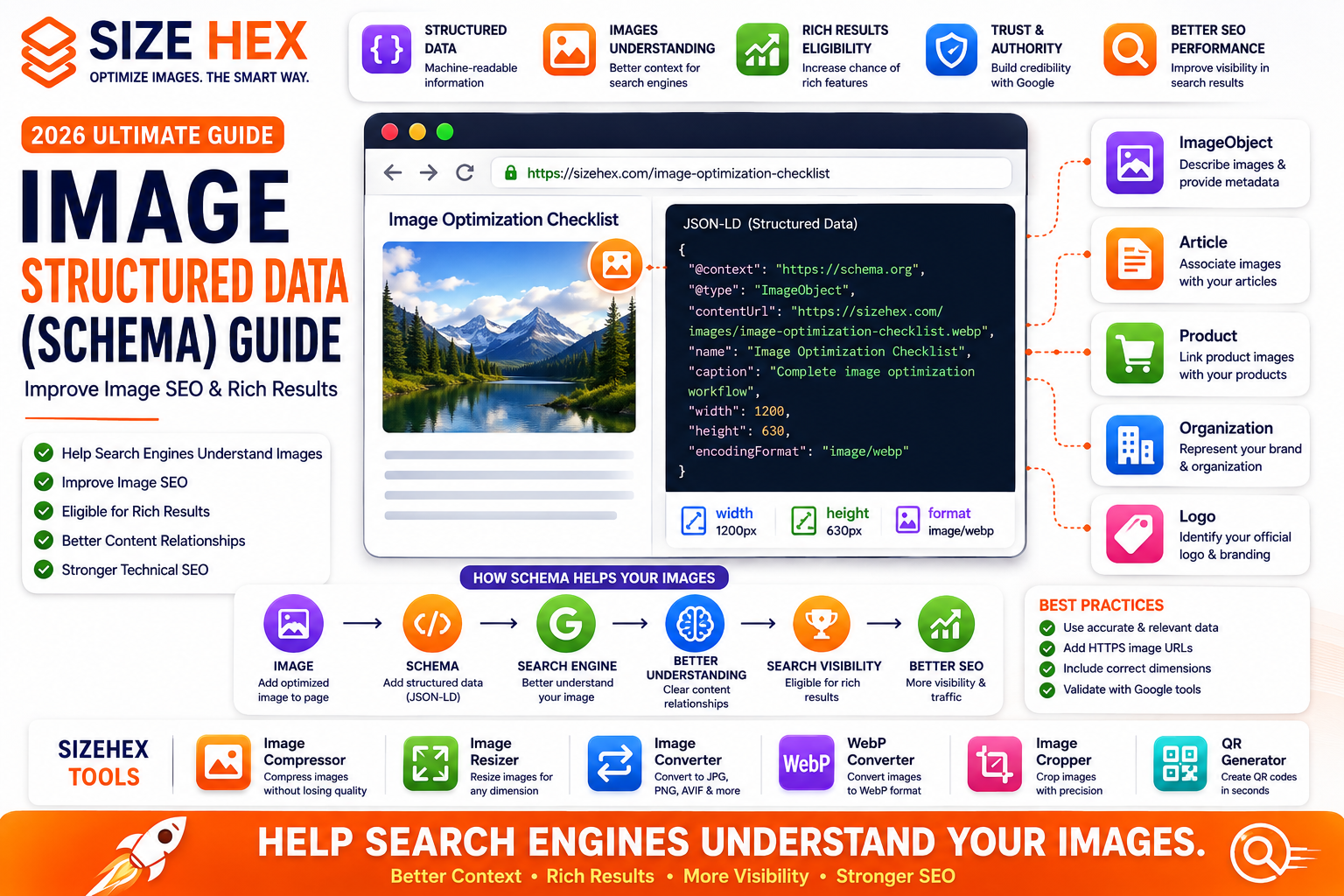
Image Structured Data (Schema) Guide (2026): Improve Image SEO & Search Visibility
Images are an important part of modern websites, but search engines need context to understand what those images represent and how they relate to the surrounding content.
Adding an image to a webpage is only the beginning. Descriptive filenames, alt text, captions, structured content, image sitemaps, and appropriate structured data can all help provide additional context.
One of the most useful technical approaches is structured data, commonly implemented using Schema.org vocabulary and JSON-LD.
Structured data allows website owners to provide machine-readable information about their content. Depending on the page type, this can include information about articles, products, organizations, logos, and images.
For image-heavy websites, e-commerce stores, publishers, blogs, and SaaS platforms, understanding image-related structured data can be an important part of a broader technical SEO strategy.
In this guide, you'll learn what image structured data is, how ImageObject works, how images can be associated with Article and Product structured data, how structured data differs from alt text and image sitemaps, and how to implement it correctly.
What Is Image Structured Data?
Image structured data is machine-readable information that describes an image or connects an image with other content on a webpage.
It is commonly implemented using JSON-LD.
A simplified example looks like this:
<script type="application/ld+json">
{
  "@context": "https://schema.org",
  "@type": "ImageObject",
  "contentUrl": "https://example.com/images/example.jpg",
  "name": "Example image"
}
</script>
This provides structured information that search engines can use to better understand the resource.
However, structured data should accurately represent content that is actually available on the page.
What Is Schema Markup?
Schema.org provides a standardized vocabulary for describing entities and relationships on webpages.
It includes types such as:
- Article
- Product
- Organization
- WebPage
- ImageObject
- BreadcrumbList
- FAQPage
- LocalBusiness
Different schema types communicate different kinds of information.
For image SEO, ImageObject is particularly relevant, while Article and Product structured data can also contain image properties.
Why Image Schema Matters
Search engines don't interpret webpages exactly like humans do.
A person can look at a photograph and immediately understand what it represents.
A search engine needs contextual signals.
Structured data can provide additional machine-readable context.
For example, an article could identify:
- The article headline
- Author
- Publication date
- Main image
- Article URL
A product page could identify:
- Product name
- Product image
- Brand
- Price
- Availability
This makes structured relationships clearer to search engines.
ImageObject Explained
ImageObject is a Schema.org type specifically designed to describe images.
It can include properties such as:
-
contentUrl -
url -
name -
caption -
description -
width -
height -
encodingFormat
Example:
{
  "@context": "https://schema.org",
  "@type": "ImageObject",
  "contentUrl": "https://example.com/images/image.webp",
  "name": "Image optimization checklist",
  "caption": "Complete image optimization workflow",
  "width": 1200,
  "height": 630
}
Only include properties that accurately describe the image.
How Search Engines Understand Images
Search engines use multiple signals to understand images.
These can include:
- Image content
- Surrounding text
- Alt text
- File names
- Captions
- Page context
- Structured data
- Image URLs
- Sitemap information
No single signal guarantees better image visibility.
A strong image SEO strategy combines multiple relevant signals naturally.
Structured Data vs Alt Text
These two techniques serve different purposes.
Alt Text
Primarily designed to provide an alternative textual description for users who cannot see the image.
Example:
<img src="image.webp"
alt="Image optimization checklist for faster websites">
Structured Data
Provides machine-readable information about the content.
Example:
{
  "@type": "ImageObject",
  "contentUrl": "https://example.com/image.webp"
}
Important:
Structured data does not replace alt text.
Use both when appropriate.
Structured Data vs Image Sitemap
An Image Sitemap helps search engines discover image URLs.
Structured data provides additional information and relationships about content.
They have different purposes.
Image Sitemap
Discovery
↓
Helps search engines find images.
Structured Data
Context
↓
Helps describe entities and relationships.
Using both appropriately can strengthen your technical image SEO implementation.
Benefits for SEO
Correctly implemented structured data can help search engines better understand your pages and their relationships.
Potential benefits include:
- Better content understanding
- Clearer entity relationships
- Eligibility for supported search features
- Better structured search information
- Stronger technical SEO implementation
However, structured data does not guarantee higher rankings or rich results.
Google may choose whether and how to display search features based on many factors.
Common Myths
Myth 1: Image Schema automatically ranks images higher.
Reality: Structured data provides context, but it doesn't guarantee higher rankings.
Myth 2: ImageObject replaces alt text.
Reality: They serve different purposes and should not be treated as substitutes.
Myth 3: Adding every possible Schema property is better.
Reality: Only use properties that accurately describe your content.
Myth 4: Structured data guarantees rich results.
Reality: Valid structured data can make a page eligible for supported search features, but eligibility doesn't guarantee that a feature will appear.
Myth 5: You need separate Schema for every image.
Reality: The appropriate implementation depends on the page and content structure. Not every decorative image needs its own structured-data object.
Real-World Examples
Example 1: Blog
A technology blog publishes an article about image optimization.
The page can use Article structured data and identify its representative image.
This creates a clear relationship between:
Article → Main Image
Example 2: E-commerce Store
An online store has a product page with several product photographs.
Product structured data can identify the product and its associated image information.
This creates a relationship between:
Product → Product Image
Example 3: Company Website
A company website includes its official logo.
Organization structured data can identify the organization and its logo.
This creates:
Organization → Logo
Example 4: SizeHex
For a SizeHex article about image optimization, structured data can help establish relationships between:
Article → Author → Publisher → Main Image
Combined with descriptive alt text, optimized images, proper filenames, and relevant internal links, this creates a stronger technical foundation.
Key Takeaways
- Image structured data provides machine-readable information about images and their relationship to webpage content.
-
ImageObjectis the Schema.org type specifically designed for describing images. - Article and Product structured data can also associate important images with their respective content.
- Structured data and alt text serve different purposes and should not replace one another.
- Image Sitemaps help with discovery, while structured data provides additional context.
- Valid structured data can make content eligible for supported search features, but it does not guarantee rankings or rich-result display.
- Accurate, relevant, and visible content should always be the foundation of your structured-data implementation.
Before Publishing Checklist
Content
✅ Original article
✅ Relevant featured image
✅ Image visible on page
✅ Image contextually related
Image SEO
✅ Descriptive filename
✅ Meaningful alt text
✅ Correct dimensions
✅ Optimized format
✅ HTTPS image URL
Structured Data
✅ Correct
@context✅ Correct
@type✅ Correct image URL
✅ Accurate dimensions
✅ Article/Product relationship correct
✅ Organization information accurate
Technical SEO
✅ Canonical URL
✅ Sitemap updated
✅ Internal links added
✅ Mobile-friendly page
✅ HTTPS enabled
Validation
✅ JSON-LD syntax checked
✅ Rich Results Test completed
✅ Search Console monitored
Common Image Schema Mistakes
Avoid:
❌ Fake structured data
❌ Incorrect image URLs
❌ Broken URLs
❌ Wrong dimensions
❌ Unrelated images
❌ Duplicate/conflicting markup
❌ Keyword stuffing inside Schema properties
❌ Marking up hidden content
❌ Assuming Schema guarantees rankings
❌ Adding unnecessary Schema to every decorative image
Frequently Asked Questions
1. What is ImageObject Schema?
ImageObjectis a Schema.org type used to describe an image and provide machine-readable information about it.
2. Does ImageObject improve rankings?
Not directly.
Structured data helps search engines understand content and can make pages eligible for supported search features, but it doesn't guarantee higher rankings.
3. Is ImageObject required for every image?
No.
Use it where it provides meaningful structured information.
4. Does Image Schema replace alt text?
No.
Alt text and structured data serve different purposes.
5. Should blog posts use Article Schema?
When appropriate, yes. Article structured data can describe article content and associate relevant images with it.
6. Should product pages use Product Schema?
Yes, when the page genuinely represents a product and the required information is available.
7. Can I use multiple images in Article Schema?
Yes, where appropriate. Multiple relevant image URLs can be associated with an article.
8. Should decorative images have Schema?
Generally, no.
Decorative images usually don't provide meaningful structured information.
9. Does Schema help Google Images?
Structured data can provide additional context, but image visibility depends on many factors including page relevance, image quality, accessibility, crawlability, and other SEO signals.
10. Does an Image Sitemap replace Schema?
No.
An Image Sitemap helps with image discovery, while structured data provides contextual information.
11. Can Schema contain an AVIF image?
Yes, provided the URL is accessible and the structured data accurately represents the image.
12. Can Schema contain a WebP image?
Yes.
WebP images can be referenced by their publicly accessible URLs.
13. Should Schema URLs use HTTPS?
Yes. Use the canonical HTTPS URL for your images and webpages.
14. What happens if Schema contains a broken image URL?
The structured data becomes inaccurate and may produce validation or processing problems.
Always verify image URLs.
15. Can I add Schema dynamically with JavaScript?
Yes, although implementation should ensure that search engines can access and process the generated structured data correctly.
For a static HTML site like SizeHex, generating JSON-LD during your build process is often a clean approach.
16. How do I test Image Schema?
Use Google's Rich Results Test and inspect the generated HTML/JSON-LD.
17. Should I add every Schema property?
No.
Use relevant properties that accurately describe your content.
18. Can incorrect Schema hurt SEO?
Misleading or inaccurate structured data can violate Google's structured-data guidelines and may prevent eligibility for search features.
19. How often should Schema be checked?
Check it whenever you significantly modify templates, article structures, URLs, or featured images. Periodic monitoring is also useful.
20. What is the best Image SEO strategy?
Combine:
Quality Content + Optimized Images + Alt Text + Structured Data + Image Sitemap + Performance + Internal Linking
No single technique guarantees rankings.
Conclusion
Image structured data is an important part of a modern technical SEO strategy. By using appropriate Schema.org types such as
ImageObject,Article,Product, andOrganization, website owners can provide search engines with clearer information about images and their relationship to webpage content.However, structured data shouldn't be treated as a ranking shortcut.
The strongest approach combines structured data with:
- High-quality content
- Descriptive alt text
- Optimized images
- Responsive delivery
- Fast loading
- Image Sitemaps
- Internal linking
- Accessibility
- Regular technical SEO monitoring
For a website such as SizeHex, automating JSON-LD generation through the existing build system can make this process much easier to maintain as the number of blog posts grows.
Why Choose SizeHex?
SizeHex provides browser-based tools that make image preparation easier for websites, blogs, businesses, designers, and developers.
SizeHex tools include:
- Image Compressor
- Image Resizer
- Image Converter
- WebP Converter
- Image Cropper
- QR Generator
The goal is simple:
Optimize your images before publishing them.
Smaller, properly formatted, accessible images can contribute to a faster and better website experience.
Related SizeHex Tools
Image Compressor
Image Resizer
Image Converter
WebP Converter
Image Cropper